Shadow AI on Your Attack Surface: How to Find Exposed Model Servers, Notebooks and Vector Databases
By ScruteXPublished
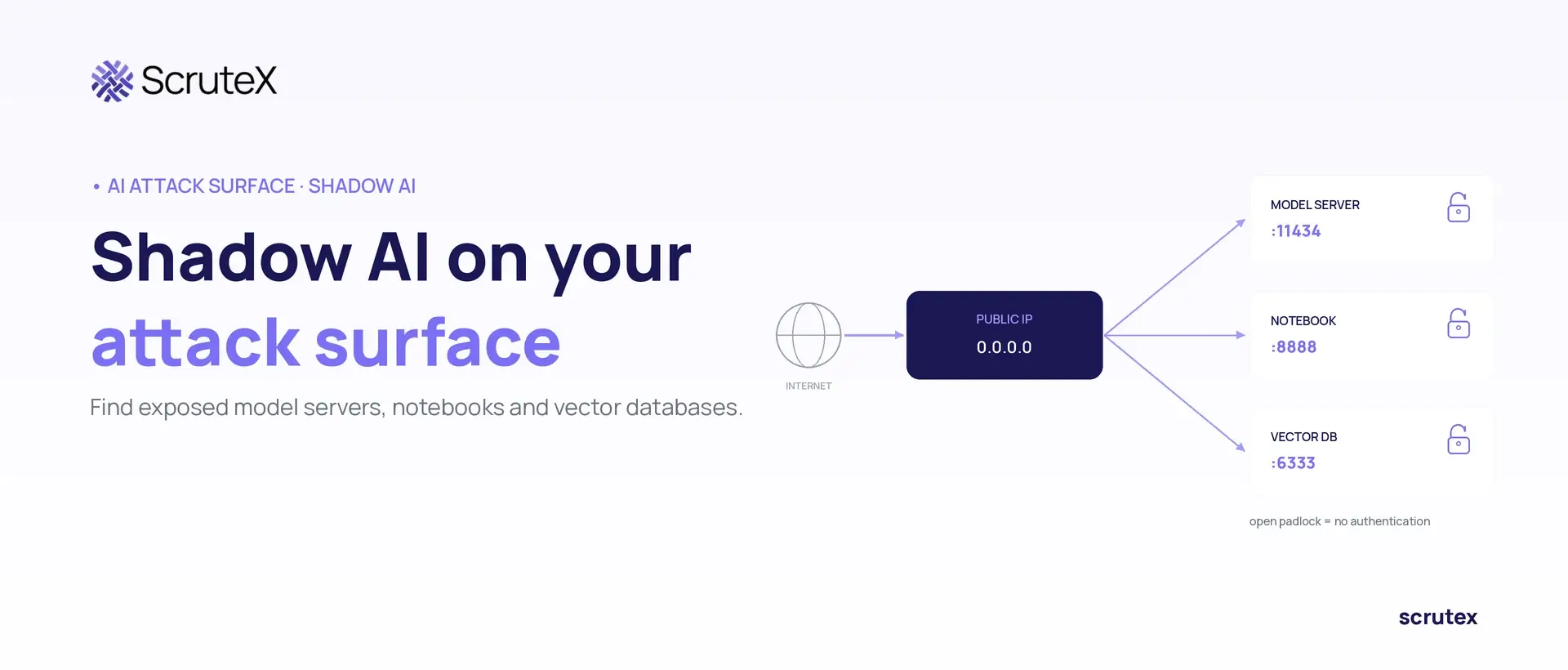
A data scientist spins up a local model server on a GPU box to test a retrieval pipeline. The tool binds to
0.0.0.0 by default, so it listens on every interface, not just localhost. The box sits in a cloud subnet with a public IP, and the default has no authentication. The project ships, the server stays up, and six weeks later it is still answering anyone on the internet, on a machine that holds the team's cloud credentials.Nobody filed a ticket. That is shadow AI, and it does not look like the shadow IT your controls catch.
What Is Shadow AI?
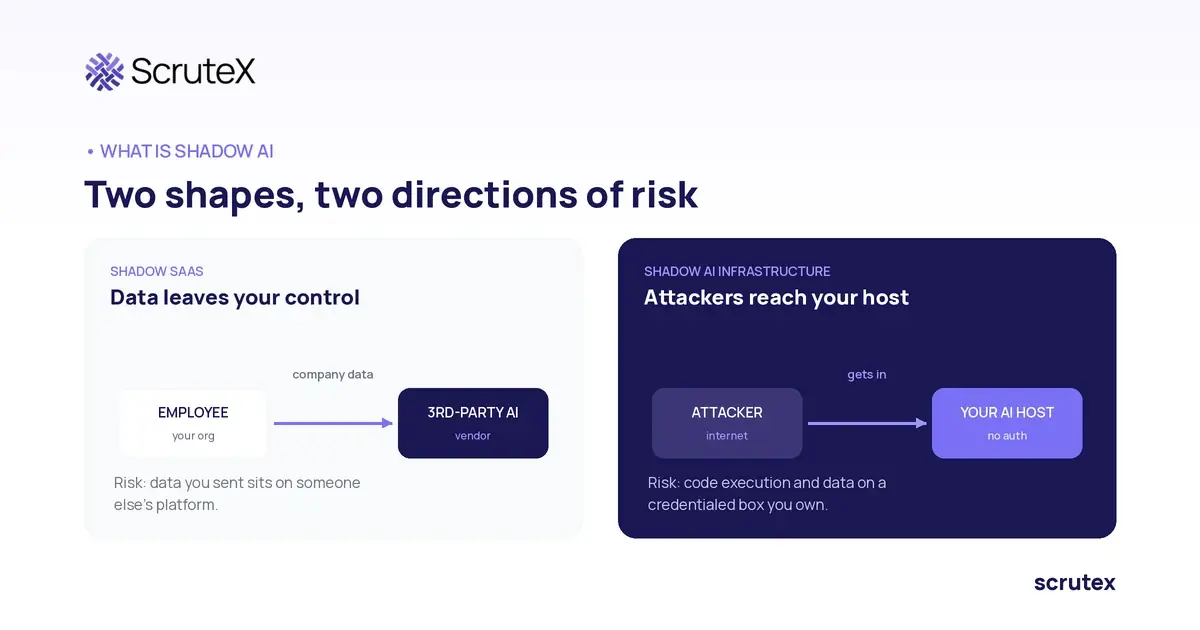
Shadow AI is the use of AI tools, models and infrastructure outside approved security and governance processes. On the attack surface, it means AI infrastructure teams deploy themselves: model servers, inference APIs, development notebooks and vector databases that end up reachable from the internet without anyone in security knowing they exist.
The distinction from ordinary shadow SaaS matters. Shadow SaaS is an employee putting company data into a third-party platform, so the risk is data leaving your control. Shadow AI infrastructure is the opposite: your own servers, on your own IP ranges, running services that often ship with no authentication and expose code execution or raw data. The risk is an attacker getting in, not just data getting out. Only the second adds hosts to your external attack surface.
This is the infrastructure layer. The model-behaviour layer, prompt injection, jailbreaks, training-data poisoning, is covered in the ScruteX knowledge base entry on AI and LLM security risks. This guide is about the servers.
Why Does Shadow AI Create Attack Surface That Inventories Miss?
Shadow AI creates attack surface that inventories miss because the assets are provisioned fast, by people outside IT, on infrastructure that spins up and down. Four conditions drive it.
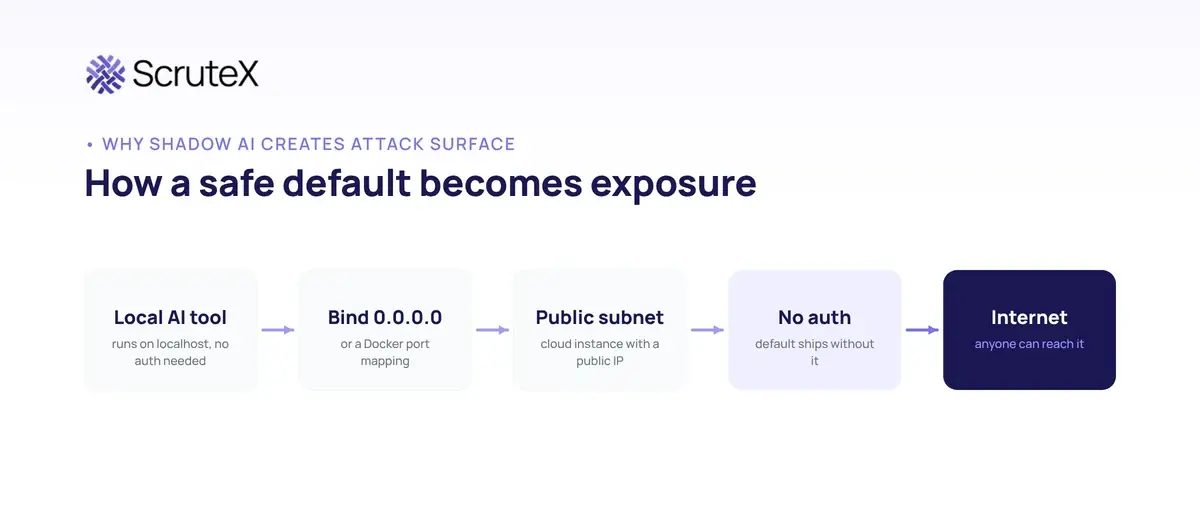
- The defaults favour reachability over safety. Many AI tools bind to all interfaces and ship without authentication, because they were written for a trusted laptop or lab network. Put one on a public subnet and it is exposed by default, not by misconfiguration.
- The people deploying are not the people securing. Data scientists optimise for a model answering quickly. A notebook, local runner or vector store goes up in minutes, without the review a production service gets.
- The infrastructure is ephemeral and GPU-backed. AI workloads run on expensive, short-lived instances. An inventory refreshed quarterly never sees a GPU box that lived three weeks, and those boxes are exactly what attackers want.
- The services do not look like your usual estate. A web app on 443 is in everyone's model of what to scan. An inference server on 11434 or a vector database on 6333 is not, so it slips past reviews built around web and mail.
These assets have to be discovered from the outside, because no internal record exists. It is part of the broader problem of what attackers can discover on your external attack surface, AI infrastructure being a poorly inventoried slice of it.
Which AI Assets End Up Exposed?
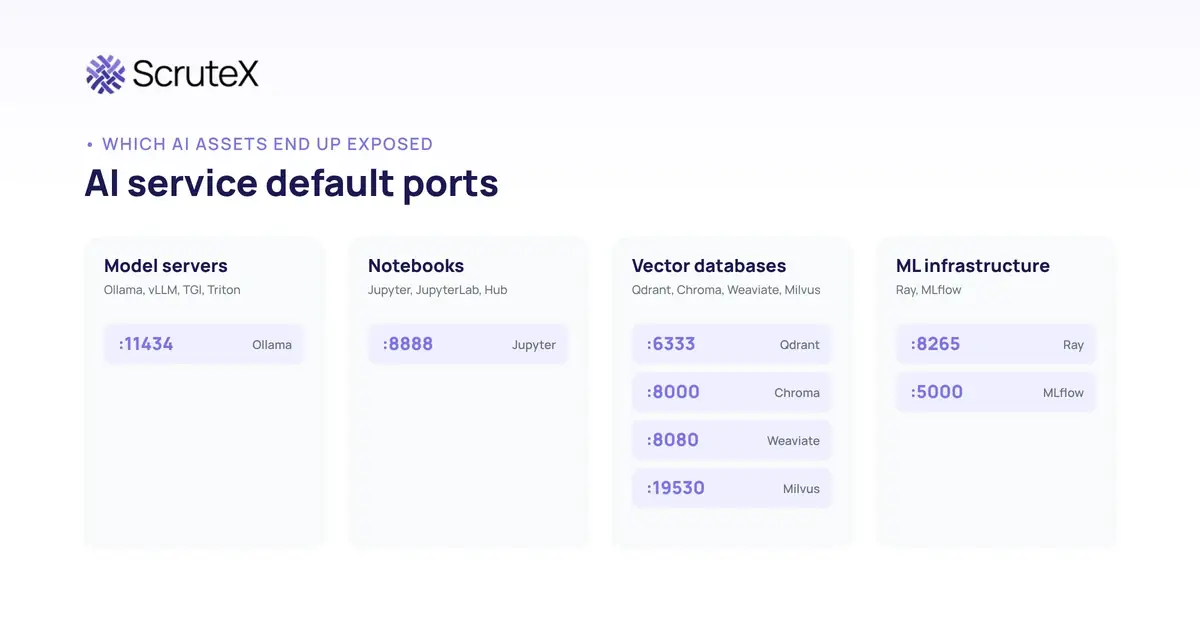
Four categories account for most external exposure. Each runs on recognisable ports and paths, which is how you find your own and how attackers find them.
| Category | Examples | Default exposure risk |
|---|---|---|
| Model servers and inference APIs | Ollama, vLLM, Text Generation Inference, Triton, LocalAI, inference proxies like LiteLLM | Often no authentication by default. Open endpoint allows model use, model extraction and resource abuse. A proxy also holds provider API keys. |
| Development notebooks | Jupyter Notebook and Lab, JupyterHub, Zeppelin | A notebook without a token is code execution as the notebook user, usually on a GPU box with cloud credentials attached. |
| Vector databases | Qdrant, Chroma, Weaviate, Milvus, pgvector | Collections are readable and modifiable over the API. They hold the RAG corpus, which is your internal documents turned into embeddings. |
| Supporting ML infrastructure | Ray clusters and dashboards, MLflow, experiment trackers, app builders like Flowise and Langflow | Job submission and code endpoints are code execution by design. Builders execute code and call internal APIs. Trackers leak experiment data and sometimes keys. |
These are not web apps with a login page. They are services whose designers assumed a trusted network, placed on an untrusted one.
What Are the Security Risks of Exposed AI Infrastructure?
The risks fall into five groups, and most exposed assets carry more than one. The reference points are OWASP Top 10 for LLM Applications 2025 and MITRE ATLAS. [1][2]
- Unauthenticated endpoints. An open inference server lets anyone run the model, extract its parameters, or exhaust its compute (OWASP LLM10:2025 Unbounded Consumption). A notebook or job API without auth is direct code execution. [1]
- Misconfigured services. Binding to all interfaces, default ports open, admin interfaces reachable, upload paths accepting untrusted models. A writable model store means poisoning, not just theft.
- Exposed credentials. Inference proxies and app builders hold provider API keys. A leaked
sk-orhf_key is direct cost abuse and data access, and keys also leak through public code and config files. - Sensitive data. Vector databases hold embeddings of internal documents, chat UIs hold conversation history, notebooks keep cell outputs with sample rows and internal hostnames (OWASP LLM02:2025 Sensitive Information Disclosure, LLM08:2025 Vector and Embedding Weaknesses). [1]
- Insecure access control. No segmentation, no rate limiting, no logging. The AI host sits in the production subnet and trusts it, so a foothold becomes lateral movement.
The business risk: an exposed AI asset is rarely one problem. It is often code execution on a credentialed host, a readable copy of your internal knowledge, and a billing liability at once.
Documented Cases: This Is Already Happening
Confirmed findings and incidents, each dated and linked. Evidence, not forecast.
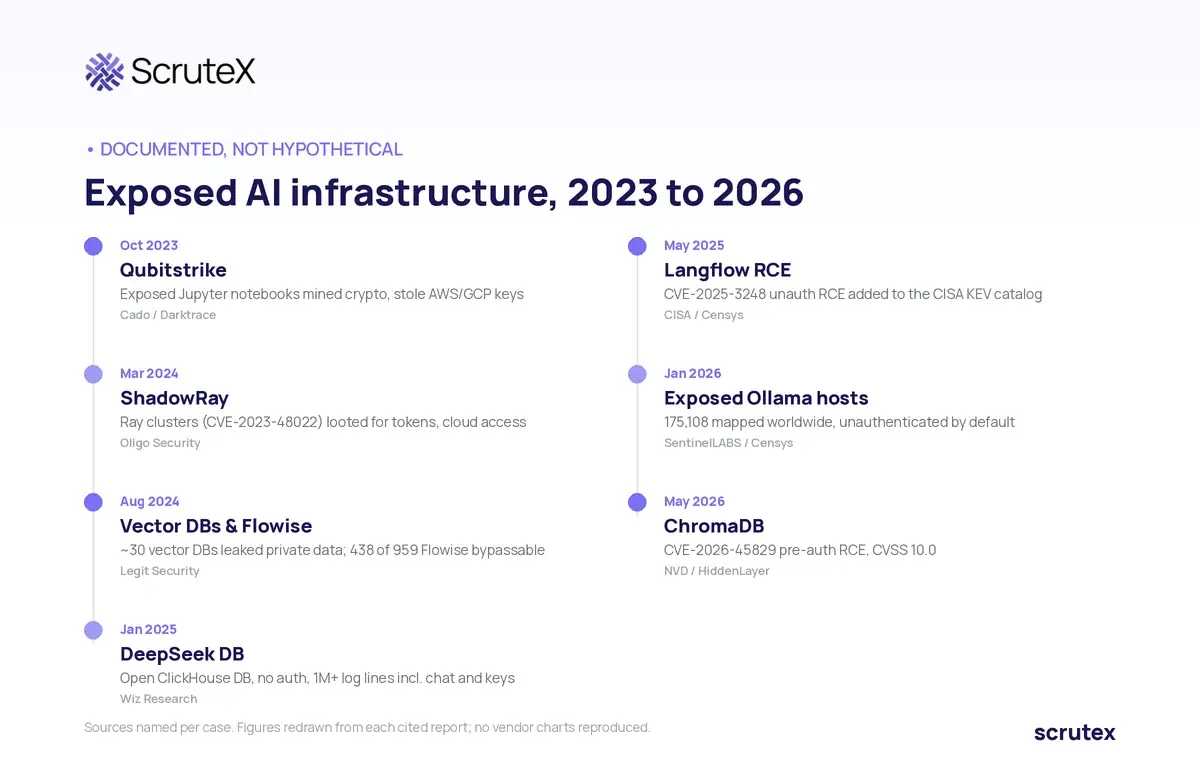
Exposed Jupyter notebooks, Qubitstrike (October 2023). Cado Security (now Darktrace) documented a campaign that gained access through exposed Jupyter notebooks, ran cryptomining, and searched for AWS and Google Cloud credential files, exfiltrating them through the Telegram Bot API. It deployed a rootkit and spread over SSH. [3]
ShadowRay, exposed Ray clusters (March 2024). Oligo Security reported active exploitation of Ray, an AI-workload framework, through CVE-2023-48022, a Jobs API with no authorization. The CVE is disputed: Anyscale calls the behaviour expected for a tool meant to run in a controlled environment, so many scanners never flagged it. Attackers ran cryptominers and stole OpenAI, Hugging Face, Stripe and Slack tokens, plus AWS, GCP and Azure access, from clusters exposed for months. [4] By November 2025, Oligo reported a follow-on campaign spreading autonomously across a population of more than 230,000 internet-facing Ray clusters, the flaw still unpatched. [5]
Exposed DeepSeek database (January 2025). Wiz Research found a publicly accessible ClickHouse database belonging to the AI company DeepSeek, reachable with no authentication at all. It held over a million log entries including chat history, secret keys and backend details, and was secured after disclosure. [6]
Langflow, unauthenticated RCE (CISA KEV, May 2025). CVE-2025-3248, a missing-authentication flaw in the AI app builder Langflow, lets an attacker run code through an unauthenticated API endpoint. CISA added it to the Known Exploited Vulnerabilities catalog on 5 May 2025; Censys reported around 470 internet-facing instances. The fix is version 1.3.0 or later. [7]
Exposed Ollama hosts (January 2026). SentinelLABS, working with Censys, mapped 175,108 unique Ollama hosts exposed to the internet across 130 countries. Ollama ships without authentication by default, so an exposed host is a reachable one. An earlier Cisco Talos scan (September 2025) found 1,139 instances, of which 214 were actively serving models. Ollama's default port is 11434. Documented risks include unauthorised model use, model extraction, resource hijacking and model poisoning through open upload paths. [8][12]
Exposed vector databases and AI tools (August 2024). Legit Security found around 30 vector-database servers holding corporate or private data, including private emails, customer PII, financial records and candidate resumes, all readable and modifiable without any tooling. In the same research, 438 of 959 Flowise servers (45 percent) were reachable through an authentication bypass, exposing OpenAI and Pinecone keys, GitHub tokens and database passwords. [9]
ChromaDB pre-auth RCE (May 2026). CVE-2026-45829, rated CVSS 10.0, is a pre-authentication code-injection flaw in the ChromaDB vector database: a crafted request runs attacker code before the auth check. HiddenLayer estimated roughly 73 percent of internet-exposed ChromaDB instances ran a vulnerable version. [10][11]
The throughline: researchers keep finding exposed AI infrastructure, and criminals keep monetising it.
How Do You Discover AI Assets on Your Own Attack Surface?
You discover your own exposed AI assets the way an attacker would: from outside, mapping your internet-facing footprint for the ports AI infrastructure runs on.
- Establish your real footprint. Enumerate your domains, subdomains and the IP ranges you control, across every cloud account and region, because shadow AI often lives on cloud IPs no central inventory tracks. The companion guide on how to find exposed subdomains covers this step.
- Scan your own ranges for the telltale ports. AI services cluster on recognisable ports: 11434 (Ollama), 8888 (Jupyter), 8265 (Ray), 6333 (Qdrant), 8000 (Chroma), 8080 (Weaviate), 19530 (Milvus), 5000 (MLflow). A service answering on one from a public IP is a candidate.
- Fingerprint what is answering. Model servers expose model-listing and generation paths, notebooks their tree and lab interfaces, vector databases their collection and heartbeat endpoints. The response tells you what it is.
- Check public code and storage too. Provider keys leak through public repositories and config files, and model weights and datasets end up in public buckets: AI exposure with no server attached.
Keep this to your own assets. Enumerating your footprint is defensive; probing what you do not own is not.
How Do You Verify Exposure and Assess Impact?
A port answering is a candidate, not a confirmed finding. Verify, then assess impact so you fix the right things.
To verify: tie the IP to a cloud account, certificate or ASN you control, then confirm the service is genuinely reachable and unauthenticated from outside, not behind a proxy the scan missed. A fingerprint can be a false positive.
To assess impact, score against what the asset grants, not raw CVSS, which does not describe an open Ollama costing hundreds of dollars a day. Highest impact is code execution or credential access: a notebook with no token, a Ray job API, a proxy holding a live key. Next, bulk-data reads: open vector collections, chat history, a dataset bucket. Then model or cost abuse: an open inference endpoint, weights in a public bucket. Weight up when the host holds cloud credentials, when the store is writable (poisoning beats theft), or when it resolves from a customer-facing hostname. State how long each has been exposed, and the cost in money for open inference, because a dollar figure moves people faster than a severity label.
How Do You Prioritise, Remediate and Prevent Recurrence?
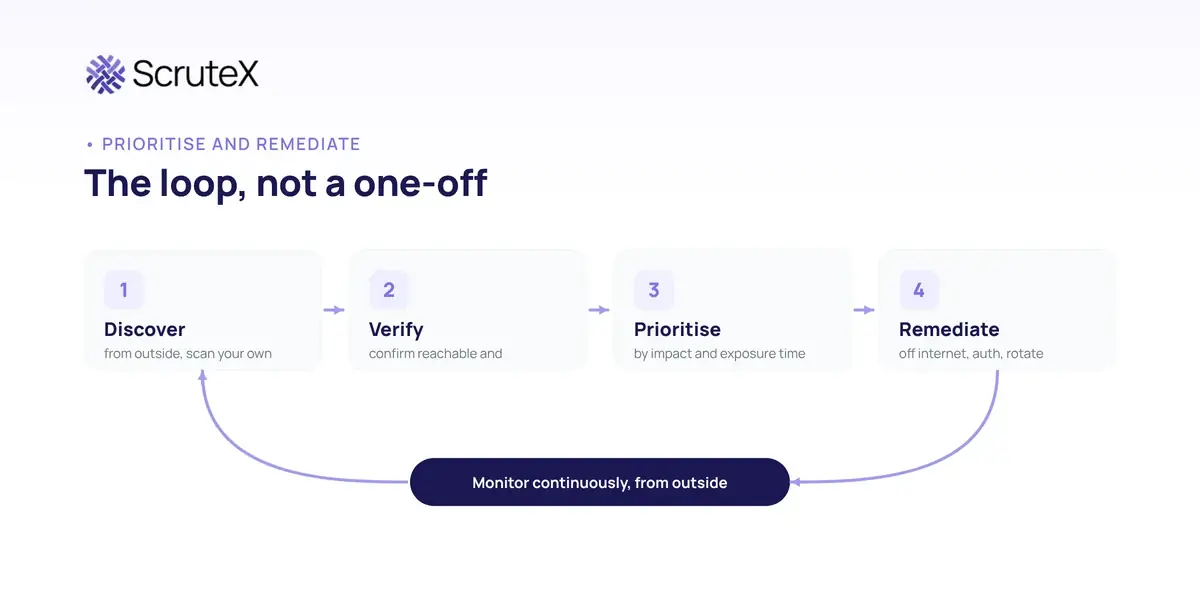
Prioritise by impact and exposure time. A notebook with no token reachable for a month outranks a fingerprinted service that still enforces auth. For a small team that ordering is the strategy: fix code-execution and live-key exposures same day, bulk-data reads next, the rest on a schedule.
Remediate:
- Take it off the internet. The fix is almost never "add monitoring." Put the service behind a firewall, VPC or VPN, or take it down if it was a forgotten experiment.
- Add authentication and rate limiting. Where it must be reachable, require an API key or OAuth with role-based access, and rate-limit it. Cisco Talos's Ollama guidance is the model: authenticate, segment, rate-limit, change default ports. [8]
- Rotate exposed credentials. A provider key found in a proxy, notebook, config file or public code is burned. Rotate it, do not wait to prove it was used.
- Assume compromise for code-execution exposure. If a notebook, Ray cluster or RCE-affected builder was reachable, check for unexpected processes, new outbound connections and added SSH keys before closing the finding.
- Patch the known-exploited flaws. Langflow to 1.3.0 or later, and track vector-database and framework CVEs against the versions you run.
Prevent recurrence by closing the gap that let the asset appear unseen.
- Give AI workloads a secure default. Provide a sanctioned way to deploy model servers, notebooks and vector stores, private and authenticated out of the box, so the fast path is the safe path.
- Put AI infrastructure in decommissioning. An AI host is deleted only when its compute and its DNS are both gone.
- Monitor from the outside, continuously. Internal inventory keeps missing shadow AI, because these assets never reach it. Continuous outside-in discovery catches a notebook that went public yesterday: EASM best practice applied to AI infrastructure.
Key Takeaways
- Shadow AI on the attack surface means model servers, notebooks and vector databases that teams deploy themselves and that end up internet-facing without security knowing, often with no authentication by default.
- It differs from shadow SaaS: the risk is an attacker getting into your own credentialed hosts and data, not just data leaving for a third-party tool.
- Exposed AI assets usually carry several risks at once: code execution on a credentialed host, a readable copy of internal knowledge, and billing abuse.
- The exposure is documented, not hypothetical. Campaigns against exposed Ray clusters, Ollama servers, notebooks and vector databases are confirmed and dated.
- The fix is to take the service off the internet, authenticate it, rotate exposed keys, and monitor from outside continuously, because internal inventories keep missing these assets.
Am I Exposed? Check These in Your Own Environment
- Do any of your public cloud IPs answer on AI service ports such as 11434, 8888, 8265, 6333 or 19530?
- Can an engineer stand up a model server, notebook or vector store without a security review?
- Do you have a sanctioned, private-by-default way to deploy AI infrastructure, or does every team improvise?
- When an AI experiment ends, does anyone confirm the GPU instance and its DNS are gone?
- Have you looked for your own provider API keys in public code and your model files in public buckets?
If you answered no, or "not sure", to two or more, you likely have shadow AI to find.
What ScruteX Finds Here
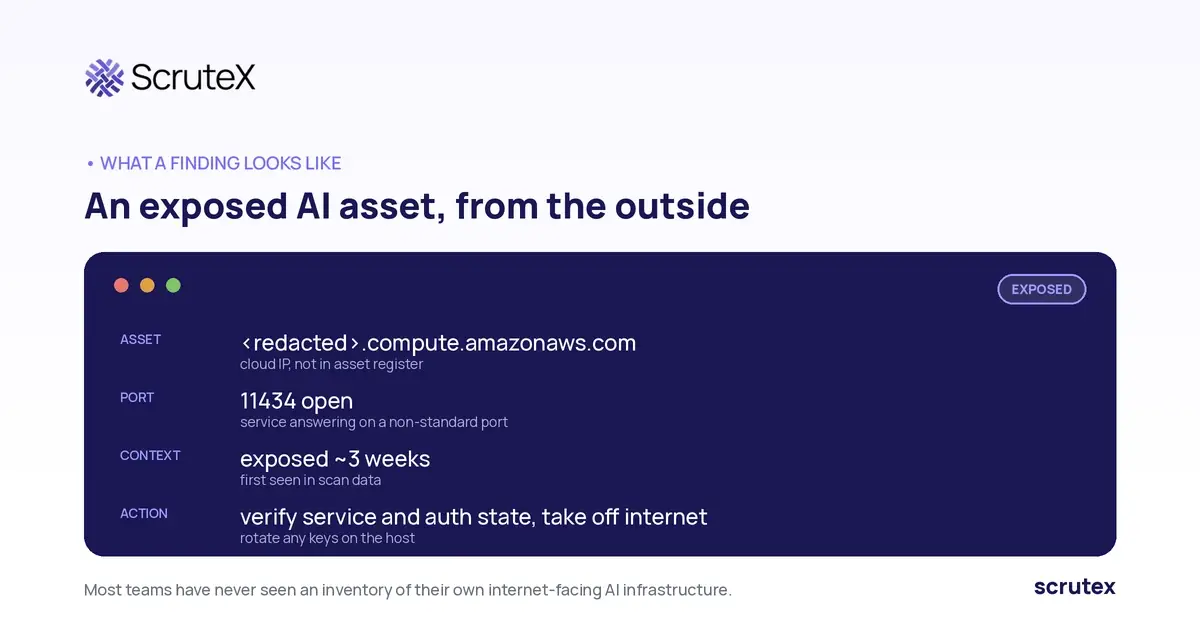
ScruteX discovers your internet-facing assets from the outside, agentless, starting from a domain. Vulnerability Insights enumerates the IPs tied to your domains across clouds and CDNs, identifies open ports and the services behind them including services on non-standard ports, and flags dangling subdomains and expired certificates. That is how a forgotten model server or notebook on a public IP surfaces: an exposed service on a port that should not be open. Source code leakage detection flags hardcoded API keys and cloud tokens in public repositories, and open cloud bucket detection finds public buckets tied to your domains, where model weights and datasets leak. Findings are ranked by real-world exploitability.
ScruteX sees what is externally observable. It surfaces the exposed port and service; confirming the asset is a specific, genuinely unauthenticated AI product is a verification step your team does with the finding. Internal-only AI infrastructure stays out of view.
What That Looks Like
A redacted shape of a typical finding, the kind most teams have never seen for their own:
Check Your External Exposure
See what is reachable on your own ranges before an attacker does. The free External Attack Surface Scan is agentless and starts from a single domain, no credit card, with first findings in about ten minutes. It surfaces unknown subdomains and IPs, open ports and exposed services, certificate issues and dangling subdomains.
Honest limit: this is external discovery. It surfaces the exposed service and port; confirming a box is a specific unauthenticated AI tool is a short analyst step on the finding.
Keep Reading
- Go deeper: EASM best practices for 2026 puts shadow AI inside a continuous external attack surface programme.
- Go sideways: Agentic AI security covers the model and agent behaviour layer, prompt injection and agent hijacking, on top of this infrastructure.
FAQ
Q: What is shadow AI?
A: Shadow AI is the use of AI tools, models and infrastructure outside approved security and governance processes. On the attack surface, it means self-deployed model servers, notebooks and vector databases that end up internet-facing without security teams knowing they exist.
Q: How is shadow AI different from shadow IT or shadow SaaS?
A: Shadow SaaS is data leaving your control for a third-party tool. Shadow AI infrastructure is the reverse: your own servers, on your own IP ranges, running AI services that often lack authentication and expose code execution or raw data. It adds attackable hosts to your perimeter.
Q: Why are exposed AI model servers and notebooks dangerous?
A: Many AI tools ship with no authentication and bind to all interfaces, so they are exposed by default on a public subnet. An open inference server allows model use, extraction and cost abuse. A notebook or job API without a token is code execution on a host that usually holds cloud credentials.
Q: How do I find exposed AI infrastructure on my attack surface?
A: Map the IP ranges you control, scan your own ranges for AI service ports such as 11434 for Ollama or 8888 for Jupyter, fingerprint what answers, and check public code and buckets for leaked keys and model files. Keep it to your own assets, and verify before escalating.
Q: Can attack surface management tools find shadow AI?
A: External attack surface management finds the internet-facing asset: the open port, the exposed service, the dangling subdomain, the leaked key in public code. Confirming it is a specific, genuinely unauthenticated AI product is a verification step your team does with the finding.