How to Find If Your Company's Data Is on the Dark Web
By ScruteX TeamPublished Updated
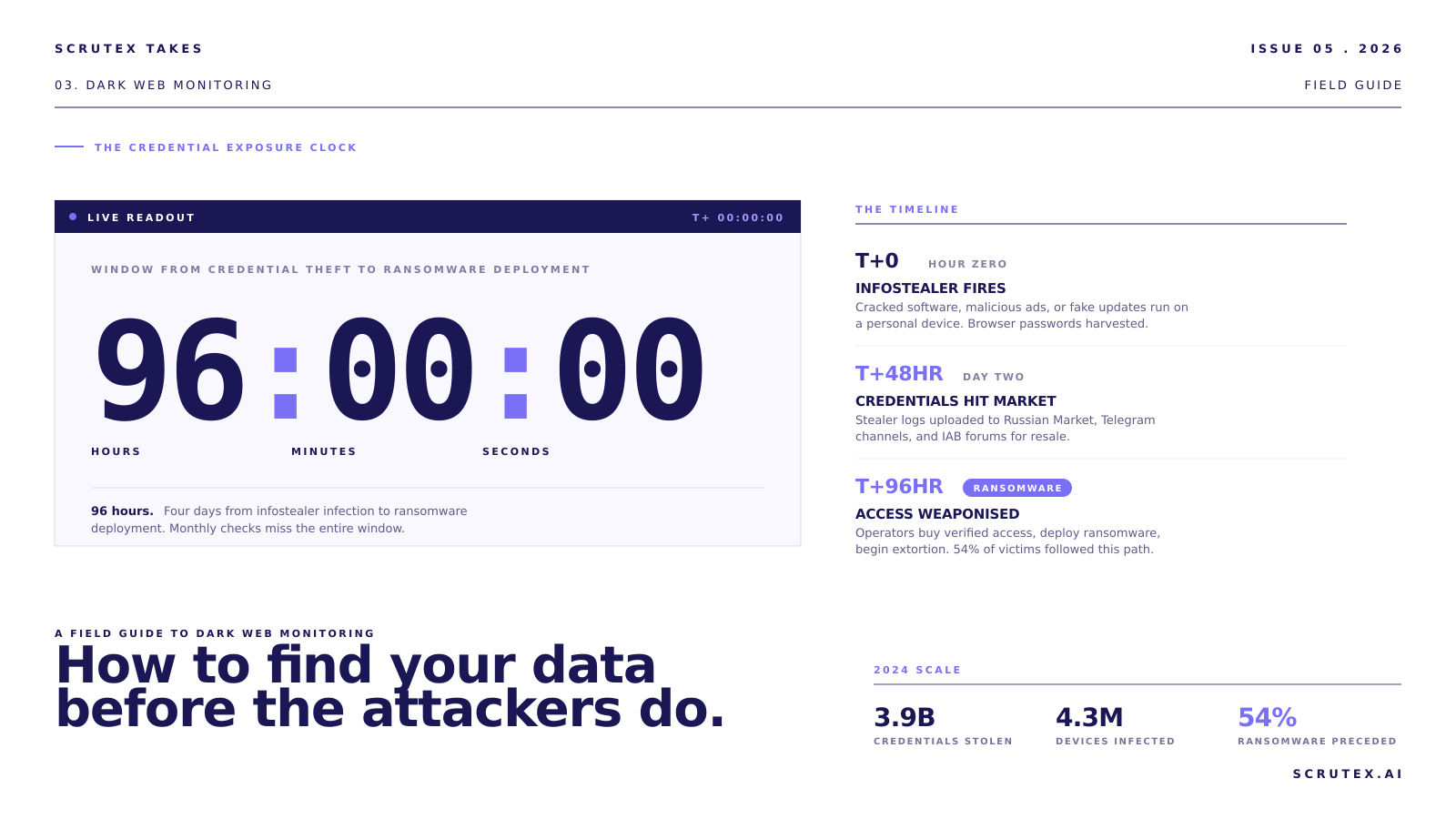
If your organisation has more than a handful of employees, some of your credentials are almost certainly on the dark web. The question isn't whether your data has been exposed. It's whether you know about it before an attacker uses it.
In 2025, infostealer malware compromised 3.9 billion credentials across 4.3 million infected devices. Those credentials -- VPN logins, email passwords, SaaS platform access, session cookies -- are packaged, sold, and resold across dark web marketplaces within 48 hours of theft. Research shows that 54% of ransomware victims had corporate credentials previously exposed in infostealer logs.
This guide walks through exactly how to check whether your organisation's data is being traded, sold, or leaked on the dark web, using both free tools and professional monitoring.
Step 1: Check Free Public Breach Databases
Start with what's freely available. These tools won't cover underground marketplaces, but they catch credentials from publicly disclosed breaches.
HaveIBeenPwned (HIBP): The most widely used free tool. Enter your corporate email domain to see which breaches include your employees' credentials. HIBP aggregates data from publicly disclosed breaches and offers a domain search feature for organisations. It won't show you dark web marketplace listings, but it provides a baseline.
Dehashed and similar aggregators: These services aggregate credential dumps from multiple sources and allow domain-level searches. Some offer free tiers with limited results.
What you'll find: Credentials exposed in known, publicly disclosed breaches. Email addresses, passwords (often hashed), and sometimes associated metadata.
What you'll miss: Infostealer logs on underground marketplaces, private forum listings, Telegram channel dumps, and IAB (Initial Access Broker) listings. The most dangerous exposures -- fresh credentials with active session cookies -- rarely appear in public databases.
Step 2: Search for Your Domain in Paste Sites and Code Repositories
Credentials, API keys, and internal data frequently appear in unexpected places.
Paste sites: Attackers and researchers post data dumps on paste sites. Search for your corporate domain, email formats, and internal hostnames. Much of this content gets removed quickly, so automated monitoring is more effective than manual checks.
Public code repositories: Search GitHub, GitLab, and Bitbucket for your organisation's domain names, API endpoints, and internal identifiers. Developers accidentally commit credentials, configuration files, and internal URLs more often than most security teams realise.

Search engine dorking: Use search engine operators to find exposed files, login pages, and configuration data associated with your domains. Queries like
site:yourdomain.com filetype:env or "yourdomain.com" password can surface unexpected exposures.Step 3: Deploy Continuous Dark Web Monitoring
Free tools provide a snapshot. Continuous monitoring provides ongoing coverage of the channels where most credential trading actually happens.
What professional monitoring covers:

- Credential marketplace scanning: Automated monitoring of marketplaces where stolen credentials are listed for sale, including buyer-verified listings with access type and pricing.
- Infostealer log detection: Scanning for your organisation's domains in stealer log packages uploaded to underground marketplaces and Telegram channels. This is where fresh, high-value credentials appear first.
- IAB listing alerts: Detecting when initial access brokers list corporate access matching your organisation's profile -- industry, revenue range, country, access type.
- Forum and channel monitoring: Tracking discussions mentioning your organisation, executives, or infrastructure on underground forums and encrypted messaging platforms.
- Paste site and dump monitoring: Continuous scanning of paste sites and data dump repositories for your domains and identifiers.
Why continuous matters: Credentials move from infected devices to marketplaces in under 48 hours. Ransomware deployment follows within another 48 hours. The total window from theft to attack can be under four days. Monthly or quarterly checks miss the exposures that matter most.
Step 4: Assess What You Find
Not all exposures carry equal risk. When you find leaked credentials, assess:
Recency: When were the credentials exposed? Fresh credentials (days to weeks old) are actively tradeable. Older credentials may have been rotated, but verify.
Access level: A leaked CEO email password is different from a leaked marketing intern's password. Assess what systems the compromised credentials could access.
Session cookies: If the exposure includes active session tokens or authentication cookies, the risk is critical. Session cookies bypass MFA entirely, giving attackers immediate authenticated access.
Password reuse: If the leaked password matches credentials used on other systems (and it often does), the exposure multiplies.
Context: Is the credential from a personal device (infostealer) or a breach of a service your organisation uses? The remediation differs.
Step 5: Respond and Remediate

Immediate actions:
- Force password resets for all exposed accounts
- Invalidate active sessions (especially if session cookies were exposed)
- Review access logs for the exposed accounts during the exposure window
- Check for unauthorised access or data exfiltration
Preventive actions:
- Enforce MFA on all remote access, email, and cloud platforms
- Deploy a password manager organisation-wide to reduce password reuse
- Restrict corporate credential storage in personal browsers -- this is the primary infostealer harvest point
- Implement conditional access policies that flag logins from new devices or unusual locations
- Brief employees on the infostealer risk: cracked software, malicious ads, and fake updates are the primary infection vectors
What to Monitor Ongoing
Set up continuous monitoring for:
- Your primary and subsidiary domains in credential marketplaces
- Executive names and email addresses in underground forums
- Your brand name in phishing kit templates and lookalike domains
- VPN and remote access credentials associated with your IP ranges
- Third-party vendor credentials that could provide indirect access
Key Takeaways
- Your credentials are almost certainly on the dark web. 3.9 billion credentials were stolen in 2024 alone. The question is whether you know about it.
- Free tools provide a baseline but miss the most dangerous exposures. Underground marketplaces, infostealer logs, and IAB listings require professional monitoring.
- The window from theft to attack is under 4 days. Continuous monitoring is the only way to catch exposures before attackers use them.
- Session cookies are more dangerous than passwords. They bypass MFA and provide immediate authenticated access.
- 54% of ransomware victims had credentials leaked before the attack. Early detection breaks the kill chain.
Scrutex's Data Exposure Insights module monitors dark web marketplaces, stealer log channels, paste sites, and underground forums for your leaked credentials, session data, and IAB listings. Agentless setup -- enter your domain and start monitoring in minutes.
Frequently Asked Questions
Is it legal to search the dark web for my company's data?
Yes. Monitoring for your own organisation's leaked credentials and data is legal and considered a security best practice. You're looking for your own exposed information, not accessing or purchasing other organisations' data.
How often should I check for leaked credentials?
Continuously. Credentials move from infected devices to dark web marketplaces within 48 hours, and ransomware can follow within another 48 hours. Monthly or quarterly checks miss the exposures that create the most risk.
What should I do if I find my company's credentials on the dark web?
Immediately reset passwords for all exposed accounts, invalidate active sessions, review access logs for signs of unauthorised access, and check for data exfiltration. Then implement preventive controls: MFA, password managers, and employee awareness about infostealer risks.