Dark Web Monitoring Tools: How to Test One Before You Buy
By ScruteXPublished Updated
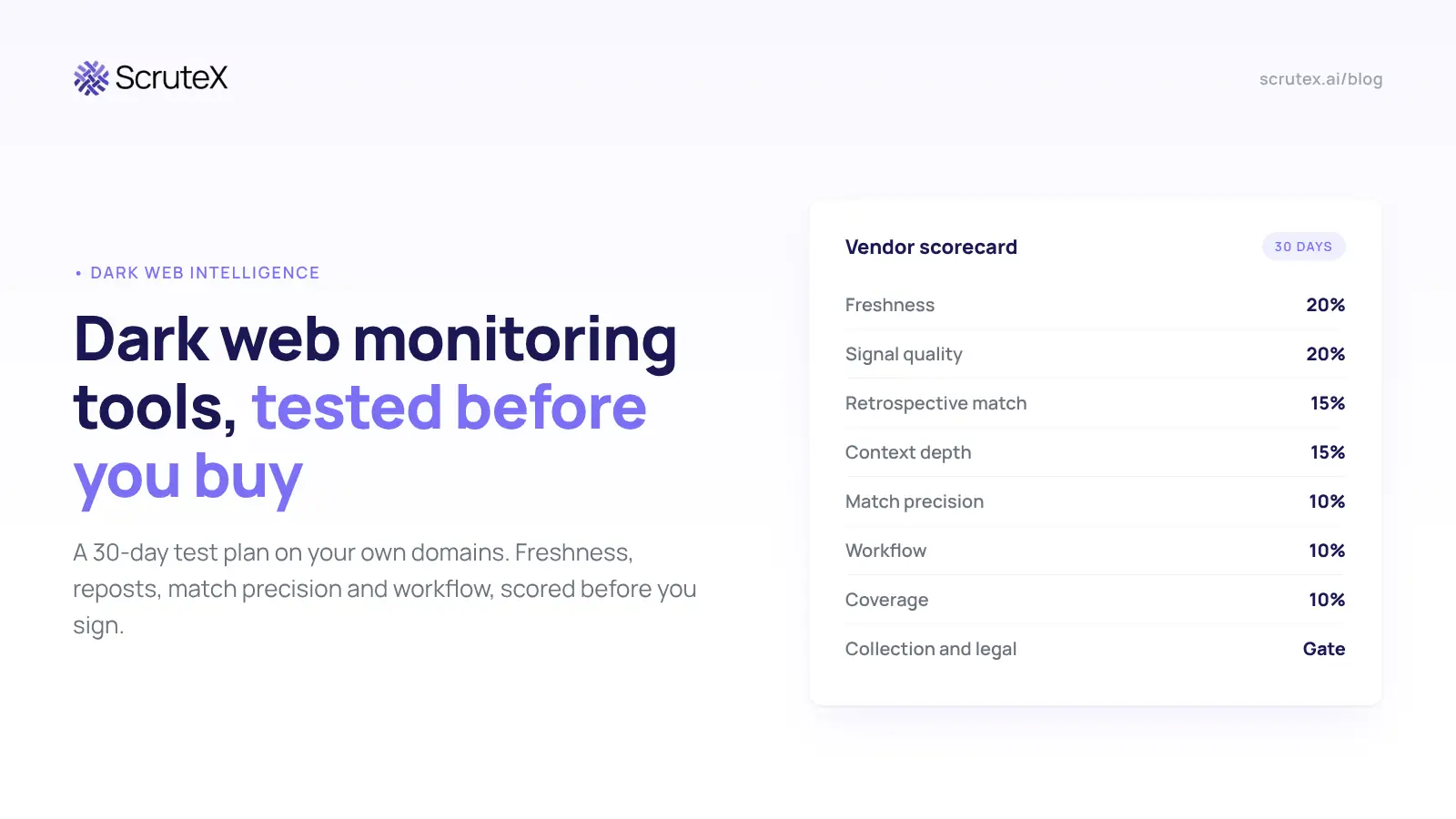
A dark web monitoring tool earns its cost when it tells you about a stolen session cookie before anyone replays it. Demos never show you that. They show record counts.
This guide is a test plan for the analyst who runs the evaluation. It takes 30 days, uses your own domains and incident history, and ends with a score you can defend to procurement.
Short answer: To test a dark web monitoring tool, point it at your own domains for 30 days. Measure whether it finds incidents you already know about, how old its data is when it alerts, how it handles reposts and false matches, and whether one alert can drive a reset.
What a dark web monitoring tool should do
A dark web monitoring tool collects posts and files from criminal forums, markets, stealer log shops, paste sites and Telegram, matches them against your domains, brands, people and keys, and alerts you only when something new and usable appears.
Each finding type needs its own response, so test each one separately:
- Stealer logs: credentials, cookies and host details from one infected device. Reset, revoke sessions, check the host.
- Combolists and ULP files: URL, login and password lines, usually compiled from older data. Check reuse, block the password.
- Leak site posts: a ransomware group claims your data or a supplier's. Triage with legal.
- Access listings: someone sells VPN, RDP or admin access to a company that fits your profile. Hunt now.
A tool can be strong on stealer logs and weak on leak sites. An average score hides that.
What we saw in the catalogue this week
Between 9 and 12 November 2026 we ran keyword searches across the ScruteX catalogue of forum posts. Four patterns came back, and every evaluation should plan for them.
Volume is mostly commodity. "Combolist" matched more than 45,000 posts and "stealer logs" matched 3,200. Most are free or cheap URL:login:password dumps on cracking forums, shared again and again. A vendor that quotes totals like these is quoting the noise floor.
"Fresh" is a label, not a fact. On 12 November a 127,991-line combolist went up on two forums. Its filename carried a timestamp of 19 October 2026, so the file was at least 24 days old on the day it was sold as new. The lines inside were likely older still.
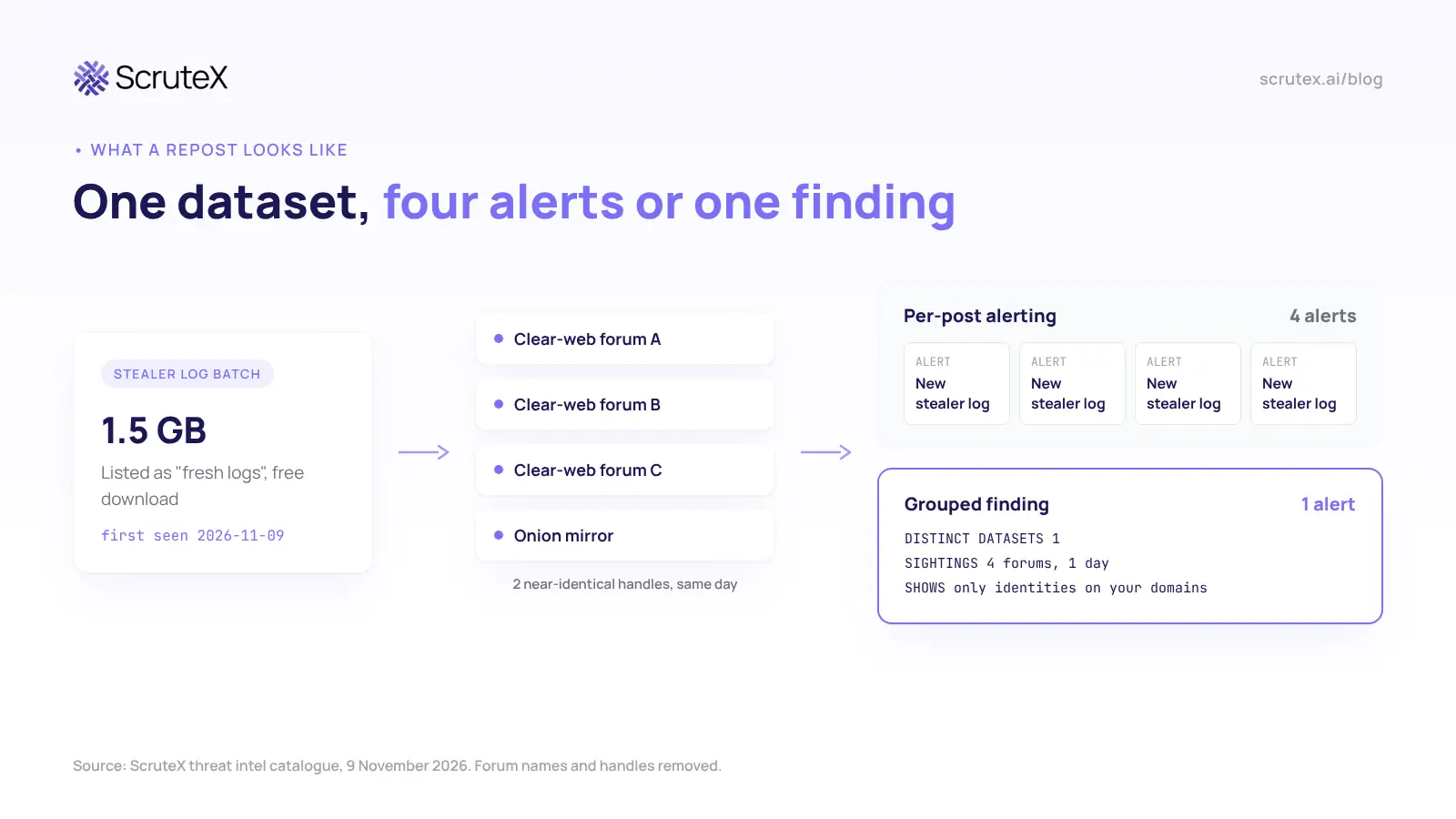
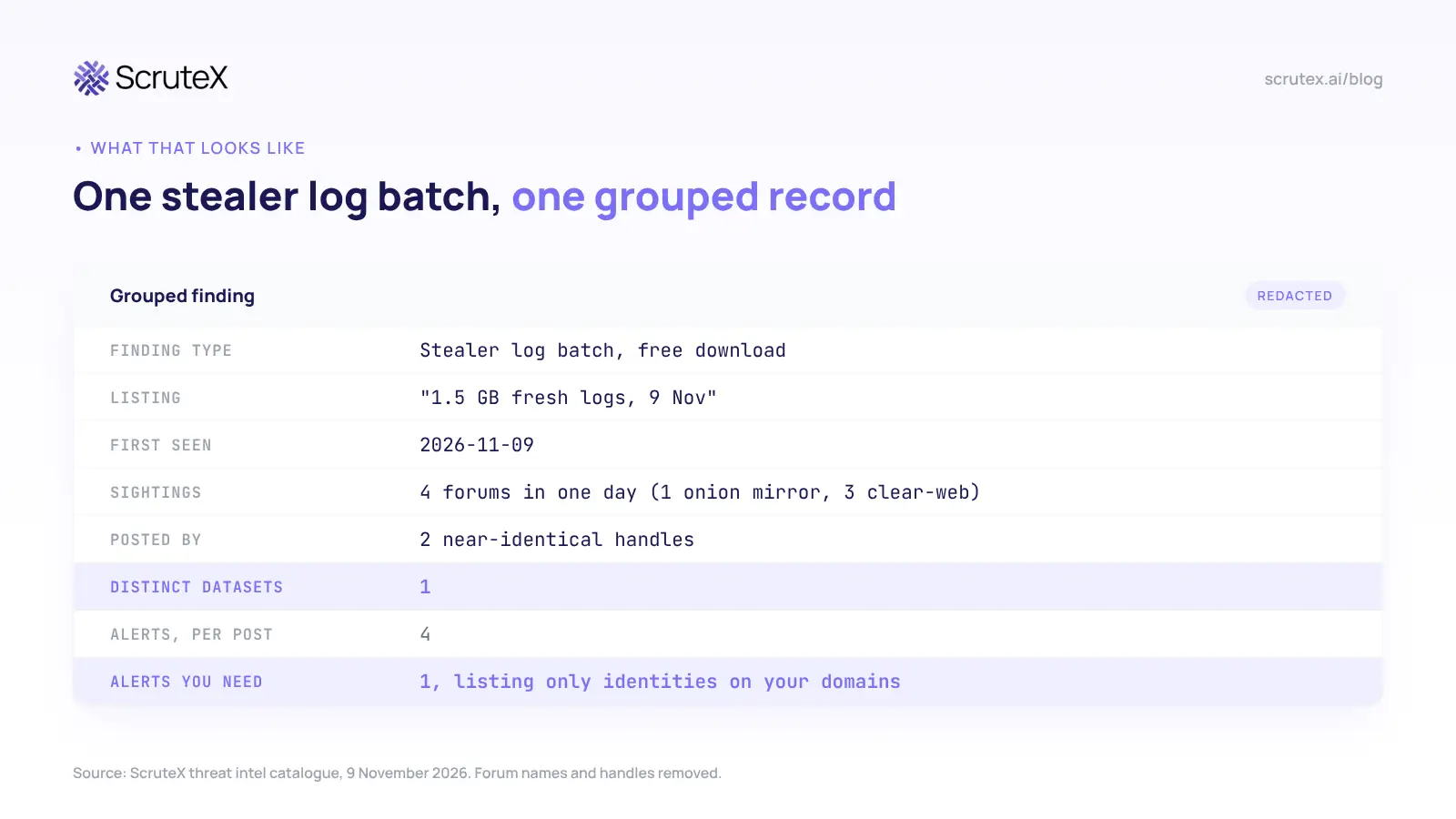
One dataset, many posts. On 9 November a 1.5 GB stealer log batch appeared on four forums, one of them an onion mirror, under two near-identical handles. A tool that alerts per post sends you four alerts for one dataset.
Substring matches create false hits. A search for "ULP" also returned ransomware leak site entries for unrelated companies, including a packaging maker whose description contains the word "pulp". Short brand names and acronyms fail the same way.
Outside research shows the same pattern. Group-IB, writing on 20 May 2026, profiled five of the most active lead-data sources, some posting 500 to 1,000 messages a month, and traced supposedly new corporate leaks back to old public datasets such as the 2021 Facebook scrape. Old-looking data is not always harmless either.
So what: the tool you want separates new data from repackaged data, groups reposts into one finding, and matches your names precisely. Those abilities decide whether your analysts trust the queue.
Build your ground truth before the trial
Spend one week collecting five things before any vendor touches your scope.
- An answer key. Twelve months of EDR stealer detections, phishing-driven resets, incident tickets, vendor breach notices and leak site mentions of you or your suppliers.
- One scope for every vendor. Domains, the subdomains that matter (SSO, VPN, mail, admin), brand names, executive names, your top 20 suppliers' domains, and the prefixes your cloud and SaaS keys use.
- Three reviewers. The analyst who will triage, the identity owner who can force resets, and someone from legal or privacy.
- Pass marks in writing. For example: half of known stealer incidents found, median alert age under 72 hours, repeat alerts under 20%. Fix the numbers before the first demo.
- A tracking sheet. One row per alert: vendor, finding type, source type, first-seen time, alert time, matched string, repeat (yes or no), action taken, and analyst minutes. Every score in this guide comes from this sheet.
The 30-day test plan
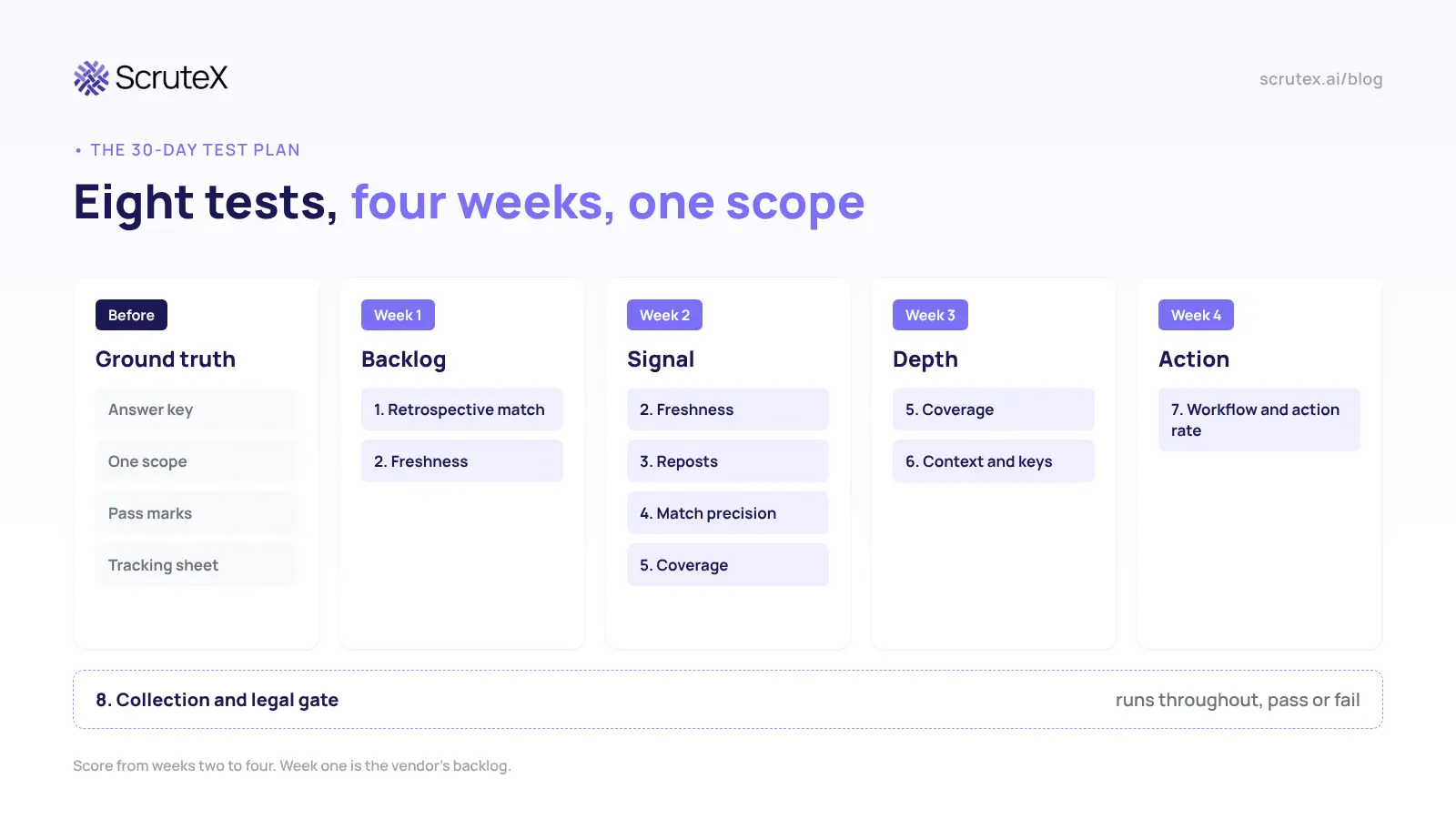
Run every test across all vendors at the same time, on the same scope.
Test 1: Retrospective match (week 1)
Ask each vendor for every finding on your scope from the past 12 months. Compare the list with your answer key.
Pass: the tool finds most known stealer infections and supplier incidents, with matching dates. Fail: a long list of old breach hits that misses incidents you know happened. Verify a sample of findings you did not know about. Real unknowns are the strongest evidence a vendor can give you.
Test 2: Freshness (weeks 1 and 2)
Log two timestamps for every alert: first appearance at the source and arrival in your queue. For stealer logs, add the infection date from the log itself.
Pass: source timestamps on every alert, and stealer alerts within a day or two of first appearance. Fail: no source timestamp. Without it you cannot measure freshness at all.
Test 3: Reposts and recycled data (week 2)
Sort trial alerts into first-seen and repeat. Then give the vendor the 9 November scenario (one stealer batch, four forums, one day) and ask how many alerts the tool raises. Ask how it flags a combolist whose rows match an older dataset.
Pass: one finding per dataset, reposts attached as sightings, old rows labelled. Fail: every post is a new alert at the same severity.
Test 4: Match precision (week 2)
Add your shortest brand name, any acronym you use, and one common word in your company name. Count false matches after a week. Then ask the vendor to add exclusions and count again.
Pass: false matches fall sharply after tuning, and the tool shows why each alert matched. Fail: you cannot see the matched string, or exclusions need a support ticket.
Test 5: Coverage (weeks 2 and 3)
Ask for sources by name and type: forums, markets, log shops, Telegram, pastes, leak sites. Ask which ones the vendor collects itself, which it buys from another feed, and what it added last quarter.
Our catalogue showed the same listings on clear-web forums and onion mirrors, so a tool needs both. Ask about Telegram channels by name too.
Run your top 20 supplier domains too. A stealer log from a supplier's admin can open your systems.
Pass: named sources, own collection separated from resold data, recent additions, supplier findings included. Fail: "thousands of sources" with no names.
Test 6: Context and non-human identities (week 3)
Open five real stealer alerts. Check for infection date, host details, saved URLs, session cookies, and whether the person still works for you. Then give the vendor your key prefixes and check whether it matches API keys and tokens at all.
Pass: an analyst can act on the alert without opening another tool. Fail: "credential found" and nothing else, or matching on email addresses only.
Test 7: Workflow and action rate (week 4)
Push one real alert through your webhook or API into your ticketing system or SIEM. Have the identity owner reset the password and revoke sessions. Time each step.
Then divide two weeks of alerts that led to action (reset, revocation, key rotation, takedown or hunt) by the total. That action rate is the best single measure of a dark web monitoring tool. If a vendor names an integration, ask to see it run live.
Check the out-of-hours path too: how does a high-severity stealer alert at 2 a.m. on a Saturday reach your on-call analyst? In India, CERT-In directions give you six hours to report certain incidents, so a weekend delay can become a compliance problem.
Test 8: Collection and legal gate (throughout)
Ask for the written collection policy. Ask whether the vendor buys stolen data and whether it would buy data for you. Ask where your scope is stored and who can see it.
US Department of Justice guidance treats passive collection as generally lawful when the data is reached through legitimate means. It sees little risk in buying your own data, but a seller who bundles in another company's records creates real exposure. Have legal check the answers against your own regime (DPDP in India, GDPR in the EU). Treat this as pass or fail.
Optional: canary credential
Post an unused mailbox with a unique password and no access to a public paste or repository you control, then time each vendor's alert. Never post canaries on criminal forums, and clear it with legal first. It tests public paste coverage only, so weight it lightly.
Common trial mistakes
Different scopes per vendor. Twelve domains for one and 40 for another gives you nothing to compare.
Judging on week one. Week one is the vendor's backlog, so every tool looks busy. Score weeks two to four.
Letting the vendor tune your queue. Ask who maintains the exclusions a sales engineer adds during the trial, and whether your team can do it alone.
Testing the dashboard only. Your team will work in the ticket queue. Run the workflow test on the API or webhook you will use in production.
How to score a dark web monitoring tool
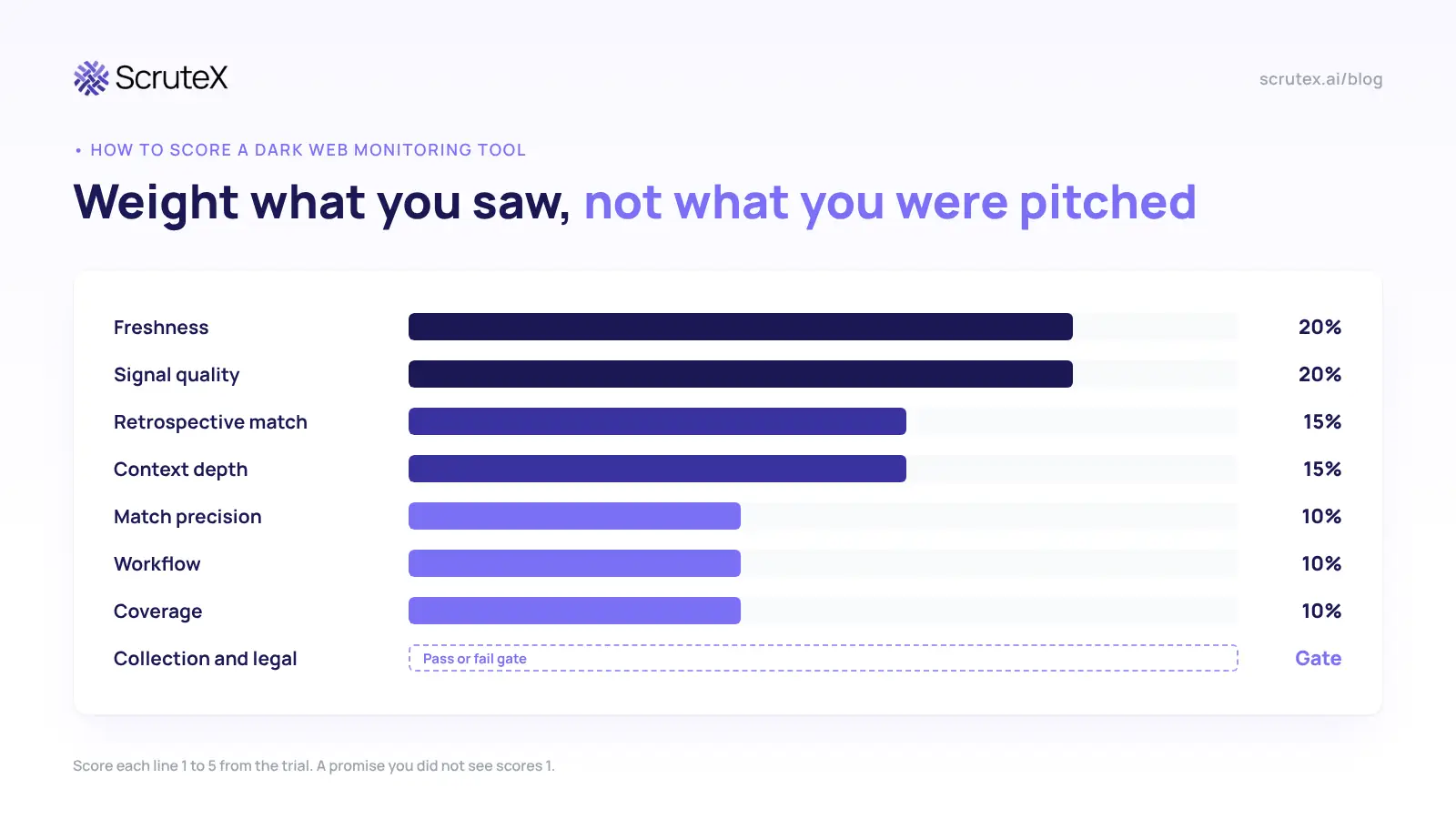
Score each line 1 to 5 from what you saw in the trial, not from the pitch.
| Criterion | Weight | Measured by |
|---|---|---|
| Freshness | 20% | Median time from first appearance to alert |
| Signal quality | 20% | Repost grouping, recycled labels, action rate |
| Retrospective match | 15% | Share of known incidents found |
| Context depth | 15% | Infection date, cookies, URLs, key matching |
| Match precision | 10% | False matches before and after tuning |
| Workflow | 10% | Live webhook or API test, time to reset |
| Coverage | 10% | Named sources, own versus resold, suppliers |
| Collection and legal | Gate | Written policy, no buying on your behalf |
A promise you did not see during the 30 days scores 1.
Worked example: reading the action rate
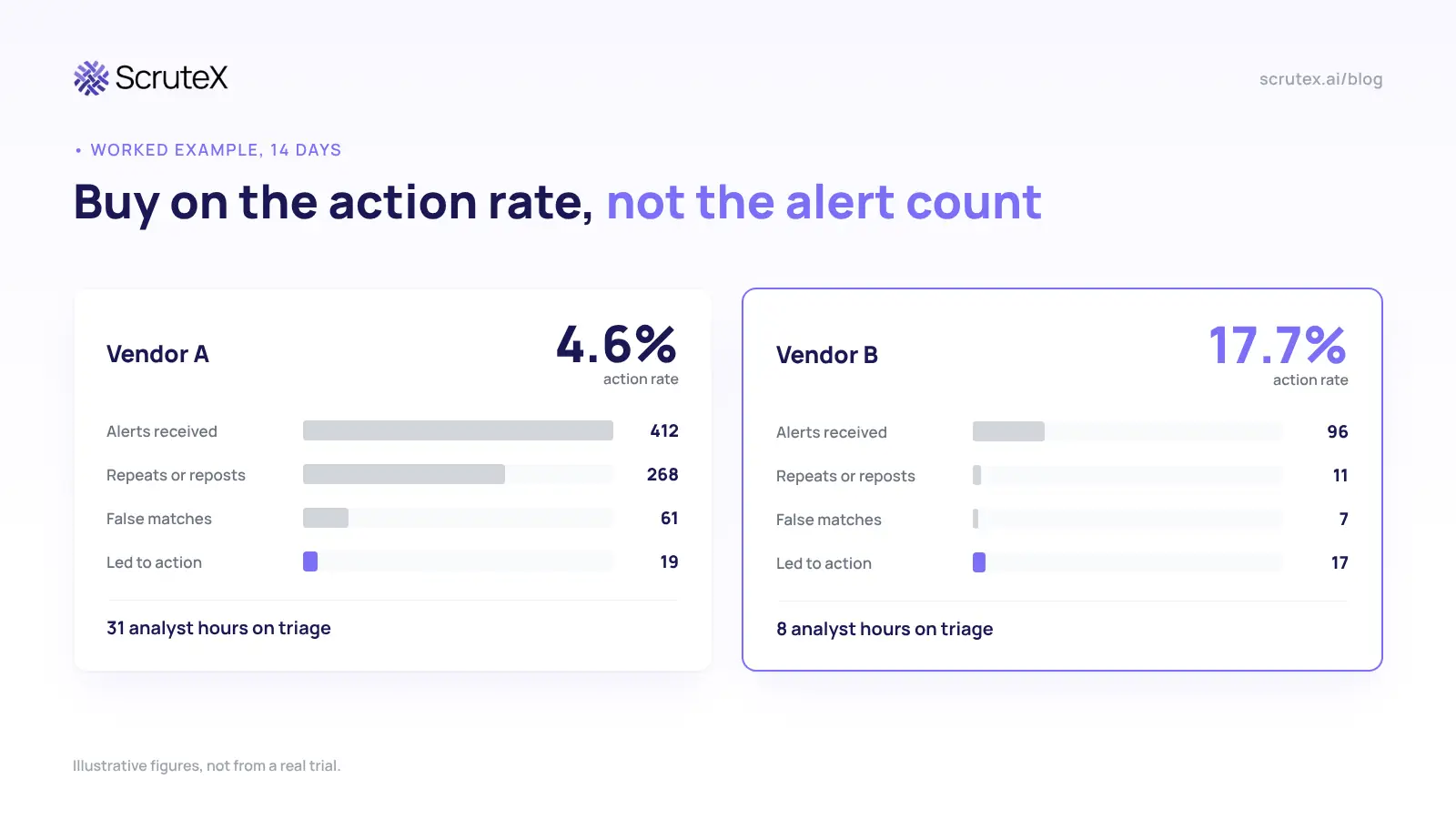
The figures below are illustrative, not from a real trial. They show how two tools can look in your tracking sheet after 14 days.
| Measure | Vendor A | Vendor B |
|---|---|---|
| Alerts received | 412 | 96 |
| Repeats or reposts | 268 | 11 |
| False matches | 61 | 7 |
| Alerts that led to action | 19 | 17 |
| Action rate | 4.6% | 17.7% |
| Analyst hours on triage | 31 | 8 |
Vendor A wins the demo with a feed four times larger. Vendor B found almost as many real problems for a quarter of the analyst time. Over a year, that gap costs a part-time analyst.
Pricing and contract checks
- What you pay for. Per-domain or per-identity pricing is easy to forecast. Per-alert pricing rewards the vendor for noise.
- What is extra. Supplier monitoring, takedowns and API access are often add-ons. Confirm that everything you tested sits in the quoted tier.
- Exit terms. Confirm you can export your findings history. Twelve months of first-seen dates is audit evidence.
Questions for the vendor call
- Show me one real, redacted stealer alert with source and alert timestamps.
- One dataset gets posted to four forums today. How many alerts do I get?
- Which sources do you collect yourself, and which do you resell?
- Do you match API keys and tokens, or only email addresses?
- Which integrations ship today?
- What will your tool not see?
A vendor who cannot answer the last question has not thought about its limits.
Key takeaways
- Test on your own domains and incident history, never a demo tenant.
- Freshness, repost grouping and match precision measure the tool. Record counts measure the market.
- Session cookies decide whether a stealer alert stops an intrusion.
- Score weeks two to four, and buy on action rate and analyst hours.
Am I exposed?
You can check these without any tool:
- ☐ Did EDR flag stealer malware on any employee or contractor device in the last 90 days, and did you revoke sessions as well as reset the password?
- ☐ Can personal or contractor devices reach your SSO or VPN without EDR coverage?
- ☐ Do your cloud or SaaS key prefixes appear in any public code repository?
- ☐ Has a top-20 supplier reported a breach this year, and did you rotate the credentials you share with them?
- ☐ If someone sent you a "your data is for sale" screenshot today, could your team tell within an hour whether it is new or recycled?
Two or more "not sure" answers mean your next step is to see what already sits outside your network.
What ScruteX finds here
ScruteX matches your domains against stealer logs, combolists, dark web forum posts and Telegram channels, and records when each finding first appeared. It keeps stealer logs and breach corpora apart: last week's log from one infected laptop needs a session revocation, an old breach row needs a reuse check. It flags credentials tied to your SSO, VPN and admin URLs, and runs the same checks on your suppliers' domains. Findings go out over webhooks and the REST API today. Named SIEM and ticketing connectors are on the roadmap.
What that looks like
The 9 November batch from our catalogue, as one grouped record. Forum names and handles removed.
Is your domain already in stealer logs?
See what sits in stealer logs and combolists for your domain before you start a 30-day trial. Free tier, no credit card, no agent.
ScruteX monitors external sources only. It will not see an exposure that never left your network, and it cannot delete data from a criminal forum. Run the tests in this guide on us the same way you run them on anyone else.
Where to go next
- If credentials are your problem: Data Exposure Insights covers stealer logs, combolists and paste sites, with first-seen dates on each finding.
- If your exposure sits with suppliers: Vendor Insights runs the same checks on your vendors' domains.
- To go deeper on manual checks: How to find leaked credentials on the dark web shows the searches you can run yourself first.
- For background on what gets sold: What data ends up on the dark web explains why some datasets surface months after the theft.
FAQ
How long should a dark web monitoring trial last?
At least 30 days. A shorter trial shows the vendor's backlog, not live performance. You need two weeks of normal volume to measure freshness and noise.
What is the best test for a dark web monitoring tool?
The retrospective test. Ask for 12 months of findings on your domains and compare them with incidents you already know about. It measures coverage and accuracy with facts the vendor cannot dispute.
Why do dark web monitoring tools send duplicate alerts?
Sellers post the same dataset on several forums and mirrors, often on the same day. A tool that alerts per post sends one alert per sighting. A better tool groups sightings into one finding.
Do dark web monitoring tools detect session cookies?Some do. Stealer logs often carry session cookies that bypass MFA. During the trial, open real stealer alerts and confirm that cookies and the affected domains appear.
Can a free breach lookup replace a dark web monitoring tool?
No. A free lookup checks known breach collections when you ask. It does not alert you when new data appears, and it rarely shows stealer log context such as cookies or infection dates. It does work as a baseline to compare vendors against during the trial.