Your Org Chart Is an Attack Tool: How Directory Data Fuels Help Desk Fraud
By Mohana SubiPublished Updated
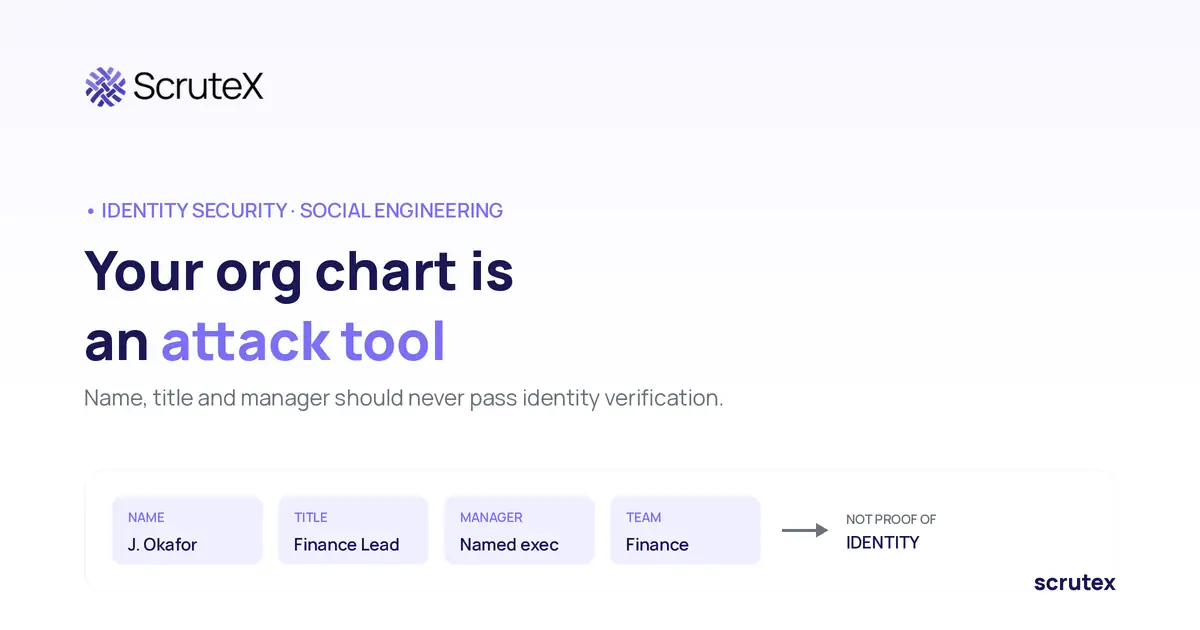
An attacker calls your IT help desk. They give a real employee's full name, correct job title, that person's manager, and their team. They sound calm and busy, and they ask for a password reset because they are locked out before a meeting. Every fact they offered is true. None of it proves who is on the phone.
That is the problem this article addresses. Help desk social engineering is the use of convincing, often public, organisational information to impersonate an employee and talk a support agent into a password reset, an MFA reset, or an account recovery. The information that makes the call credible, names, titles, reporting lines, team structures, is the same information most organisations publish or leak without treating it as sensitive. The fix is not to hide every employee's name. It is to make sure that knowing a name, a title, a manager, or a team is never enough to pass identity verification.
The technique works against real companies. The joint FBI and CISA advisory on the Scattered Spider group documents actors phoning help desks and persuading staff to reset passwords and MFA tokens, then taking over accounts in single sign-on environments. MITRE ATT&CK tracks impersonation of IT and help desk staff as a named technique. The attack path is well understood. The defence is a process problem, not a people problem.
What Is Help Desk Fraud?
Help desk fraud is a social engineering attack in which someone impersonates a legitimate employee, or an IT administrator, to trick a support agent into performing a privileged action on an account they do not own. The usual targets are password resets, MFA resets or re-enrolment, and account recovery, because those actions hand the caller control of an account.
It is a specific case of social engineering. The attacker is not breaking a system. They are using a human process that exists to help locked-out employees, and feeding it enough true information to look like the person it is meant to help. The FBI and CISA advisory maps this to spearphishing voice (vishing) and to impersonation of IT staff. Once an attacker gets a reset, they can register their own MFA token and, in a federated environment, keep access even after the password changes.
The agent is usually doing their job. They were hired to unblock employees quickly, they are often measured on resolution speed, and the request sounds routine. The failure, when it happens, is that the verification step did not require anything the attacker could not already know or obtain.
How Can Attackers Use Organisational Charts for Social Engineering?
An organisational chart gives an attacker the raw material to sound like an insider: who exists, what they do, who they report to, and which team handles what. On its own, an org chart is not a vulnerability. Combined with a weak verification process, it becomes the script for a convincing impersonation.
Consider what directory data supplies. A name and title let the caller claim a specific identity. A reporting line lets them name a real manager, which creates legitimacy and sometimes authority. Team structure lets them describe their work plausibly and name the right systems. None of these facts is secret in most organisations, which is exactly why they are dangerous when a reset process treats them as proof.
Publishing an org chart is not reckless, and much of this data leaks regardless, through professional networks, conference bios, email signatures, and marketing pages. The point is that the information is widely available, so a control that relies on it is relying on something an attacker can get. Directory exposure alone does not prove a vulnerability or mean an attack will succeed. It raises the odds that an impersonation sounds credible, which is why the verification step has to ask for something else entirely.
How Does Employee Directory Information Support Impersonation?
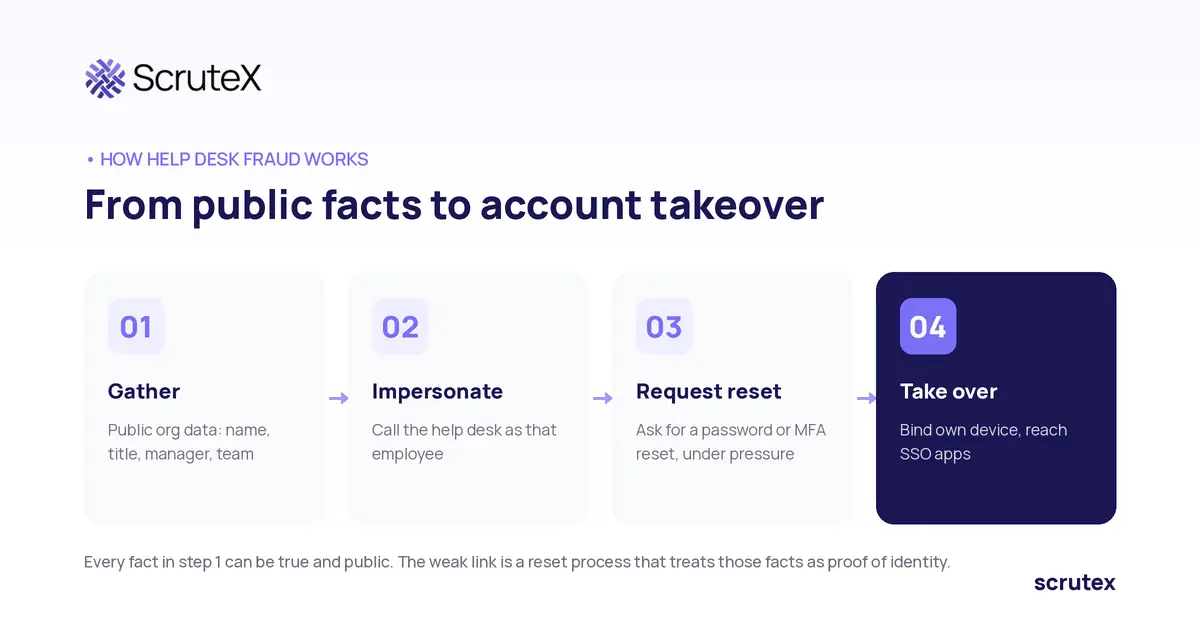
Directory information supports impersonation by letting an attacker assemble a profile that matches what a help desk agent expects to hear. No single field is the problem. The risk comes from combining fields until the story holds together.
MITRE ATT&CK describes this collection phase as gathering victim identity information and phishing for information, carried out before the impersonation. The attacker builds the picture first, then makes the call: find a target and their role, identify the manager and team from public structure, gather enough context to describe the person's work, then ask for a reset under time pressure. Each individual fact is innocuous. Together they make a request that is hard to tell apart from a real one by ear.
Two kinds of exposure deepen the problem. Public information about IT and security staff tells an attacker who to impersonate when they want to sound like internal support. And leaked personal data, from breaches or dark web sources, can add details that feel like genuine confirmation: a personal email, a phone number, sometimes a security question answer. When a reset process asks for information that has already leaked, it is asking for something the attacker may already hold.
Why Are Password Resets and MFA Recovery Attractive Targets?
Password resets and MFA recovery are attractive because they are designed to grant access to someone who has lost it, which is exactly what an attacker wants to appear to be. They combine a high-privilege outcome with a process that runs many times a day and is optimised for speed.
A successful reset gives the attacker the account. In a single sign-on environment, one account reaches many applications, which is why the FBI and CISA advisory notes that help desk resets enabled account takeovers across SSO. MFA recovery is the higher prize, because modern defences lean on MFA. If an attacker gets an agent to reset or re-enrol MFA, they can bind their own device as the second factor, and the account's strongest control is now working for them.
This is why identity-based attacks have shifted toward the recovery process rather than the login. Strong authentication has made the front door harder to force, so attackers target the mechanism that lets legitimate users back in when it fails.
How Can Attackers Exploit Trust and Authority Within an Organisation?
Attackers exploit trust and authority by borrowing the credibility of a role rather than earning it. Two patterns recur.
Executive impersonation uses a senior person's identity, often the most publicly documented in the whole organisation, to make a request an agent is reluctant to challenge. Leadership names, titles, and photos sit on the company website, in press coverage, and across professional networks. A caller claiming to be a named executive, or an assistant acting for one, brings built-in authority.
Authority-based pressure adds urgency and a reason to skip the normal process: a board meeting starting, a deal closing, an exception just this once. The combination of a plausible senior identity and manufactured time pressure is designed to push an agent past verification. The defence is not training agents to detect lies in the moment, which is unreliable. It is a process where the same verification applies to everyone, including executives, so no amount of claimed authority changes what the agent must confirm.
How Can Organisations Prevent Fraudulent Help Desk Requests?
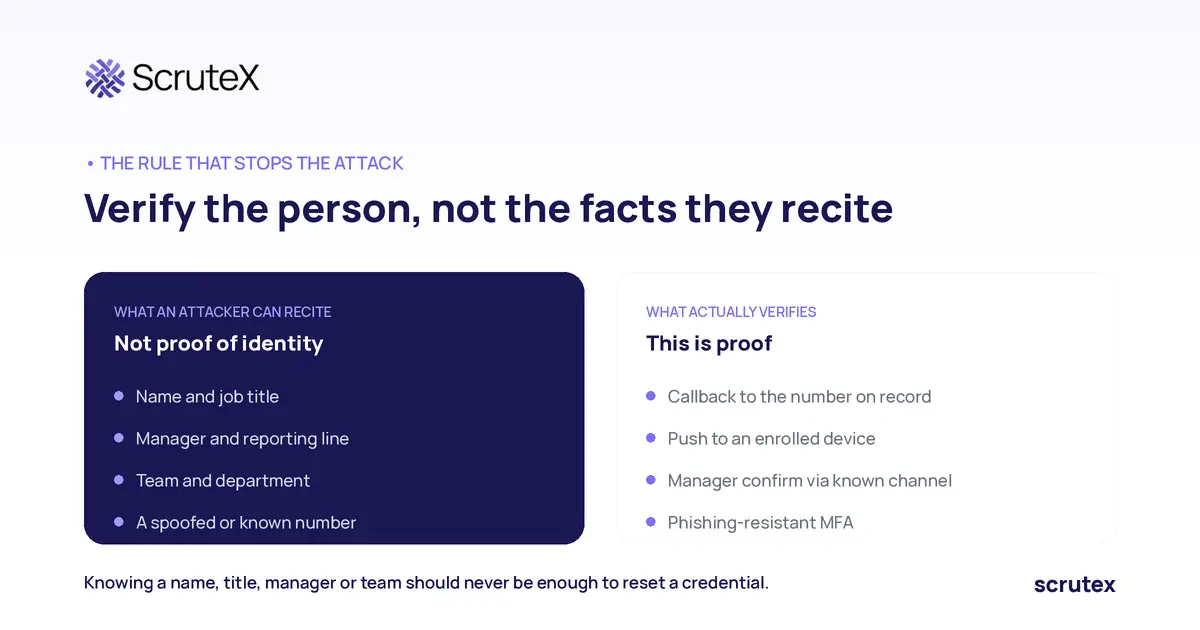
Organisations prevent fraudulent requests by making identity verification independent of any information an attacker could learn, applying it consistently, and recording it. The governing principle: knowing an employee's name, title, manager, or team should never be enough to reset a credential.
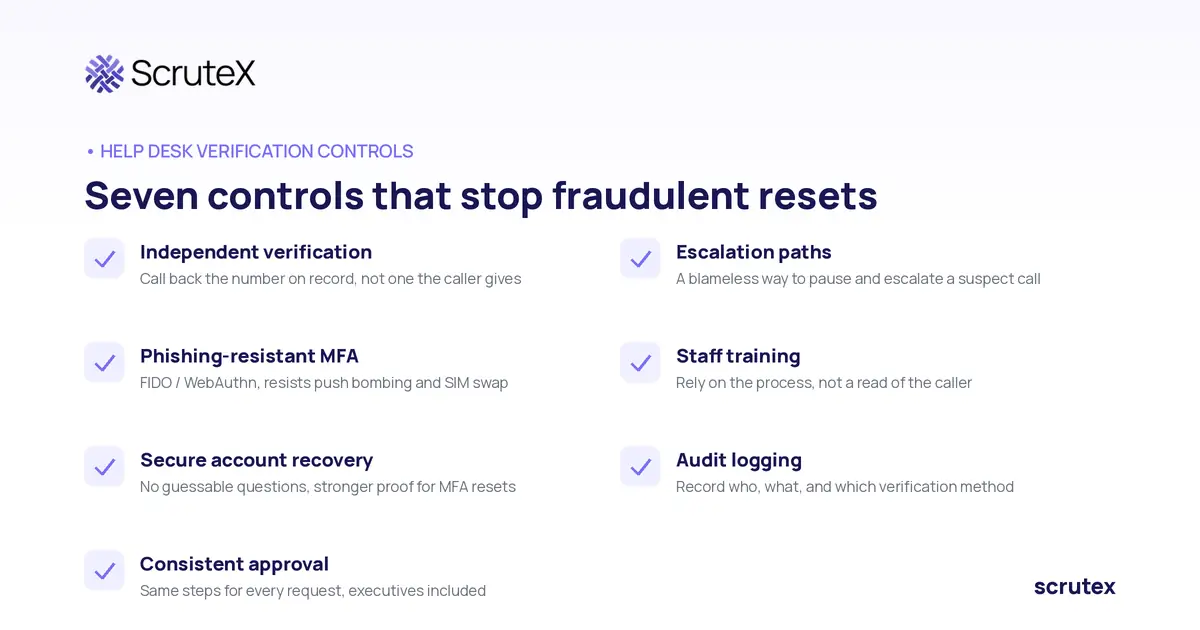
Independent identity verification. Verify the requester through a channel and factor an impersonator cannot easily satisfy: a callback to the number already on record (not one the caller provides), confirmation via the employee's manager through a known channel, video confirmation for high-risk actions, or a push to an already-enrolled device. The proof must not rely on facts from a directory.
Phishing-resistant MFA. The FBI and CISA advisory recommends phishing-resistant MFA, naming FIDO and WebAuthn, because it resists push bombing and SIM swap abuse. These factors raise the cost of the whole chain, and NIST's digital identity guidance treats how an authenticator is bound to an identity as a security decision in its own right.
Secure account recovery. Treat recovery as a privileged operation. Remove knowledge-based questions whose answers can be found or bought, require stronger proof for resets that touch MFA than for a password, and lock out repeated attempts.
Consistent approval. Write the steps down and apply them to every request, executives included. A process that bends for seniority is a process an attacker will aim at.
Escalation paths. Give agents a blameless way to pause a suspicious request and escalate. If the culture punishes a slow reset more than a wrong one, agents choose speed. Make the safe choice the easy one.
Staff training. Train agents on these scenarios, including the executive-pressure play, and make clear that following the process is expected even when the caller is annoyed. The aim is to make the process, not the agent's read of the caller, the thing they rely on.
Audit logging. Log who requested what, who approved it, and which verification method was used. Logs are how you investigate a fraud and spot patterns across attempts.
How Should Security Teams Investigate Suspected Help Desk Fraud?
Security teams investigate by reconstructing the request and the access that followed, then confirming whether the account's rightful owner made it. The audit log is the starting point: it should show the reset, the verification method used, and the agent who approved it.
From there, pull the authentication events around the reset. Look for a new MFA device registered shortly after, a sign-in from an unexpected location or device, or a federated identity change, all of which the FBI and CISA advisory associates with this activity. Contact the real employee through a known channel to confirm whether they requested the reset. Distinguish a genuine control failure from a benign one carefully: a user who legitimately lost a phone and re-enrolled looks similar on paper to an attacker who did the same, and the verification evidence in the log is what separates them.
If the reset was fraudulent, incident response runs as for any account takeover: revoke sessions, reset the real credential through a verified path, remove attacker-registered authenticators and federation changes, and review what the account could reach.
How Can Organisations Reduce Unnecessary Exposure of Employee Information?
Organisations reduce exposure by managing employee information proportionately, not by trying to erase it. The aim is to lower the credible-sounding material an attacker gathers for free, while accepting that some exposure is unavoidable and that verification is the real safety net.
Practical steps: review what organisational detail is published and whether each piece needs to be public, limit exposure of personal contact details for frequent impersonation targets, give executives and other high-risk roles extra scrutiny because their information is the most public, and monitor for leaked employee credentials and personal data on breach and dark web sources so you know what an attacker may already hold. None of this replaces verification. It reduces the attacker's raw material and tells you when a reset process is being asked for information that has already leaked.
Am I Exposed? A Self-Check
You can answer these without any tooling, right now:
- Can your help desk reset a password using only facts that appear in your public directory, email signatures, or professional networks?
- Does your reset process verify the requester through a channel the caller does not control, such as a callback to the number already on record?
- Does the same verification apply to a request that claims executive authority or urgency?
- Would a reset that re-enrolled MFA be logged in a way that lets you investigate it later?
- Do you know which of your employees' credentials or personal details already appear in breach or dark web sources?
If two or more of those make you uncomfortable, your recovery process may be relying on information an attacker can obtain.
What ScruteX Finds Here
ScruteX is external, so it does not sit inside your help desk process or verify callers for you. What it does is reduce the external material an attacker gathers before the call, and flag the infrastructure built to impersonate you. Data Exposure Insights monitors breach corpora, paste sites, and dark web sources for your employees' leaked credentials and exposed personal information, the material that makes a fraudulent reset request sound like genuine confirmation. VIP and executive monitoring focuses that discovery on the high-profile people most likely to be impersonated. Brand Insights detects lookalike domains and phishing pages that imitate your SSO or service desk login, which attackers use alongside help desk calls.
What That Looks Like
A redacted shape of a typical finding:
Exposure:   employee personal email + phone, from breach corpus
Role:       finance team, reports to a named executive
Why it matters: these facts could make a help desk reset request sound legitimate
Related:    lookalike domain imitating <redacted> SSO login page, mail records set
Action:     flagged for review; feed into help desk verification policy, not a reset input
You have probably never seen what an attacker can assemble about your people before they call. That is the thing to check against your own domain.
Check Your External Exposure
See what employee and brand information is exposed on your domain before an attacker uses it on your help desk. ScruteX is agentless: a domain and a set of keywords start discovery, and the free tier covers the core modules with no credit card. Domain only, no agent to install.
Honest limit: this reduces and surfaces external exposure. It does not verify callers or replace a strong help desk identity-verification process. That control lives in your own workflow.
Key Takeaways
- Help desk fraud uses true, often public, organisational information to impersonate an employee and obtain a password or MFA reset.
- An org chart is not a vulnerability by itself. It becomes dangerous when a verification process treats directory facts as proof of identity.
- Password resets and MFA recovery are prime targets: they grant account access, run at routine volume, and in SSO one reset reaches many applications.
- The fix is process, not suspicion: independent verification, phishing-resistant MFA, consistent approval for everyone, escalation paths, and audit logging.
- Reducing information exposure lowers the attacker's raw material, but verification is the control that actually stops the attack.
Frequently Asked Questions
Q: What is help desk social engineering?
A: It is an attack where someone impersonates a legitimate employee to trick an IT support agent into resetting a password, resetting MFA, or recovering an account. The attacker uses convincing organisational information, often public, so the request sounds routine and passes a weak verification step.
Q: How do attackers use an org chart to impersonate employees?
A: An org chart supplies names, titles, reporting lines, and team structures, letting an attacker claim an identity and describe their work plausibly. On its own the chart is not a vulnerability. It becomes risky when a reset process accepts those facts as proof of who is calling.
Q: Why are password resets and MFA recovery common targets?
A: They are built to grant access to someone who has lost it, which is exactly what an attacker wants to appear to be. A reset hands over the account, and in single sign-on environments one account reaches many applications. MFA recovery lets an attacker bind their own device as the second factor.
Q: Does exposing an employee directory mean we will be breached?
A: No. Directory exposure alone does not prove a vulnerability or guarantee an attack. It raises the chance an impersonation sounds credible. The deciding factor is whether your verification process relies on information an attacker can obtain, or on something independent.
Q: How can we stop fraudulent help desk requests?
A: Verify the requester through a channel they do not control, such as a callback to the number on record, apply the same verification to everyone including executives, use phishing-resistant MFA, remove guessable recovery questions, give agents a blameless escalation path, and log every reset.
Q: What role does ScruteX play in help desk fraud defence?
A: ScruteX is external and does not verify callers. It reduces the material an attacker gathers beforehand by monitoring for leaked employee credentials and exposed personal information, focuses on executives through VIP monitoring, and detects lookalike domains imitating your login pages. The verification control stays in your help desk process.
Conclusion
Help desk fraud is not a sophisticated exploit. It is a true story told to a process that was built to help, verified with facts that were never secret. The names, titles, and reporting lines that make the call convincing are the same ones your organisation publishes or leaks, and hiding all of them is neither realistic nor the real fix.
The real fix is a verification process that does not depend on anything an attacker can learn. Knowing an employee's name, title, manager, or team should never be enough to reset a credential. Build independent verification, apply it to everyone including the executive claiming urgency, back it with phishing-resistant MFA and clear audit logs, and reduce unnecessary exposure so the attacker has less to work with. The org chart stops being an attack tool the moment the reset no longer trusts it.