What is Brand Protection in cybersecurity?
By ScruteXPublished Updated
A customer gets an email from what looks like your company. Same logo, same tone, a domain one character off from your real one. They click, they log in, and their credentials are gone. Your security team never saw it, because none of it touched your network.
That is the gap brand protection closes.
Brand protection in cybersecurity is the practice of finding and shutting down the domains, emails, websites, apps, and social accounts that impersonate your organisation to defraud your customers, staff, or partners. It sits outside the firewall. It watches the parts of the internet you do not control but that attackers use to borrow your name. Traditional security protects the assets you own. Brand protection deals with the abuse of your identity everywhere else.
This guide is written for security leaders who need to answer three questions in order: what this actually covers, whether their own organisation is already exposed, and what a real solution should do before they spend a budget line on one.
In this post
- What brand protection covers, and what it does not
- Why brand protection belongs to security, not just marketing
- How a brand impersonation attack unfolds
- Could your organisation be exposed? Five checks
- What security teams should monitor
- How brand protection software works
- Service vs software vs tools vs manual monitoring
- What to look for in a brand protection solution
- How ScruteX approaches brand exposure
- What a real finding looks like
- FAQ
What brand protection covers, and what it does not
Marketing teams have used the phrase "brand protection" for years to mean trademark enforcement and counterfeit goods. The cybersecurity meaning overlaps but points at a different threat: attackers using your brand as the bait in a technical attack.
In security terms, brand protection covers a defined set of abuse types:
- Domain impersonation. Typosquatting (paypa1.com), homoglyph domains that swap in lookalike characters, and combosquatting (yourbrand-support.com). These become phishing sites, fake login pages, or fraud storefronts.
- Email spoofing and business email compromise. Mail that appears to come from your domain, or from a lookalike, used to trick staff, customers, or suppliers into paying or sharing data.
- Phishing infrastructure. Cloned websites and phishing kits built to capture credentials, card data, or one-time passcodes.
- Fake mobile apps. Rogue apps in official and third-party stores that carry your name and logo to harvest logins or push malware.
- Social media impersonation. Fake executive profiles, fake support accounts, and fraudulent brand pages that run scams in your name.
- Executive impersonation. Targeted spoofing of named leaders, used in payment fraud and to pressure staff.
It is worth being clear about the boundary. Brand protection in this sense is not trademark law, not counterfeit-goods seizure, and not brand reputation management in the PR sense. Those are real disciplines with their own teams. Security-led brand protection is about the infrastructure of impersonation: the domain, the mail, the app, the profile, and getting it taken down before it does damage.
Why brand protection belongs to security, not just marketing
The case for treating this as a security problem is in the incident data.
The FBI's Internet Crime Complaint Center recorded 859,532 complaints in 2024 and reported losses above $16.6 billion, a 33% rise on 2023. Phishing and spoofing was the single most reported crime type by volume, with 193,407 complaints. Business email compromise, which runs almost entirely on impersonation, accounted for $2.77 billion in reported losses across 21,442 incidents that year. These are the FBI's figures, not projections.
The Anti-Phishing Working Group tracked roughly 3.8 million phishing attacks across 2025. In its Q1 2026 reporting, impersonation made up 43.8% of threats observed on social media platforms. In one quarter of 2025 alone, its members identified 866 distinct brands being spoofed in the phishing reports they processed.
Two points follow for a security leader.
First, most of this activity is invisible to the controls you already run. Your email gateway filters inbound mail. It does nothing about a domain a criminal registered last night to phish your customers. Your endpoint agents watch your machines. They cannot see a fake app in a third-party store or a spoofed profile on a social platform. The attack surface here is external and unowned, which is exactly why it goes unmonitored.
Second, the damage lands on people who trust you. A customer phished through a lookalike of your bank loses money and blames your bank. A supplier who pays a spoofed invoice loses funds and questions your controls. The financial loss may sit with them, but the erosion of trust is yours to absorb. That is why brand protection has moved from a marketing nicety to a security responsibility, and why it now appears inside digital risk protection and external attack surface programmes rather than beside them.
How a brand impersonation attack unfolds
Impersonation attacks follow a repeatable sequence. Understanding the sequence tells you where defence is cheapest and most effective.
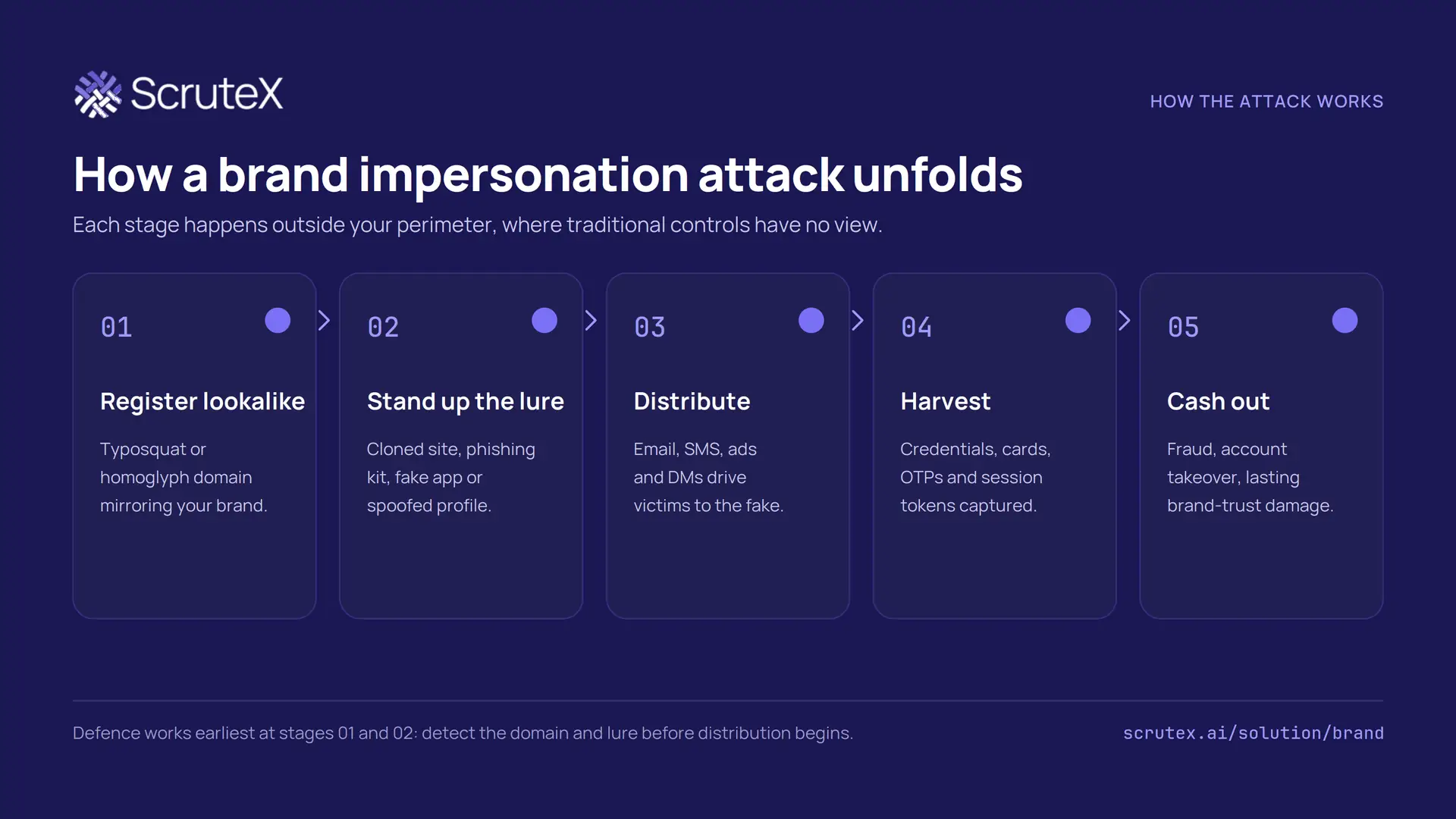
- Register a lookalike. The attacker buys a domain that reads like yours: a typo, a swapped character, or an added word such as "login" or "secure".
- Stand up the lure. They clone your site or deploy a phishing kit, spin up a fake app, or create a spoofed social profile. Registration and hosting can take minutes.
- Distribute. They drive victims to it through email, SMS, paid ads, or direct messages, often using your logo and copy lifted straight from your real site.
- Harvest. Victims enter credentials, card numbers, one-time passcodes, or session tokens. Modern kits relay these in real time to defeat multi-factor authentication.
- Cash out. The attacker commits fraud, takes over accounts, or resells the access, and your brand absorbs the reputational hit.
The lesson in that chain is about timing. The cheapest place to stop the attack is at stages one and two, before a single victim sees the lure. A domain detected at registration can be watched, reported, and taken down before it is weaponised. A domain discovered after your customers are already being phished is a cleanup job. Speed of detection is the whole game, which is why periodic manual checks lose to continuous monitoring.
Could your organisation be exposed? Five checks
You can get a rough read on your own exposure using only public data, before you talk to any vendor. None of the following requires special access. All of it is visible from the outside, which is the point: if you can see it, so can an attacker.
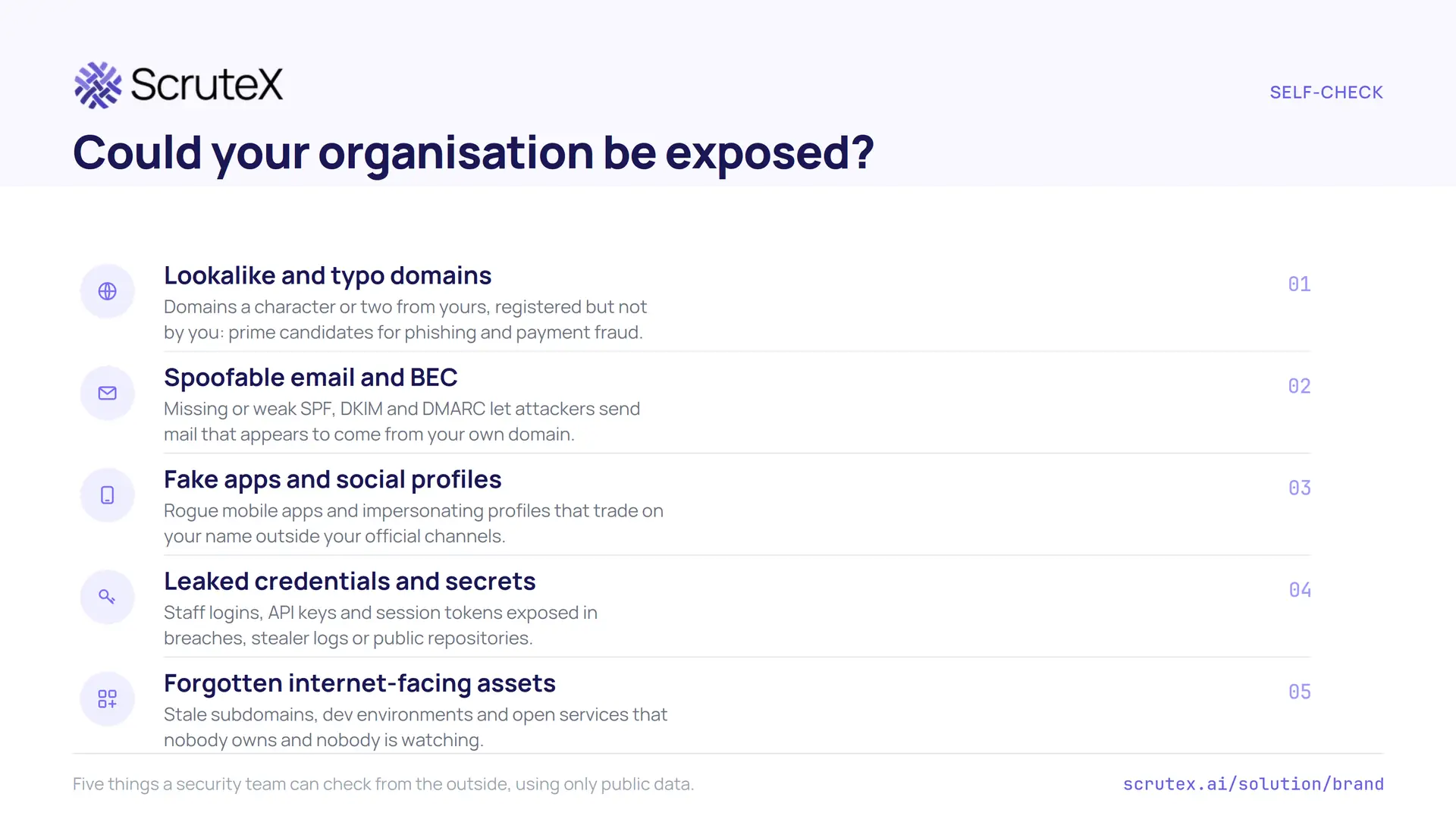
- Look for lookalike and typo domains. Take your primary domain and generate the obvious variants: single-character swaps, missing letters, added hyphens, and common words like "-support" or "-login". Check whether they are registered, and by whom. Registered variants you do not own are candidates for phishing.
- Test whether your email can be spoofed. Check your domain's SPF, DKIM, and DMARC records. A missing or permissive DMARC policy (p=none, or no record at all) means attackers can send mail that passes as yours. This is one of the most common and most fixable exposures.
- Search app stores and social platforms for your name. Look for apps and profiles using your brand that you did not create. Fake support accounts and rogue apps are a standard channel for impersonation fraud.
- Check for leaked credentials and secrets. Staff logins, API keys, and session tokens surface in breach dumps, stealer logs, and public code repositories. Exposed credentials are the raw material for account takeover and are frequently paired with impersonation.
- Inventory your forgotten internet-facing assets. Stale subdomains, old dev and staging environments, and abandoned services are easy to hijack and are often the launch pad for a convincing lookalike on infrastructure that once was yours.
If you found even one registered lookalike domain, a weak DMARC record, or a profile you do not recognise, you have confirmed the problem is not hypothetical. Doing these five checks once, by hand, is a snapshot. The exposure changes daily, which is where the case for tooling begins.
What security teams should monitor
A brand protection programme, run properly, keeps eyes on a defined list of external sources. If you are scoping a solution or building the requirement yourself, this is the coverage to expect:
- Domain registrations and DNS. New registrations resembling your brand, certificate transparency logs (new TLS certs for lookalike domains are an early signal), and changes to MX and nameserver records.
- Email authentication and abuse. DMARC aggregate and failure reports, and spoofing attempts against your domain and your executives.
- The open, deep, and dark web. Phishing pages, cloned sites, leaked credentials, stealer logs, and brand mentions on paste sites and criminal forums.
- App stores. Official and third-party marketplaces for apps trading on your name.
- Social media. Impersonating profiles, fake pages, and fraudulent ads across the major platforms.
- Your own external attack surface. Because forgotten and misconfigured assets are where impersonation often takes root, brand monitoring works best sitting alongside external attack surface visibility rather than in isolation.
The coverage list matters more than any single feature. An attacker only needs one channel you are not watching.
How brand protection software works
Brand protection software automates the monitoring, triage, and takedown work that no team can sustain by hand at internet scale. Under the surface, most capable platforms run four stages.
Discovery. The platform starts from what identifies you: your domains, brand names, executive names, logos, and app names. From those seeds it scans domain registrations, certificate transparency logs, app stores, social platforms, and web and dark-web sources for anything that matches or mimics them.
Detection and validation. Raw matches are noisy. A mention of your brand is not automatically an attack. Good software separates a genuine impersonation from a fan page, a reseller, or a news article, and confirms whether a suspicious domain is actually hosting a phishing page. Validation is what keeps analysts from drowning in false positives.
Prioritisation. Not every finding deserves the same urgency. A parked lookalike domain is lower risk than the same domain now serving a live clone of your login page. Strong platforms rank findings by real-world risk, weighting active weaponisation over mere existence, so responders work the dangerous items first.
Response and takedown. Confirmed threats move into action: evidence is packaged, abuse reports go to registrars, hosts, app stores, and platforms, and the case is tracked to resolution. Mature tools automate the evidence and submission steps and give you an audit trail.
The quality of a platform lives in the middle two stages. Discovery is close to a commodity. The difference between a tool that helps and a tool that generates work is whether it validates and prioritises well enough that a small team can act on the output.
Service vs software vs tools vs manual monitoring
Organisations run brand protection in one of four ways, or in a mix. Each has a place. The question is which layer carries the load for your team.
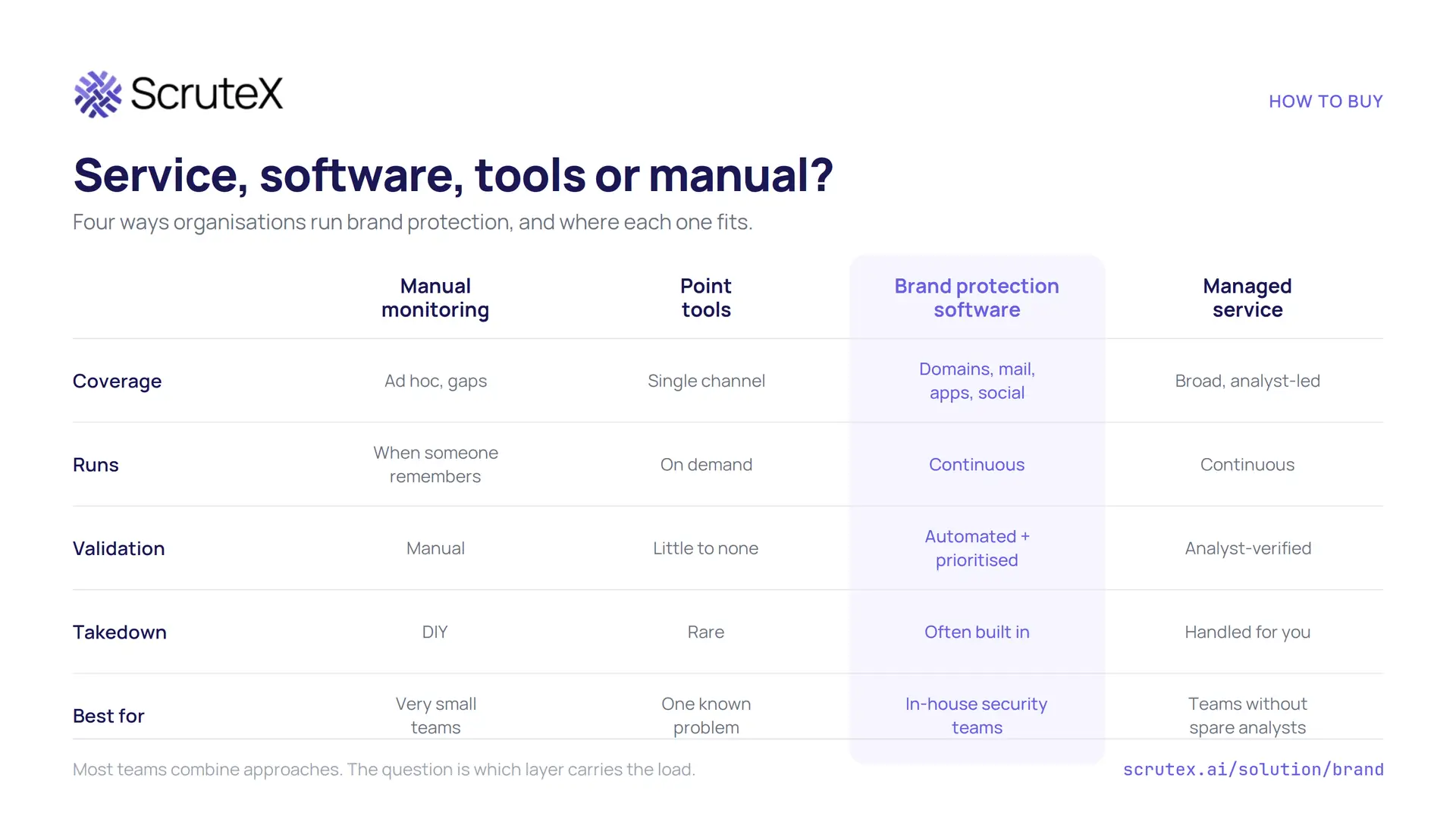
Manual monitoring means someone periodically searches for lookalike domains and checks app stores. It costs nothing to start and suits a very small organisation with a low profile. It fails on coverage and speed. Nobody does it consistently, and the exposure changes faster than a human can check.
Point tools solve one slice: a domain-monitoring service, or a takedown vendor, or a DMARC reporting tool. Useful when you have one known problem to fix. The limitation is that impersonation spans channels, and a stack of single-purpose tools leaves gaps between them and gives your analysts several consoles to reconcile.
Brand protection software brings discovery, validation, prioritisation, and takedown into one continuous workflow across domains, email, apps, and social. It suits an in-house security team that wants to run the programme itself and integrate findings into existing ticketing and SIEM. It needs someone to own it, but it scales in a way manual work cannot.
Managed service puts analysts between you and the noise. The provider runs detection and handles takedowns on your behalf. This fits teams that lack the headcount to work the queue themselves and would rather buy the outcome. The trade-off is less direct control and a higher cost.
Most mature programmes combine these: software as the engine, a managed layer for takedown muscle, and point tools where a specialist need remains. The failure mode is relying on manual monitoring for a brand that has become worth impersonating.
What to look for in a brand protection solution
If you are evaluating vendors, the marketing pages will all claim discovery, monitoring, and takedown. Push past that. These are the criteria that separate a solution your team can run from one that adds work:
- Coverage across channels. Domains, DNS and certificate transparency, email authentication, web and dark web, app stores, and social. Ask which channels are included in the base offering and which are add-ons.
- Detection quality and false-positive handling. How does it tell an attack from a mention? What is the realistic precision? A high-recall, low-precision tool buries your analysts.
- Validation. Does it confirm a domain is actually serving a phishing page, or just flag that it exists? Validation is the difference between an alert and an action.
- Prioritisation by real risk. Findings should be ranked by active weaponisation and exploitability, not by a raw match score. You want the live clone of your login page at the top, not a dormant registration.
- Evidence and investigation. Each finding should come with the evidence a registrar or platform needs for takedown, and enough context for an analyst to make a call quickly.
- Takedown and remediation. Is takedown included, automated, or your job? What are typical resolution times and success rates? Ask for their process, not a slogan.
- Alert quality and workflow. Alerts should reach the right person with the right context. Look at how it fits your analysts' day, not just the dashboard.
- Integrations. REST API and webhooks into your SIEM, SOAR, ticketing, and chat, so findings become tickets automatically instead of another inbox.
- Scalability and time to value. How long from signing to first useful finding? Agentless, same-day onboarding beats a multi-month deployment for a capability you need running now.
- Reporting. Board-ready summaries and audit-ready evidence, because you will be asked to show what the programme caught and closed.
Score vendors against your own list, and weight validation, prioritisation, and false-positive handling heavily. Those three decide whether the tool saves analyst time or consumes it.
How ScruteX approaches brand exposure
Everything above describes what a capable programme should do. This is where ScruteX fits, stated plainly.
ScruteX is an AI-powered external security intelligence platform. Its Brand Insights module monitors for typosquatted and impersonating domains, phishing kits, fake mobile apps, and impersonation across DNS, social platforms, and app stores, and coordinates takedowns of confirmed threats. It runs agentless: you add your domain and brand keywords, and discovery starts within minutes rather than after a deployment project.
What makes brand protection more useful inside ScruteX than as a standalone tool is the sequencing around it. Brand Insights sits in the same lifecycle as the platform's external attack surface scanning (Vulnerability Insights) and its leaked-data monitoring (Data Exposure Insights). A lookalike domain, a set of leaked staff credentials, and an exposed forgotten subdomain are not three separate tickets in three tools. They are correlated signals of the same external risk, discovered, validated, prioritised by real-world exploitability, and pushed into your ticketing and takedown workflows together. Detection is continuous rather than a periodic scan, which matters because, as the attack chain shows, the value is in catching the lookalike before it is weaponised. See how ScruteX handles brand impersonation takedowns.
ScruteX reports a 92% reduction in mean time to detect and a median remediation time of 48 hours across its monitored deployments, with the usual caveat that individual results vary. Those are ScruteX's own measured figures, not industry averages, and worth treating as such when you compare vendors.
Two honest boundaries. Best-of-breed point tools can go deeper on a single channel, and a large, mature team may prefer to assemble specialists. A single connected view tends to suit teams that want external risk correlated rather than fragmented, especially those without the headcount to run five consoles. Compare on your own coverage and validation criteria, not on any one claim.
Run an external exposure check. The fastest way past a general answer is to point the tooling at your own brand. See what a scan surfaces for your domains: lookalikes, exposed assets, and leaked credentials, the way an attacker would see them. Start at scrutex.ai/solution/brand, or book a live scan of your external attack surface with a ScruteX analyst.
Key takeaways
- Brand protection in cybersecurity is the detection and takedown of domains, emails, sites, apps, and profiles that impersonate your organisation. It is an external, unowned attack surface your existing controls do not cover.
- The incident data is concrete: the FBI IC3 logged $16.6 billion in reported 2024 losses with phishing and spoofing the top crime by volume, and the APWG tracked roughly 3.8 million phishing attacks across 2025.
- You can gauge your own exposure today with five public checks: lookalike domains, email spoofability, fake apps and profiles, leaked credentials, and forgotten internet-facing assets.
- Impersonation is cheapest to stop at registration, before distribution. That makes continuous detection worth more than periodic manual checks.
- When evaluating a solution, weight validation, prioritisation, and false-positive handling above raw discovery. Those decide whether the tool saves or costs analyst time.
FAQ
What is brand protection in cybersecurity?
It is the practice of finding and shutting down domains, emails, websites, apps, and social accounts that impersonate your organisation to defraud your customers, staff, or partners. It focuses on the external infrastructure of impersonation, which sits outside your firewall and is not covered by traditional network or endpoint controls.
Why is brand protection important?
Impersonation drives a large share of real financial loss. The FBI IC3 reported phishing and spoofing as the most common cybercrime by complaint volume in 2024, and business email compromise, which runs on impersonation, caused $2.77 billion in reported losses that year. The damage also lands on customers and partners who trust your name, so the reputational cost is yours even when the financial loss is theirs.
What is the difference between brand protection and digital brand protection?
They are used interchangeably in security. "Digital brand protection" emphasises online channels: domains, email, web, apps, and social. In practice, security-led brand protection is digital by nature, because that is where impersonation attacks are built and distributed.
How do I check if my brand is being impersonated?
Start with five public checks: search for registered lookalike and typo domains, test your SPF, DKIM, and DMARC records for spoofability, look for fake apps and profiles using your name, check for leaked credentials in breach and stealer-log data, and inventory forgotten internet-facing assets. Any one hit confirms the exposure is real. Continuous monitoring is what keeps the check current, because exposure changes daily.
Is brand protection software or a managed service better?
It depends on your team. Software suits an in-house security team that wants to run detection and takedown itself and integrate findings into its own tooling. A managed service suits teams without the headcount to work the queue, who would rather buy the outcome. Many organisations combine both, using software as the engine and a managed layer for takedown.
How does brand protection connect to attack surface management?
Impersonation often starts on forgotten or misconfigured external assets, and a lookalike domain, leaked credentials, and an exposed subdomain are frequently signals of the same external risk. Running brand monitoring alongside external attack surface management lets you correlate those signals and prioritise them together rather than triaging them in separate tools.