Typosquatting and Lookalike Domains: The Full Threat Map
By ScruteXPublished Updated
On 12 August 2026, ICANN closes the application window for the first new round of generic top-level domains since 2012. The 2012 round added more than 1,200 extensions to the internet's naming system. Whatever this round adds, every new extension is another place where somebody can register a name that looks almost exactly like yours.
That is the core of the problem. Your domain is a trust anchor. Customers type it, employees click it, invoices reference it. An attacker does not need to break any of that. They register something one keystroke away, point it at a server, and wait for a fraction of your traffic to arrive at their door.
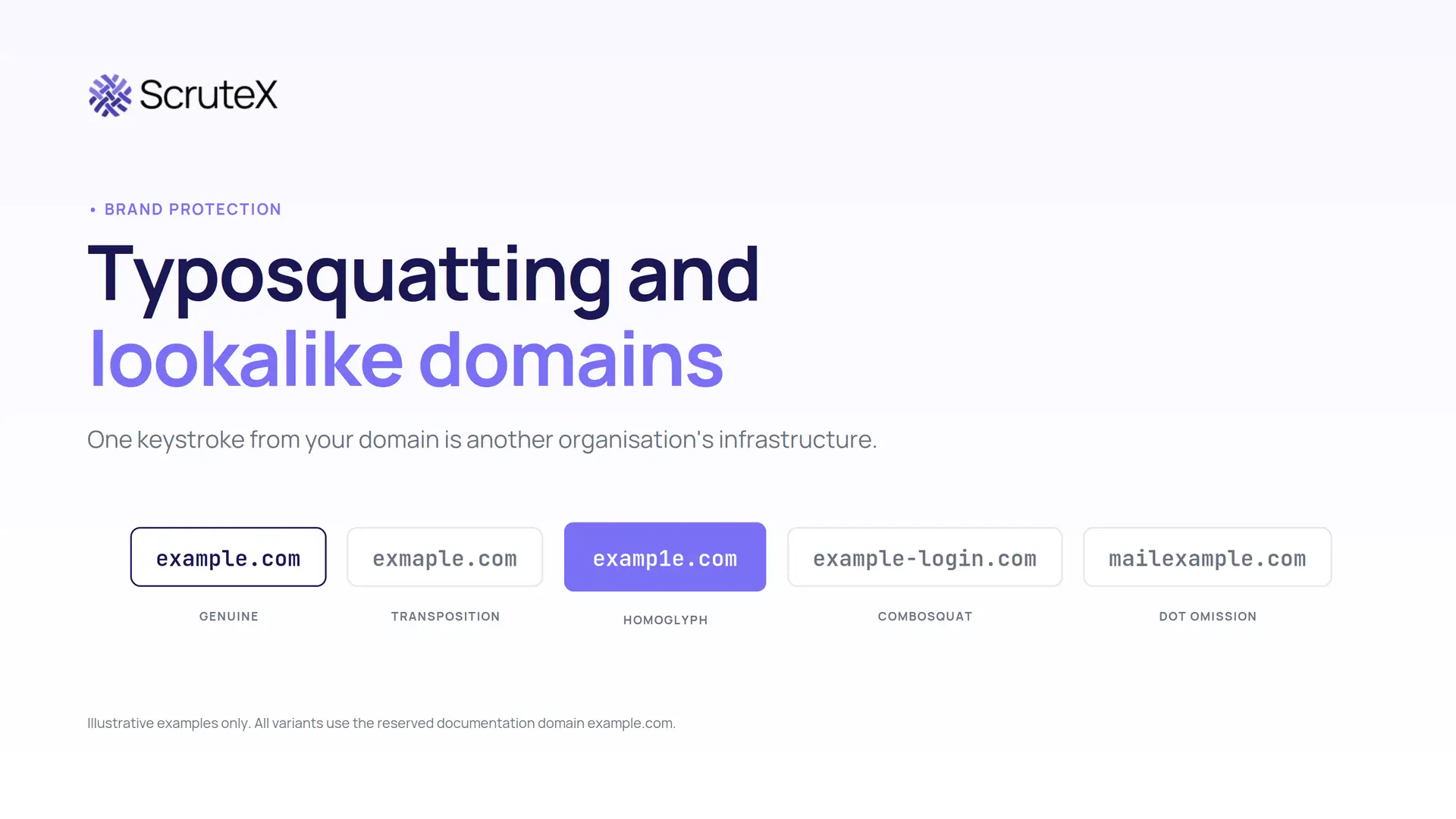
Typosquatting is the registration of domain names that closely resemble a legitimate domain, using typing errors, character substitutions or visual lookalikes, so that people who mistype a URL or skim a link reach infrastructure the attacker controls. Lookalike domains are the wider category: any domain registered to be mistaken for yours, whether through a typo, a homoglyph, an added word or a different extension.
This guide covers the techniques, how attacks unfold, which signals separate a dangerous domain from a harmless one, and how to detect, investigate and shut them down.
What is typosquatting?
Typosquatting is a form of domain abuse in which an attacker registers a domain that resembles a legitimate one closely enough to be mistaken for it. The name comes from the original technique: registering the misspellings people produce when typing a web address by hand. The definition has widened to cover any small manipulation of a known domain string, including swapped letters, inserted hyphens, added words, alternative extensions, and characters from other alphabets that render identically to Latin ones.
Three things make it work. People do not read domains, they recognise them, so a string with the right shape and brand token passes inspection at a glance. Registration is cheap, fast and anonymous enough, with privacy services keeping registrant details out of public records. And trust in the brand transfers to the string, so the attacker borrows your reputation rather than breaching your systems.
What is typosquatting in cybersecurity?
In a security context, typosquatting is rarely the attack. It is the infrastructure the attack runs on.
MITRE ATT&CK classifies it under Acquire Infrastructure: Domains (T1583.001), which explicitly covers domains resembling targets through typos, different top-level domains and homoglyphs. The related Compromise Infrastructure: Domains (T1584.001) covers the same outcome achieved by hijacking someone else's domain. Both sit before the intrusion, which is why internal controls miss them.
When a lookalike domain is registered, nothing has touched your network. Your endpoint agent sees nothing, your SIEM has no log, your scanner has no asset to scan. The exposure lives entirely outside your perimeter and stays invisible until an employee clicks a link or a customer calls about a charge they did not make. By then the attacker has had days or weeks of preparation.
What are lookalike domains?
A lookalike domain is any domain registered to be confused with a legitimate one. Typosquatting is one way to build one. The wider set includes visual lookalikes using homoglyph characters, semantic lookalikes that spell the brand correctly and add a plausible word (combosquats), structural lookalikes that place the brand in a subdomain of a domain the attacker owns, and extension lookalikes that register your exact name under a different TLD.
Treat these as one monitoring problem with several generators. A programme that only looks for misspellings will miss most of what is used against it, because the highest-converting fakes are usually spelled correctly.
How does a typosquatting attack work?
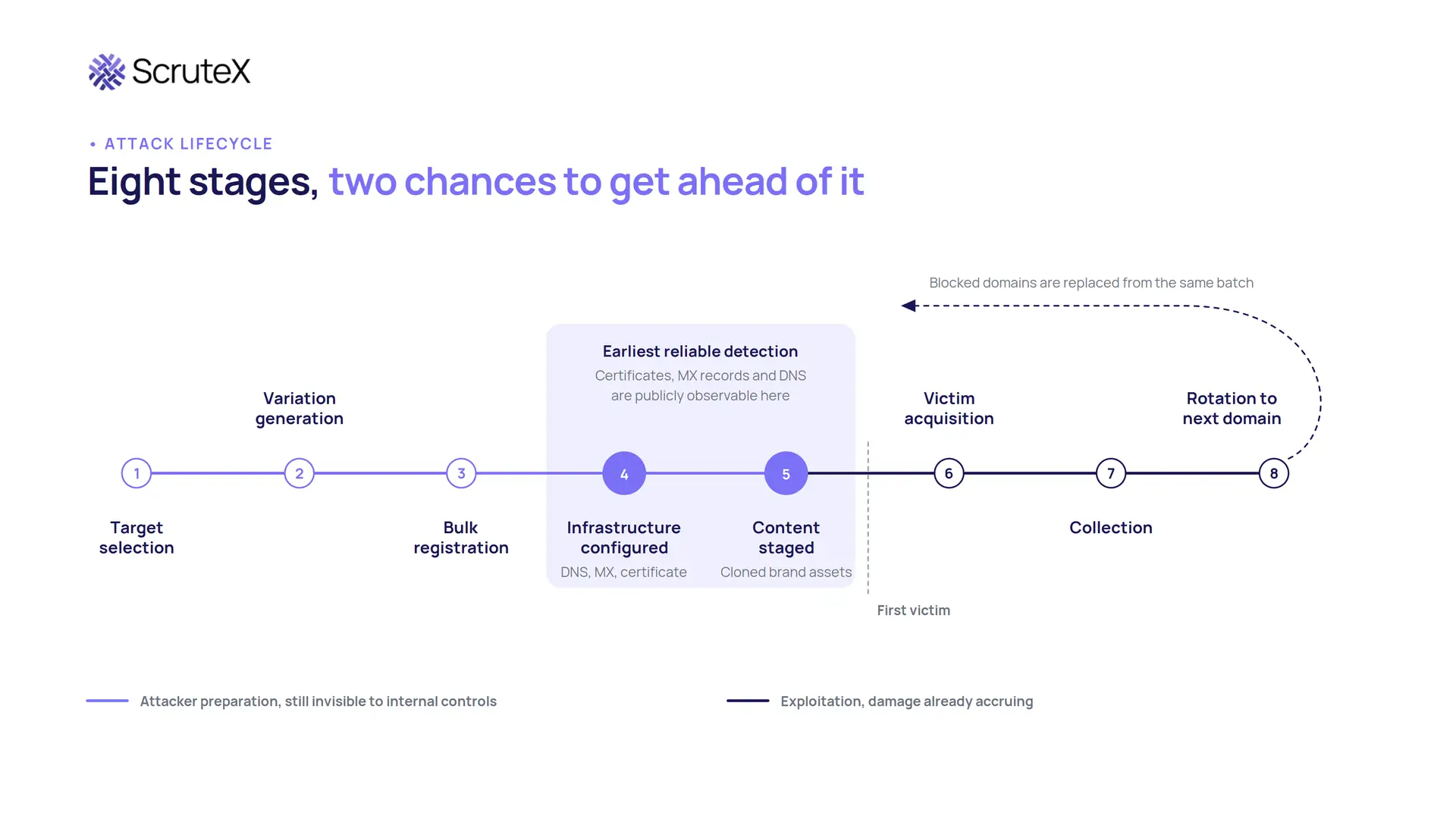
A campaign follows a predictable sequence, and knowing it is what lets you intervene early rather than after the fraud.
- Target selection. A domain with traffic worth intercepting: a corporate site, a customer login, a payments portal, a vendor used across an industry.
- Variation generation. Permutation engines produce hundreds of candidate strings using standard algorithms.
- Registration. Candidates are checked for availability and bulk registered, often across several extensions on the same day.
- Infrastructure configuration. DNS points at hosting, mail records are added if the plan involves email, and a TLS certificate is issued, usually free and automated, which produces the padlock.
- Content staging. The attacker clones your login, support or download page, often pulling live assets from the real site so logos and styling match exactly.
- Victim acquisition. Traffic arrives through mistyping, phishing email, SMS, paid search, social posts or QR codes.
- Collection. Credentials, session tokens, card details, invoice payments or malware installs.
- Rotation. When one domain is blocked, the attacker moves to the next in the batch.
Two points matter. Step 4 is the earliest reliable detection point, because certificate issuance and mail records are publicly observable. Step 5 is the last cheap one, because after content goes live, victims start arriving.
Types of typosquatting
The table uses the reserved documentation domain example.com. Every variation is illustrative and fictional.
| Technique | Illustrative example | Why it works | Primary security risk |
|---|---|---|---|
| Character omission | exmple.com | Skipped keystrokes are the most common typing error | Traffic interception, phishing pages |
| Character transposition | exmaple.com | Fast typists invert adjacent letters | Credential phishing, malware |
| Adjacent-key substitution | exsmple.com | The wrong key sits next to the right one | Traffic interception, phishing |
| Character repetition | exampple.com | Held or double-struck keys double letters | Phishing, fake support pages |
| ASCII homoglyph | examp1e.com, exarnple.com | The digit 1 resembles lowercase l, "rn" resembles "m" | High-conversion credential harvesting |
| IDN homograph | An xn-- registration rendering as the brand in Cyrillic or Greek characters | The rendered name can be visually identical | Credential theft, invisible to users |
| Bitsquatting | exanple.com | A single bit flip in memory or transit changes a character, catching machine traffic | Automated client and update interception |
| Hyphenation | ex-ample.com | Hyphens read as formatting, not a different owner | Phishing, fake portals |
| Combosquatting | example-login.com | The brand is spelled correctly, so spell-based detection misses it | Credential phishing, BEC support |
| Prefix and suffix | secure-example.com | Security words increase perceived legitimacy | Fake login and verification pages |
| TLD manipulation | example.co, example.support | Users rarely check the extension | Brand impersonation across markets |
| Subdomain deception | example.com.account-verify.net | The brand appears first, while ownership is decided by the rightmost labels | Mobile phishing, where URLs truncate |
| Dot omission | mailexample.com from mail.example.com | Removing the dot creates a registrable name that catches misaddressed email | Silent email interception |
Two entries are consistently underestimated. Combosquatting now dominates campaigns aimed at customers, because it needs no misspelling and reads as an official subsite. Dot omission is the quietest technique here: a domain that silently receives and forwards mistyped email produces no phishing page, no malware and no user complaint to trigger investigation.
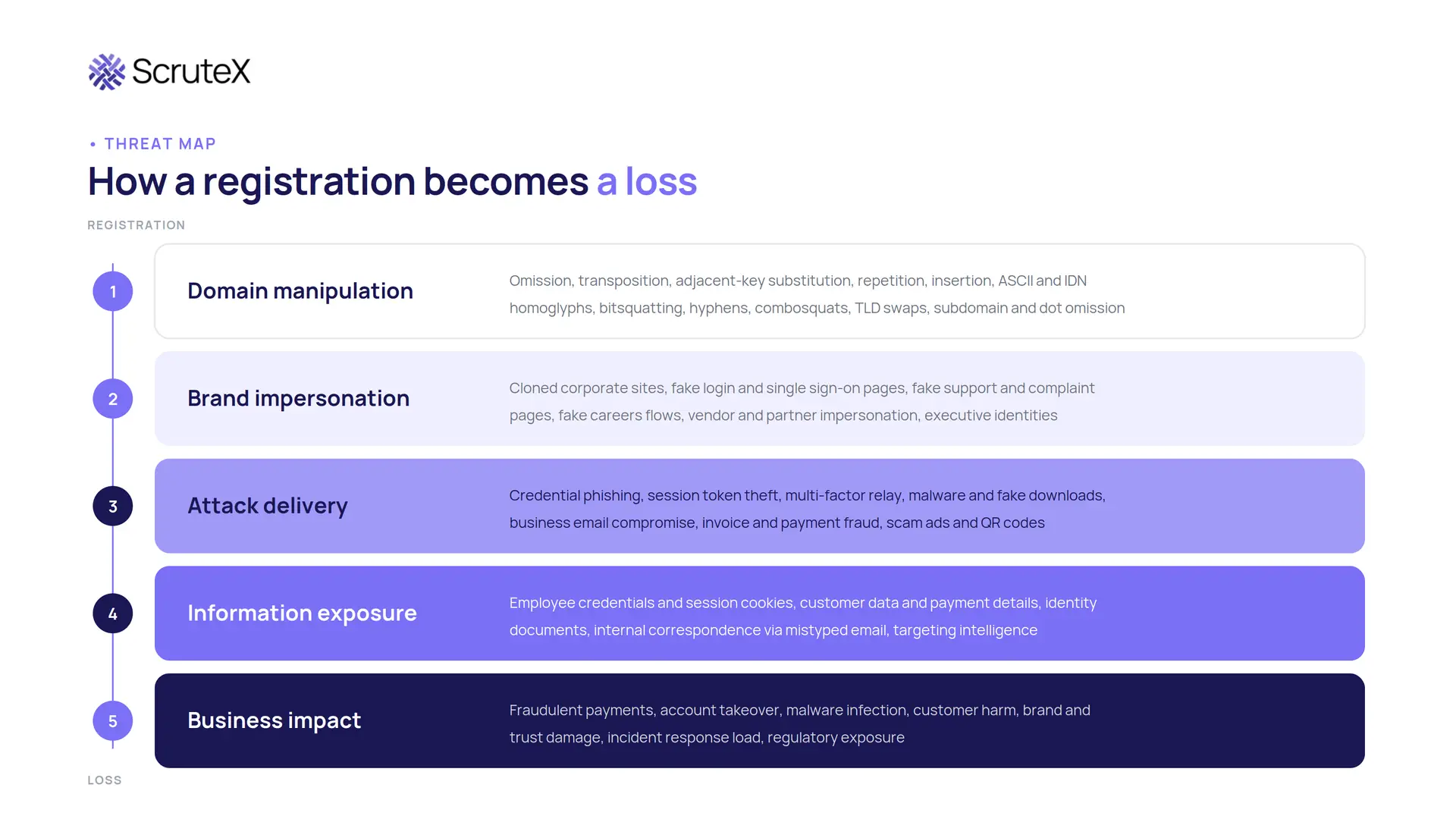
These techniques are only the first layer. A registration becomes a loss by moving through four more: brand impersonation, where the attacker builds a convincing fake on the domain; attack delivery, where it carries phishing, malware or fraud; information exposure, where credentials and customer data are collected; and business impact, where the money leaves. Most registered lookalikes never get past layer one. The job of a monitoring programme is to find the few that are moving.
Typosquatting vs lookalike domains vs cybersquatting vs phishing
These terms are used interchangeably, which causes real confusion in incident reports and legal escalation.
| Threat | What it involves | Typical objective | Primary risk |
|---|---|---|---|
| Typosquatting | Registering misspellings and near-miss variants | Capture traffic from typing errors | Credential theft, malware, ad fraud |
| Lookalike domains | Any domain built to be mistaken for a legitimate one | Impersonate a brand convincingly | Phishing, fraud, customer harm |
| Cybersquatting | Registering a domain containing someone else's trademark in bad faith | Resale, traffic monetisation, blocking the rights holder | Brand and legal exposure |
| Domain spoofing | Making communications appear to originate from a domain | Impersonate an identity in transit | BEC, payment diversion |
| Phishing | Deceptive messages pushing a target toward an action | Steal credentials, money or data | Account compromise, financial loss |
The practical reading: cybersquatting is a legal and trademark problem, typosquatting and lookalike domains are a security and fraud problem, and phishing is the attack that most often uses them. The domain is the weapon, phishing is the delivery, and neither legal remedies nor security controls work well alone.
Typosquatting attack examples
All examples are fictional. For each, the important line is the last one: the signal that would have surfaced it early.
Credential phishing on a homoglyph domain. The attacker registers examp1e.com, clones the SSO login page and sends staff a password expiry notice. The page is pixel-identical and the certificate is valid, so the padlock appears. The early signal is a certificate issued for a domain one character from yours, appearing in public certificate transparency logs hours before the email goes out.
Executive impersonation supporting BEC. The attacker registers exarnple.com, configures mail records only, and emails finance as the CFO with revised bank details. The display name is right, the reply address reads correctly at a glance, and there is no website to inspect. The early signal is mail exchanger records on a lookalike domain hosting no content, which strongly indicates email-only intent.
Customer fraud through a fake refund portal. The attacker registers example-refunds.com, buys ads against your brand terms and collects card details from customers chasing refunds. It appears above your real site in a sponsored slot. The early signal is a paid placement on your own brand keywords from a domain you do not own.
Silent interception through dot omission. The attacker registers mailexample.com, sets a catch-all mailbox and forwards everything on. Nobody is phished. Mail intended for mail.example.com and mistyped by a partner simply arrives elsewhere. The early signal is a registration matching your subdomain structure with the dot removed, which permutation logic based only on your second-level domain will never generate.
Why typosquatting is a security problem
Attackers register lookalike domains for five reasons: credential harvesting, business email compromise, malware delivery, payment and refund fraud, and brand or traffic abuse. Each one turns a cheap registration into a direct loss.
- Credential harvesting. A cloned login page collects usernames, passwords and session tokens on infrastructure you do not own, bypassing perimeter controls because the user hands the details over willingly.
- Business email compromise. A lookalike sender domain carries a fraudulent invoice or a bank-detail change that the recipient accepts because the address reads correctly at a glance.
- Malware delivery. A fake download or update page reaches users who deliberately avoided email attachments.
- Payment and refund fraud. A fake portal, often promoted through paid search on your brand terms, collects card details from customers.
- Brand and traffic abuse. Mistyped traffic is monetised through ads, redirects or resale, eroding trust in the real brand.
The scale is documented. The FBI's Internet Crime Complaint Center recorded $20.877 billion in reported losses across 1,008,597 complaints in its 2025 Annual Report. Business email compromise alone accounted for $3,046,598,558 from 24,768 complaints, the second largest loss category after investment fraud. On the trademark side, the WIPO Arbitration and Mediation Center administered 6,168 domain name cases in 2024 and more than 6,200 in 2025, the highest annual total since the UDRP began more than twenty-five years ago, and those are only the disputes worth formally filing.
Two costs are easy to miss. Awareness training assumes users can spot a wrong domain, an assumption that homoglyph and combosquat domains defeat by design. And reputation damage persists after the domain is gone, because the customer remembers the loss, not the takedown.
How to detect typosquatting
Security teams detect suspicious lookalike domains by correlating several signals rather than trusting one: domain similarity, registration age, DNS and mail records, hosting infrastructure, TLS certificates and page content. A single indicator is never enough. Detection quality comes from combining them.
- Permutation generation. Produce the candidate set from primary domains, product domains, regional domains, subdomains and brand terms, using every algorithm in the technique table. Open permutation engines maintained by CERT and research communities cost nothing.
- Newly registered domain feeds. Registration timing is one of the strongest signals available, because malicious lookalikes cluster around announcements, launches, incidents and results days.
- Certificate transparency logs. Publicly trusted certificate issuance is logged by design under Certificate Transparency (RFC 6962) and browsers require it. Because attackers need a certificate for the padlock, CT logs often reveal a domain before any content goes live. This is the highest-value free signal available and it remains underused.
- DNS, passive DNS and mail records. Whether a domain resolves, what it resolves to, and how that changes. MX records on a lookalike with no website indicate email intent and deserve high severity on their own.
- RDAP registration context. Much published guidance is out of date here. Since 28 January 2025, ICANN no longer requires gTLD registries and registrars to run WHOIS on port 43, and RDAP (RFC 9082 and RFC 9083) is the authoritative source for gTLD registration data. It returns structured JSON over HTTPS, which makes automated enrichment far easier. Roughly 60% of country code TLDs have deployed RDAP, so keep a WHOIS path for the rest.
- Content and infrastructure correlation. Compare page structure, logos and favicons against your real site. Favicon hashing is cheap and effective. Shared IPs, name servers and certificate patterns link separate domains into one campaign.
The limits matter. String similarity produces false positives on legitimate partners and resellers. Certificate transparency shows issuance, not intent. Registration data rarely identifies people now that privacy services are the norm. Content analysis fails against a parked page that goes live later. Automation should rank, not decide: a scored queue putting twenty domains in front of an analyst each morning beats an unranked list of two thousand.
What makes a lookalike domain high risk?
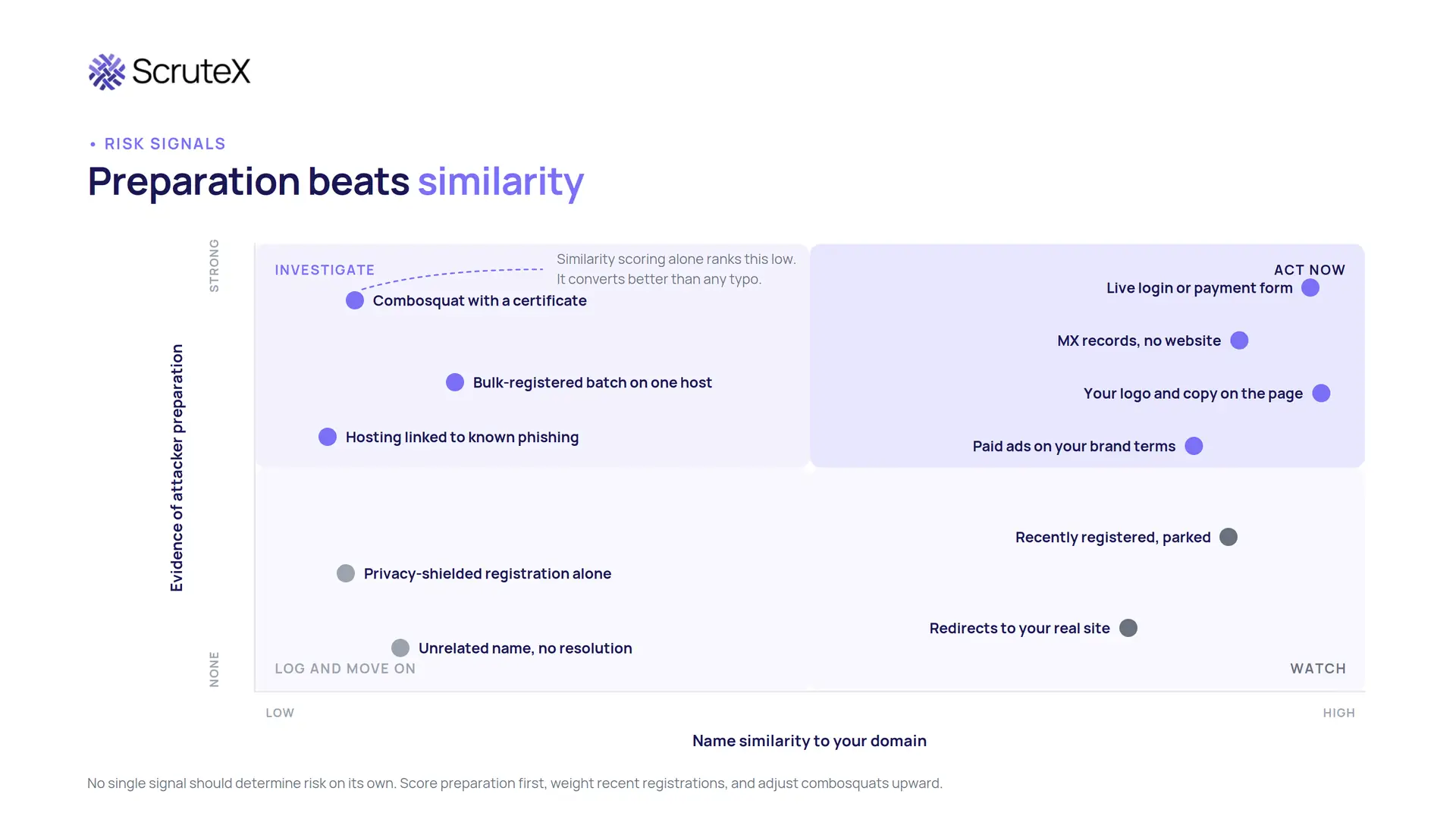
A lookalike domain becomes high risk when it shows evidence of preparation: mail records, a certificate, resolving infrastructure, or content that copies your brand. Similarity alone is a starting point, not a verdict.
| Signal | What it can indicate | How security teams should use it |
|---|---|---|
| Registered in the last 30 days | Active campaign preparation | Weight recent registrations significantly higher |
| Mail exchanger records present | Email-based fraud intent, including BEC | High severity even with no website |
| Valid TLS certificate issued | Preparation for a convincing phishing page | Combine with content checks; certificates alone are routine |
| Login form or payment fields present | Active credential or card harvesting | Escalate to incident response immediately |
| Your logo, styling or copy on the page | Deliberate impersonation | Strong takedown evidence; capture it before it disappears |
| Resolves to hosting known for abuse | Attacker infrastructure reuse | Raise severity and check for sibling domains |
| Bulk registration alongside similar names | Campaign rather than a lone opportunist | Handle as one case, not many tickets |
| Appears in paid search on your brand terms | Victim acquisition already running | Urgent; this converts customers today |
| Privacy-shielded registration | Common and normal | Contributing signal only, never standalone |
Two cautions. No single signal should determine risk: privacy protection is the norm, recent registration describes every new business, and a valid certificate is free and universal. And similarity scoring systematically under-ranks combosquats, which are often the most dangerous. Adjust for that explicitly rather than trusting edit distance.
How to investigate a suspicious lookalike domain
To investigate a lookalike domain, confirm which asset it imitates, check its RDAP registration data, inspect its DNS and hosting, analyse the page for impersonation and harvesting, then decide whether to monitor, report or escalate. The seven stages below make that repeatable so findings stay comparable and evidence stays usable.
| Stage | What to check | Desired outcome |
|---|---|---|
| 1. Validate the target | Which of your assets it imitates, and how | Confirmed relevance, or documented dismissal |
| 2. Check registration | RDAP creation date, registrar, status codes, name servers | Registration timeline and responsible parties |
| 3. Inspect infrastructure | A and MX records, hosting, IP neighbours, certificate history | Understanding of capability and intent |
| 4. Analyse content | Page structure, brand assets, forms, favicon, redirects | Evidence of impersonation, captured and timestamped |
| 5. Check for harvesting | Login forms, payment fields, document upload, credential relay | Severity determination |
| 6. Assess the campaign | Other domains on the same infrastructure, registrar or certificate pattern | The full batch, not one domain |
| 7. Decide | Monitor, report to registrar and host, or escalate to legal for URS or UDRP | A clear next action with an owner |
Capture evidence before you report, because malicious pages disappear the moment an abuse report lands. Registrar and hosting abuse reports are usually faster than formal dispute processes, so run them first and reserve URS or UDRP for domains that persist or carry real trademark value.
How to protect against typosquatting
Separate the three functions, because organisations routinely buy one and assume they have all three.
Prevention
Defensive registration of the highest-value variations. You cannot register the whole permutation space and should not try. Take the closest misspellings of your primary domain, the main extension variants in your markets, and obvious login or support combosquats. Twenty to forty names is a small line item against the exposure it removes.
Trademark rights in the domain system. Recording marks in the Trademark Clearinghouse gives access to Sunrise registration periods in new extensions and generates Trademark Claims notices when someone registers a matching string. With the ICANN 2026 round closing its application window, Sunrise participation will be the cheapest moment to secure your name in whatever extensions it produces.
Domain hygiene on what you own. Registrar lock, registry lock for critical names, multi-factor authentication on registrar accounts, monitored expiry dates and a named owner. An expired domain you let go becomes someone else's lookalike, with your inbound links and residual trust attached.
Detection
Continuous monitoring across registration data and certificate transparency, scoped to all brands and subdomains rather than just the primary domain, with risk scoring and alerts routed into the queue your analysts already work. This is the function most organisations are missing, and it decides whether you learn about a fake from a log or from a customer.
Response
Email authentication. SPF, DKIM and DMARC at enforcement stop attackers spoofing your exact domain. Be clear about the limit: DMARC does nothing about a different domain that merely looks like yours.
Gateway and browser controls. Lookalike sender rules, external sender banners, and blocking of newly registered domains at the DNS or proxy layer.
Awareness that is specific. Generic "check the URL" advice fails against homoglyphs. Teach the behaviours that hold: reach credential and payment systems through saved bookmarks rather than links, verify payment changes out of band on a number you already had, and report suspicious domains through a channel that gets read.
A takedown workflow that exists before you need it. Named owner, evidence template, registrar and host abuse contacts, and criteria for when to use URS (faster and cheaper, suspends the domain) versus UDRP (transfers it to you). In the United States, the Anticybersquatting Consumer Protection Act provides an additional route where bad-faith registration of a trademark can be shown.
Credential protection. Assume some credentials will be captured. Monitor for your domains appearing in credential dumps and stealer logs, and reset early rather than waiting for the login attempt.
What to do when you find a malicious lookalike domain
When you confirm a malicious lookalike domain, preserve the evidence, contain internal exposure, then pursue takedown while watching for the attacker's next domain. A defined response turns a finding into a closed incident rather than an open ticket.
- Preserve evidence. Screenshot the page, save the certificate and DNS records, and record the RDAP data before anything is taken down.
- Confirm it is live. Check whether the domain resolves and hosts content or mail. A parked domain is watched; an active one is worked.
- Check for harvesting. Look for login forms, payment fields or credential relay behaviour, which set the severity.
- Scope internal exposure. Search email and proxy logs for staff or customers who reached the domain, and reset affected credentials.
- Block the indicators. Add the domain and its infrastructure to DNS, proxy and email gateway blocklists.
- Report and take down. File registrar and hosting abuse reports with your evidence package, and escalate to URS or UDRP where trademark rights apply.
- Monitor related infrastructure. Watch the shared IPs, name servers and registrar for the next domain in the batch, because the same actor usually returns.
Where typosquatting programmes go wrong
- Monitoring only the primary domain. Attackers target subdomains, product names and regional sites precisely because the primary is watched.
- Scoring by string similarity alone. This buries combosquats, which convert better than typos.
- Ignoring registration timing. Recency is one of the strongest signals available and it is regularly discarded.
- Treating every lookalike as malicious. Partners, resellers and franchisees legitimately register brand-adjacent names. An allowlist maintained with marketing is not optional, and over-reporting burns the analyst credibility you need for real cases.
- Checking weekly. Campaign domains can live for days. Content, hosting and DNS also rotate, so a domain assessed as benign on Monday can host a login page by Thursday.
- Leaving domain intelligence outside incident response. A confirmed phishing domain should trigger blocking, credential checks and log review, not just a takedown ticket.
- Assuming DMARC covers it. Enforcement stops exact-domain spoofing and nothing else.
- Having no takedown workflow. Building the process during a live incident costs days you do not have.
- Monitoring without measuring. If you cannot report time to detect and time to takedown, you cannot improve the programme or defend its budget.
Where Digital Risk Protection fits
Digital Risk Protection is the category of tooling that monitors risk outside your perimeter: domains, brand abuse, leaked credentials, dark web exposure, and impersonation across social and app stores. Typosquatting sits squarely inside it, because the asset in question is one you do not own and cannot scan.
The chain it is meant to complete runs from external visibility across registration and certificate data, to detection matched against your specific brands, to context from DNS, hosting and threat intelligence, to prioritisation by evidence of preparation rather than similarity, to investigation and remediation. This complements internal controls rather than replacing them. Endpoint and network tooling sees the click. Email security sees the message. DRP sees the infrastructure being built, which is the only stage where you get ahead of the attack.
Being honest about the category: dedicated brand protection suites and corporate domain registrars have deep enforcement machinery and suit organisations with a standing brand protection function. Free permutation tools and certificate transparency search get a small team most of the way to basic coverage at zero cost, if someone has time to run them. The gap sits in the middle, with teams that need continuous coverage and a prioritised queue but have no analyst to build one.
The outcome, when this works, reaches past the security team: the customer who never receives the fake refund page, the employee who never types credentials into a cloned login, the partner whose invoice payment goes to the right account.
How ScruteX approaches lookalike domain detection
Brand Insights is the ScruteX module covering this problem. Its Lookalike Domain Detection capability scans for new registrations of domains similar to your in-scope domains, covering typing mistakes, character substitutions and homograph variants. It alerts within hours of registration, and flags when a lookalike domain is configured with MX records, web servers or TLS certificates, which are the preparation signals described above. Where a domain needs to come down, ScruteX provides evidence packages and assists with registrar takedown requests.
Setup is agentless: add a domain and brand keywords, and first findings appear in about ten minutes. Findings push to Splunk, Sentinel, Elastic, Jira, ServiceNow, Slack or Teams through the API and webhooks, so domain intelligence lands in the queue your team already works. Across its customer deployments ScruteX measures a 92% reduction in mean time to detect, though individual results vary with scope and starting position.
The free tier covers core modules on primary domains with no credit card. Run a free exposure scan to see which lookalike domains already exist against your brand, or request a demo.
Key takeaways
- Typosquatting is infrastructure preparation, not the attack itself, which is why it sits outside the view of most internal security tooling.
- Combosquats and homoglyphs are more dangerous than misspellings and are routinely under-ranked by similarity scoring.
- The highest-value early signals are certificate issuance, mail exchanger records and registration recency, all publicly observable before any victim exists.
- Registration data moved to RDAP for gTLDs on 28 January 2025, so runbooks that assume WHOIS on port 43 need updating.
- Defensive registration, monitoring and takedown are three different functions. Most organisations buy one and assume coverage of all three.
FAQ
What is typosquatting?
Typosquatting is the registration of domain names that closely resemble a legitimate domain, using misspellings, character substitutions or visual lookalikes, so people who mistype an address or misread a link reach infrastructure the attacker controls. It mainly supports phishing, fraud and malware delivery.
What is typosquatting in cybersecurity?
It is adversary infrastructure preparation. MITRE ATT&CK classifies it under Acquire Infrastructure: Domains (T1583.001). It happens before any intrusion, on infrastructure the target does not own, which is why endpoint, network and vulnerability tooling cannot see it.
What is a lookalike domain?
Any domain registered to be mistaken for a legitimate one. That includes typos, visual homoglyphs, correctly spelled brand names with added words, brand names placed in subdomains, and the same name under a different extension.
What are common typosquatting examples?
Using example.com: exmple.com (omission), exmaple.com (transposition), examp1e.com (digit for letter), exarnple.com (rn for m), example-login.com (combosquat), example.co (extension swap) and mailexample.com (dot omission from a subdomain).
Is typosquatting the same as cybersquatting?
No. Cybersquatting is registering a domain containing someone else's trademark in bad faith, usually for resale or to block the rights holder, and it is primarily a legal matter. Typosquatting targets typing and reading errors and is primarily a security and fraud matter. They overlap when a typosquatted domain also infringes a trademark.
What is the difference between typosquatting and phishing?
Typosquatting supplies the domain. Phishing is the attack delivered through it. Most phishing campaigns use a lookalike domain, but the two are separate stages with separate controls.
How do you detect typosquatting?
Generate the plausible permutations of your domains and brand names, monitor newly registered domain data and certificate transparency logs for matches, then enrich each hit with DNS, MX, hosting and content checks before scoring it for analyst review.
How can you protect against typosquatting?
Register the highest-risk variations defensively, monitor continuously for the ones you cannot register, enforce SPF, DKIM and DMARC, block newly registered domains at DNS or proxy level, train staff to reach sensitive systems through bookmarks, and keep a takedown workflow ready before you need it.
Can a lookalike domain have a valid SSL certificate?
Yes, and most malicious ones do. Certificates are free and issued automatically, so the browser padlock is no proof a site is legitimate. Certificate issuance is publicly logged, though, which makes it a detection signal rather than a reassurance: a certificate for a domain close to yours often appears before the phishing page goes live.
Why are newly registered domains suspicious?
Most domain abuse happens early in a domain's life, often within hours or days of registration, timed to a brand announcement, product launch or incident. Registration age is one of the strongest available risk signals, which is why security teams weight recent registrations higher and watch newly registered domain feeds.
Are all lookalike domains malicious?
No. Many are registered by partners, resellers or regional offices, and many are speculative registrations that never host anything. Judge risk on evidence of preparation such as mail records, certificates, resolving infrastructure and copied brand content, rather than on name similarity alone.