Subdomain Takeover Explained: How Dangling DNS Hands Attackers Your Brand, and How to Audit for It
By Mohana SubiPublished
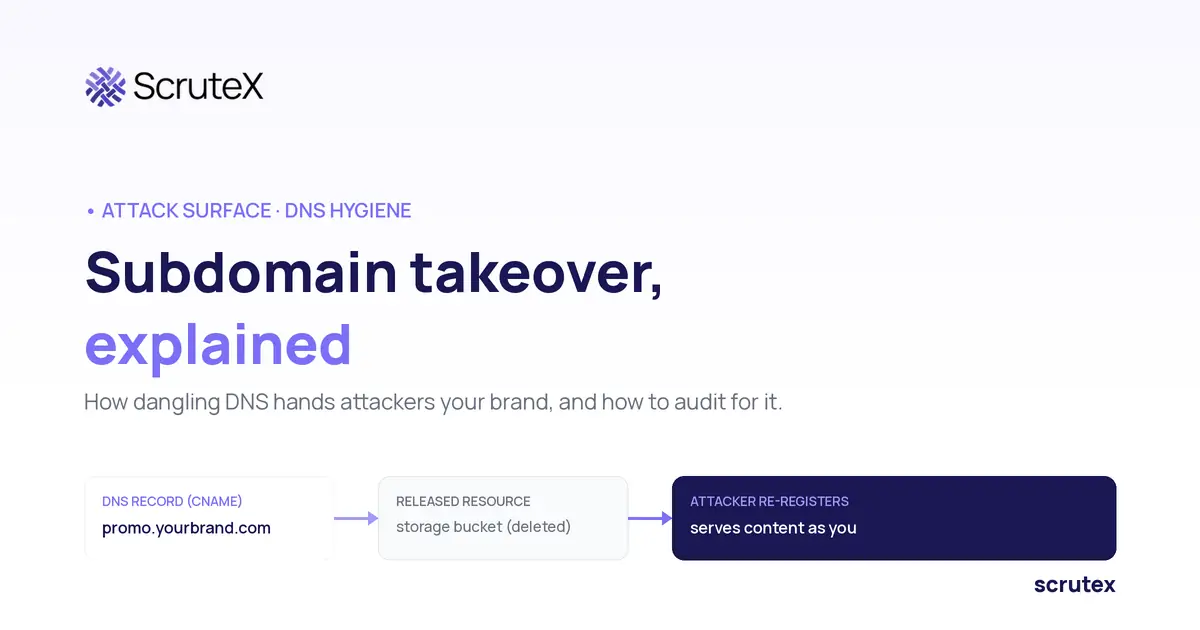
Marketing spins up
promo.yourbrand.com for a campaign, points it at a cloud storage bucket, and runs the site for three months. The campaign ends. Someone deletes the bucket. Nobody deletes the DNS record. A year later promo.yourbrand.com still has a CNAME pointing at a bucket name that no longer exists. An attacker finds it, registers a bucket with that exact name, and now serves their content from your subdomain, with your name in the address bar and, often, a valid TLS certificate.That is a subdomain takeover, and the gap that caused it is a record nobody cleaned up.
What Is Subdomain Takeover?
Subdomain takeover is when an attacker gains control of a subdomain because its DNS record still points to a third-party service or resource that the owner has released. The record is live, the resource behind it is gone, and the attacker claims the resource to serve content from your subdomain.
The condition that makes it possible is a dangling DNS record: a record that resolves to a target that no longer belongs to you. Subdomain takeover is the attack. The dangling subdomain is the weakness it exploits. MITRE ATT&CK tracks this under Compromise Infrastructure: Domains (T1584.001), which states that "Subdomain hijacking can occur when organizations have DNS entries that point to non-existent or deprovisioned resources." [15] The attacker registering the released resource maps to Acquire Infrastructure: Domains (T1583.001). [16]
Why Does Subdomain Takeover Keep Appearing in Pen Test Reports?
Subdomain takeover keeps appearing in pen test reports because DNS records outlive the resources they point to, and in most organisations nobody's job includes deleting them. Four conditions make it common.
- The record and the resource have different owners. A developer or an agency deletes the app or the bucket. The DNS record sits with a network or IT team that never hears about the deletion.
- Third-party hosting is everywhere. Marketing sites, documentation, status pages, help centres and campaign pages often run on SaaS or cloud platforms, and each one needs a CNAME.
- Your subdomains are easy to find from outside. Certificate transparency logs publish every hostname that has had a public certificate, so a forgotten subdomain is rarely hidden.
- The weakness is widespread. In August 2023, Certitude Consulting reported finding more than 1,000 organisations with subdomains open to takeover. [3] In April 2025, SentinelOne said it had alerted clients to more than 1,250 instances of takeover risk from deprovisioned cloud resources over the previous year. [7]
Pen testers report it because it is cheap to confirm from outside and the impact lands on a hostname your users already trust. For a CISO, a recurring finding is a process signal: the decommissioning workflow has no DNS step.
How Does a Dangling DNS Record Become a Takeover?
A dangling DNS record becomes a takeover when an attacker registers the released resource that the record still points to. The failure runs in a fixed sequence, and the record is only dangerous once the resource behind it is gone.
| Step | What happens | Who does it |
|---|---|---|
| 1 | A subdomain record is created, pointing at a third-party resource (a bucket, an app, a SaaS endpoint) | Your team |
| 2 | The resource is provisioned and serves content | Your team |
| 3 | The resource is deleted, cancelled, or left to expire | Your team |
| 4 | The DNS record is left behind, still pointing at the released resource name | Nobody |
| 5 | An attacker finds the record and registers a resource with the same name on that provider | Attacker |
| 6 | The subdomain now resolves to the attacker's resource and serves their content | Attacker |
Two details make this worse than it looks. First, once the attacker controls the content at that hostname, they can often get a valid TLS certificate for it, because certificate authorities commonly validate a domain by checking content served on it. Microsoft's guidance on dangling DNS warns that attackers can obtain valid SSL certificates for a hijacked subdomain and use them to harvest even secure cookies. [13] Second, the order of decommissioning matters. If the DNS record goes before the resource, the window never opens. If the resource goes first, the record dangles from that moment.
The business risk: once step 6 completes, anything that trusts your domain, browsers, email filters, OAuth flows, now trusts attacker-controlled content on a hostname your customers recognise.
Which Record Types Are Affected: CNAME, A, NS, MX?
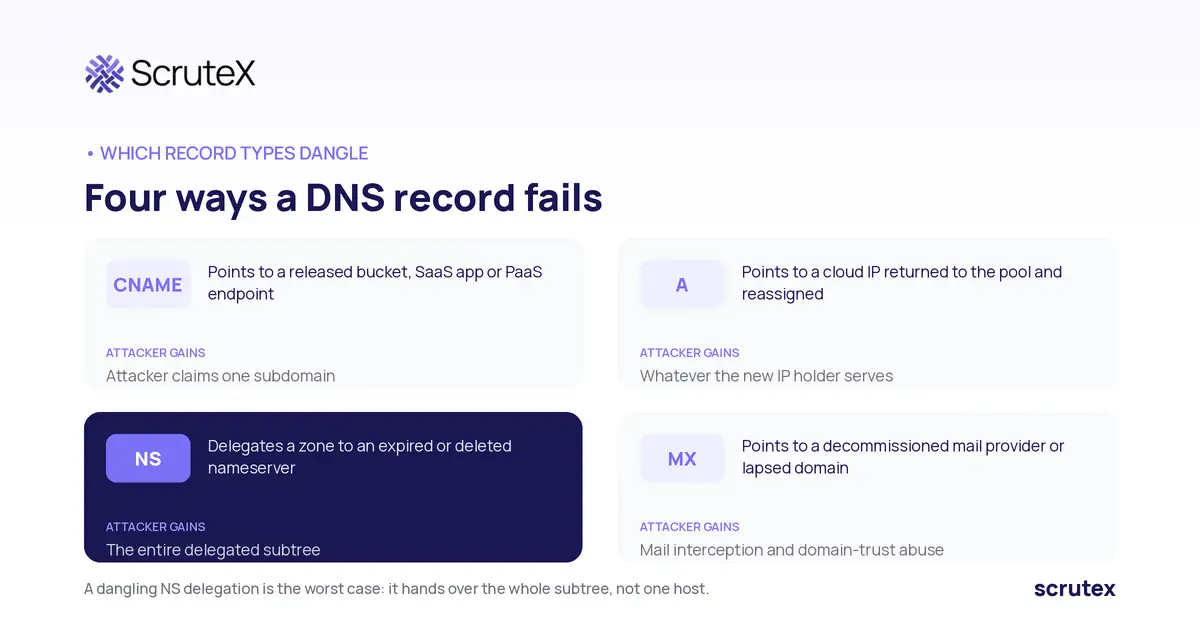
Several record types can dangle, and each fails in a different way. CNAME is the most common, but NS delegation is the most severe when it happens.
| Record type | How it dangles | What an attacker gains |
|---|---|---|
| CNAME | Points to a third-party hostname (bucket, SaaS app, PaaS endpoint) that has been released | Control of the one subdomain by re-registering the target name on that provider |
| A record | Points to a cloud IP that was returned to the provider's pool and reassigned | Whatever the new holder of that IP serves, if they can bind your hostname |
| NS | Delegates a subdomain zone to a nameserver or zone that has expired or was deleted | Control of the entire delegated zone and every record under it |
| MX | Points to a decommissioned mail provider or a domain that lapsed | Interception or spoofing of mail for that domain, and abuse of domain trust |
NS takeover is the worst case because it hands the attacker the whole subtree, not a single host. A dangling A record is harder to exploit reliably, because the attacker has to be reassigned the exact released IP, but cloud IP churn makes it possible.
Wildcard records widen the exposure. A wildcard CNAME such as
*.campaigns.yourbrand.com pointing at a third-party platform dangles for every possible name under it once the platform account is gone, not only for the names you remember creating.The fingerprint tells you which failure you are looking at. A CNAME whose target itself returns NXDOMAIN, common with Azure and Elastic Beanstalk, means the provider hostname no longer exists. A CNAME that resolves but returns a provider error page, such as S3's "bucket does not exist", means the provider hostname exists but nothing is behind it.
Which Providers Are Still Vulnerable, and Which Have Fixed It?
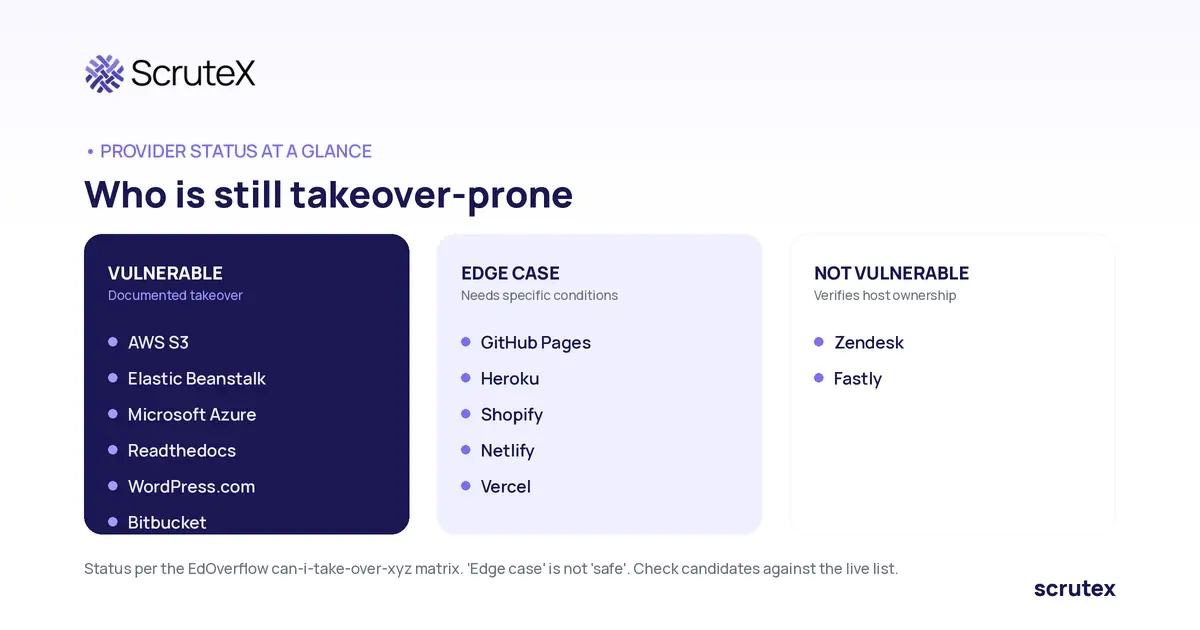
Provider status changes, so defenders should check against a maintained reference rather than memory. The community baseline is the EdOverflow "can-i-take-over-xyz" matrix. [14] The table below reflects its current statuses. "Vulnerable" means a straightforward takeover is documented. "Edge case" means it depends on specific conditions. "Not vulnerable" means the provider verifies domain ownership before serving content.
| Provider | Record type | Status (per can-i-take-over-xyz) | Fingerprint defenders see | Notes |
|---|---|---|---|---|
| AWS S3 | CNAME | Vulnerable | The specified bucket does not exist | Deleted global bucket names can be re-created by anyone; account regional namespaces (March 2026) protect new buckets only |
| AWS Elastic Beanstalk | CNAME | Vulnerable | NXDOMAIN | Region-scoped environment names |
| Microsoft Azure | CNAME / A | Vulnerable | NXDOMAIN | Alias records and asuid TXT verification reduce risk where adopted |
| Readthedocs | CNAME | Vulnerable | project not found page | Documentation subdomains |
| WordPress.com | CNAME | Vulnerable | Do you want to register .*.wordpress.com? | Blog subdomains |
| Bitbucket | CNAME | Vulnerable | Repository not found | Code and pages hosting |
| GitHub Pages | CNAME | Edge case | There isn't a GitHub Pages site here. | Depends on specific conditions |
| Heroku | CNAME | Edge case | No such app | Depends on specific conditions |
| Shopify | CNAME | Edge case | Sorry, this shop is currently unavailable. | Depends on specific conditions |
| Netlify | CNAME | Edge case | Not Found - Request ID: | Depends on specific conditions |
| Vercel | CNAME | Edge case | DEPLOYMENT_NOT_FOUND. | Depends on specific conditions |
| Zendesk | CNAME | Not vulnerable | Help Center Closed | Verifies host ownership |
| Fastly | CNAME | Not vulnerable | Fastly error: unknown domain: | Verifies host ownership |
What AWS and Azure Have Changed
AWS: account regional namespaces for S3 (March 2026). On 12 March 2026, AWS added account regional namespaces for S3 general purpose buckets. [10] A bucket created in this namespace carries your account ID and region as a suffix, in the form
<prefix>-<accountId>-<region>-an. AWS documents that only your account can create buckets in that namespace, and that a CreateBucket request from another account using your suffix is rejected. [11] That closes the re-registration step for new buckets.It does not protect the buckets you already have. AWS states that when you delete a bucket in the global namespace, "the bucket name becomes available again in the global namespace for anyone to re-create." [11] Coverage at launch noted the feature does not retroactively protect existing buckets; to benefit, teams create new buckets with the namespace pattern and migrate data. [12] Teams can enforce the new namespace with the
s3:x-amz-bucket-namespace condition key set to account-regional in IAM, service control or resource control policies. [11]Azure: lifecycle-bound records and ownership verification. Microsoft's guidance gives defenders several controls. [13] Azure DNS alias records tie a record's lifecycle to the Azure resource it points at, for supported targets such as Front Door, Traffic Manager, CDN endpoints and public IPs. An
asuid TXT record holding the App Service domain verification ID stops other subscriptions from validating your custom domain. Microsoft Defender for App Service alerts when a decommissioned App Service still has a custom domain in DNS. Microsoft also publishes a Get-DanglingDnsRecords PowerShell tool to list CNAME records that point at Azure resources. Certitude's 2023 research noted that Microsoft had added domain ownership verification for Azure Storage accounts. [3] These controls reduce the risk only where teams adopt them, and the community matrix still lists Azure as vulnerable.What "Edge case" means in practice. The matrix does not define "Edge case" in detail. In practice it marks providers where a takeover depends on specific conditions rather than a simple re-registration. That still leaves a dangling record to remove, because you do not control whether those conditions hold for your account.
The point for defenders: treat any CNAME to a third party that returns one of these fingerprints as something to investigate, then confirm against the live matrix before you rule it in or out.
What Can an Attacker Do With a Taken-Over Subdomain?
A taken-over subdomain lets an attacker act with your domain's reputation and trust, which is worth far more than the single host. Here is what that converts into, and the business risk behind each.
- Phishing on your own domain. A login page on
account.yourbrand.comdefeats the usual "check the URL" advice because the URL is genuinely yours. Business risk: credential theft that your staff and customers have been trained to trust. - Cookie and session theft. Cookies scoped to
.yourbrand.comare sent to any subdomain. An attacker on a taken-over subdomain can read or set them. Business risk: session hijacking against your real applications. - OAuth redirect abuse. If a taken-over subdomain is an allowed redirect target, an attacker can intercept authorization codes or tokens. Business risk: account takeover against services that trusted the subdomain.
- CORS and CSP trust abuse. Policies that allowlist your own subdomains now allowlist the attacker. Microsoft lists cross-site scripting, cross-site request forgery and CORS bypass among the escalation paths. [13] Business risk: data exfiltration and script execution that your controls were built to prevent.
- Email trust abuse. A dangling MX or a trusted subdomain can help mail pass checks that lean on your domain's reputation. Business risk: convincing fraud sent from, or trusted because of, your domain.
- SEO poisoning and content abuse. The attacker inherits the subdomain's search ranking and link equity to host scams or malware. Business risk: brand damage and blocklisting of your real domain.
These uses are not theoretical. Infoblox reported in May 2025 that the actor it tracks as Hazy Hawk hijacked subdomains through dangling CNAME records and routed victims through traffic distribution systems to tech support scams, fake antivirus pages, malware downloads and phishing. [8]
The thread through all of these: the damage is not to one forgotten host. It is to every system and person who treats your domain as yours.
Documented Subdomain Takeover Cases, 2020 to 2026
These cases span researcher disclosures and active criminal abuse. Each is dated and linked.
670+ Microsoft subdomains (March 2020). Researchers at Vullnerability.com, Numan Ozdemir and Ozan Agdepe, found more than 670 Microsoft subdomains vulnerable to takeover. The cause was dangling CNAME records pointing to Azure resources that were no longer in use. The researchers reported the findings to Microsoft rather than exploiting them. [1][2]
More than 1,000 vulnerable organisations (August 2023). Vienna-based Certitude Consulting reported finding more than 1,000 organisations with subdomains open to takeover after their cloud resources were abandoned. To demonstrate, it took control of subdomains belonging to government organisations in the US, Canada, the UK and Australia, as well as CNN, Netscout, Penn Mutual, UCLA, Stanford and the University of Pennsylvania, and pointed them at a security awareness notice. [3]
Abandoned S3 buckets, 8 million requests (February 2025). The research team at watchTowr identified roughly 150 abandoned AWS S3 buckets that still had live references from software, systems and infrastructure, then re-registered them. They observed more than 8 million requests to those buckets, including requests for software updates, VM and container images, CloudFormation templates and VPN configurations. The buckets had been owned by government bodies, Fortune 500 companies and open-source projects. watchTowr disclosed responsibly and the exposure was remediated. [4][5][6]
Hazy Hawk (first reported May 2025). Infoblox discovered the actor in February 2025 and published its research in May 2025, with activity dating back to at least December 2023. Hazy Hawk found dangling CNAME records pointing at decommissioned resources on Azure, AWS, GitHub and Cloudflare, registered the abandoned names, and used the resulting subdomains to host malicious URLs. Infoblox names subdomains of the US Centers for Disease Control, Deloitte, UC Berkeley and UNICEF among those hijacked. [8]
Hazy Hawk at US universities (April 2026, vendor-reported). Aviatrix reported in June 2026 that Hazy Hawk hijacked subdomains at 34 US universities in April 2026 through abandoned DNS records, and hosted explicit content that search engines then indexed under the universities' .edu domains. This is a single vendor's report, so treat the scale as reported rather than independently confirmed. [9]
The pattern across the cases: researchers proved the condition is common, Hazy Hawk shows criminals monetise it, and watchTowr shows the impact reaches anyone who still downloads from an abandoned resource. SentinelOne set out that last point as a supply chain risk in April 2025. [7]
How Do I Audit My Own Domains for Dangling Records?
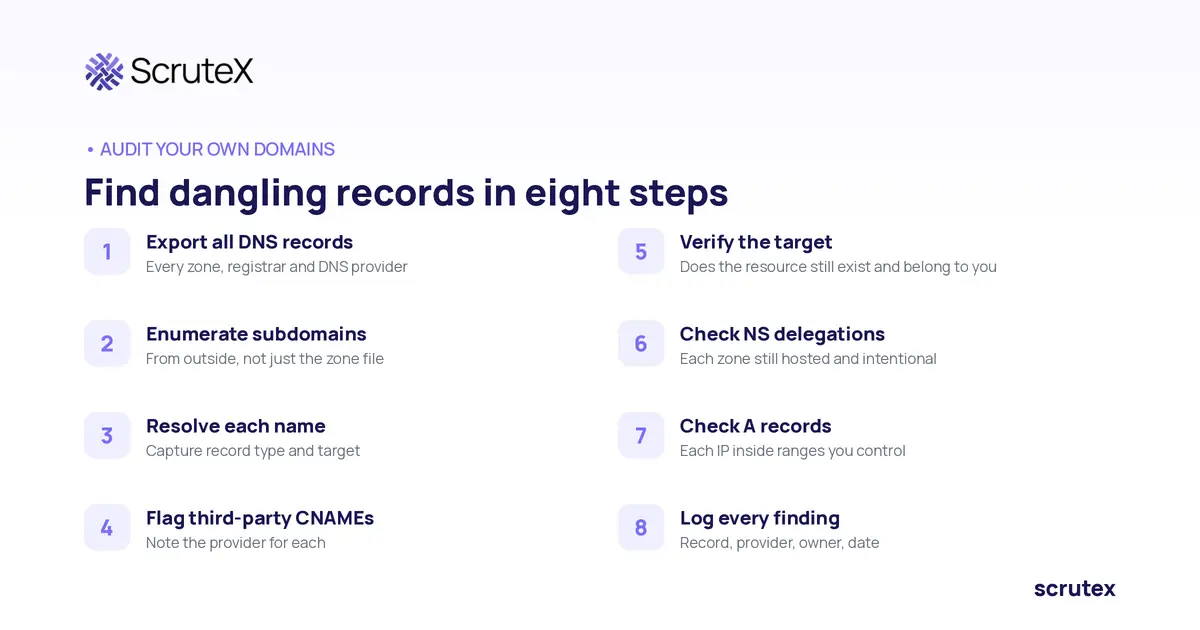
You audit for dangling records by listing every DNS record you own, resolving each one, and checking whether the target it points to still belongs to you. The goal is to find your own dangling records before anyone else does, not to claim resources that are not yours.
The workflow, defensively:
- Export all DNS records from every zone you control, across every registrar and DNS provider. Shadow zones are common, so include them.
- Enumerate subdomains from outside as well, because your zone file and your real attack surface differ. This article does not re-cover enumeration in depth; the companion post on how to find exposed subdomains does.
- Resolve each name and capture the record type, the full CNAME chain and the final target.
- Flag CNAMEs that point to third parties. Any CNAME to a cloud or SaaS endpoint is a candidate. Note the provider.
- Check the target resource still exists and is yours. A candidate becomes a finding when the record resolves but the target returns a provider fingerprint like the ones in the table above.
- Check NS delegations. For each delegated subdomain, confirm the nameservers still host the zone and the delegation is intentional.
- Check A records against IP ranges you own. Flag any A record pointing to an address outside your allocated or currently assigned ranges.
- Record every finding with the record, the provider, the owner and the date.
How the Free Tools Fit Together
Practitioners usually chain a few free tools. Use them against your own estate.
| Stage | Tool | What it gives you |
|---|---|---|
| Find names | subfinder | Subdomains from passive sources, including certificate transparency |
| Resolve | dnsx | Record type, CNAME chain and target for each name |
| Match fingerprints | nuclei takeover templates, Subjack, SubOver | Flags targets that return known provider error fingerprints |
| Decide | can-i-take-over-xyz | Whether a fingerprint usually means vulnerable, edge case or not vulnerable |
| Azure estates | Get-DanglingDnsRecords (Microsoft) | CNAME records that point at Azure resources, to compare with what your subscriptions still hold |
Triage: A Fingerprint Is a Candidate, Not a Finding
Two errors are common. False positives: the error page appears, but the provider verifies domain ownership, so nobody can claim the name. False negatives: a custom error page, a CDN in front of the target, or a long CNAME chain hides the provider fingerprint. Confirm each candidate inside your own provider account by checking whether the target resource exists and belongs to you.
Then fix the riskiest records first. Prioritise subdomains that sit inside the cookie scope of your main applications, appear in OAuth redirect allowlists or CSP and CORS policies, still receive real traffic, or are linked from your products and documentation. A dangling record on a hostname your login flow trusts is worth far more to an attacker than one on an old campaign page.
Dangling DNS audit checklist
- Records exported: every zone, every registrar, every DNS provider.
- Subdomains enumerated: zone file plus outside-in discovery.
- Each name resolved: record type, CNAME chain and target captured.
- Third-party CNAMEs flagged: provider identified for each.
- Targets verified: resource exists and belongs to you, or fingerprint confirms it does not.
- NS delegations checked: each delegated zone still hosted and intentional.
- A records checked: each address inside ranges you control.
- Findings prioritised: cookie scope, OAuth, CSP and CORS trust first.
- Findings logged: record, provider, owner, date.
Certificate transparency is a useful cross-check, because a subdomain that once had a certificate issued will appear in CT logs even if it is missing from your zone file export. The companion post on certificate transparency monitoring explains how new names surface there.
How Do I Fix a Dangling Subdomain and Prove It Is Fixed?
You fix a dangling subdomain by removing or repointing the DNS record. Deleting the record is the fix. Monitoring it is not a fix, it is a decision to watch the window stay open.
The steps:
- Check whether it was already taken over. Before you change anything, capture what the subdomain serves now. Look in certificate transparency logs for certificates issued for that name that your team did not request, and review any logs you hold for unexpected traffic. If someone else already controls the content, run it as an incident, not a clean-up. Microsoft's guidance makes the same point: investigate possible compromise before you close the finding. [13]
- Delete or repoint the record. If the subdomain is no longer needed, delete the DNS record. If it is still needed, repoint it to a resource you currently own and control.
- Reclaim the resource if you can. Where the provider allows it, re-register the released resource name yourself so nobody else can claim it, then attach it to the record or retire both together.
- Remove references to the subdomain. Search code and configuration for the hostname: cookie domains, OAuth redirect URIs, CSP and CORS allowlists, and links in products and documentation. An allowlist entry for a hostname you no longer control is a trust grant waiting for the next mistake.
- Re-verify from outside. Resolve the name again from an external vantage point and confirm it no longer returns the provider fingerprint. An internal check can be misled by caching.
- Keep the evidence. Save the before and after resolution output, the change record and the date, so the fix is auditable and the finding can be closed with proof.
The common mistake is marking a finding "accepted risk" and adding it to a monitoring list. If the record still dangles, the subdomain is still claimable. Remove the record.
How Do I Prevent Subdomain Takeover From Recurring?
You prevent recurrence by making DNS part of decommissioning, not an afterthought. Records dangle because deleting a resource and deleting its DNS record are two separate actions owned by two different people.
- Decommissioning runbook that includes DNS. No resource is considered deleted until its DNS record is removed in the same change, and the record goes first so it never points at nothing. Microsoft recommends adding "Remove DNS entry" to decommissioning checklists. [13]
- Infrastructure as code owns DNS. When DNS records live in the same IaC as the resources they point to, destroying the resource destroys the record. Out-of-band records added by hand in a console are the ones that dangle.
- An owner for every external DNS record. Keep an inventory of every public hostname with a named owner and the resource it serves. Microsoft's guidance recommends maintaining an FQDN inventory and reviewing DNS records regularly. [13] Records created by agencies and marketing teams are the ones most often missing.
- Use provider controls. On AWS, create new S3 buckets in your account regional namespace and enforce it with the
s3:x-amz-bucket-namespacecondition key. [11] On Azure, prefer alias records, addasuidTXT verification for App Service custom domains, and put delete locks on resources with custom DNS entries. [13] - Continuous outside-in monitoring. Your zone file is not your attack surface. Discover subdomains from outside continuously and re-check third-party CNAMEs against current provider fingerprints, so a record that starts dangling after a teardown is caught in days, not at the next annual pen test. This connects to broader external attack surface management practice.
Key Takeaways
- Subdomain takeover happens when a live DNS record points to a third-party resource you have released, and an attacker re-registers that resource to serve content from your subdomain.
- CNAME records dangle most often, but a dangling NS delegation is the most severe because it hands the attacker an entire subtree.
- Provider status changes: AWS's March 2026 account regional namespaces protect new S3 buckets but not existing ones, so check candidates against the maintained can-i-take-over-xyz matrix rather than assuming a provider is safe.
- A taken-over subdomain is dangerous because everything that trusts your domain then trusts attacker content, and actors such as Hazy Hawk already use hijacked subdomains to route victims to scams and malware.
- The fix is to delete or repoint the record; monitoring a dangling record is not a fix, and prevention means putting DNS removal first in your decommissioning process.
Are You Exposed? Check These in Your Own Environment
- Do you have DNS records pointing at cloud or SaaS resources that your team no longer uses?
- When a project or microsite is decommissioned, does anyone remove its DNS records as part of teardown?
- Are all your DNS records managed in infrastructure as code, or are some added by hand in a console?
- Have you resolved every subdomain you own from outside in the last 90 days and checked third-party CNAMEs against provider fingerprints?
- Do you know every zone and registrar your organisation controls, including ones set up by teams outside IT?
If you answered no to two or more, you likely have dangling records to find.
What ScruteX Finds Here
ScruteX Vulnerability Insights discovers your internet-facing subdomains from the outside and flags dangling records and expired certificates among them, ranked by real-world exploitability rather than raw severity. It runs continuously, so a record that starts dangling after a teardown surfaces between assessments instead of waiting for the next pen test. Setup is agentless: a domain and a set of keywords start discovery, with no agent to install. ScruteX sees what is externally observable. The fix itself, removing or repointing the record, stays in your DNS and your decommissioning process. See Vulnerability Insights and the dangling subdomains detail.
Keep Reading
- Go deeper: EASM best practices 2026 sets dangling DNS inside a continuous external attack surface programme.
- Go sideways: Certificate transparency monitoring shows how new subdomains surface, which is where your next dangling record will come from.
FAQ
Q: What is subdomain takeover?
A: Subdomain takeover is when an attacker controls a subdomain because its DNS record still points to a third-party resource the owner has released. The attacker re-registers that resource and serves their own content from your subdomain, often with a valid certificate.
Q: Is subdomain takeover still possible on AWS and Azure?
A: Yes, for most existing setups. The can-i-take-over-xyz matrix lists AWS S3, Elastic Beanstalk and Azure as vulnerable. AWS's account regional namespaces (March 2026) stop other accounts re-creating new S3 buckets, but deleted global bucket names can still be re-created. Azure offers alias records and asuid TXT verification where teams adopt them.
Q: How do I check for subdomain takeover?
A: Export all your DNS records, enumerate your subdomains from outside, resolve each one, and flag any CNAME pointing to a third-party resource that returns a known provider fingerprint. Tools like subfinder, dnsx and nuclei takeover templates help you check your own estate.
Q: What is the difference between a dangling subdomain and subdomain takeover?
A: A dangling subdomain is the weakness: a DNS record that points to a resource you no longer own. Subdomain takeover is the attack: someone claiming that released resource to control the subdomain. The dangling record is the open door; the takeover is walking through it.
Q: Which record type is the most dangerous if it dangles?
A: A dangling NS record. A dangling CNAME gives an attacker one subdomain, but a dangling NS delegation hands them the entire delegated zone and every record beneath it. Audit NS delegations as carefully as CNAMEs.