Rogue Mobile App Detection: How to Identify Fake and Impersonating Apps
By ScruteXPublished Updated
In May 2025, an app called "Document Viewer - File Reader" climbed to the top five of Google Play's free tools chart. Fifty thousand people installed it. Six weeks later, an update quietly dropped the Anatsa banking trojan onto their phones, and the app started overlaying fake login screens on top of real banking apps. Researchers caught it and Google removed it. The incident illustrates a more difficult problem for defenders: an app can establish legitimacy first and introduce malicious behaviour later through an update.
That problem lands on the security team of the impersonated brand, not on the app store.
Rogue mobile apps are unauthorised applications that imitate a legitimate organisation, product, or brand. They can be used for credential theft, fraud, data collection, malware distribution, or brand abuse. Detecting them requires more than searching Google Play: security teams should monitor app stores and external distribution channels, verify developer identity, compare branding and permissions, preserve evidence, and continuously track new listings.
This guide explains what rogue mobile apps are, how to identify fake apps as an individual or an analyst, how to find them on Android specifically, and how organisations detect them at scale when manual searching stops working.
What Are Rogue Mobile Apps?
For brand-protection purposes, this article uses "rogue mobile app" to describe an application published without authorisation that represents, imitates, or misuses an organisation's brand, product, or identity. That is an operational definition rather than a universally agreed industry taxonomy, and it is deliberately broader than malware, because the distinctions matter when you triage findings.
| Term | What it means | Always malicious? |
|---|---|---|
| Rogue mobile app | Published without the impersonated organisation's authorisation | No, but always unauthorised |
| Fake app | Pretends to be, or to be affiliated with, a real app or brand | Often, not always |
| Impersonating app | Copies a brand's name, logo, or identity to appear official | No, some are fan-made or repackaged |
| Malicious app | Contains harmful functionality: credential theft, spyware, fraud | Yes, by definition |
These sets overlap, but they are not a ladder that every finding climbs. The working rule is: unauthorised is not the same as malicious, and neither is the same as impersonating. A developer can publish an "Unofficial XYZ fan app" that says exactly what it is, misleads nobody, and still sits in your unauthorised column; whether it becomes a takedown, a policy conversation, or nothing at all is a judgement the investigation makes, not the label. Treating the categories as synonyms causes two mistakes. First, teams over-escalate: a repackaged version of your app with injected adverts is a brand and policy problem, not necessarily an incident. Second, teams under-escalate: an app that looks harmless today can turn malicious later. The Anatsa operators demonstrated this pattern repeatedly. They publish a clean, working utility, build an install base and positive reviews, then push the malicious payload through an update weeks later. In the 2025 campaign, the infection window lasted roughly one week after six weeks of clean operation.
The economics predict the behaviour: ad-skimming clones want longevity and stay quiet, credential harvesters expect removal and publish in bursts under rotating developer accounts, and droppers invest weeks building legitimacy because device takeover fraud justifies the patience. In MITRE ATT&CK for Mobile terms, the common thread is Masquerading (T1655): the app's value comes from being mistaken for something the victim already trusts.
The practical takeaway: classify by evidence, not first impression, and treat "unauthorised" as the trigger for investigation rather than waiting for proof of malware. The classification you assign at discovery is a starting position, not a verdict.
Why Do Rogue Mobile Apps Matter to Organisations?
The direct victim of a fake app is the person who installs it. The organisation being impersonated absorbs the second-order damage, and that damage is concrete.
Credential theft against your customers. Banking trojans distributed through fake apps use overlay attacks: when the victim opens a real banking app, the malware draws a counterfeit login screen on top and captures the credentials and multi-factor codes typed into it.Researchers has tracked Anatsa doing exactly this since at least 2020, across Europe and North America, with individual waves reaching 150,000 installs. The 2025 campaign added a refinement: a fake "scheduled maintenance" notice that stopped victims checking their accounts while fraudulent transactions ran in the background.
Fraud losses and disputes. Credentials captured through a fake app get used for account takeover. The fraudulent transactions hit your fraud team, your chargeback process, and in regulated sectors, your reporting obligations. Frameworks such as RBI directions in India, APRA CPS 234 in Australia, and NIS2 in the EU carry incident notification duties that credential theft at scale can trigger, even though the malicious code never touched your infrastructure. Your servers stay clean while your customers get compromised in your name.
Brand and trust erosion. A customer who got scammed through an app carrying your logo does not distinguish between you and the impersonator. They blame the brand they recognise.
Support and communications burden. Every rogue app with meaningful reach generates confused support tickets, social media complaints, and eventually press questions. Teams that discover the app only at that point start the response from behind.
Data and privacy exposure. Fake apps frequently request permissions far beyond their claimed function. Contact lists, SMS access, and accessibility services in the wrong hands become surveillance and fraud infrastructure, and the data collected belongs to your customers.
None of this requires the fake app to be sophisticated. It requires it to be findable by your customers before you find it yourself.
How Do You Identify Fake Apps?
No single indicator proves an app is malicious. Identification is a weight-of-evidence exercise. Work through these checks in order.
Check the developer identity
Every listing names a publisher. Compare it against the developer accounts your organisation actually uses. A banking app published by "Hybrid Cars Simulator, Drift & Racing" should end the analysis quickly, and that is a real example: it was the publisher name behind the 2025 Anatsa document viewer. Subtler cases use near-match names, so compare exactly, not approximately, and check the developer's contact domain and published portfolio: a publisher whose other apps are wallpaper packs is an unlikely home for your finance product.
Compare the app with the official version
Put the suspect listing next to the genuine one. Look at the icon resolution, screenshot quality, description language, version history, and release date. Impersonators usually copy assets at lower quality, write descriptions with translation artefacts, and have a short or erratic version history. A "bank app" first published three weeks ago is a signal on its own. Watch update cadence too: droppers often show one large update shortly before complaints begin, which is the payload arriving.
Examine the permissions
Match requested permissions against claimed function. A PDF reader requesting accessibility services, SMS access, or device administration is asking for capabilities overlay malware and keyloggers need. Excessive permissions do not prove malice, but they raise investigation priority sharply. Google itself blocked 1.3 million apps from getting unnecessary access to sensitive data in 2024, which shows how common the pattern is even inside the official store.
Check the distribution source
Where does the install come from? Official stores apply review and scanning, imperfect but real. Direct APK downloads, third-party stores, and links pushed through SMS or messaging apps bypass those controls entirely, and attackers know it. Smishing campaigns pairing a fake bank message with a direct APK link are a standard route precisely because no store review ever sees the file. Off-store distribution does not make an app malicious, but it removes a safety layer and should raise scrutiny.
Review ratings and user reports
Read the negative reviews first. Victims often describe the exact behaviour: unexpected charges, login problems after installing, battery drain, permission prompts. Also check for manufactured ratings, such as bursts of five-star reviews with generic text in a short window.
Verify the claimed relationship with the organisation
The final check is authoritative: does the organisation acknowledge this app? Official websites should list every legitimate app with direct store links. If the suspect app does not appear there, and the developer account is not one the organisation controls, the app is unauthorised regardless of whether it behaves maliciously yet. A maintained public registry of official apps is the cheapest control an organisation can build: it turns "is this app real?" into a lookup.
How Do You Find Fake Apps on Android?
Android deserves specific attention because it supports installation from outside official stores, which widens the distribution surface for fake apps.
Start inside Google Play. Search for your brand name, product names, and common misspellings. Check every result's developer account against your known publisher accounts. Google's enforcement is substantial: the company blocked 2.36 million policy-violating apps and banned 158,000 developer accounts in 2024, then blocked a further 1.75 million apps in 2025 while running more than 10,000 safety checks per published app. Substantial is not the same as complete. Anatsa has entered Google Play repeatedly despite that screening, because the app that passes review is genuinely clean and the malicious code arrives later, as an update to an already-trusted install base.
Understand what Google Play Protect covers. Play Protect scans apps on the device, including sideloaded ones, and now processes over 350 billion app scans daily. In 2025 it identified more than 27 million new malicious apps distributed outside Google Play, up from 13 million the year before. Those numbers tell you two things at once: Play Protect catches a great deal, and the off-store fake app economy is enormous. Its limit matters as much as its coverage: Play Protect protects the device it runs on, and it does not notify the brand being impersonated.
Look outside official stores. Fake apps targeting a brand often never touch Google Play. They live on lookalike websites, third-party APK stores, Telegram channels, and links sent through phishing SMS. Google's pilot that blocks risky sideloaded installs, running in markets including India, Brazil, Thailand, and Nigeria, prevented 36 million risky installation attempts across 200,000 unique apps. Those 200,000 apps represent distribution that store-focused monitoring would never have seen.
Check the metadata trail. For any candidate app, capture the package name, developer account, signing details where available, first-seen date, and download count. This metadata drives both the risk assessment and any later takedown request, and it disappears when the listing does.
For individual users, the guidance compresses to: install from official stores, keep Play Protect on, check the developer name, and question permissions. For security teams, those same checks become inputs to a repeatable monitoring process, which is where the next section goes.
How Can Organisations Detect Rogue Mobile Apps at Scale?
Manual searching fails for structural reasons. There are dozens of app stores beyond the big two, hundreds of APK mirror sites, and regional stores your team has never heard of. Listings appear and vanish within days. Searches in English miss impersonations localised into other languages. And the person doing the searching has other work.
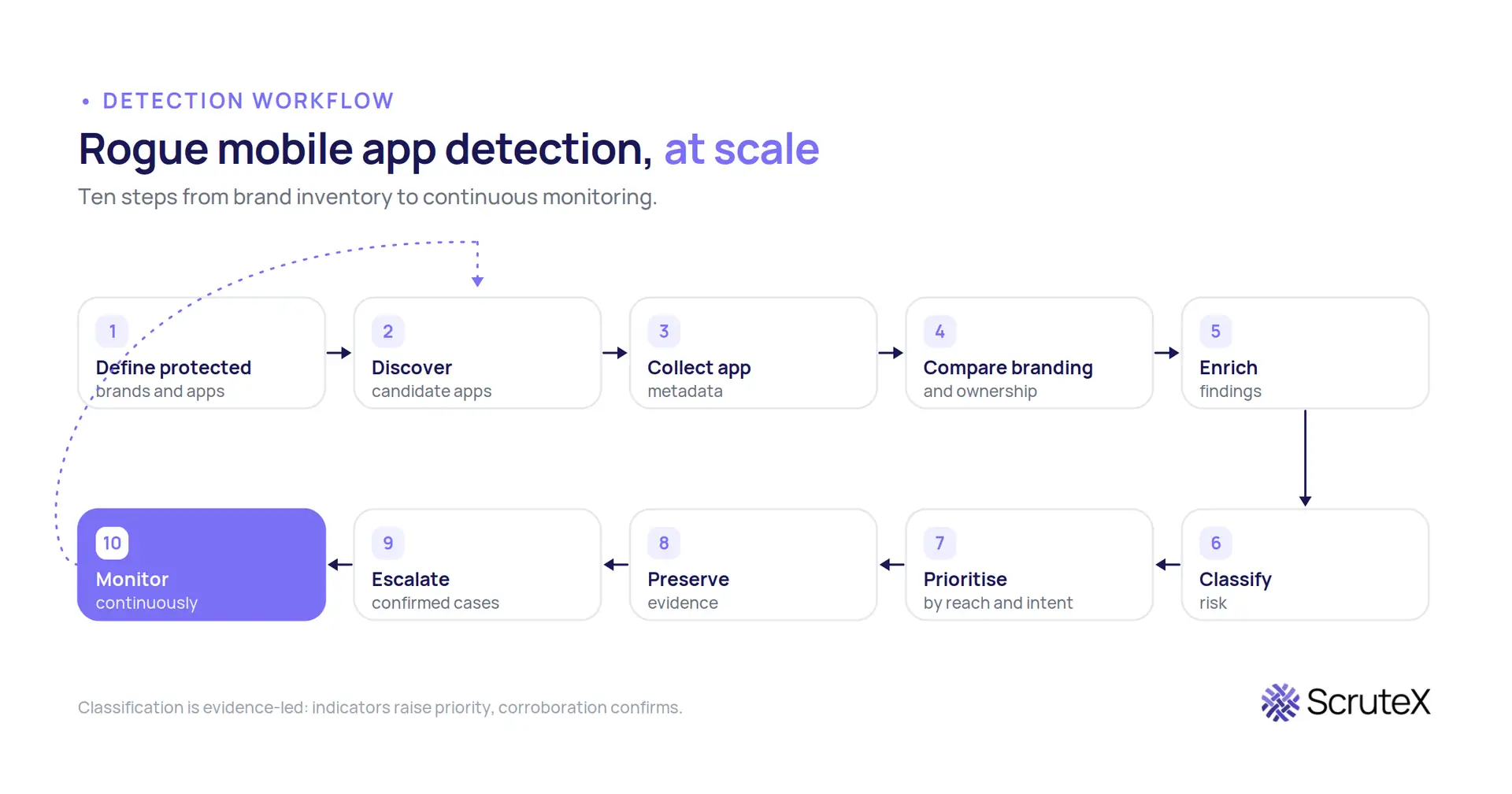
A scalable detection workflow looks like this:
- Define what you protect. List official app names, package names, developer accounts, brands, logos, and product terms. This inventory is the matching baseline, and most organisations discover during this step that no single team holds the complete list.
- Discover candidate apps. Continuously query official stores, third-party stores, APK sites, and web sources for listings that match protected names, marks, or visual assets. Coverage should follow your customers, including regional stores and non-English search terms.
- Collect metadata. Capture the listing details, developer identity, permissions, screenshots, and download counts for every candidate at discovery time.
- Compare branding and ownership. Match the candidate's identity claims against the protected inventory. Unauthorised use of the name or logo by an unknown developer is the core impersonation signal.
- Enrich the finding. Check the developer account's other apps, hosting infrastructure for off-store distribution, and any overlap with known malware campaigns or phishing infrastructure.
- Classify risk. Separate confirmed malicious apps, likely impersonations, policy violations such as unauthorised repackaging, and benign matches such as fan apps or coincidental names. Each class gets a different response, ranging from immediate takedown to no action at all.
- Prioritise. Rank by reach, capability, and intent signals. An app collecting credentials with ten thousand installs outranks a dormant lookalike with none.
- Preserve evidence. Screenshot and archive the listing, metadata, and distribution pages before takedown or self-deletion removes them. Takedown requests and legal action both depend on this.
- Escalate confirmed cases. Route to app store abuse channels, hosting providers, legal, and where relevant, customer communications.
- Keep monitoring. Operators republish under new developer accounts. Anatsa alone ran campaigns in 2021, 2023, 2024, and 2025 under fresh publisher identities. Detection is a cycle, not a project.
One discipline matters throughout: do not treat every suspicious app as malicious. Classification errors in either direction cost credibility, either with the app stores handling your takedown requests or with the executives reading your findings.
What Should Security Teams Look For?
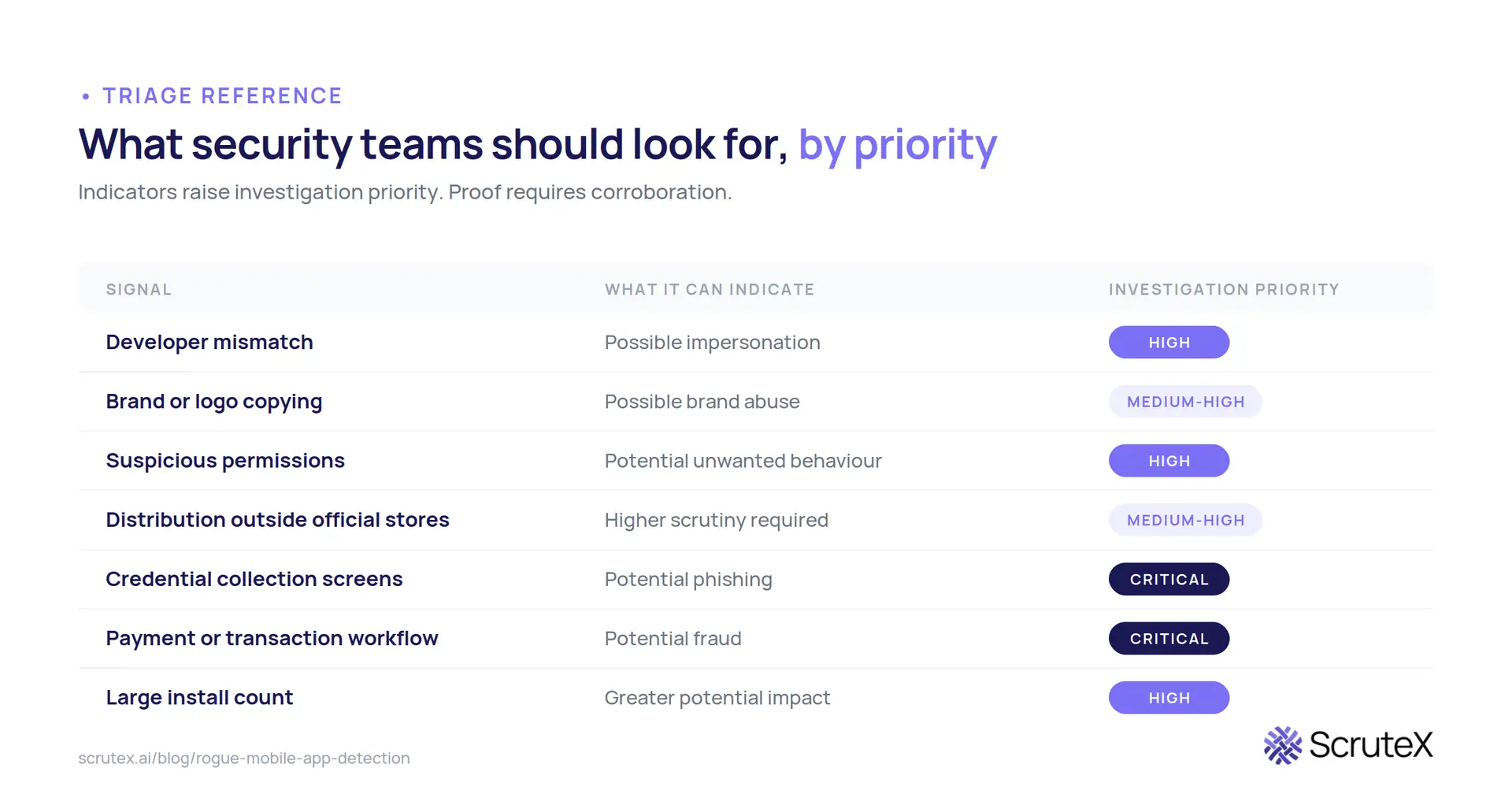
| Signal | What it can indicate | Investigation priority |
|---|---|---|
| Developer mismatch | Possible impersonation | High |
| Brand or logo copying | Possible brand abuse | Medium to High |
| Suspicious permissions | Potential unwanted behaviour | High |
| Distribution outside official stores | Reduced review, higher scrutiny needed | Medium to High |
| Credential collection screens | Potential phishing | Critical |
| Payment or transaction workflow | Potential fraud | Critical |
| Large install count | Greater potential impact | High |
Read this table as a prioritisation aid, not a verdict engine. Each row is an indicator that justifies investigation at the stated priority. Proof requires corroboration: behavioural evidence, victim reports, or technical analysis. The gap between "flagged" and "confirmed" is where analyst judgement earns its keep.
Signals also compound: developer mismatch alone might be a fan project, while developer mismatch plus a credential screen plus off-store distribution is a phishing operation. And an absence of signals is not clearance, since the dropper model is built on presenting zero indicators at review time.
Could Your Organisation Be Exposed?
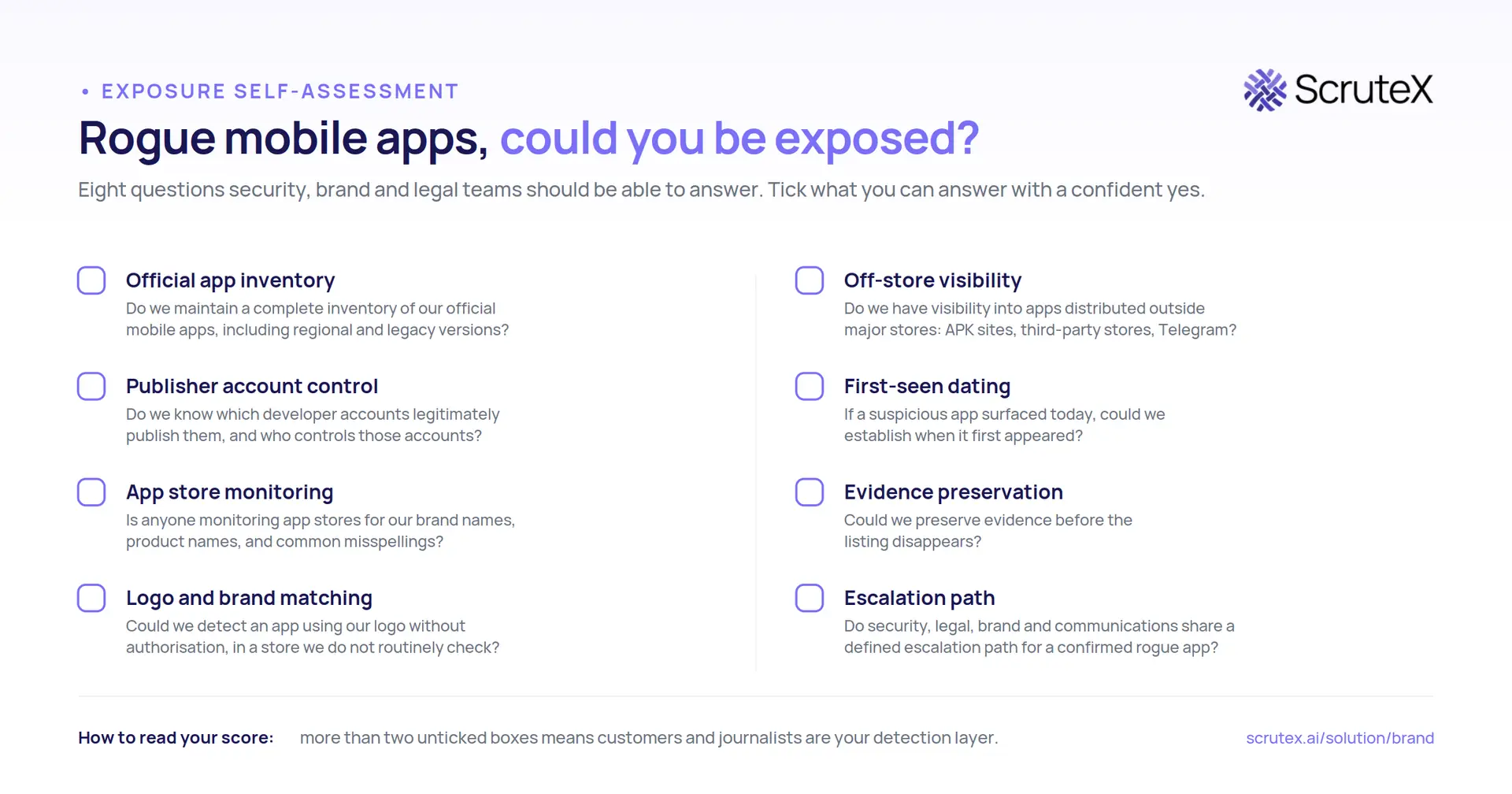
Most organisations cannot answer these questions quickly, and the gaps are where rogue apps live. They cover three things: knowing your own footprint, seeing the external environment, and being able to act. Work through them honestly:
- Do we maintain a complete inventory of our official mobile apps, including regional and legacy versions?
- Do we know which developer accounts legitimately publish them, and who controls those accounts?
- Is anyone monitoring app stores for our brand names, product names, and common misspellings?
- Could we detect an app using our logo without authorisation, in a store we do not routinely check?
- Do we have any visibility into apps distributed outside major stores: APK sites, third-party stores, Telegram?
- If a suspicious app surfaced today, could we establish when it first appeared?
- Could we preserve evidence before the listing disappears?
- Do security, legal, brand, and communications teams share a defined escalation path for a confirmed rogue app?
If more than two answers are "no" or "not sure", the organisation is relying on customers and journalists to be its detection layer. That is the most expensive way to find out.
This self-assessment is also available as a one-page checklist you can download and run with your team.
Run it as a thirty-minute exercise with security, brand, and legal in the same room. The output worth keeping is not the score; it is the list of owners assigned to each unticked box.
What Should a Rogue Mobile App Detection Solution Provide?
If the self-assessment exposed gaps, the next question is what capability closes them. Whether built internally or bought, evaluate against these requirements:
- Broad discovery across official stores, third-party stores, APK sites, and web distribution, in the regions and languages your customers actually use
- Metadata enrichment: developer identity, permissions, package details, hosting infrastructure, first-seen dates
- Brand matching that catches visual impersonation (logos, screenshots) as well as name matches
- Developer and ownership analysis to distinguish your accounts from impersonators and to link related rogue listings
- Evidence preservation captured automatically at discovery, not manually after the fact
- Historical visibility so you can answer "when did this appear" and "what else has this publisher done"
- Risk prioritisation that separates critical credential-harvesting apps from low-risk lookalikes
- Investigation workflow support so findings move from alert to decision with an audit trail
- Continuous alerting rather than periodic reports, because listing lifetimes are short
- Escalation and takedown support, since detection without removal only documents the problem
Teams evaluating the build option should cost the maintenance honestly: the initial scraper is a fortnight of engineering, but keeping it accurate across dozens of stores and languages is a permanent job with a silent failure mode, because a broken monitor produces the same output as a clean environment.
For vendors, two tests separate marketing from capability: ask for a live discovery run against your own brand and check it against listings you already know, and ask how a finding becomes a takedown, with what evidence, at what median removal time. Detection without a working path to removal produces a well-documented problem rather than a solved one.
Point tools for app store monitoring exist and serve mature teams well. The trade-off is that rogue apps rarely travel alone. The same campaign usually pairs a fake app with lookalike domains, phishing pages, and fake social accounts, and disconnected tools leave the analyst to join those dots manually.
That connection is where a brand exposure monitoring capability fits. ScruteX approaches this through its Brand Insights module, which detects fake mobile apps, typosquatted domains, phishing kits, and impersonation across DNS, social platforms, and app stores, and coordinates takedowns, alongside the platform's dark web, attack surface, and threat intelligence modules. The relevance to this problem is the correlation: a fake app finding arrives with the related infrastructure already mapped. ScruteX offers a free tier covering core modules on primary domains.
Key Takeaways
- Rogue mobile apps are unauthorised apps impersonating a brand; they are always a risk to investigate even when they are not provably malware
- Identification is weight-of-evidence: developer identity, comparison with the official app, permissions, distribution source, reviews, and confirmed relationship with the organisation
- Google blocked 1.75 million policy-violating apps in 2025 and Play Protect flagged over 27 million malicious sideloaded apps, so store defences are strong but demonstrably not sufficient, as repeated Anatsa infiltrations show
- Manual app store searching does not scale across stores, regions, languages, and short listing lifetimes; organisations need a continuous discovery, classification, evidence, and escalation workflow
- Distinguish indicators from proof, preserve evidence early, and define the cross-team escalation path before the incident forces one
How ScruteX approaches brand exposure
Explore how ScruteX helps organisations identify and investigate external brand exposure, including fake mobile apps: https://scrutex.ai/solution/brand. To see your organisation's external exposure directly, you can request a demo with a live scan of your attack surface: https://scrutex.ai/demo.
Rogue mobile apps convert your brand's trust into an attack tool, and the store-level defences that protect individual users were never designed to protect the impersonated organisation. The detection methodology is not mysterious: know your official apps, search widely, verify developer identity, weigh the indicators, preserve evidence, and escalate through a path you defined in advance. What separates prepared teams from surprised ones is doing this continuously rather than after the first fraud report.
FAQ
Q: What is a rogue mobile app?
A: A rogue mobile app is an application published without the authorisation of the brand or organisation it represents. It may impersonate a real app to steal credentials or commit fraud, or it may simply misuse a brand's name and logo. Not all rogue apps contain malware, but all create unmanaged risk for the impersonated organisation.
Q: How do I identify fake apps?
A: Check the developer name against the organisation's known publisher accounts, compare the listing with the official app, review the requested permissions against the app's stated function, prefer official store downloads, read negative reviews, and confirm the app appears on the organisation's official website. No single check is conclusive; combine them.
Q: Are fake apps always malware?
A: No. Some fake apps are repackaged copies with injected adverts, unauthorised fan apps, or brand misuse without harmful code. Others carry credential stealers or banking trojans. Treat every unauthorised app as worth investigating, and classify it based on evidence of behaviour, not appearance alone.
Q: How do I find fake apps on Android?
A: Search Google Play for the brand and its misspellings and verify each result's developer account. Keep Google Play Protect enabled, since it also scans sideloaded apps. Then extend the search beyond Google Play to third-party stores and APK sites, because a large share of fake apps are distributed outside official channels.
Q: Can Google Play Protect detect fake apps?
A: Play Protect detects many. It scans over 350 billion apps daily and identified more than 27 million new malicious apps outside Google Play in 2025. It cannot catch everything: droppers that ship clean and turn malicious through later updates, such as Anatsa's campaigns, have repeatedly passed initial review.
Q: Why should companies monitor for fake mobile apps?
A: Because the impersonated company absorbs the damage: customer credential theft, fraud losses, support load, and reputational harm. Companies that do not monitor typically learn about rogue apps from defrauded customers or the press, after the app has already reached its victims.