One Leaked CI Token: From Detection to Rotation
By ScruteXPublished
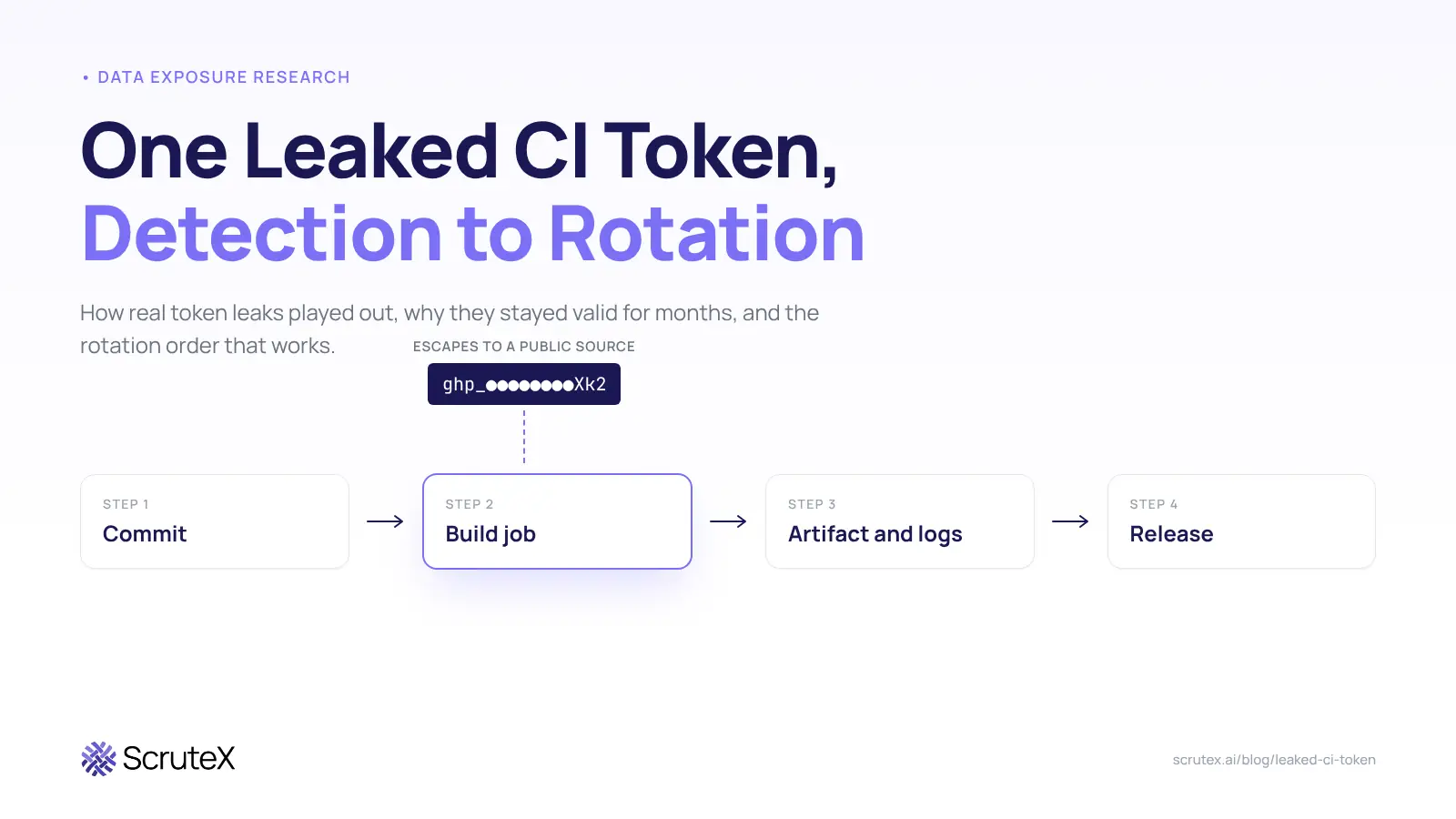
Attackers want the token that builds your software more than they want most user passwords. A CI token has no MFA prompt, and it sits upstream of every release you ship. This post follows real token leaks from exposure to outcome. One token leaked for five months without anyone knowing, and its owner killed it within hours of being told. Another team spotted its leaked key within hours, never finished revoking it, and lost its release pipeline four months later. A third leak spread through three projects before anyone noticed.
What is a leaked CI token? A leaked CI token is a credential used by a build pipeline (GitHub Actions, GitLab CI, CircleCI, Jenkins) that has escaped its secret store into a public repo, build log, artifact or paste. If it still authenticates, anyone holding it can act as your pipeline.
Why is a leaked CI token worse than a leaked password?
A password usually guards one account, and a second factor often guards the password. A CI token skips both. Machines use it, so nothing prompts for a code when it logs in. Teams also scope these tokens wide because narrow scopes break builds, and many never set an expiry.
The volume keeps growing. GitGuardian counted 28.65 million new hardcoded secrets in public GitHub commits in 2025, 34% more than the year before. Private code is worse. In the same report, 32.2% of internal repositories held at least one hardcoded secret, against 5.6% of public ones.
Which CI tokens leak, and what can each one reach?
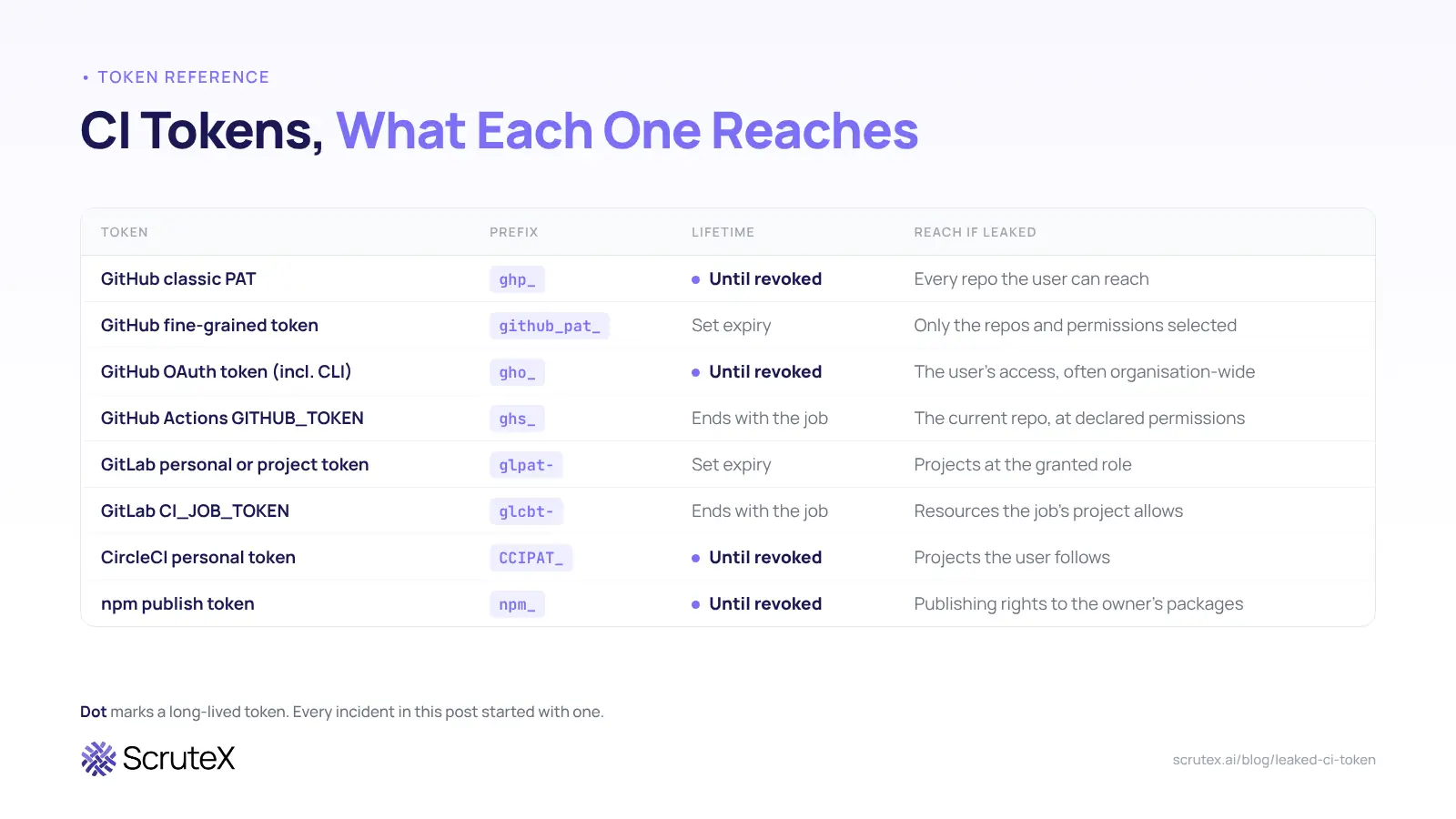
Every token type below can leak. They differ in how long they live and how far they reach, and those two facts set your response time.
| Token | Typical prefix | Lifetime | What it can reach if leaked |
|---|---|---|---|
| GitHub classic personal access token | ghp_ | Until revoked, unless an expiry was set | Every repo the user can reach, at the scopes granted |
| GitHub fine-grained token | github_pat_ | Set expiry | Only the repos and permissions selected |
| GitHub OAuth token (incl. GitHub CLI) | gho_ | Until revoked | The user's access, often organisation-wide |
| GitHub Actions GITHUB_TOKEN | ghs_ | Ends with the job | The current repo, at the default or declared permissions |
| GitLab personal or project token | glpat- | Set expiry | Projects at the granted role |
| GitLab CI_JOB_TOKEN | glcbt- on recent versions | Ends with the job | Resources the job's project allows |
| CircleCI personal token | CCIPAT_ | Until revoked | Projects the user follows |
| npm publish token | npm_ | Until revoked | Publishing rights to the owner's packages |
Long-lived user tokens (classic PATs, OAuth tokens, publish tokens) cause the worst incidents. Every case in this post started with one.
Where do CI tokens actually leak?
Most teams picture a developer committing a .env file. That still happens, but it is one route among several.
Build logs. A Composer flaw disclosed in May 2026 printed raw GitHub Actions tokens into CI job logs when GitHub's newer token format failed Composer's validation check. GitHub's log masking missed the token because colour codes and line wrapping broke it into pieces. The boxed error showed asterisks, and the raw line below printed the token in full. Composer 2.9.8, 2.2.28 and 1.10.28 fix it.
Build artifacts. GitLab masks secrets in job logs. It does not mask them in published artifacts. The GnuTLS token covered below leaked this way: a test script dumped every CI variable into a temp file, and a job uploaded that file as a public artifact on every run. In 2024, Unit 42's ArtiPACKED research showed the same class of problem on GitHub, with misconfigured artifacts exposing tokens such as GITHUB_TOKEN and ACTIONS_RUNTIME_TOKEN to anyone with read access to the repository.
Workflow triggers. A workflow that runs untrusted pull request code with access to secrets hands those secrets to whoever opens the pull request. That is how the tj-actions chain began, covered below.
Poisoned build tools. In March 2026, attackers who had compromised the Trivy GitHub Action took LiteLLM's PyPI publish token from its CI and published two malicious releases (1.82.7 and 1.82.8). Your pipeline trusts every action and scanner it runs, and each one can read the secrets in scope.
Malware on developer machines and runners. The Shai-Hulud worm in September 2025 ran TruffleHog on infected machines and CI jobs, used stolen npm tokens to publish trojanised packages, and dumped the haul into public GitHub repositories. GitGuardian counted 278 secrets leaked publicly in the first wave and found 37 still valid after the initial clean-up.
Places that are not code. GitGuardian found that 28% of secrets incidents in 2025 started entirely outside source code, in tools such as Slack, Jira and Confluence.
AI-assisted commits. GitGuardian also found that commits co-authored by Claude Code leaked secrets at about twice the baseline rate.
Two leaks, two outcomes
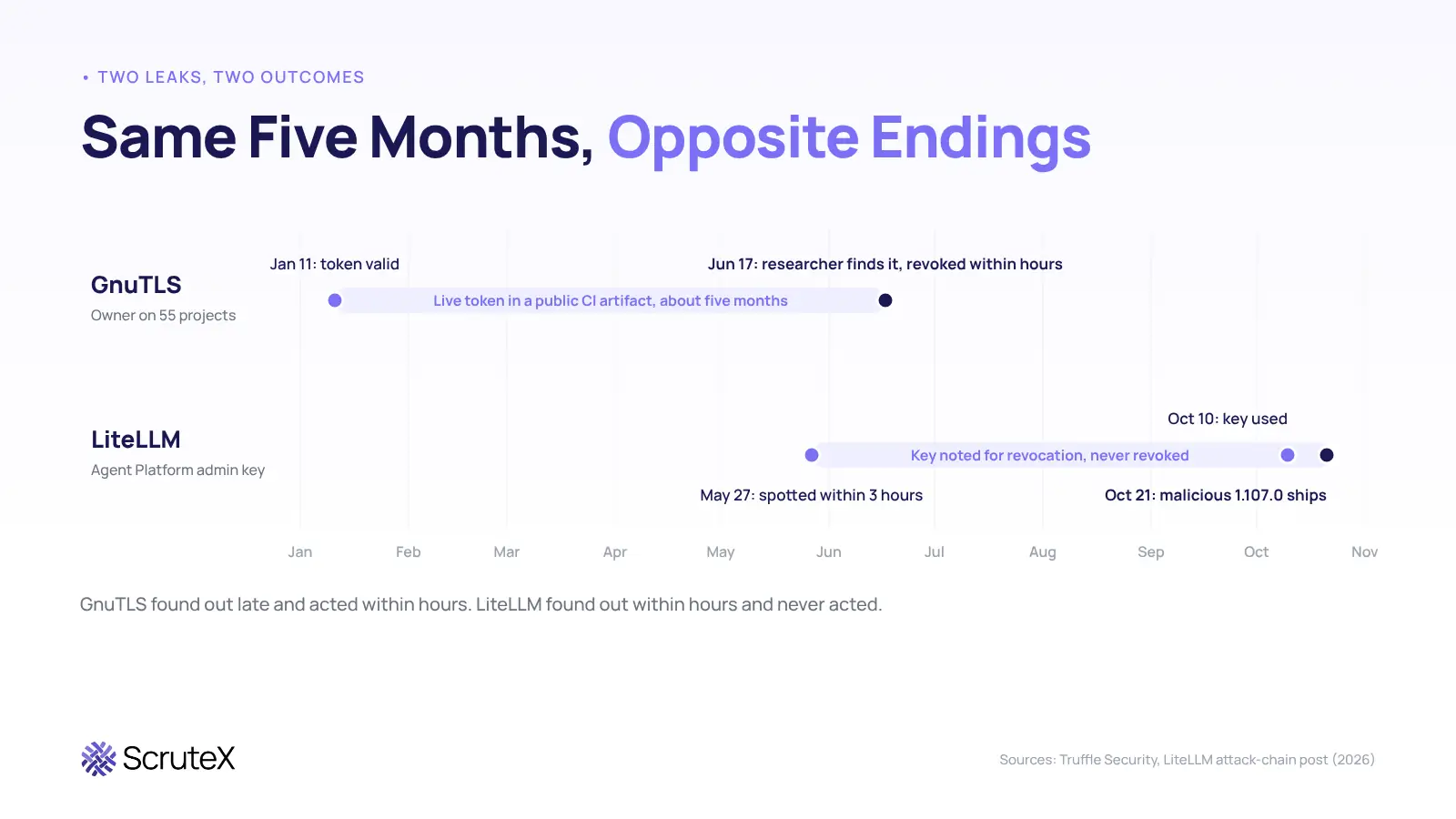
GnuTLS: five months exposed, revoked within hours
| Date (2026) | Event |
|---|---|
| Jan 11 | A GitLab personal access token with api scope becomes valid. It sits in a CI/CD variable in the public ocserv project |
| Jan to Jun | A test helper script dumps every CI variable into a temp file. A Fedora job uploads that file as a public artifact on every pipeline run |
| Jun 17 | Truffle Security's scanner finds the live token. It is Owner on 55 of the 75 projects it can see, including GnuTLS, Nettle, libtasn1 and libidn2, and can push directly to a GnuTLS release branch |
| Jun 17 | The account owner revokes the token within hours of disclosure. Maintainers remove the environment dumps the same day |
| Sep 9 | Truffle Security publishes its write-up. The owner's review found no sign of misuse |
Nobody at GnuTLS knew about the leak. The job logs looked clean because GitLab masked the token there. The outcome stayed clean for two reasons: the owner revoked fast once told, and no attacker appears to have found the artifact first. The second reason is luck.
LiteLLM: caught in hours, never revoked
| Date (2026) | Event |
|---|---|
| May 27 | An administrative key for LiteLLM's internal Agent Platform lands in a config file in a public LiteLLM repository |
| May 27, about 3 hours later | A follow-up commit deletes the file and the team notes the key for revocation. Nobody finishes the job. The original commit stays in public history |
| Oct 10 | The attacker calls the Agent Platform API with the old key. One response contains the GitHub CLI OAuth token of an organisation owner |
| Oct 10 and 12 | The attacker pushes workflows to short-lived branches that post secrets to an external webhook, then delete themselves. They collect two more maintainers' GitHub tokens |
| Oct 21 | The attacker overrides branch protection with the owner token, points the release pipeline at a lookalike fork, approves the production gate with a stolen maintainer token and publishes 1.107.0 to PyPI, Docker Hub and GHCR |
| Oct 21, about 1 hr 43 min later | PyPI quarantines the release |
Two things made the last step easier. The owner's OAuth token was unscoped and issued after 2FA, so it worked across the whole organisation with no second factor in the way. And LiteLLM had temporarily relaxed its production release gate, normally held by an account locked to a physical device, to any two engineers.
Put the two cases side by side. Both tokens sat exposed for about five months. GnuTLS found out late and acted within hours. LiteLLM found out within hours and never acted. In both cases the outcome turned on revocation, not detection.
How did one stolen token become the tj-actions attack?
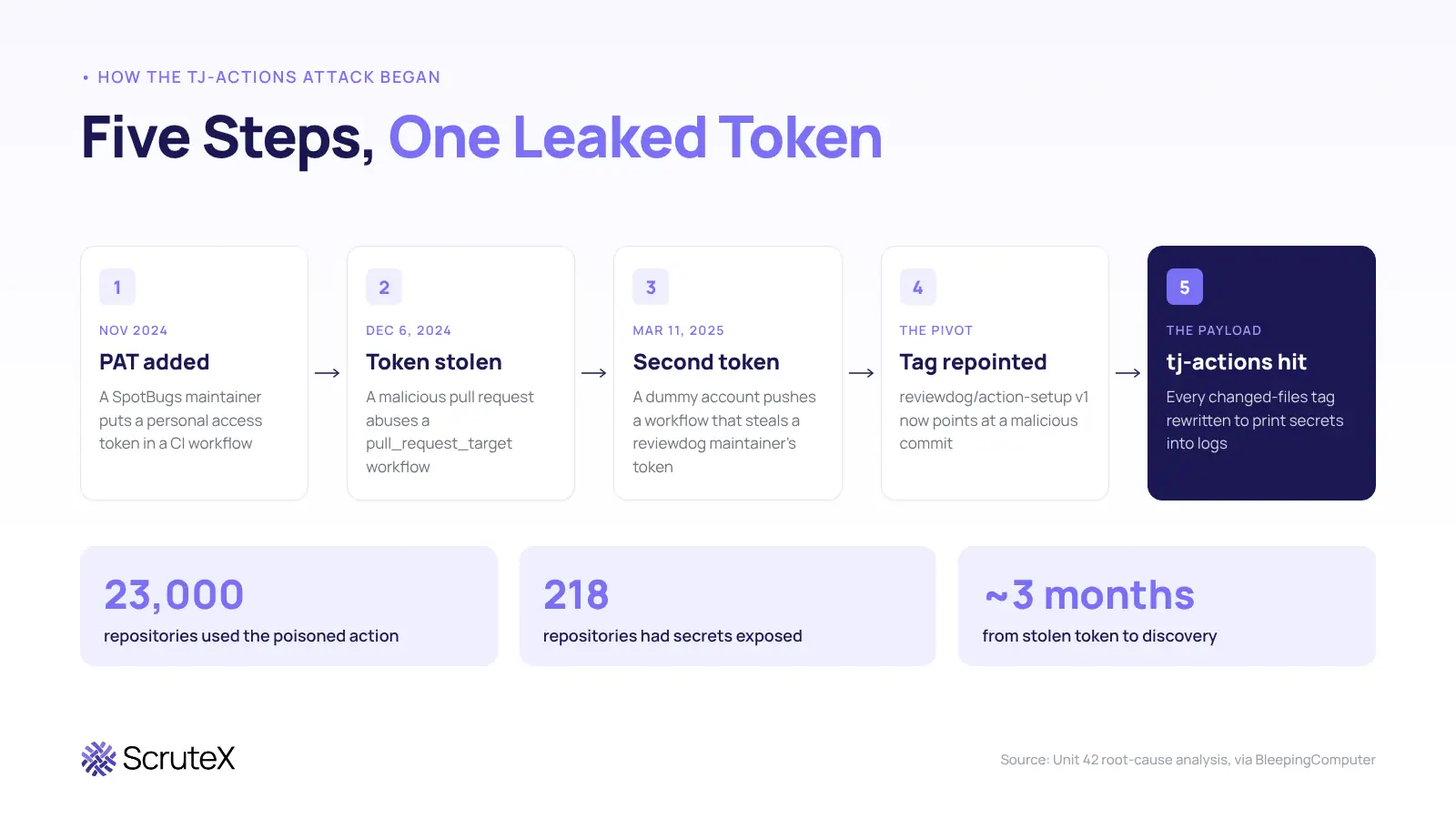
The tj-actions/changed-files compromise of March 2025 is often told as a story about a poisoned GitHub Action. Unit 42's root-cause work shows it was really a chain of leaked tokens.
- Late November 2024. A SpotBugs maintainer added a personal access token to a CI workflow.
- December 6, 2024. The attacker opened a malicious pull request from a throwaway account. It abused a workflow that used the pull_request_target trigger, and the maintainer's token leaked.
- March 11, 2025. The attacker used that token to invite a dummy account into SpotBugs. The dummy account pushed a workflow that stole a second token, belonging to a reviewdog maintainer.
- The pivot. The second token had write access to reviewdog/action-setup. The attacker repointed its v1 tag at a malicious commit, poisoning everyone who used v1.
- The payload. tj-actions/eslint-changed-files depended on that action. Its run stole a token with write access to tj-actions/changed-files. The attacker then rewrote every tag to point at a commit that printed workflow secrets into logs.
The poisoned action sat in about 23,000 repositories. Investigators later found secrets exposed in 218 of them. The first token leaked on December 6, 2024, and the attack came to light in mid-March 2025. Nobody spotted the stolen token for about three months.
What attack path does a leaked CI token open?
Treat each step as a question your audit log can answer. The MITRE ATT&CK mapping shows where each step sits.
- Find the token (T1552.001, Unsecured Credentials: Credentials In Files). Attackers scrape public repos, gists, logs, artifacts and pastes for known prefixes like the ones in the table above.
- Validate and act as the pipeline (T1078, Valid Accounts). One API call tells the attacker whether the token works and what it can touch.
- Harvest more secrets. A token with workflow scope can run a workflow that prints or ships every secret in the repo. LiteLLM's attacker used this to collect two more maintainers' GitHub tokens plus internal and vendor keys, mostly upstream AI inference API keys.
- Persist. Shai-Hulud created a branch holding a workflow that sent repository secrets to an external webhook. Revoking the first token does not remove a workflow that already exists.
- Tamper with the release (T1195.002, Compromise Software Supply Chain). Move a tag, push a commit, or publish a package. Downstream users pull it on their next build.
How fast do attackers use a leaked CI token?
Faster than a human review cycle. A short-lived token gives you less protection than its lifetime suggests.
In the Composer case, GitHub revokes write-scoped job tokens soon after the job ends. Sansec's testing still found that a window under 2 seconds was enough to capture the token and push a commit while the job was running. For workflows that run more steps after Composer (test, build, deploy), that window stretches to minutes.
For long-lived tokens the clock never runs out. The LiteLLM key still worked more than four months after the leak. The GnuTLS token stayed live for about five. The SpotBugs token worked for about three before the attacker used it.
How do you rotate a leaked CI token in the right order?
Rotation is a sequence. Get the order wrong and you either leave the door open or lose the evidence.
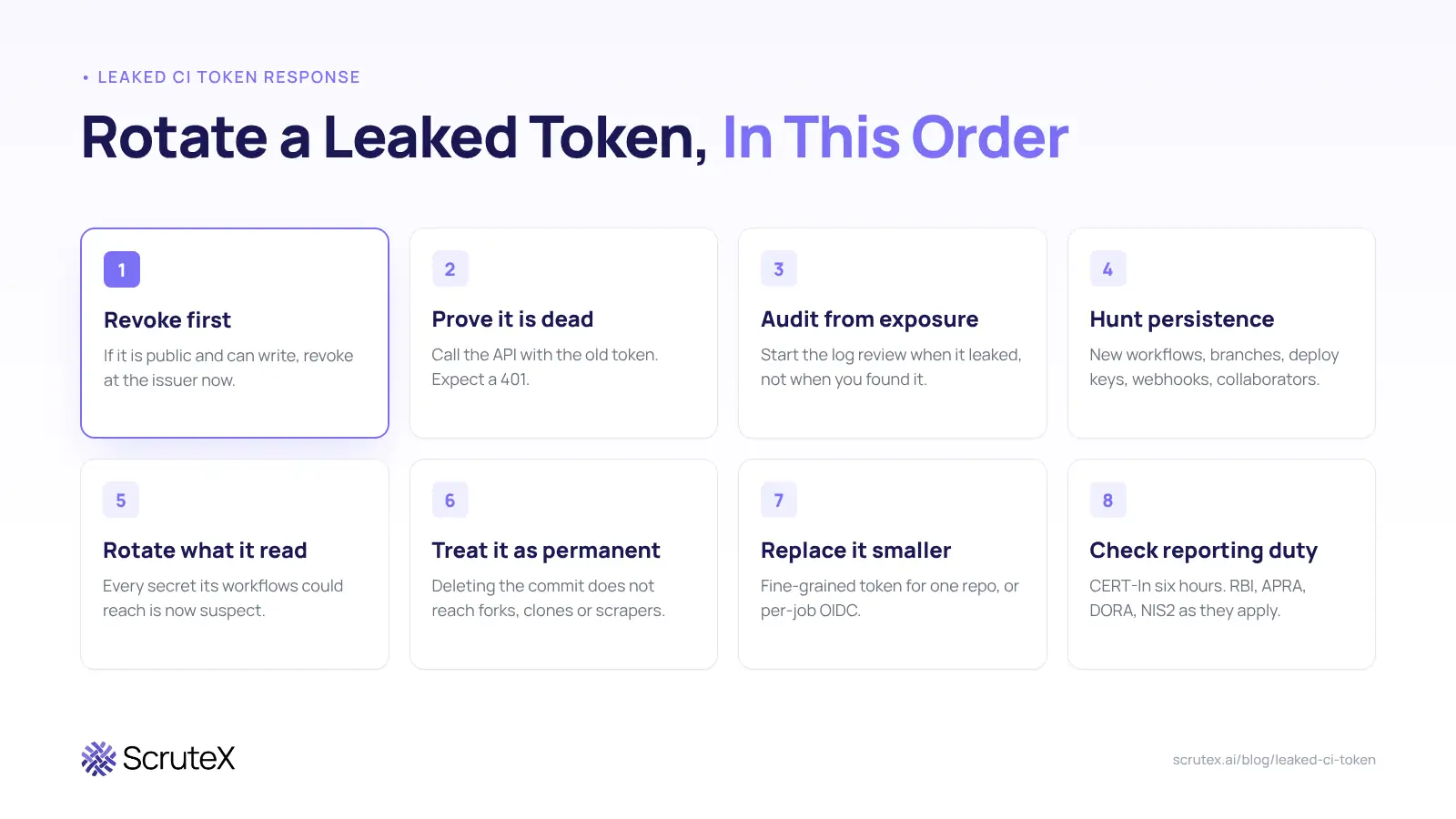
1. Revoke first if the token is public and can write. If the token is public, still valid and write-scoped, revoke it at the issuer now and accept the broken build. The GnuTLS token owner took this path. If the token is read-only and internal, create the replacement first, then revoke.
2. Prove the revocation worked. Call the API with the old token and confirm you get a 401. LiteLLM's key was noted for revocation. It was never dead.
3. Pull the audit log from the exposure time, not the detection time. The exposure time is when the token first became public. For GnuTLS that was five months before detection. Look for token use from unfamiliar IPs, and check for actions nobody planned:
- new workflow files
- new deploy keys
- new OAuth apps
- new webhooks
- new tags or releases
4. Hunt for persistence. Look for short-lived branches, workflows that serialise secrets or post to external URLs, new collaborators, and private repos turned public. Shai-Hulud did all of these. Wiz found eight users whose private repositories had been republished as public copies.
5. Rotate everything the token could read. A token with workflow scope can read every secret those workflows use. Each of those secrets is now suspect, and so is anything those secrets open.
6. Treat the exposure as permanent. Deleting the file in a later commit leaves the secret in history. Force-pushing does not reach forks, clones, caches or scrapers. LiteLLM deleted the file about three hours after the leak, the original commit stayed public until October 22, and the key still worked on October 10.
7. Replace the token with something smaller. Use a fine-grained token scoped to one repository, or a short-lived OIDC credential that expires with the job.
8. Check whether you must report it. If the token was used, you may have a reportable incident. In India, CERT-In's 2022 directions set a six-hour reporting window for listed incident types. Regulated firms should also check RBI, APRA CPS 234, DORA or NIS2 obligations as they apply.
Why do leaked CI tokens stay valid for months?
Three things keep them alive. Bot and service tokens often have no named owner. Teams fear breaking production builds. Many tokens also cannot be tested automatically. GitGuardian found that 64% of secrets it confirmed valid in 2022 were still active and exploitable four years later. It also reports that 46% of critical secret types lack validation checkers.
Defaults lag too. GitHub switched the default GITHUB_TOKEN permission to read-only on February 2, 2023, but only for newly created organisations and personal-account repositories. Older projects keep issuing read and write tokens until an admin changes the setting.
What controls shrink the blast radius of a leaked CI token?
You cannot stop every leak. You can make each leaked token reach less and live shorter.
- Set the default GITHUB_TOKEN permission to read. Grant write per workflow with an explicit permissions block. Sansec notes this one change neutralises the Composer leak for every workflow that does not need to push.
- Pin third-party actions to a full commit SHA, not a tag. The tj-actions attacker rewrote tags, and so did the Trivy attacker. A pinned SHA would not have moved.
- Keep secrets away from untrusted pull request code. Audit every workflow that uses pull_request_target. SpotBugs lost its first token this way.
- Replace stored cloud keys with OIDC. The pipeline gets a short-lived credential per job, so there is no long-lived key to leak.
- Upload only the files an artifact needs. Uploading the whole workspace, or untracked files, can bundle tokens into a download anyone with read access can open. GitLab will not mask them there.
- Tie release approval to a hardware-bound account. LiteLLM's attacker approved the production gate with a stolen token after the gate was relaxed to any two engineers.
- Turn on push protection and run an organisation-wide scan. GitHub offers a free secret risk assessment to Team and Enterprise organisations, covering public leaks, private exposures and token types.
- Disable install scripts in CI where you can. Researchers gave this advice after Shai-Hulud, because the worm ran at install time.
- Give every non-human token a named human owner and an expiry. A token without an owner never gets rotated.
Who pays when a CI token leaks?
The cost rarely stays with the team that leaked the token. The people who pay are the developers and companies downstream who trusted the release.
Microsoft's analysis of the malicious LiteLLM 1.107.0 build found startup hooks that ran whenever Python launched in an affected environment, even if the application never imported LiteLLM. The hooks sat outside the LiteLLM package directory, so removing the package alone could leave the credential collector in place. The teams that pulled 1.107.0 did nothing wrong. They updated a dependency.
The same applies to tj-actions. The 218 repositories that leaked secrets had done nothing unusual. They used a popular action.
Where does external monitoring fit next to secret scanners?
Secret scanners such as GitHub secret scanning, GitGuardian and TruffleHog work inside your code and pipelines. They catch a token at commit time or in your own repos, and they should be your first line. They do not see a token once it has left your estate, for example in a contractor's personal repo, a paste, a stealer log or a breach dump. External monitoring covers that ground. Mature teams run both. A smaller team that can run only one should start with the scanner inside its own code, then add external monitoring for what leaks past it.
Key takeaways
- A leaked CI token gives the holder your pipeline's identity, with no MFA in the way.
- Every incident here started with a long-lived user token. Short-lived job tokens can still be raced.
- GnuTLS and LiteLLM both left tokens exposed for about five months. Revocation, not detection, decided the outcome.
- "Noted for revocation" is not revoked. Test the old token until it returns a 401.
- Audit from the exposure time and hunt for planted workflows before you call it closed.
- Read-only defaults, SHA pinning, clean artifacts and OIDC cut what the next leaked token can reach.
Am I exposed?
Check these today. You do not need ScruteX for any of them.
- ☐ List every personal access token, OAuth token and publish token with write or workflow scope. Can you name a human owner for each?
- ☐ Search your public repos, gists and contributors' personal repos for ghp_, gho_, github_pat_, glpat-, npm_ and CCIPAT_ prefixes.
- ☐ Download one public artifact from each pipeline and search it for those prefixes. Logs can look clean while artifacts do not.
- ☐ List every workflow that uses pull_request_target, and check whether any of them expose secrets to pull request code.
- ☐ Pick one token flagged for revocation in the past year. Does it still authenticate?
What ScruteX finds here
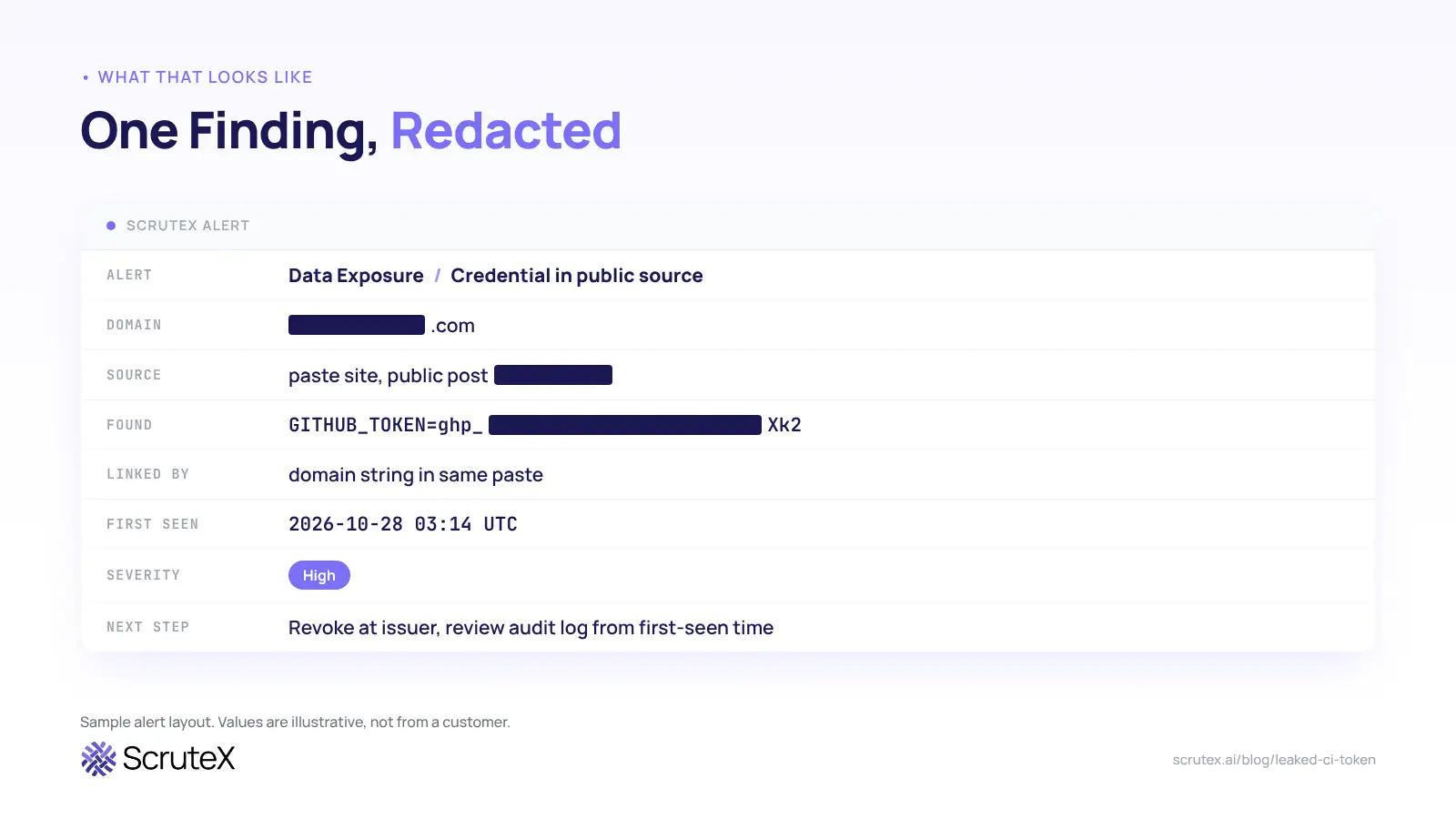
ScruteX watches paste sites, stealer logs, dark web sources and breach data for credentials and source code tied to your domains and keywords. It links each exposure to your organisation through the domain, email or keyword that matched. Each alert names the source and first-seen time, so your analyst can start the audit from the exposure time, not the detection time.
What that looks like
Sample alert layout. Values are illustrative, not from a customer.
Check your domain
Are credentials tied to your domain sitting in public sources right now? Enter your domain to check. Domain only, no signup.
ScruteX only sees exposure on the public internet. It will not see a token leaked inside your private repos, internal CI logs or chat tools. For those, run a secrets scanner inside your environment.
Where to go next
- Data Exposure Insights: start here if your concern is credentials and tokens tied to your domain turning up in public sources.
- Vendor Insights: read this if the risk sits in a third-party action or vendor pipeline, as it did with tj-actions and Trivy.
- How to find leaked credentials on the dark web: goes deeper on the same problem for human credentials and stealer logs.
- What is CTEM?: steps sideways to show where token exposure fits in a continuous exposure programme with scoping, validation and mobilisation.
FAQ
Q: What should I do first if a CI token leaks?
A: If the token is public and can write to repositories, revoke it at the issuer right away, even if a build breaks. Then confirm the old token returns a 401. Then review the audit log from the time of exposure, not the time you found it.
Q: Does deleting the commit remove a leaked token?
A: No. A later commit that deletes the file leaves the secret in history, and forks, clones, caches and scrapers may already hold it. Treat any token that reached a public source as compromised and revoke it.
Q: Is the GitHub Actions GITHUB_TOKEN dangerous if it leaks?
A: It is less dangerous than a personal access token because it expires when the job ends. Researchers have shown the revocation can be raced in under two seconds, and older organisations may still issue write-scoped tokens by default.
Q: How long do leaked tokens stay valid?
A: Often for years. GitGuardian found that 64% of secrets it confirmed valid in 2022 still worked in early 2026. Owners rarely rotate them unless something forces the issue.
Q: Why is pull_request_target risky?
A: It runs workflows with access to repository secrets, even for pull requests from forks. If the workflow checks out and runs the pull request's code, the author of that pull request can read those secrets.
Q: What replaces long-lived CI tokens?
A: Fine-grained tokens scoped to a single repository, or short-lived OIDC credentials issued per job. Both shrink what a leaked token can reach and how long it works.