Malicious npm and PyPI Packages: How to Monitor Your Exposure
By ScruteXPublished Updated
On May 19, 2026, attackers published 639 versions of 323 npm packages in about one hour. The payload did more than steal secrets. It checked whether the stolen npm credentials worked, listed the packages that account could publish, injected itself into them and republished them. Each developer laptop or build runner that installed an affected version became a new source of stolen tokens.
That is the problem to monitor. The question is no longer whether a bad package exists somewhere. It is whether one reached your environment, and whether anything left with it.
Monitoring your exposure to malicious npm and PyPI packages means answering three questions on a schedule: did a flagged package version enter your lockfiles or builds, did a build runner hold secrets when it ran, and have those secrets appeared outside your network.
Why are malicious npm and PyPI packages harder to spot in 2026?
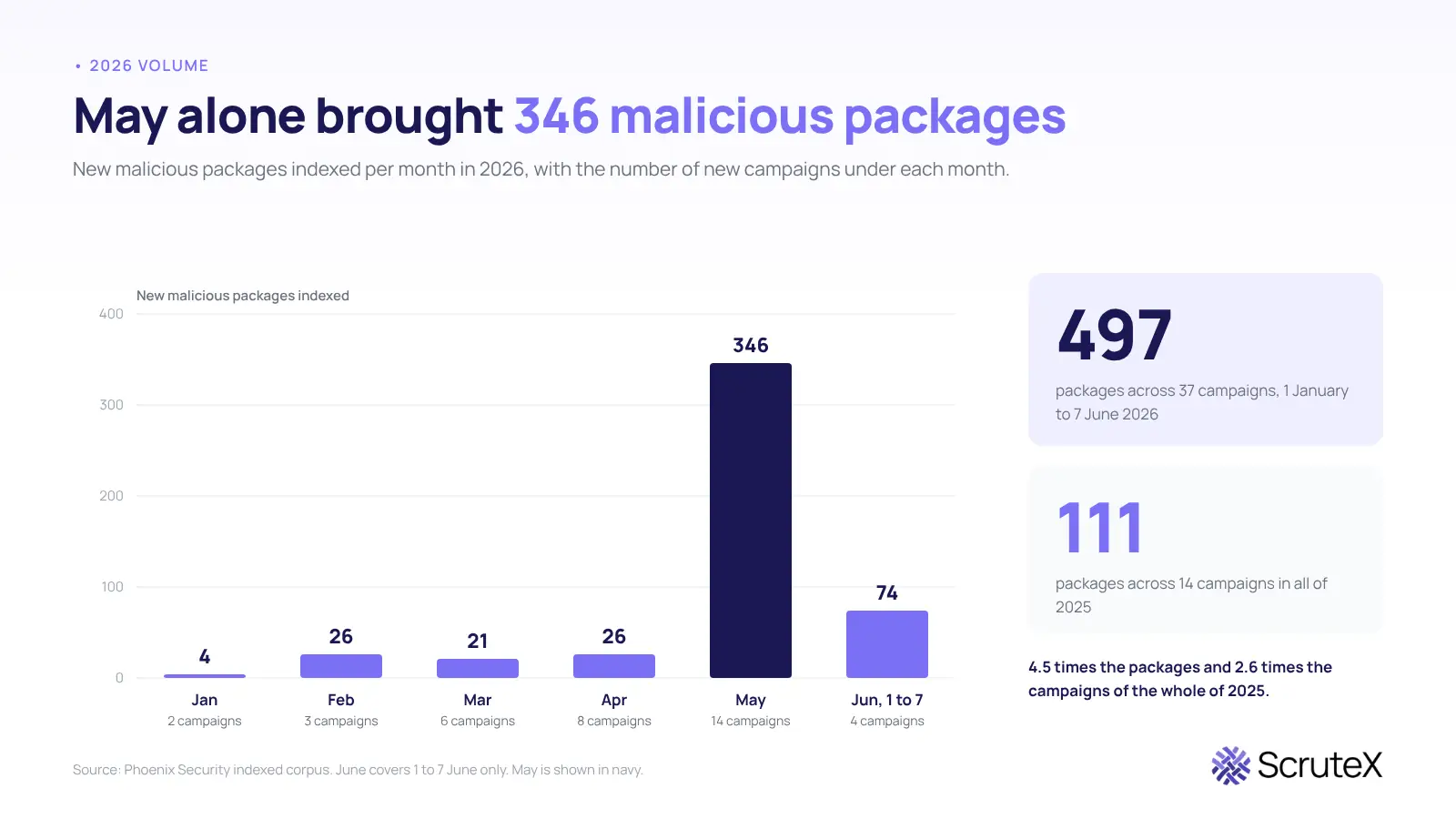
Volume rose, and speed rose with it. Malicious package campaigns have grown sharply in 2026 compared with the whole of 2025, with the pace accelerating month over month. npm accounts for the large majority of malicious packages, with PyPI a distant second.
The worm design is why a single account can matter so much. One compromised CI pipeline or maintainer account can be used to publish malicious versions across dozens of packages within minutes, and later waves have been larger, reaching hundreds of packages from publishers with very large combined download counts. Similar behaviour in a newly reported compromise doesn’t, by itself, prove the same operators.
Attribution matters less than it used to. Once a worm’s source code is public, any competent actor can copy the method. Track the behaviour, not the brand name of the crew.
A weekly audit finds out after the damage. When a whole wave lands in hours, you need to know on the day whether your lockfiles and runners touched it.
How does a malicious package reach your environment?
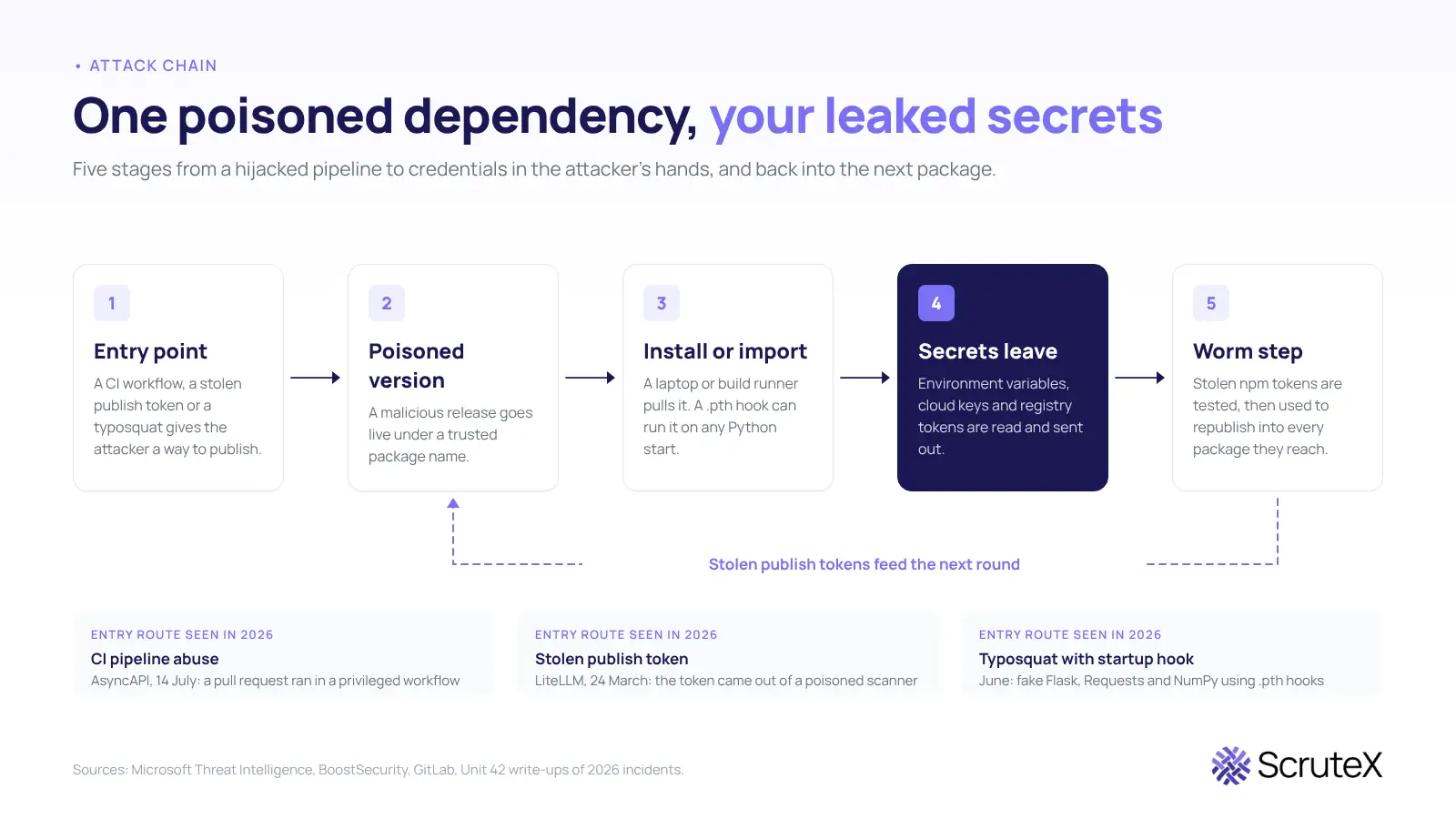
Three routes cover most of the 2026 cases.
CI pipeline abuse.A malicious pull request aimed at repository automation, such as docs-preview or build workflows, can compromise a package. GitHub calls this pattern a pwn request: a workflow that runs with elevated trust and executes untrusted pull request code. It has been the root cause of several supply chain compromises.
Stolen publish tokens.If a tool inside your pipeline is poisoned, it can read the publish token from the build environment and use it to push malicious versions to the registry. Those versions stay live until the registry quarantines them, and any pipeline that resolves a fresh version in that window is exposed.
Typosquats and startup hooks.Python’s .pth file mechanism lets a package run code at interpreter startup, so a payload executes on any Python invocation in the environment, with no import needed. Typosquats of popular libraries and compromised legitimate packages can both use it.
One more point for anyone who relies on signatures: provenance attestation doesn’t prove a package is safe. It is possible to produce malicious packages with valid provenance, so a package can be attested and still hostile.
What should you check first when a package is flagged?
Work in this order. Each step narrows the next.
- Find the version in your lockfiles. Researchers on the Tensorlake incident told readers to run npm ls for the package, search lockfiles for the bad version, and check whether anyone pulled the repository and ran install after the compromise date. For Python, run pip freeze or pip show, and look for unexpected .pth files in site-packages. For LiteLLM, the last known clean version is 1.82.6.
- Establish whether it ran. Install, import and interpreter start are different triggers. Check developer laptops, CI jobs and container builds separately.
- List the secrets in scope when it ran. The LiteLLM security test job alone had more than 230 secrets in scope. Cloud keys, registry tokens and CI variables all count.
- Rotate everything in scope. If a compromised version is confirmed, treat the environment as fully breached and rotate credentials. Do not rotate only the keys you think were used.
- Check clusters and outbound traffic. For LiteLLM, responders were told to look for attacker pods in Kubernetes clusters where it was deployed and to watch outbound traffic to known attacker domains.
- Look for what the thief did with your access. In the @antv wave, thousands of GitHub repositories were created automatically using stolen credentials. Review new repositories, changed workflows and unexpected publishes under your accounts.
How do you monitor exposure on an ongoing basis?
Treat these as standing controls, not incident steps.
Keep an inventory you can query. An SBOM turns “do we ship this package” from a multi-day hunt into a lookup.
Install from the lock and verify hashes. Use lockfiles with hash pinning, so the package manager rejects any dependency whose hash changes.
Add a release cooldown. Most major package managers now let you set a minimum release age before a new version can be installed. The reasoning is that registry takedowns of malicious releases take a few days to land. The limit is plain: a cooldown does not help with packages already in your lockfile.
Harden CI. Do not run untrusted pull request code in a privileged workflow. Scan workflows with a static analyzer such as zizmor, and pin actions to commit SHAs.
Shorten credential life. Prefer short-lived tokens and trusted publishing, which removes long-lived tokens from CI. A token that expires in a week is worth far less to a thief.
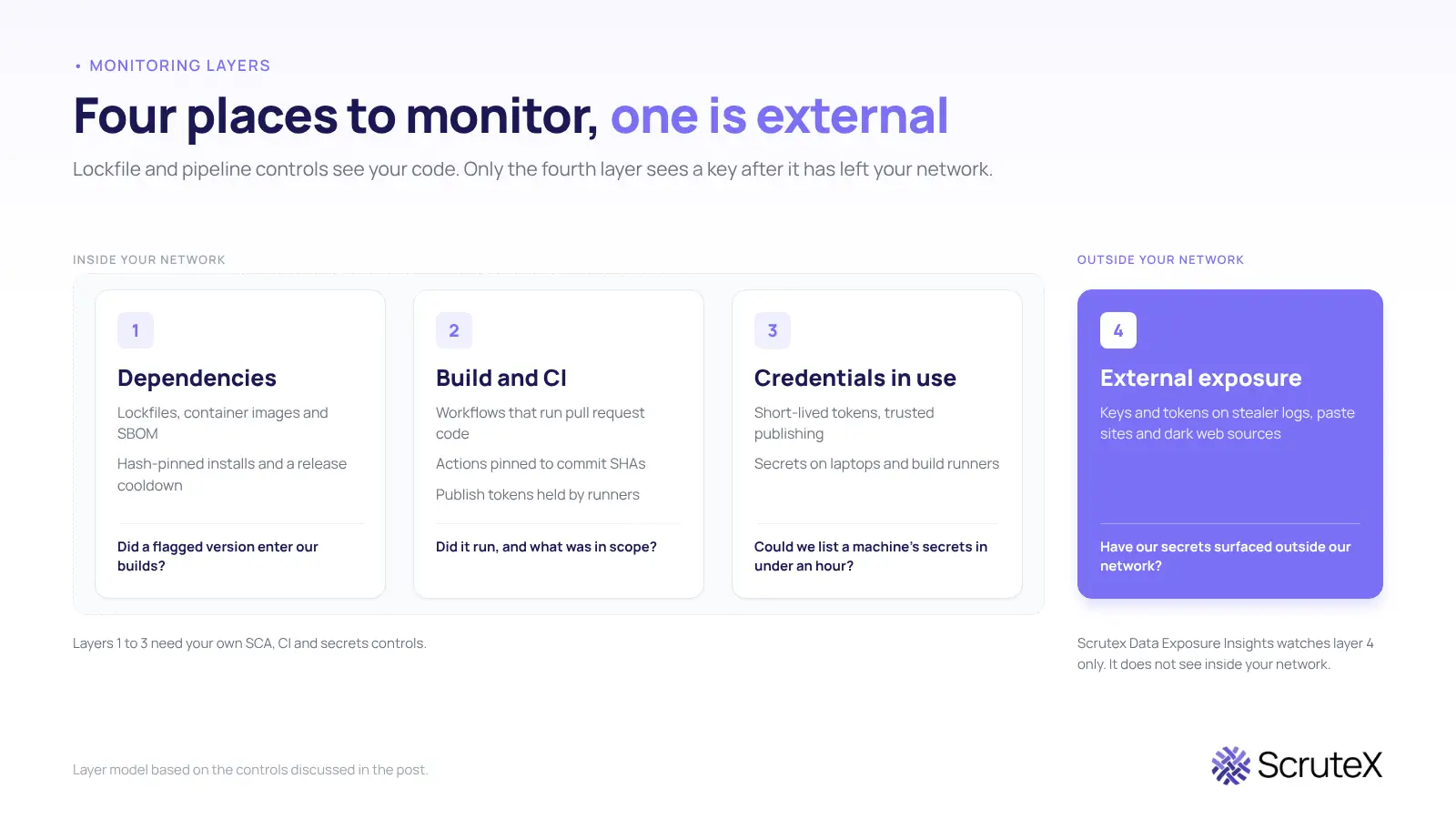
Watch outside your network. The controls above see your code and your pipelines. They do not see a key after it lands on a stealer log, a paste site or a dark web forum. That is the fourth layer, and the one most teams leave unwatched.
Where do SBOMs, lockfile scans and cooldowns fall short?
Each control answers a narrow question.
- An SBOM lists what you ship. It cannot tell you whether a secret already left.
- A cooldown protects fresh installs. It does nothing for a version you pinned last month and that was poisoned later in the same release line.
- Blocking install scripts is not enough. npm 12 blocks post-install scripts, but the AsyncAPI attackers placed the malicious code in the main JavaScript file instead.
- Registry scanners answer a different question. Tools such as Socket and Sonatype analyse PyPI packages for malicious behaviour before install. They are strong at "is this package bad". Large, mature teams often run several best-of-breed tools of this kind, and that is a sound choice. Smaller teams gain from one connected view. Neither type answers "did our secrets already leave".
Who else pays when a dependency is poisoned?
The customers of the affected software do. LiteLLM lets applications route requests across LLM providers through one API. The malware went after credentials for AI platforms, cloud services, Kubernetes and developer pipelines. The end users of those applications never chose that dependency. They carry the risk when a key or a prompt log is exposed.
Key takeaways
- Worm-style malicious packages now move across hundreds of packages in hours, so monitoring has to run daily, not quarterly.
- The first triage question is "did it run, and what secrets were in scope", not "is the package installed".
- Lockfile hashes, cooldowns and tighter CI cut your exposure but do not show you what has already leaked.
- Signed and attested packages can still be malicious.
- Credentials that leave your network need a separate, external check.
Are you exposed? A five-point self-check
You can answer these without any tool from us.
- Does any lockfile or container image in your organisation contain a version from a flagged advisory, including transitive dependencies?
- Did any CI job install dependencies with a fresh resolve (no lock, or a lock that rewrote itself) during a known malicious window?
- Do your build runners hold long-lived publish tokens or cloud keys in environment variables?
- Can you list every workflow that uses pull_request_target, and does any of them check out and run pull request code?
- If a developer machine ran a bad package yesterday, could you list the secrets on that machine in under an hour?
If you hesitated on two or more, your exposure is unknown, and unknown is the state attackers rely on.
What Scrutex finds here
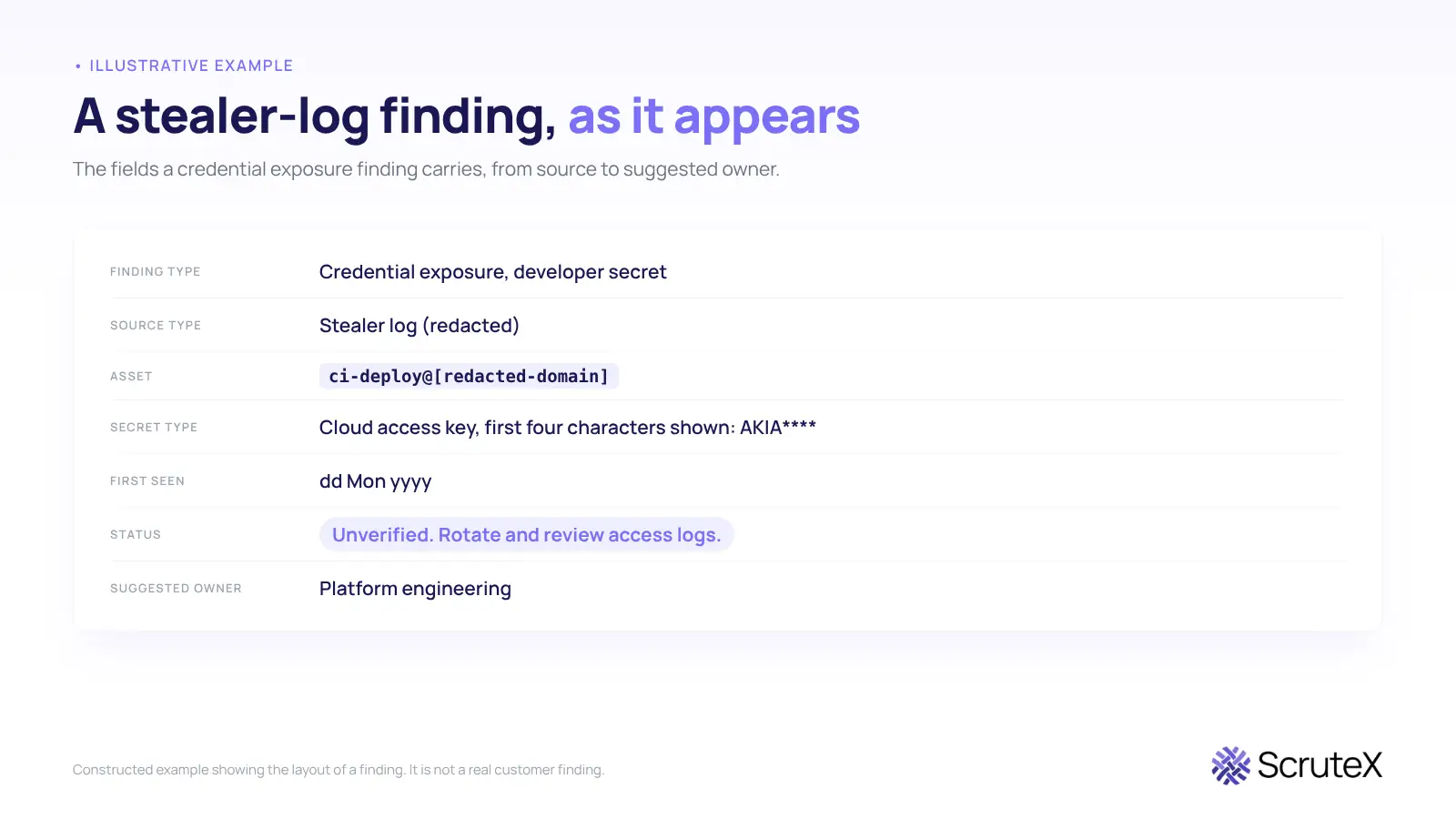
Scrutex's Data Exposure Insights module watches dark web sources, paste sites and stealer logs for credentials and keys tied to your domains and keywords, and raises an alert when it finds a match. Setup is agentless: you give it a domain and keywords. Alerts reach your team through webhooks and the REST API.
Scrutex sees external exposure only. It will not tell you which package version sits in your lockfile, and it will not see a secret that leaked inside your network. Use it next to your SCA and CI controls, not in place of them.
What that looks like
Illustrative example. This is a constructed layout showing the fields a finding of this type carries. It is not a real customer finding.
Check your domain for exposed credentials
If a poisoned package ran in your pipeline, the question that matters next is whether any of your keys have surfaced outside your network. Check your domain for leaked credentials and keys. The free tier covers all five modules, with no credit card and no time limit.
Where to go next
- If a third party's package caused this, read the vendor angle in what to monitor after a SaaS supply chain attack.
- LiteLLM was hit again in October, when version 1.107.0 carried a credential stealer. Our Black October 2026 write-up covers it as incident BO-06, with an exposure checklist.
- To see how leaked secrets are found, start with Data Exposure Insights.
- If the risk sits with a supplier rather than your own code, start with Vendor Insights.
FAQ
How do I check whether a malicious npm package is in my project?
Run npm ls with the package name and search package-lock.json, yarn.lock or pnpm-lock.yaml for the flagged version. Check transitive dependencies too, since most hits arrive through a package you never chose directly.
How do I check a PyPI package for compromise?
Run pip freeze or pip show and compare versions with the advisory. Also look in site-packages for .pth files you did not expect, because for LiteLLM 1.82.8 the advisory told users to check for that file.
What is Shai-Hulud?
It is a self-replicating worm that automated the compromise and redistribution of malicious npm packages. Recent waves are linked to the TeamPCP actor.
Should I rotate credentials if the package only ran in CI?
Yes. Treat every secret that was in scope on that runner as exposed, because the payloads read environment variables and credential files on the machine where they run.
Does a package cooldown stop these attacks?
It lowers the odds of pulling a fresh malicious release. It does not help with versions already in your lockfile. Pair it with hash-pinned installs and external credential monitoring.