LiteLLM Supply Chain Attack: What 1.107.0 Steals and How to Respond
By ScruteXPublished
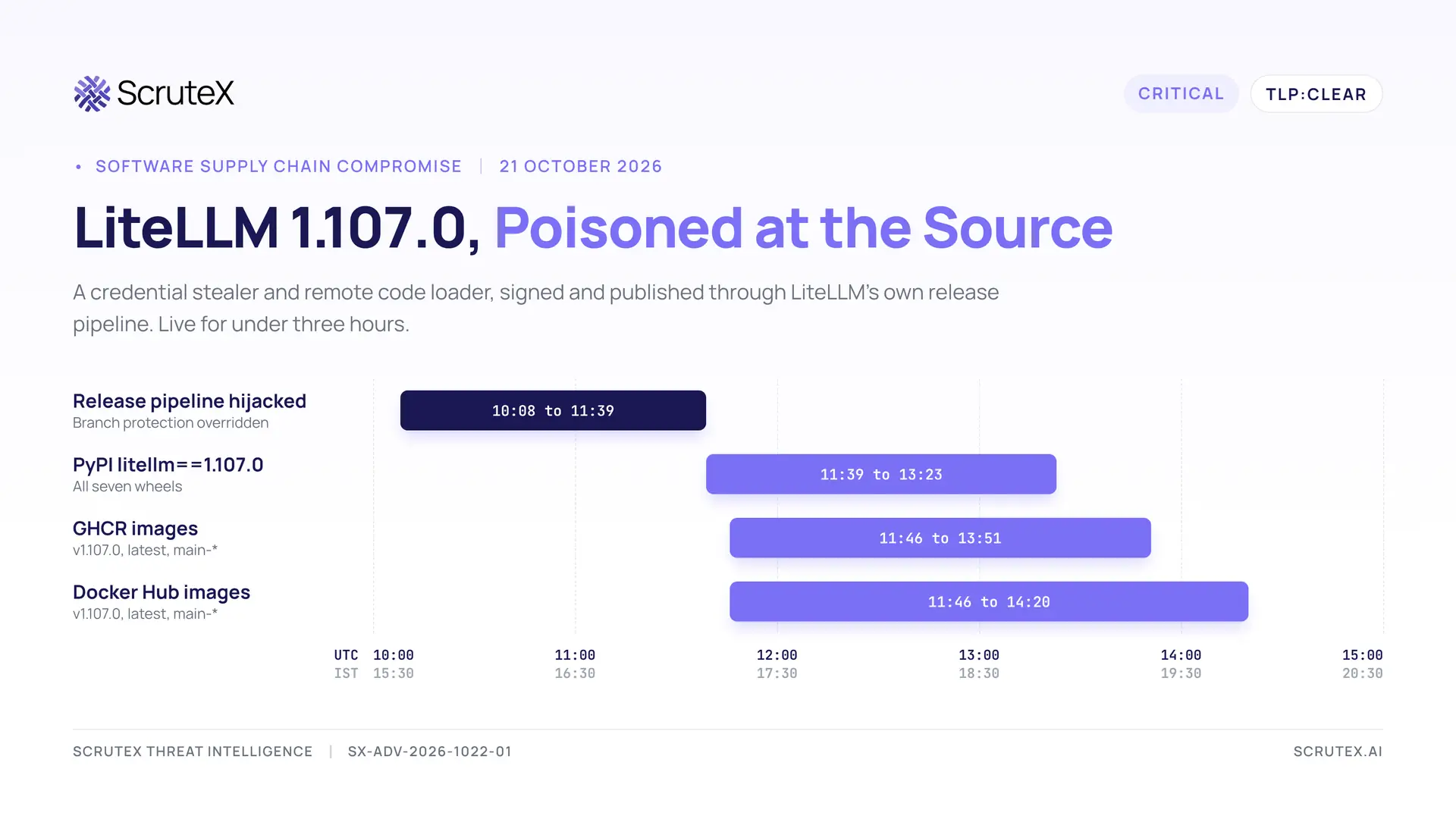
On 21 October 2026, attackers used LiteLLM's own release pipeline to publish litellm==1.107.0 to PyPI and Docker with a credential stealer and a remote code loader built in. The poisoned release was live for under three hours. Any host that ran it should be treated as breached, and every secret that host could reach as stolen.
The LiteLLM supply chain attack is a compromise of the release process, not the source code. The attackers used stolen GitHub tokens belonging to three LiteLLM engineers to override branch protection, pointed the release workflow at a lookalike repository (Berri-AI/litellm instead of BerriAI/litellm), and let the genuine pipeline sign and publish the result. The official source tag on GitHub is clean, so a review of the release code shows nothing wrong.
LiteLLM is an open-source gateway that sits between applications and LLM providers. A typical deployment holds the API keys for OpenAI, Anthropic, Azure, AWS Bedrock and others, so one compromised LiteLLM host is a route into every model account behind it. This is LiteLLM's second supply chain compromise in 2026, after attackers poisoned versions 1.82.7 and 1.82.8 in March.
The short answer. If 1.107.0 never ran in your environment, the payload did not reach you. If it did, do four things in this order: kill the loader and delete the startup files without starting Python, rebuild on 1.106.2 pinned by hash, rotate every reachable secret from a clean machine, then hunt for use of those secrets from 11:39 UTC on 21 October onwards.
Updates
| Date (IST) | Update |
|---|---|
| 22 Oct 2026, 10:30 | First published, based on LiteLLM's incident update of 21 Oct 2026, 20:30 UTC |
What is confirmed and what is still open
| Item | Status | Detail |
|---|---|---|
| Affected release | Confirmed | litellm==1.107.0 on PyPI. Docker tags v1.107.0, latest, main-latest and main-stable on Docker Hub and GHCR |
| Earlier versions | Safe | LiteLLM states all earlier versions are safe. Last clean release is 1.106.2 |
| Enterprise customers | Not affected | LiteLLM's private enterprise registry did not receive the poisoned build |
| Payload | Confirmed | Credential stealer plus a remote code loader that polls hourly for new Python to run |
| Removal | Done | PyPI removed the release by 13:23 UTC. All registry tags removed or repointed by 14:20 UTC |
| Data theft per host | Assume yes | If the host had outbound internet, assume exfiltration worked. A missing marker file proves nothing |
| Second stage | Dormant | The loader's dead-drop held no domain at disclosure. One commit could arm it, so running loaders must be killed |
| Root cause | Preliminary | GitHub CLI OAuth tokens taken from the logs of an internet-exposed internal LiteLLM deployment |
| Initial access | Unknown | How the attacker reached that deployment is unconfirmed. LiteLLM suspects a recently patched vulnerability |
Who is affected by the LiteLLM supply chain attack?
You are affected if an unpinned pip install pulled LiteLLM during the PyPI window, or if a container started from one of the listed tags during the registry window. Pulling the artifact is enough. The payload runs the next time any Python process starts in that environment, whether or not anything imports LiteLLM.
| Source | Affected artifact | Window (UTC) | Window (IST) |
|---|---|---|---|
| PyPI | litellm==1.107.0, all seven wheels. The source archive carries a tampered pyproject.toml | 11:39 to 13:23 | 17:09 to 18:53 |
| Docker Hub | Tags v1.107.0, latest, main-latest, main-stable. Image index sha256:1bbcb1443bc9... | 11:46 to 14:20 | 17:16 to 19:50 |
| GHCR | Same four tags on litellm, litellm-database and litellm-non_root | 11:46 to 13:51 | 17:16 to 19:21 |
The short window does not make this a small incident. The people most likely to have pulled 1.107.0 are the ones with the most automation: CI runners that rebuild on every commit, Kubernetes deployments that pull latest on every restart, and autoscalers that started new pods during a traffic spike that afternoon.
Likely affected:
- CI pipelines, notebooks and developer machines that install litellm without a version pin
- Kubernetes or Compose deployments on latest or main-stable that restarted or scaled on 21 October
- Any cached image or wheel pulled in the window, even if you deployed it later
Not affected:
- Installs pinned to 1.106.2 or any earlier explicit version
- Images pinned by digest to a pre-1.107.0 build
- Enterprise customers pulling from LiteLLM's private registry
- Builds from the official GitHub source tag
How to check for LiteLLM 1.107.0 without starting Python
LiteLLM's guidance suggests running
pip show litellm. On an infected host that is a mistake. pip is itself a Python program, so running it triggers the payload again. Run these checks from the shell instead.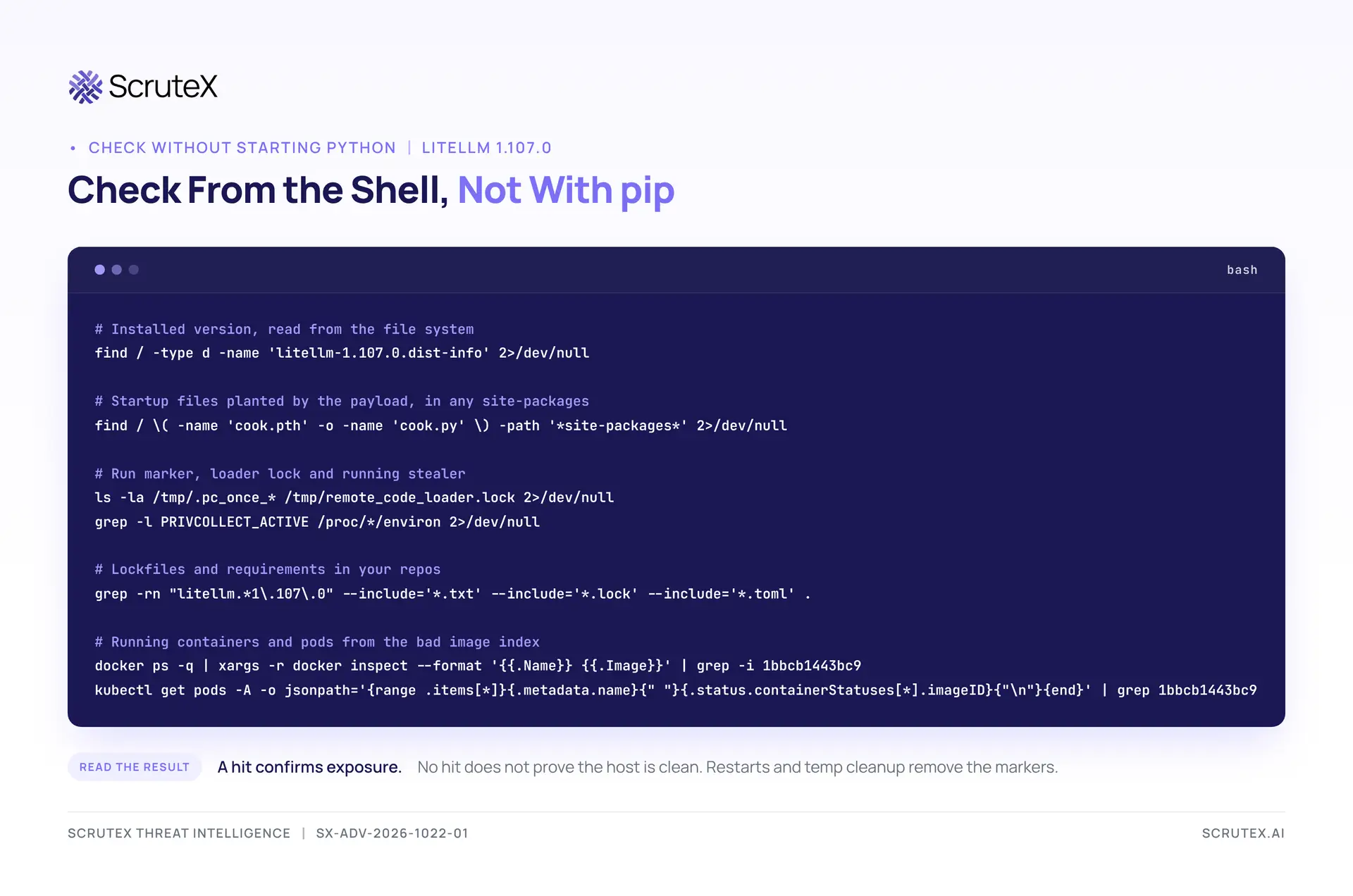
A hit confirms exposure. No hit does not prove the host is clean, because container restarts and temp cleanup remove the markers. Check deployment logs, package proxy logs and image pull history for the window as well.
How did attackers hijack the LiteLLM release pipeline?
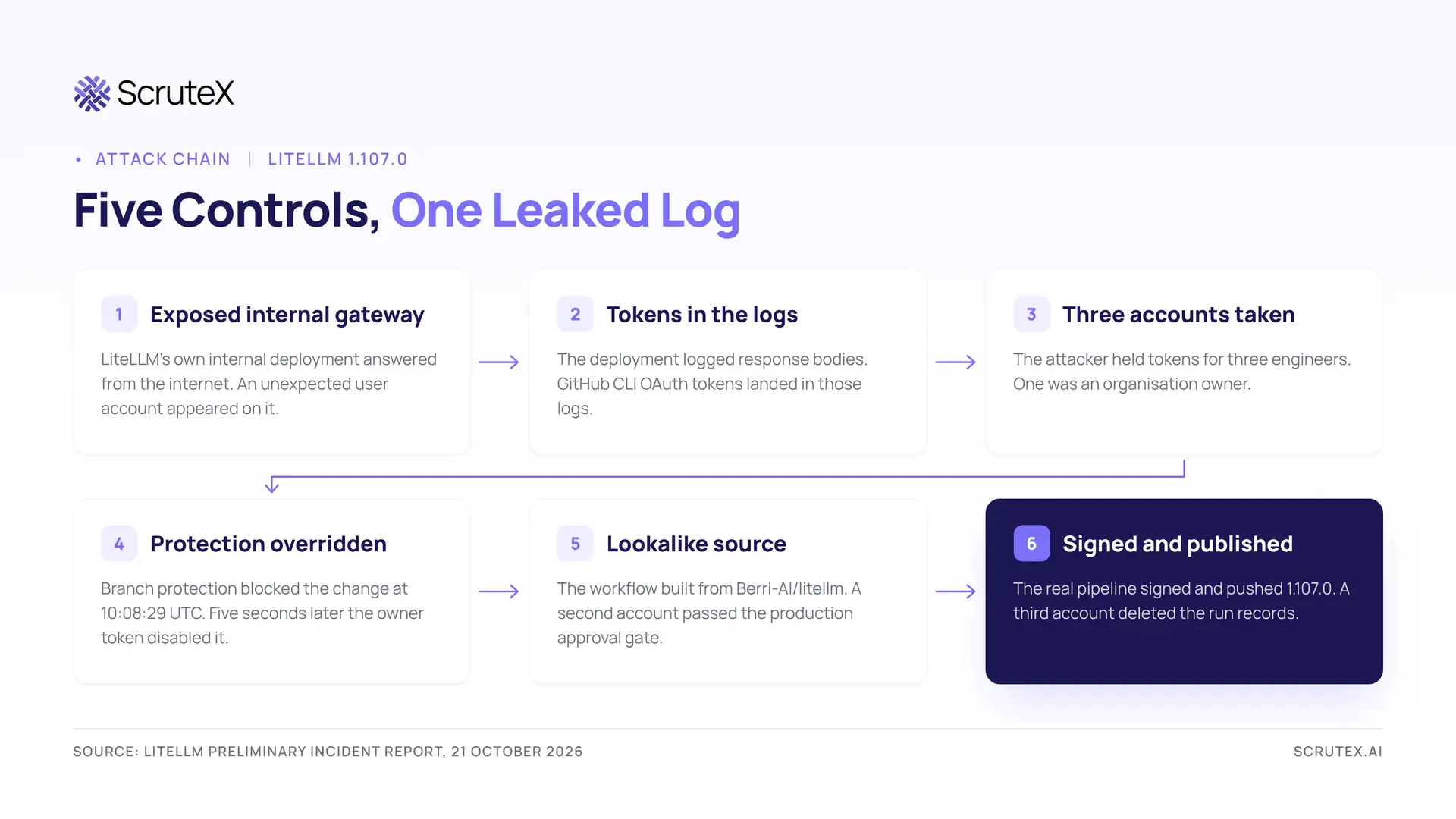
The attackers did not break LiteLLM's release controls. They signed in past them. After the March incident, LiteLLM moved releases to a private repository, published through trusted publishers from one office-bound machine, made Docker tags immutable and signed its images. Stolen developer tokens got the attacker past all five controls. The account below follows LiteLLM's preliminary incident report of 21 October, and details may change as the investigation continues.
- Exposed internal gateway. LiteLLM's own internal LiteLLM deployment was reachable from the internet. An unexpected, innocuously named user account appeared on it.
- Tokens in the logs. That deployment logged response bodies. LiteLLM says Claude Code can, in specific situations, embed a user's GitHub CLI OAuth token in a response body, so those tokens landed in the gateway logs.
- Three accounts taken. The attacker held GitHub CLI tokens for three engineers. One belonged to an organisation owner. One could run workflows.
- Protection overridden. Branch protection rejected the attacker's change at 10:08:29 UTC. Five seconds later the owner token disabled protection and force-pushed the change.
- Lookalike source. The modified workflow built from Berri-AI/litellm, a lookalike of the genuine BerriAI organisation. A second account passed the production approval gate.
- Signed and published. The real pipeline signed and pushed the poisoned build. A third account then deleted the workflow run records.
Timing helped the attacker. On Monday 19 October, LiteLLM had temporarily widened release permissions so two engineers could publish daily bugfix backports. How the attacker first reached the internal deployment is not confirmed. LiteLLM suspects a recently patched vulnerability.
Timeline, 21 October 2026
| UTC | IST | Event |
|---|---|---|
| 10:08:29 | 15:38 | Branch protection rejects an unauthorised change to the private release workflow |
| 10:08:34 | 15:38 | A privileged developer credential overrides protection and applies workflow commit 9cf97e93... |
| 10:46:39 | 16:16 | Staging run starts from the lookalike repository, commit 20535d8f... |
| 11:11:18 | 16:41 | A second developer credential satisfies the production approval gate |
| 11:39:51 | 17:09 | Seven malicious wheels uploaded to PyPI |
| 11:46:56 | 17:16 | Poisoned images published to Docker Hub and GHCR |
| 11:53:49 | 17:23 | A third developer credential deletes the staging and production workflow records |
| 12:09 to 12:24 | 17:39 to 17:54 | LiteLLM removes the unauthorised workflow and restores the release workflow |
| 13:23 | 18:53 | PyPI removes litellm==1.107.0. GHCR tags unavailable by 13:51 |
| 14:20 | 19:50 | All Docker Hub tags removed or repointed to verified clean images |
The lesson for defenders is narrow and uncomfortable. Signed images and trusted publishing prove that an artifact came from the official pipeline. They prove nothing about who controlled that pipeline at the time. A signature check would have passed on every one of the poisoned artifacts.
What does the LiteLLM 1.107.0 malware do?
The malware does not wait for anyone to import LiteLLM. It plants files in site-packages that Python loads at interpreter start, so every Python process in that environment runs it, pip included. Uninstalling LiteLLM removes neither these files nor a loader that is already running. The March 2026 compromise used the same startup technique.
| Stage | What happens |
|---|---|
| 1. Startup hook | cook.pth holds one line, import cook. Python processes it at every start |
| 2. Credential stealer | cook.py runs as a background thread and sets PRIVCOLLECT_ACTIVE=1 so it does not run twice |
| 3. Exfiltration | Encrypts the haul with a random AES-256 key wrapped in an embedded RSA-4096 public key, then posts a tar.gz to www.litellm[.]dev/healthcheck. Writes a run marker on success |
| 4. Remote loader | sitecustomize.py forks a detached daemon and locks /tmp/remote_code_loader.lock. Every hour it reads a domain from a GitHub dead-drop, then downloads and runs Python from that domain's /codepy path with no signature check |
| 5. Windows | The daemon fork fails silently, but the stealer still runs |
The exfiltration domain, www.litellm[.]dev, was registered on 13 October 2026, eight days before the attack. The endpoint name, /healthcheck, is chosen to look like routine monitoring traffic in an egress log. Both choices say the same thing: the attacker planned for defenders who skim logs, not for defenders who check when a domain was born.
The encryption also matters for incident response. Because the stealer wraps each upload in a public key only the attacker can open, a captured packet or a recovered tar.gz will not tell you what left the host. Your rotation list has to come from what the host could read, not from what you can prove was taken.
What it steals
| Target | Detail |
|---|---|
| LiteLLM proxy database | When DATABASE_URL is set: rows from LiteLLM_CredentialsTable and LiteLLM_ProxyModelTable, which hold every upstream provider key and model configuration |
| LLM provider keys | OpenAI, Anthropic, Cohere and other provider keys from environment variables and config files |
| Cloud credentials | AWS files, environment and instance metadata (IMDSv2, ECS task roles). GCP service account keys and default credentials. Azure CLI token cache |
| Every process environment | Environment variables from every readable process through /proc/*/environ, not only the LiteLLM process |
| Developer and registry secrets | Kubernetes, Docker and Git configuration. npm, PyPI and other registry tokens. Credential files of AI development tools |
| Keys and history | SSH, GPG and TLS private keys. Shell and database history files |
| Browsers | Saved passwords, cookies and Firefox key stores from Chrome, Firefox, Edge and Safari profiles on the host |
Why the proxy database matters most. A LiteLLM gateway gathers an organisation's AI spend and data access in one place. One stolen credentials table hands the attacker every model provider account behind it, with its billing and, depending on each provider's logging settings, stored prompts and outputs.
That last point is where the harm leaves the security team. Prompts sent through an LLM gateway often carry support tickets, contracts, internal documents and customer records. The customers whose data sat in those prompts never chose LiteLLM and will not read this advisory. They depend on the gateway owner cleaning up in the right order.
How does the attack map to MITRE ATT&CK?
The table maps each observed behaviour to the closest MITRE ATT&CK Enterprise technique. Use it to check which detections you already have and where the gaps sit.
| Behaviour | Technique |
|---|---|
| Poisoned release published through the vendor's own pipeline | T1195.002 Compromise Software Supply Chain |
| Lookalike exfiltration domain registered eight days ahead | T1583.001 Acquire Infrastructure: Domains |
| GitHub CLI OAuth tokens taken from gateway logs | T1528 Steal Application Access Token |
| Stolen developer tokens used to override branch protection | T1078 Valid Accounts |
| cook.pth and sitecustomize.py run at every Python start | T1546.018 Event Triggered Execution: Python Startup Hooks |
| Keys read from config files, environment and history | T1552.001 Unsecured Credentials: Credentials In Files |
| AWS role credentials read from instance metadata | T1552.005 Unsecured Credentials: Cloud Instance Metadata API |
| Saved browser passwords and cookies collected | T1555.003 Credentials from Password Stores: Credentials from Web Browsers |
| Encrypted tar.gz posted over HTTP | T1041 Exfiltration Over C2 Channel |
| Loader reads its next domain from a GitHub file | T1102.001 Web Service: Dead Drop Resolver |
| Loader downloads and runs new Python hourly | T1105 Ingress Tool Transfer |
| Workflow run records deleted after publishing | T1070 Indicator Removal |
Most organisations have some coverage for the middle of this table: endpoint tools flag credential file access, and egress monitoring can catch the POST. The first four rows are where coverage usually runs out. They happen on someone else's infrastructure, before any malicious code reaches yours.
How to respond if LiteLLM 1.107.0 ran in your environment
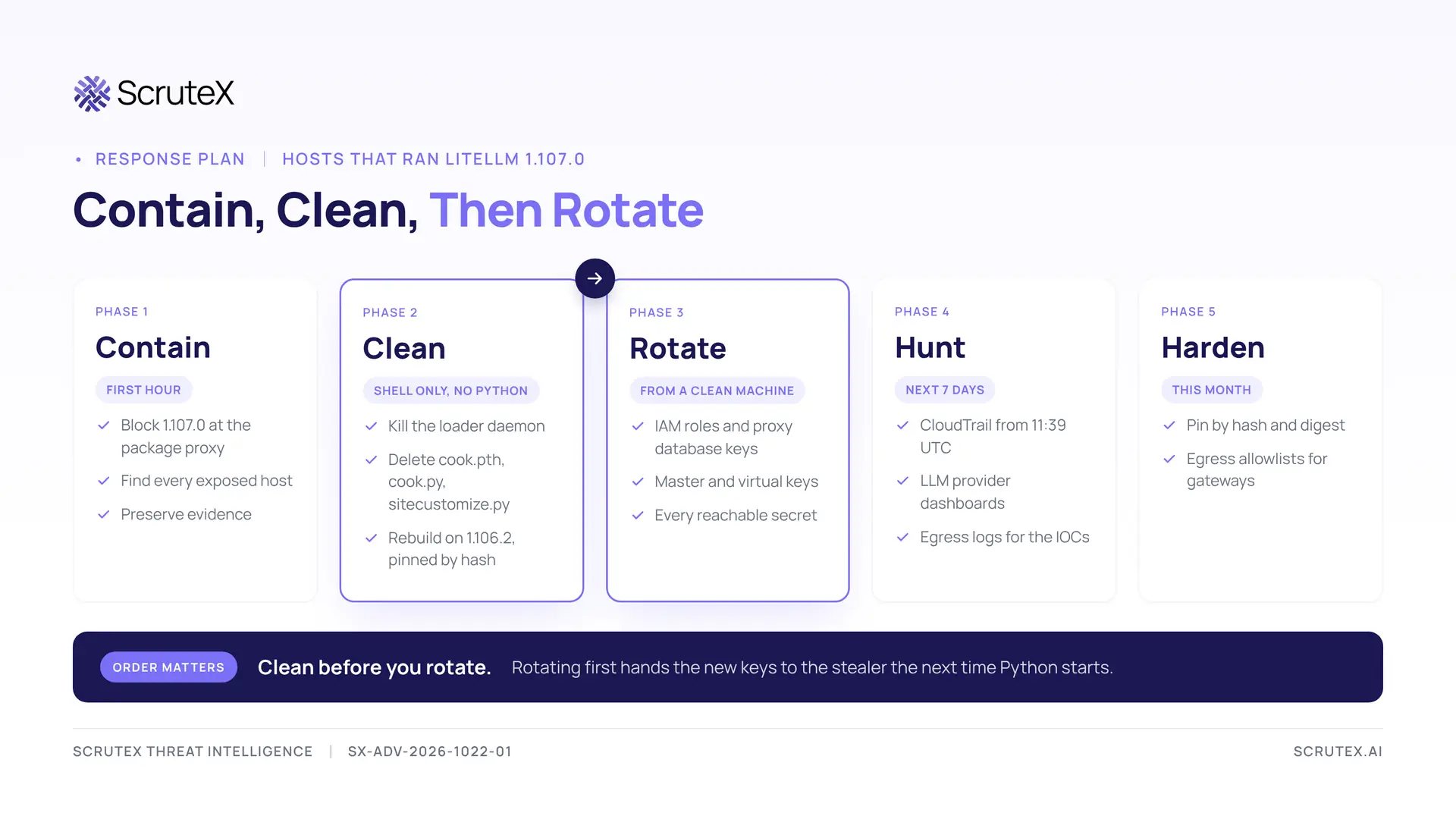
Work in this order: contain, clean, rotate, hunt, harden. The order is the most important part of the plan. If you rotate keys before you remove the payload, the stealer collects the new keys the next time Python starts.
Phase 1: Contain (first hour)
- Block litellm==1.107.0 at your package proxy and the listed image digests at your registry mirror. Stop deploying LiteLLM images by floating tag.
- Find every exposed environment with the shell checks above: hosts, containers, CI runners, notebooks and developer laptops.
- Isolate affected hosts and preserve evidence before you rebuild anything: site-packages contents, the /tmp indicators, the process list and egress logs.
Phase 2: Clean (without starting Python)
- Kill the detached daemon holding /tmp/remote_code_loader.lock, from the shell.
- Delete cook.pth, cook.py, sitecustomize.py and their .pyc files from every affected site-packages.
- Rebuild virtual environments and images from scratch on litellm==1.106.2, pinned by hash. A rebuild is safer than cleaning in place, because you cannot prove the loader did not fetch and plant something else.
Phase 3: Rotate (from a clean machine)
- Rotate what the host could reach directly first: the instance or task IAM role, every provider key in the LiteLLM proxy database, the LiteLLM master and virtual keys, and the DATABASE_URL password.
- Then rotate the rest: any secret in the environment of any process on the host, cloud, registry and GitHub tokens, SSH and GPG keys, and browser sessions on developer machines.
Phase 4: Hunt (next 7 days)
- Review CloudTrail for GetCallerIdentity calls from instance roles around install time, then for any use of those credentials from outside your infrastructure since 11:39 UTC on 21 October.
- Check LLM provider dashboards for new keys, unusual spend, unfamiliar models or regions, and calls from unknown IP addresses.
- Search egress logs for the exfiltration domain, the dead-drop path and the two reported attacker IP addresses.
Phase 5: Harden (this month)
- Pin every dependency by hash and every image by digest. Route installs through a proxy that can block a version within minutes.
- Restrict egress from gateway hosts to the LLM provider endpoints they need, so a loader cannot reach its controller.
Check your reporting clock
If you are regulated, a confirmed 1.107.0 execution may already have started a reporting deadline. In India, CERT-In's directions of April 2022 require organisations to report specified cyber incidents within six hours of noticing them. In Australia, APRA CPS 234 requires regulated entities to notify APRA within 72 hours of becoming aware of a material information security incident. In the EU, NIS2 requires essential and important entities to send an early warning within 24 hours of a significant incident. Ask your compliance team today whether your exposure meets the threshold, rather than after the rotation work is finished.
What should every team running an AI gateway check this week?
An AI gateway is a credential vault, and this attack started on one. Each step in the chain maps to a control most organisations can check this week, whether or not they ever ran 1.107.0.
| What went wrong | Why it matters to you | Control to check |
|---|---|---|
| Internal gateway on the internet | LiteLLM's own deployment was publicly reachable. Internet-facing LiteLLM proxies have been attacked before: LiteLLM reports that CVE-2026-42208, a pre-auth SQL injection fixed in 1.83.7, was exploited within 36 hours of disclosure in April 2026 | Put the proxy and its admin UI behind VPN, SSO or an IP allowlist. Keep it patched |
| Full bodies in logs | Request and response bodies can carry tokens, keys and customer data. Here they carried GitHub tokens | Turn off body logging, or redact secrets before storage. Restrict who can read gateway logs |
| Long-lived, powerful tokens | Three CLI tokens, one from an organisation owner, were enough to override branch protection | Short-lived tokens, hardware-backed sign-in for owners, alerts on protection changes |
| Temporary permission change | Release access widened for backports two days before the attack | Time-box and review every temporary privilege grant |
| Floating tags and unpinned installs | Signed, trusted releases still carried malware. Anyone pinning a version or digest was safe | Pin versions by hash and images by digest. Hold new releases for a cooling-off period |
| Unknown second stage | The loader waited for orders. A quiet host is not a clean host | Egress allowlists for gateway hosts, so a loader cannot call out |
Which tools catch which part of this attack
No single class of tool covers this chain end to end, and it is worth being honest about where each one fits.
Software composition analysis tools, package firewalls and private package proxies see inside the build. They are the controls that would have blocked 1.107.0 at install time, through a version hold, a pin mismatch or a fast blocklist push. Endpoint and runtime tools see the stealer read credential files and fork a daemon. Egress monitoring sees the POST leave.
External attack surface and threat monitoring sees the other side: what an attacker can observe and buy before any code reaches you. Two of this attack's preconditions sat in that space before 21 October. LiteLLM's internal gateway answered from the internet, and the exfiltration domain was registered on 13 October. The same holds for your own estate: a gateway left reachable, a provider key committed to a public repository, or a lookalike of a vendor you depend on. Teams with mature pipelines get the most from strong build-time controls. Smaller teams without them gain more from first knowing which of their AI endpoints the internet can reach at all.
Questions to send vendors and partners who run LiteLLM for you
The exposure may not sit in your own estate. If a vendor runs an LLM gateway with your API keys or data in it, send them these four questions.
- Did any environment that holds our API keys or data install litellm==1.107.0 or run the affected image tags on 21 October?
- If yes, when did you clean it, which of our keys did you rotate, and when?
- Do you pin LiteLLM by version and image digest, and can the internet reach your gateway?
- Do your gateway logs store request or response bodies, and who can read them?
Two things to plan for
Another LiteLLM disclosure on 27 October. LiteLLM is shipping an embargoed fix for a separate vulnerability to enterprise customers through its private registry. Public disclosure is set for 27 October 2026. Open-source users should plan to upgrade that day, from a pinned and verified release.
Second compromise in seven months. Attackers poisoned versions 1.82.7 and 1.82.8 in March 2026 with the same Python startup technique. Treat LiteLLM, and any package with this history, as one that needs a pinned, reviewed upgrade path rather than automatic updates.
LiteLLM 1.107.0 indicators of compromise
These indicators come from LiteLLM's incident report and independent researcher analysis, cross-checked between sources. Domains and URLs are defanged. A legitimate sitecustomize.py can exist on a host, so correlate file hits with Python execution in the window before you call a host infected.
Host indicators
| Type | Indicator |
|---|---|
| Startup files | cook.pth (12 bytes), cook.py (22,252 bytes), sitecustomize.py (25,509 bytes) in a site-packages root, plus matching __pycache__/cook*.pyc and sitecustomize*.pyc |
| Package metadata | litellm-1.107.0.dist-info |
| Run marker | /tmp/.pc_once_72129118c59f5636c0bb. Present means exfiltration fired |
| Loader lock | /tmp/remote_code_loader.lock |
| Temp folders | /tmp/.pc_sq_*, /tmp/.pc_e_* |
| Environment | PRIVCOLLECT_ACTIVE=1 |
| Process | Orphaned python process with working directory /, holding the loader lock |
Network indicators
| Type | Indicator |
|---|---|
| Exfiltration | POST hxxp://www.litellm[.]dev/healthcheck, header X-Token: XWiA8gZNa7NcX2XRoAEb, Content-Type: application/octet-stream |
| User agent | Mozilla/4.0 (compatible; MSIE 7.0; Windows NT 10.0; WOW64; Trident/7.0) |
| Dead-drop | hxxps://raw.githubusercontent[.]com/letters9813/pythonclient-test/main/domain.txt. Block this path only, not the whole domain |
| Loader stage | http://<domain>/codepy. Never observed active |
| Attacker IPs | 168.100.8[.]57, 165.227.201[.]8. Reported by one research team after exfiltration. Confidence: low to medium |
| Cloud signal | AWS STS GetCallerIdentity from a host's instance role around install time, then use of that role from outside your infrastructure |
Source and build indicators
| Type | Indicator |
|---|---|
| Lookalike repository | github[.]com/Berri-AI/litellm. The genuine organisation is BerriAI |
| Malicious commits | Dockerfile 20535d8fa11f786a6c24df7488a0e449ed5f09ad, build config 783c43bc455d2e05d3cfaf194c2f325cfeab1433, release workflow 9cf97e935aeaf791b9c8db224a2bb3ee156134ce |
| Build strings | data = "cook" under [tool.maturin], and COPY cook ./cook in the Dockerfile |
SHA-256 hashes
Use these to block at your package proxy and registry mirror, and to search artifact caches, CI logs and image layers. The wheel hashes match across two independent analyses. Verify them against LiteLLM's GitHub security issue before you put them in blocking rules.
| Artifact | SHA-256 |
|---|---|
| Wheel, macOS x86_64 | 7598727f209d717041db37f7dca271d3a7d328a279890e0e1d55375729aeb86d |
| Wheel, macOS arm64 | 0aaf7ba346d41ef2f40390436738b001180d5a1c03aa093f121078a9969d9a1a |
| Wheel, manylinux aarch64 | 668169d35b87bf51324080390b1b1c5ab12bd335cfe5f1a99e3689abd5e02ae6 |
| Wheel, manylinux x86_64 | 462d0c9f67ca522d9e0e4acd245e90b36ce0d5353604a66bb7c43a1ec4a6fcf7 |
| Wheel, musllinux aarch64 | c2e32d0ce2548aa662c18bf5001911a79fe5b30cf8357132275add02fdcde054 |
| Wheel, musllinux x86_64 | 1bbce8caa94f01c0aaa0b7ddae51553a8a32e1ce53d96d44fe583272aff7ad00 |
| Wheel, Windows amd64 | 12d4ccc5c6f8d35cf4f2cf233b7f3e418e863e657d81ff5f5fc9e210005b9484 |
| Source archive (tampered pyproject.toml) | 2befe2a79fb4fbbd9a543b5b40b530c8cffa8771bab22b8fb22b2e4ae3b1f819 |
| Image index, litellm (vendor) | 1bbcb1443bc962e45f5aad53fe3d2c30600e0379715fb6c664cdd3ac126c339e |
| Image, litellm amd64 (Docker Hub, GHCR) | bd1aeee419ea36da9aa2b657288da4101887be468f020ac63d22ba6ed84a3ea5 |
| Image, litellm arm64 (Docker Hub, GHCR) | 56b74573eed6e4aafe4b50603dbe7853e0345f188c8e44a09f1098caf1f4bcdf |
| Image, litellm-database amd64 | 24581ddc30767f16ecb69d2b0517556f2cd7dea56971adb42a3d1beb97d69523 |
| Image, litellm-database arm64 | 827dd893c74cf621a860a66a3a447a5c732533f087589ce905573e285c0a239c |
| Image, litellm-non_root amd64 | 645a67d810628252d63df85dcc8824c58bcc77cf8383f4d3e6321f0ccc3ce9e4 |
| Image, litellm-non_root arm64 | f75c8edae59b72b1ebfd617295833f465c85bb2fab9c1d60f21b496db86cb8da |
| cook.py, Linux and macOS | 9dd0a3926f96a37eb86cf1ee2310d9be93139cc4ebef3ef9e2efe9531390be25 |
| cook.py, Windows | 03ac2a8b752605d1d7710979c17ff18b03dd978203ba23ba97fd8ce3d6f897ea |
| sitecustomize.py, Linux and macOS | 34bef04fe88ac9d0aae0475630b1738681d15b94f233ac8aa46eacf5968305fa |
| sitecustomize.py, Windows | b6122440d0d9cb1eb1ade9933f49214da8c31288de7710c076c2680dfa528465 |
| cook.pth, Linux and macOS | 7f191632e7320705d154b85204f1ae546b543acbd7e8861229b76f5042b92bdb |
| cook.pth, Windows | 84dc8c82c0a4a4a62552ef826b49fcc86d1a5c4a5d0f2c06665723f93d129d7d |
Clean reference: litellm==1.106.2, official git tag commit
66c8f5b1a9cefaa7c55b758f86f4ab552f2e859e.Key takeaways
- Only litellm==1.107.0 and the four affected Docker tags carried the payload. Pinned installs of 1.106.2 or earlier, and LiteLLM enterprise customers, were not affected.
- The payload runs at every Python start, so pip itself re-triggers it. Check and clean from the shell.
- Clean before you rotate. Rotating first hands the new keys to the stealer.
- Assume every secret the host could read is gone, because the encrypted upload hides what actually left.
- Signed releases from a trusted pipeline still shipped malware. Pinning by hash and digest is what protected the teams that stayed safe.
Am I exposed to the LiteLLM supply chain attack?
You can check each of these yourself today.
- ☐ Does any pipeline, notebook or image install litellm without a pinned version, or run the latest or main-stable image?
- ☐ Did a LiteLLM container restart, scale or rebuild on 21 October between 11:39 and 14:20 UTC (17:09 to 19:50 IST)?
- ☐ Does your LiteLLM proxy or its admin UI answer from the internet?
- ☐ Do your gateway logs store full request or response bodies?
- ☐ Does a vendor or partner run LiteLLM with your API keys, and have they answered the four questions above?
What ScruteX finds here
ScruteX Vulnerability Insights discovers internet-facing AI infrastructure on your domains and IP ranges, including LiteLLM proxies and their admin interfaces, model servers and agent tools, and flags the ones anyone can reach. Data Exposure Insights watches public code repositories and paste sites for leaked LLM provider keys and GitHub tokens tied to your organisation. Brand Insights flags newly registered lookalike domains that impersonate your brand, the same pattern as www.litellm[.]dev in this attack.
What ScruteX does not see: packages installed inside your build pipelines and hosts. ScruteX works from the outside only, so whether 1.107.0 ran in your environment still needs the shell checks earlier in this post.
What a finding looks like
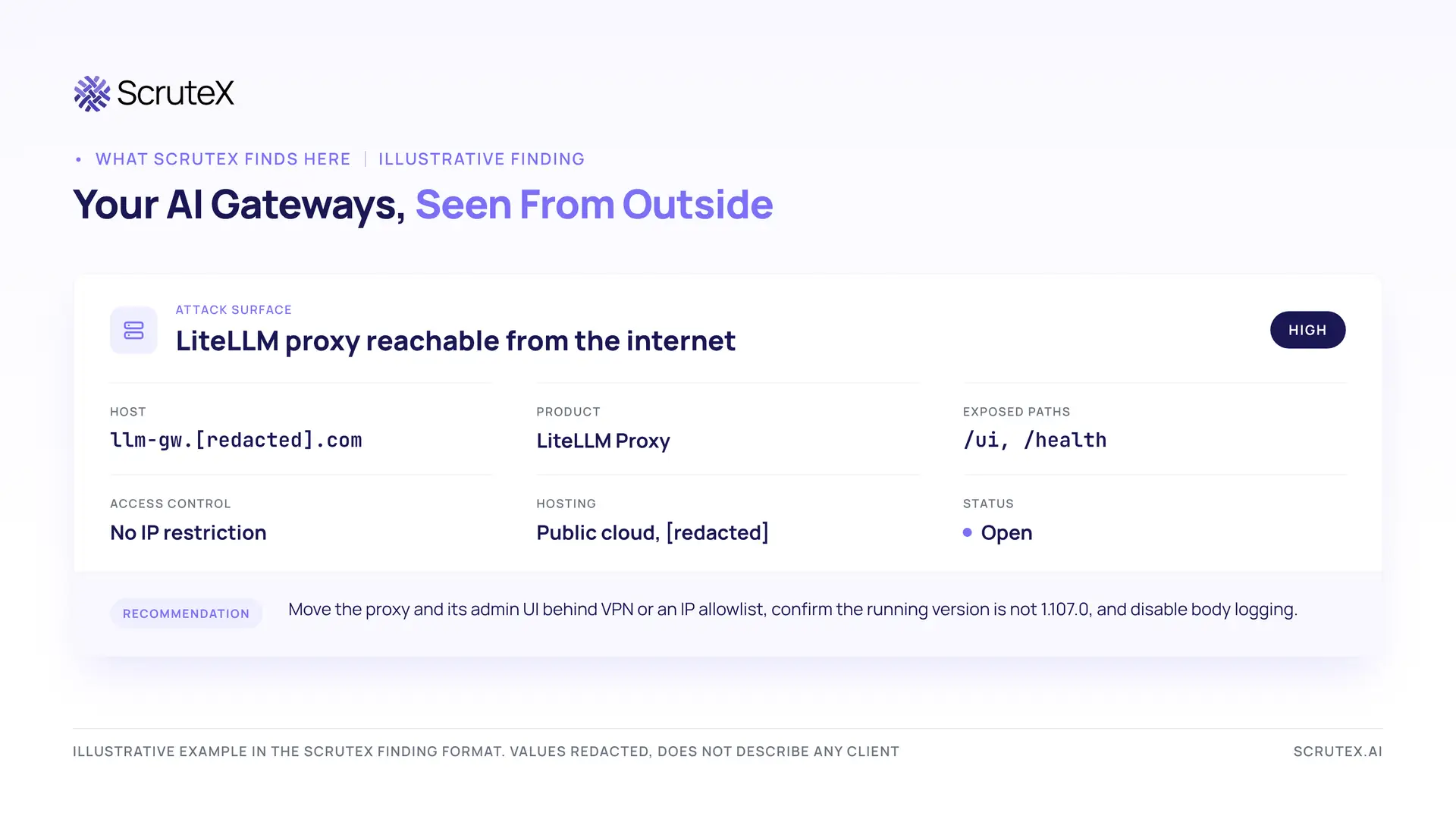
Illustrative example in the ScruteX finding format. The host name and values are redacted and do not describe any client.
Which of your AI gateways can the internet reach?
Enter your domain and ScruteX returns the externally visible AI endpoints on it, LiteLLM proxies included. Domain only. No signup, no agent.
Where to go next
- If an exposed gateway is your worry: Vulnerability Insights, which maps internet-facing assets on your domains, AI endpoints included, and flags the ones without access control.
- If leaked keys are your worry: Data Exposure Insights, which watches code repositories and paste sites for provider keys and tokens tied to your organisation.
- If a supplier runs AI tooling with your data: start with the vendor security assessment template.
Frequently asked questions
Which LiteLLM version is compromised?
Only litellm==1.107.0, published to PyPI on 21 October 2026, and the Docker tags v1.107.0, latest, main-latest and main-stable published on Docker Hub and GHCR the same day. LiteLLM states that all earlier versions are safe. The last clean release is 1.106.2.
Is it safe to run pip show litellm to check?
No, not on a host that may be infected. pip is a Python program and the payload runs at every Python start, so pip triggers it again. Check from the shell with find, ls and grep instead.
Does uninstalling LiteLLM remove the malware?
No. The malware plants cook.pth, cook.py and sitecustomize.py in site-packages, and those files stay after LiteLLM is removed. A loader daemon that is already running keeps running too. Kill the daemon, delete the files, and rebuild the environment from scratch on 1.106.2.
What should I rotate first after the LiteLLM compromise?
Start with what the host could reach directly: the instance or task IAM role, every provider key in the LiteLLM proxy database, the LiteLLM master and virtual keys, and the DATABASE_URL password. Rotate only after you clean the host, and do it from a machine that never ran 1.107.0.
Are LiteLLM enterprise customers affected?
No. LiteLLM states that its private enterprise registry did not receive the poisoned build. Enterprise customers who pulled only from that registry are not affected by this release.