Infostealer Malware: How One Infected Laptop Becomes a Corporate Breach
By ScruteXPublished
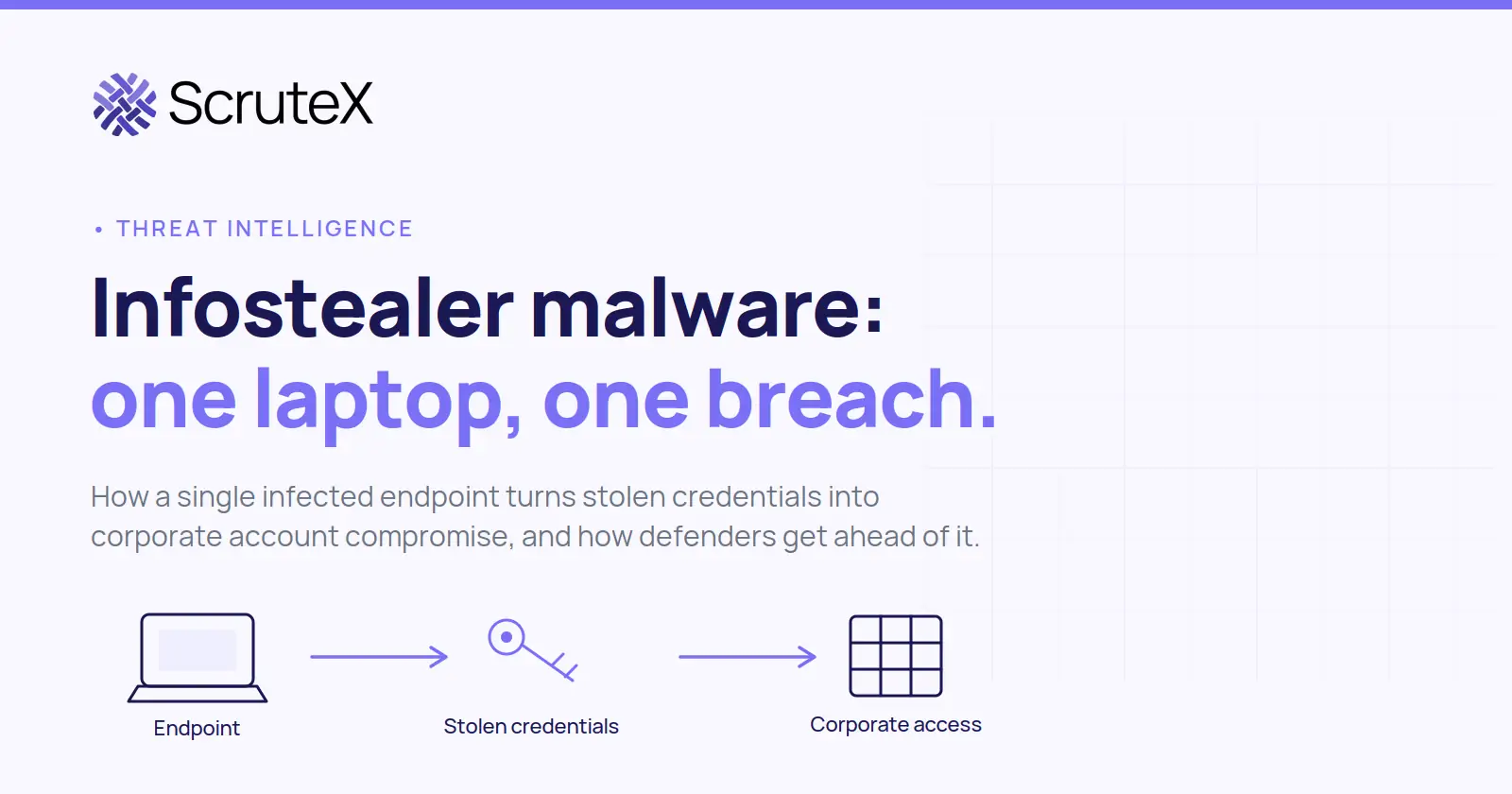
A corporate breach does not always start with an attack on the company. Often it starts on a laptop, sometimes a personal one, when an employee runs the wrong installer. Infostealer malware collects what is already stored on that device and sends it to an operator, where the credentials can sit for weeks before anyone signs in with them.
Infostealer malware is software that harvests sensitive data from an infected device, such as saved passwords, browser cookies, session tokens, and autofill data, then sends it to an attacker. It does not breach your firewall; it reads what the browser already stored. The result is a set of credentials tied to your domain, moving through markets and private channels while your perimeter shows nothing wrong.
What is infostealer malware?
Infostealer malware is a class of programs built to collect data from an infected system and send it to an attacker or command-and-control server. It targets what is stored locally, packages it, and ships it out. The infection itself can be brief. The stolen data stays useful for as long as the credentials remain valid.
Common targets include browser-saved passwords, authentication data, cookies, session tokens, cryptocurrency wallet files, autofill records, and system details. Capabilities differ by malware family, version, configuration, and campaign. Not every stealer takes every category, and two infections by the same family can collect different things. Families such as Lumma, RedLine, and Vidar are sold as a service, which is why their behaviour varies from campaign to campaign.
Some infostealers run briefly and try to minimise their footprint, which can make the infection hard to spot afterward, and their stealth tends to leave little forensic residue. This is a common pattern, not a rule for every family.
In MITRE ATT&CK terms, the core actions map to Credentials from Password Stores (T1555, including the Credentials from Web Browsers sub-technique T1555.003), Steal Web Session Cookie (T1539), and Unsecured Credentials in local files (T1552). The follow-on abuse maps to Valid Accounts (T1078), and that step, from stolen data to a working login, is where an endpoint problem becomes an identity problem.
How does infostealer malware infect a device?
Infostealers usually reach devices through ordinary actions, not exotic exploits. The user runs something they trusted.
Common infection routes include:
- Cracked or pirated software and game cheats
- Fake or trojanised installers for real applications
- Malicious advertisements and poisoned search results
- Fake browser or software updates
- Phishing emails with malicious links or attachments
- Malicious browser extensions
- Social engineering that convinces a user to paste and run a command
IBM X-Force recorded an 84% increase in infostealers delivered through phishing emails per week in 2024 compared with 2023, and linked the rise to attackers using AI to scale distribution (Threat Intelligence Index 2025). The defences are the familiar ones applied consistently, covered in the prevention section below, and they need to address cracked software and fake updates, not only email.
What information can infostealers steal?
The short answer: whatever the device holds that the malware is configured to read. The categories below appear most often in real logs, with the risk each one creates.
| Data type | Examples | Potential risk |
|---|---|---|
| Credentials | Browser-saved usernames and passwords | Account takeover |
| Session cookies and tokens | Authentication cookies, OAuth or session tokens | Access to an authenticated session |
| Autofill data | Names, addresses, payment-related fields | Identity or financial fraud |
| Keys in local files | API keys and tokens stored on disk | Access to services and pipelines |
| System information | Host, OS, and installed software details | Reconnaissance and targeting |
| Wallet data | Cryptocurrency wallet files | Financial theft |
| Browser history | Visited URLs | Finding internal portals |
Capabilities vary by malware family, version, configuration, and campaign. No single list applies to every infection.
Session cookies deserve their own note, stated precisely. A stolen session cookie or token can represent an already-authenticated session. Depending on the application's session design and controls, someone holding a valid session artifact may be able to reach the associated session without completing the original authentication flow again, which is why it can sometimes sidestep a repeated MFA prompt until the session expires or is revoked. MITRE describes this as using stolen cookies to act as an authenticated user without needing credentials (MITRE ATT&CK T1539). The lifetime and usefulness of a stolen session vary, so session revocation matters after any exposure.
How one infected laptop becomes a corporate incident
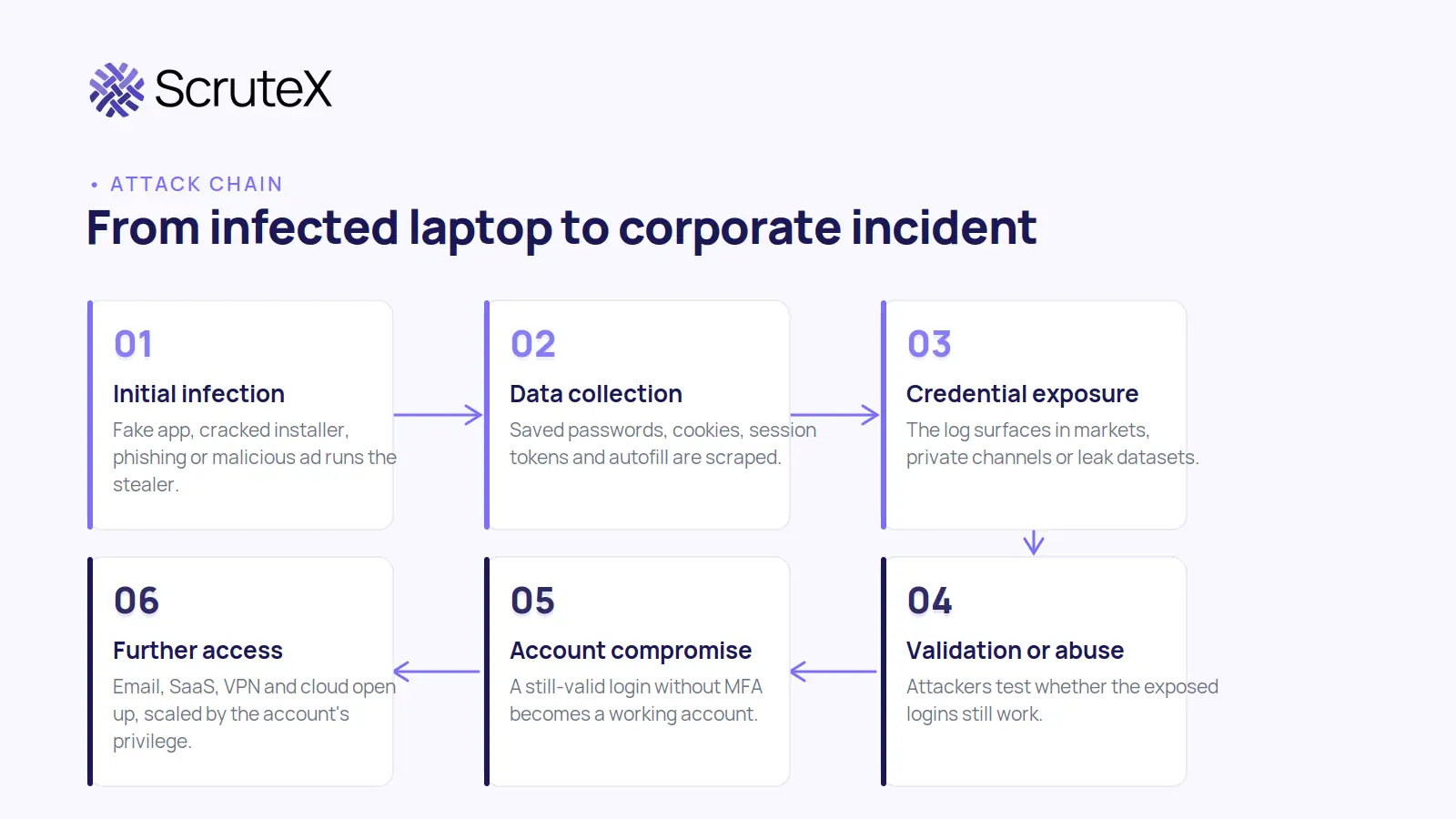
Here is the progression, one step at a time. Read the arrows as "can lead to", not "will lead to".
- Initial infection. An employee or contractor runs malicious software, often a fake app or cracked installer, on a device that also holds work logins.
- Data collection. The malware reads browser profiles and local app data, packaging saved passwords, cookies, tokens, and autofill into one archive.
- Credential exposure. That archive, the log, reaches the operator and may later appear in criminal markets, private channels, or bulk leak datasets.
- Credential abuse. Attackers and initial access brokers test whether the exposed logins still work. Automation makes this fast and cheap.
- Account compromise. If a credential is still valid and no other control stops it, an account can be taken over. A stolen session artifact can reach this step without prompting for a password.
- Further access. A compromised account can open email, SaaS tools, VPNs, and cloud consoles, scaled by that identity's privilege and the controls around it.
- Business impact. Possible outcomes include unauthorised access, data exposure, business email compromise, fraud, and operational disruption, plus the duties that follow a confirmed incident. These are potential consequences, not guaranteed ones.
The best-documented public example of this chain is the 2024 Snowflake customer intrusions. Google Cloud and Mandiant reported that a financially motivated actor tracked as UNC5537 accessed roughly 165 Snowflake customer instances using credentials stolen earlier by infostealer malware, and found no evidence that Snowflake's own environment was breached (Google Cloud, Mandiant, June 2024). Many credentials came from historical infostealer infections, some dating to 2020, and in several cases from contractor systems used for personal activity rather than the victims' managed endpoints. The affected accounts lacked multi-factor authentication. The exposure came first, sometimes years earlier, and the unauthorised access came later, once someone used those still-valid logins.
What are infostealer logs?
An infostealer log is a dataset of information collected from one infected machine by stealer malware. Think of it as a file per victim device.
Depending on the family and configuration, a single log may contain saved credentials, browser cookies, session data, system information, visited URLs, autofill records, and wallet files. Logs are bundled, sorted, and traded in bulk. For defenders they matter because a log signals that credentials tied to your employees, domains, or applications may be exposed, and roughly when. The value is knowing the datasets exist and monitoring for your own presence in them.
Infostealer malware vs keyloggers vs ransomware
These three often get grouped together as "malware", but their goals differ, which changes how you defend against each.
| Threat | Primary objective | Typical impact |
|---|---|---|
| Infostealer | Steal credentials and other stored data | Credential exposure and account compromise |
| Keylogger | Capture keystrokes as they are typed | Password and sensitive-input theft |
| Ransomware | Extortion and disruption | Data encryption, theft, and downtime |
Each has a different primary purpose: an infostealer collects data already stored on the device, a keylogger records input as it is typed, and ransomware encrypts or steals data to extort the victim. They are separate tools, and the presence of one does not imply another.
Exposure, risk, compromise, breach: four different states
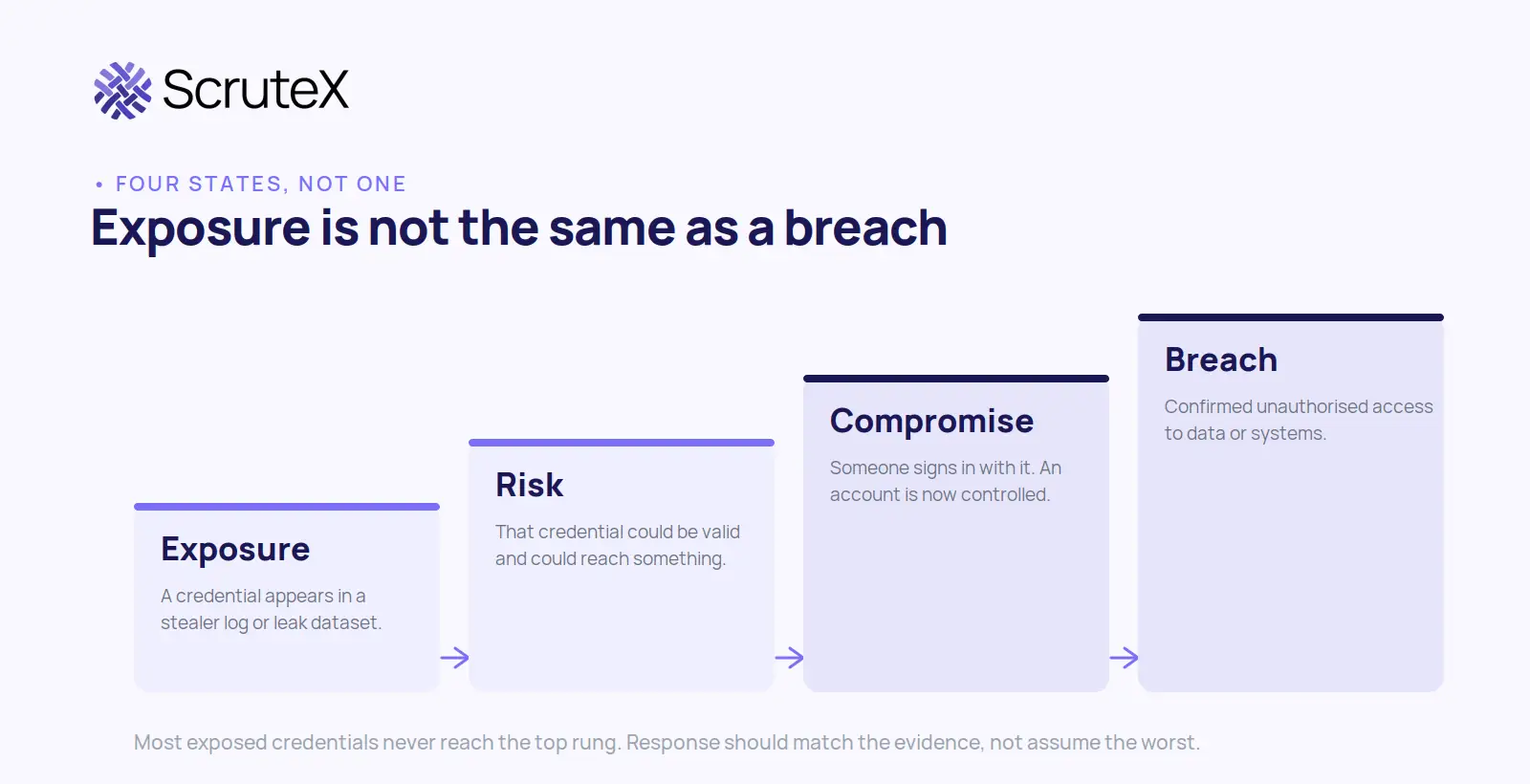
These four words are not interchangeable, and using them loosely leads to the wrong response.
- Exposure. A credential or authentication artifact has appeared outside the intended environment.
- Risk. The exposed information may still be useful, depending on validity, privileges, MFA, session state, and other controls.
- Compromise. There is evidence that an unauthorised party successfully accessed an account or system.
- Breach. There is confirmed unauthorised access to protected systems or data that meets the organisation's definition of a security incident.
The distinction against a traditional data breach is worth drawing directly.
| Factor | Infostealer exposure | Traditional data breach |
|---|---|---|
| Initial point of compromise | Usually an endpoint or user device | Usually an application, infrastructure, or third party |
| Primary data exposed | Credentials and browser or endpoint data | Depends on the breached system |
| Organisational visibility | Often hard to see at first | Often triggers internal alerts |
| Typical next step | Credential abuse and account takeover | Data theft, disruption, or account compromise |
The two can overlap: an infostealer infection can become the first stage of a full breach, as the Snowflake case showed. But exposure on its own is not proof that anyone got in. Response should track the evidence.
How can organisations detect infostealer-related credential exposure?
Detection needs two views at once: what is happening on the endpoint, and what is showing up outside it. Neither is enough alone.
Useful controls include external credential exposure and dark web monitoring against your domains; endpoint detection and response to find the infection; authentication monitoring for unusual logins, new devices, and impossible-travel patterns; and session and token monitoring, since a stolen session artifact can be used without a password prompt.
What should organisations do when credentials appear in infostealer data?
Work the finding as a short investigation, and keep the response proportional to what you can confirm.
- Validate the exposure. Identify the account, what was exposed, roughly when, and whether it is still valid.
- Investigate the endpoint first. Use EDR to check whether the device is still infected. A reset means little if the stealer is still running.
- Reset and revoke. Reset the credential, then invalidate active sessions and revoke OAuth and refresh tokens. A password reset alone can leave a stolen session working.
- Investigate authentication activity. Look for logins from unusual locations, new devices, failed-then-successful attempts, and privilege changes.
- Assess reach. Map what the identity could access: corporate apps, cloud, SaaS, privileged systems, and sensitive data.
- Document and monitor. Record the finding and keep watching the identity and related assets.
The order matters: resetting a password while the endpoint stays infected, or while a live session token is still valid, closes one door and leaves others open.
How can organisations prevent infostealer-driven account compromise?
No single control stops this. Several, applied together, reduce the risk. Treat each as risk reduction, not a guarantee:
- Phishing-resistant MFA (passkeys, FIDO2) on accounts that matter
- Unique credentials and a password manager, to break reuse
- Endpoint protection, EDR, and application allowlisting where practical
- Least privilege and conditional access, so a stolen login reaches less
- Session management with sensible token lifetimes and re-authentication
- Regular patching and browser security controls
- Awareness training that names the real routes: cracked software, fake updates, paste-and-run lures
- Continuous credential exposure and dark web monitoring, plus fast revocation when exposure is found
MFA is a strong control, not an absolute one. Stolen session artifacts and MFA-fatigue attacks can get past it, which is why session monitoring and phishing-resistant methods belong on the list.
What does an infostealer exposure look like?
This is a generic scenario, not a real incident, and it uses no real names, domains, or data.
An endpoint that also holds corporate logins becomes infected. The malware collects authentication information from the browser and sends it to an operator. Some time later, that data appears in an external exposure dataset, and a security team monitoring its own domains identifies an account tied to the organisation. The finding is confirmed exposure and a clear trigger to investigate. It is not, on its own, proof that anyone signed in. The investigation decides which is true.
A few questions make that assessment concrete, and you can ask them before involving any vendor:
- Are corporate credentials monitored for external exposure at all?
- Are employees using unmanaged devices with corporate accounts saved in the browser?
- Is phishing-resistant MFA enabled for high-value accounts?
- Can the team revoke active sessions and tokens, and investigate the endpoint behind an exposed identity?
How Scrutex helps organisations manage credential exposure
Infostealer exposure is an external-visibility problem: the credential is often already outside your environment before anything internal shows a sign. That is the gap Scrutex is built to watch.
Scrutex is an external security intelligence platform. Its Data Exposure Insights module monitors dark web sources, paste sites, and breach corpora for exposures tied to your domains and employees. Its published capabilities include Breached Credentials, Malware Infected Machines, Leaked Sessions, Pastebin Leaks, Telegram Monitoring, Source Code Leakage, and API Leak Monitoring (Scrutex, Data Exposure Insights). Setup is agentless: add a domain and keywords, with a free tier covering the core modules and no credit card.
For a security team, the value is in supporting the response. An external finding tells you a credential for your domain has surfaced and which account it maps to. Because that record sits alongside external attack surface and threat intelligence in one workflow, an exposed login can be scored against the external systems it can actually reach, which helps separate a low-priority hit from one that needs action now.
One honest limit. External monitoring cannot identify every exposure that stays entirely inside an organisation's environment. If an exposure never leaves your network, external tooling will not see it, which is why endpoint and identity telemetry remain essential alongside it. Infostealer exposure also connects to credential exposure monitoring, digital risk protection, external attack surface management, dark web monitoring, and continuous threat exposure management (CTEM): distinct disciplines that work better together than alone.
You can check whether credentials tied to your domain are appearing in stealer logs and breach data with a domain-based lookup, then work the response steps above against whatever it returns.
Key takeaways
- Infostealer malware harvests credentials, cookies, and tokens from one endpoint, exposing logins that reach far beyond it.
- Exposure, risk, compromise, and breach are four different states. A leaked credential is a reason to investigate, not proof of an intrusion.
- A stolen session artifact can sometimes be used without a fresh login, so revoke sessions and tokens, not just passwords. Detection needs both external exposure intelligence and internal endpoint and identity telemetry.
- Infostealer exposure often precedes a stolen-credential attack, so monitoring for it gives defenders an early-warning signal rather than a lagging cleanup task.
FAQ
What is infostealer malware?
Infostealer malware is software that collects sensitive data from an infected device, such as browser-saved passwords, cookies, session tokens, and autofill data, then sends it to an attacker. The data is bundled into stealer logs and reused for account takeover. Capabilities vary by family and configuration.
What does infostealer malware steal?
It steals what the device holds and the malware is configured to read: saved passwords, authentication cookies, session tokens, autofill records, keys stored in local files, system details, and sometimes cryptocurrency wallet files. No single list applies to every infection, because capabilities vary by family, version, and campaign.
What are infostealer logs?
An infostealer log is a dataset collected from one infected machine, often one file per device. It can hold credentials, cookies, session data, system information, visited URLs, and wallet files. For defenders, a log signals that credentials tied to your employees or domains may be exposed, and roughly when.
How can an infostealer infect a corporate laptop?
Usually through something the user ran: a cracked or fake installer, a trojanised app, a malicious ad, a fake update, or a phishing attachment. Endpoint protection, EDR, application control, restricted local admin rights, patching, and awareness of cracked software and fake updates all reduce the risk.
Can infostealer malware cause a corporate data breach?
Yes, it can contribute to one. An infostealer can expose credentials or session artifacts that are later used to access corporate accounts. But exposure alone does not establish that an account or system was compromised. Whether it becomes a breach depends on credential validity, privilege, MFA, and detection.
How can organisations detect stolen employee credentials?
Combine external credential exposure and dark web monitoring against your domains with internal endpoint (EDR) and identity telemetry. External sources show that a credential has surfaced in a stealer log; internal telemetry shows whether the device is still infected and whether anyone used it. No single tool catches everything.
What should a company do if employee credentials appear in infostealer data?
Validate the exposure, then investigate the endpoint before assuming a reset is enough. Reset the credential and invalidate active sessions and tokens. Check authentication activity for unusual logins, assess what the identity could reach, and document and monitor. Keep the response proportional to the evidence.
How can Scrutex help with infostealer-related credential exposure?
Scrutex Data Exposure Insights monitors external sources for leaked credentials, exposed sessions, and stealer-log appearances tied to your domains, so a security team learns which accounts to investigate first. It is agentless with a free tier, and external only, so endpoint and identity telemetry remain necessary for exposures that stay inside your network.