How to Detect Brand Impersonation
By ScruteXPublished
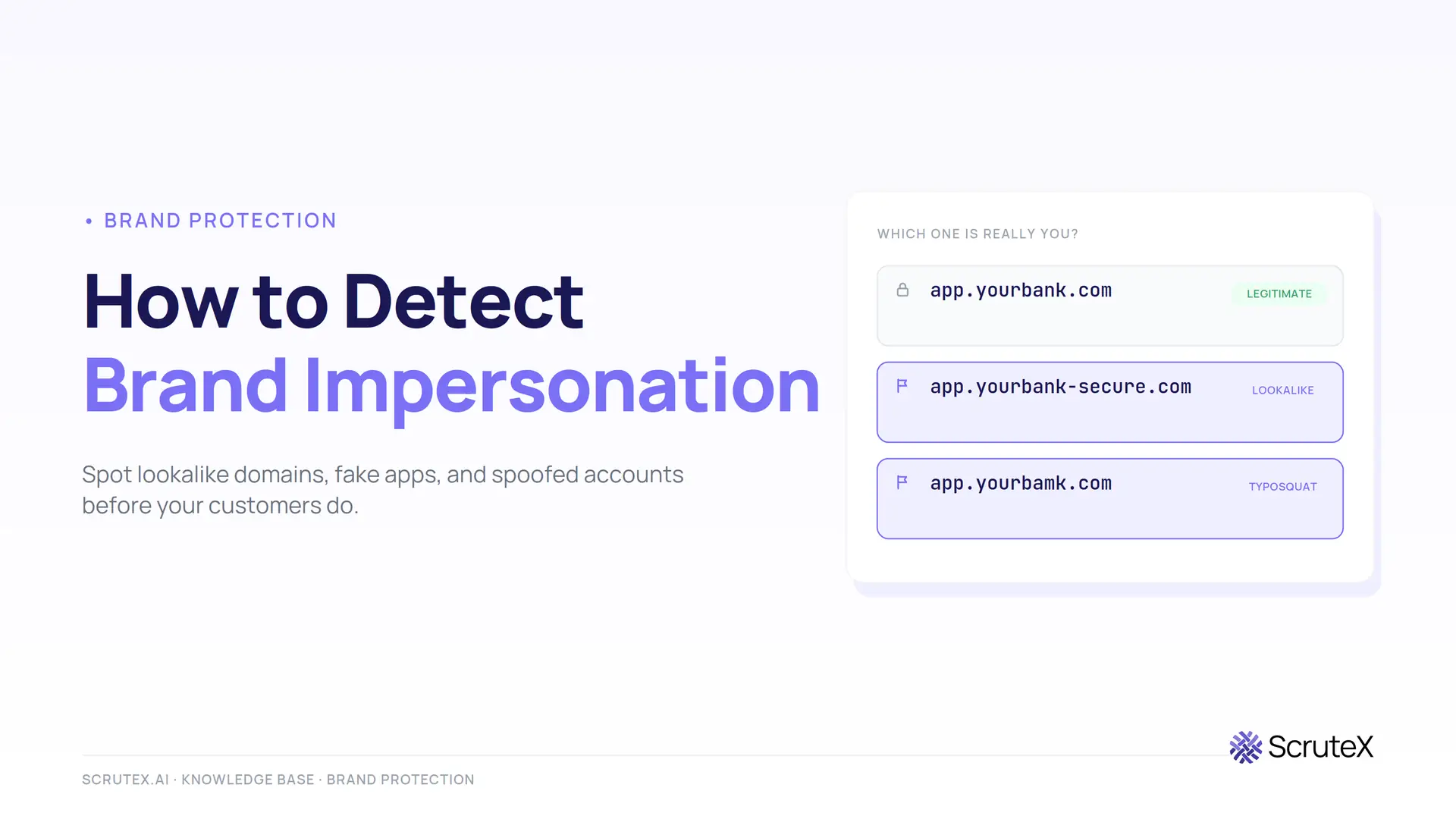
A lookalike domain gets registered. A TLS certificate is issued for it an hour later. A cloned login page goes live the next morning, and by afternoon your customers are typing real passwords into a fake site. None of this touches your network, so none of it shows up in your SIEM. The first internal signal is often a customer complaint, which means the campaign has already been running for days.
Brand impersonation is the abuse of your name, logo, domain, or identity to deceive the people who trust you. To detect it, you monitor the external channels where attackers stage the fraud (domain registrations, certificate transparency logs, DNS, social platforms, app stores, and paid ads), validate each suspicious asset against your real footprint, and prioritise the ones showing intent to go live. Detection is an external monitoring problem, not an internal one, because the attack happens entirely outside your perimeter.
This guide covers what brand impersonation is, why it keeps rising, the forms it takes, the warning signs, and the detection methods that actually surface it early. It ends with a practical workflow, a tools comparison, an incident-response path, and a checklist you can lift straight into an operating procedure.
What is brand impersonation?
Brand impersonation is any attempt to pass off a fake asset as your organisation in order to deceive your customers, employees, partners, or the public. Attackers copy enough of your identity (a domain string, a logo, a colour scheme, an executive's photo, a support phone number) to survive a two-second glance, then push the fake through a channel where people expect to see you.
It matters because it turns your own reputation into the attack tool. The victim trusts your brand, so they lower their guard. The attacker never needs to breach a firewall. They rent your credibility and point it at your users.
Three points separate impersonation from ordinary phishing. First, it targets people outside your walls, so your internal telemetry is blind to it. Second, it exploits trust you spent years building, which is why a convincing fake converts far better than a generic scam. Third, it spreads across channels you do not control (registrars, social platforms, app marketplaces, ad networks), so no single log tells you it is happening. That combination is why detection depends on outside-in visibility rather than inside-out defence.
Why brand impersonation is increasing
The barrier to launching a convincing fake has collapsed. Registering a lookalike domain costs a few dollars. A free TLS certificate makes it show the padlock a user is taught to trust. Phishing kits clone a login page in minutes. Generative AI now writes fluent scam copy, spins up fake profiles, and produces deepfake audio and video of named executives at scale.
The numbers reported by brand protection vendors point the same way. Red Points reported a 179% rise in social-media ads redirecting users to infringing sites across its client base between 2023 and 2024, which puts paid channels among the fastest-growing impersonation vectors. MarqVision has cited a rise of more than 360% in brand impersonation since 2020. Bolster's research team reported that some brands now field over 30,000 customer "is this real?" queries a month, many of them triggered by impersonated executive identities. Treat each of these as the vendor's own client-base figure rather than an industry constant, but the direction is consistent across independent sources.
There is a structural reason too. Security spending concentrates on the internal estate: endpoints, identity, cloud posture, the SOC. The external side, meaning the domains and profiles and apps that speak in your name to the outside world, often has no owner and no monitoring. Attackers moved into that gap because it is cheap, effective, and rarely watched.
Common types of brand impersonation
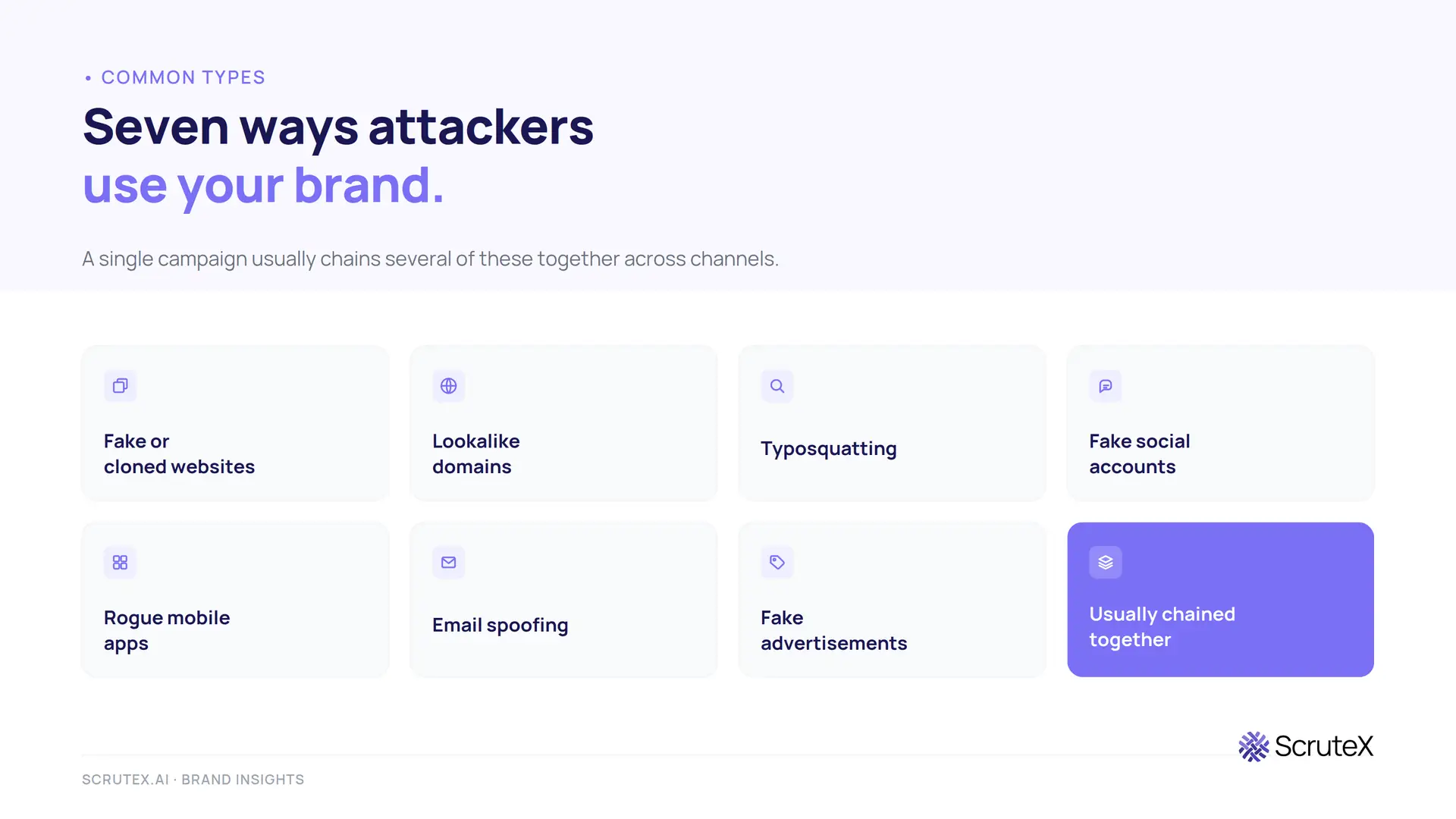
A single campaign usually chains several of these together. A typosquatted domain hosts a cloned site, a fake social profile drives traffic to it, and a paid ad buys reach. Watching only one channel means missing the campaign that runs across the others.
| Type | What it looks like | Where to look for it |
|---|---|---|
| Fake or cloned websites | A pixel copy of your site or login page on a domain you do not own | Domain registrations, certificate transparency logs, web crawls |
| Lookalike domains | Brand-adjacent domains on other TLDs, subdomain tricks, or added words | Domain permutation monitoring, passive DNS, CT logs |
| Typosquatting | Deliberate misspellings and homoglyph swaps (rn for m, a Cyrillic character for a Latin one) | Permutation engines, IDN homograph checks |
| Fake social accounts | Cloned brand pages, fake support handles, spoofed executive profiles | Social platform monitoring across Facebook, Instagram, X, LinkedIn, TikTok, Telegram |
| Rogue mobile apps | Fake or trojanised apps using your name and icon on official and third-party stores | App store and marketplace monitoring across the major and minor stores |
| Email spoofing | Mail that forges your domain or a lookalike to phish staff, customers, or suppliers | DMARC reports, lookalike domain feeds, mail authentication records |
| Fake advertisements | Paid search and social ads using your brand to send clicks to scam sites | Ad platform monitoring, brand-term search tracking |
Two definitions worth keeping straight, because they get confused. Typosquatting is one method for creating a lookalike domain, based on typos and character swaps. A lookalike domain is the broader category that also includes combosquatting (your brand plus a word such as "secure" or "login"), exact-match strings on a different top-level domain, and homograph domains built from mixed-script Unicode characters. Our full breakdown lives in the typosquatting and lookalike domains threat map, and the app-store side is covered in rogue mobile app detection.
Warning signs of brand impersonation
Some signals reach you from the outside, and some you have to go looking for. The outside-in signals are the ones people report to you.
- A spike in customer messages asking whether an email, site, app, or account is really yours.
- Support tickets about charges, logins, or "orders" nobody at your company recognises.
- Password reset attempts or failed logins for accounts whose owners never touched them.
- Staff forwarding an email from a domain that looks almost right but is not.
The signals you have to hunt for are the ones that predict an attack rather than confirm one.
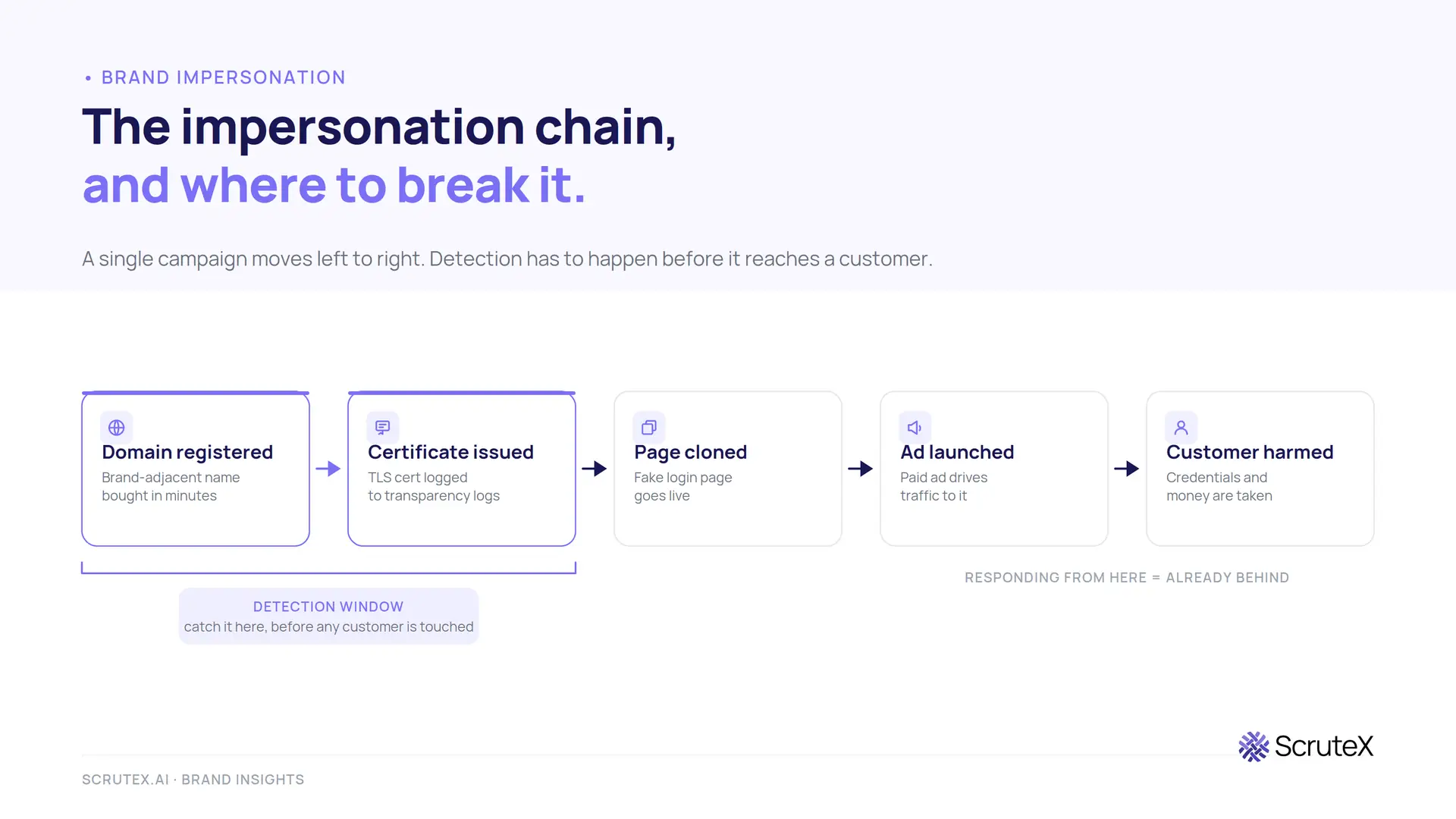
- A brand-adjacent domain registered in the last 24 to 72 hours, often privacy-protected and freshly created.
- A TLS certificate issued for a domain containing your brand string, visible in certificate transparency logs before the site is even live.
- A new social profile that copies your name, logo, and bio and has started following or messaging your customers.
- An app carrying your name and icon that your team did not publish.
The pattern that matters most is a chain forming across channels in a short window: a fresh domain, then a certificate, then a cloned page, then an ad or a profile pointing at it. Catching the chain at the domain-and-certificate stage is what "early" means in practice, because it is the window before any customer has been harmed.
How to detect brand impersonation
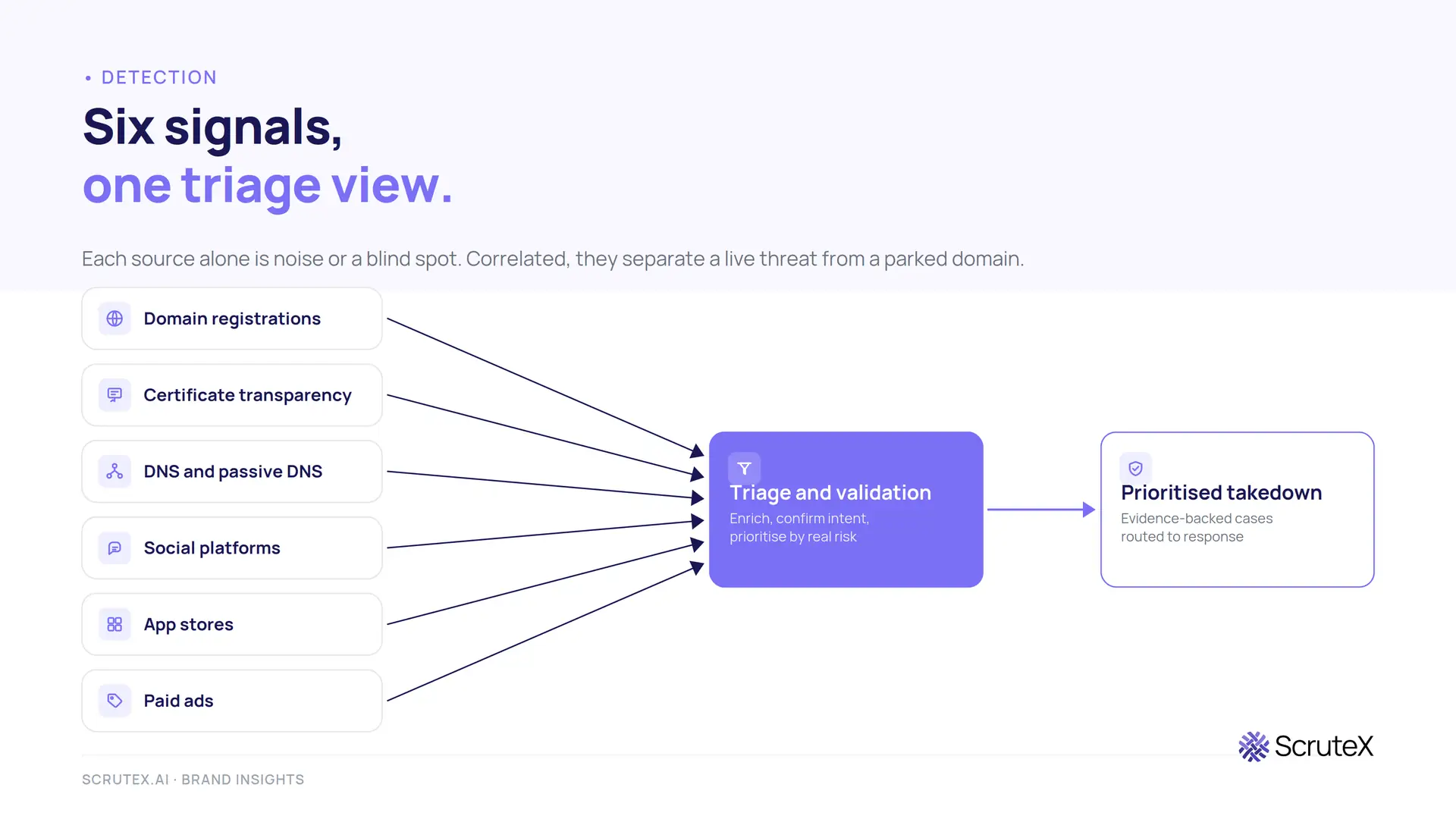
Effective detection combines several signal sources. Each one on its own produces noise or blind spots. Together they give you a multi-signal view that separates a harmless parked domain from a live threat. Here is how to detect brand impersonation across the surfaces attackers actually use.
Domain intelligence and permutation monitoring
Start from your brand strings and generate the variants an attacker would register: typos, homoglyphs, combosquats, hyphenations, and the same name across other TLDs. Feed that permutation list into monitoring that checks new registrations continuously. This is the earliest possible signal, because the domain often exists before anything is built on it. Deep-dive coverage sits in our domain monitoring guide.
Certificate transparency monitoring
Certificate transparency is a public, append-only log system (defined in RFC 6962) that records almost every TLS certificate a public authority issues. Browsers expect certificates to appear in these logs, so attackers who want the padlock end up publishing their lookalike domain to a global feed. Monitoring CT logs for your brand string surfaces impersonation domains within minutes of certificate issuance, frequently before the phishing page loads. It is one of the highest-value and lowest-noise signals available, and we cover the setup in certificate transparency monitoring.
DNS and passive DNS
Live DNS tells you when a suspicious domain starts resolving and where it points. Passive DNS gives you the history: which IPs a domain has used, which nameservers, and what other domains share that infrastructure. That history lets you pivot from one confirmed fake to the rest of the cluster hosted alongside it, which is how you find the campaign rather than the single asset.
WHOIS and RDAP analysis
Registration data (now served through RDAP, the structured successor to WHOIS) gives you registrar, creation date, and registrant details where they are not masked. A domain created three days ago, behind privacy protection, at a registrar known for abuse, carrying your brand string, is a very different risk from a ten-year-old domain owned by a real company. Age and registrar patterns are strong triage inputs.
Threat intelligence
Curated threat intelligence maps confirmed impersonation infrastructure to known actors, kits, and campaigns, and cross-references it against activity in your sector and region. It answers the question raw signals cannot: is this part of an active campaign hitting organisations like mine right now? This connects the brand-abuse signal to the wider picture in threat intelligence.
Search engine and paid-ad monitoring
Track your brand terms in organic and paid search. Fake sites compete for your name in results, and scam ads on Google and Meta buy your brand to send clicks to phishing pages or counterfeit stores. Ad-channel abuse is often the first place a fraud campaign spends real money, which makes it a strong intent signal.
Social media monitoring
Watch the platforms where a fake profile takes minutes to create: Facebook, Instagram, X, LinkedIn, TikTok, Telegram. Look for matching usernames, copied profile images, cloned bios, and near-miss handles, especially ones impersonating executives or support. Platform detection is inconsistent, so continuous external monitoring is the baseline, not an extra.
Mobile app monitoring
Fake and trojanised apps appear well beyond the two major stores, across hundreds of regional and third-party marketplaces. Monitoring only Apple's App Store and Google Play leaves most of the surface uncovered. Coverage has to extend across the smaller stores where takedowns are slower and oversight is weaker.
Brand monitoring and ASM integration
Brand monitoring ties these feeds into one view of how your name is being used across the web. Folding that into external attack surface management (ASM) puts your impersonation signals next to your exposed assets, so brand abuse is treated as part of your external risk rather than a separate marketing concern. The connective idea here is digital risk protection: correlating exposure, leaked data, and brand abuse instead of watching each in isolation.
The table below maps each impersonation type to the signal that catches it earliest.
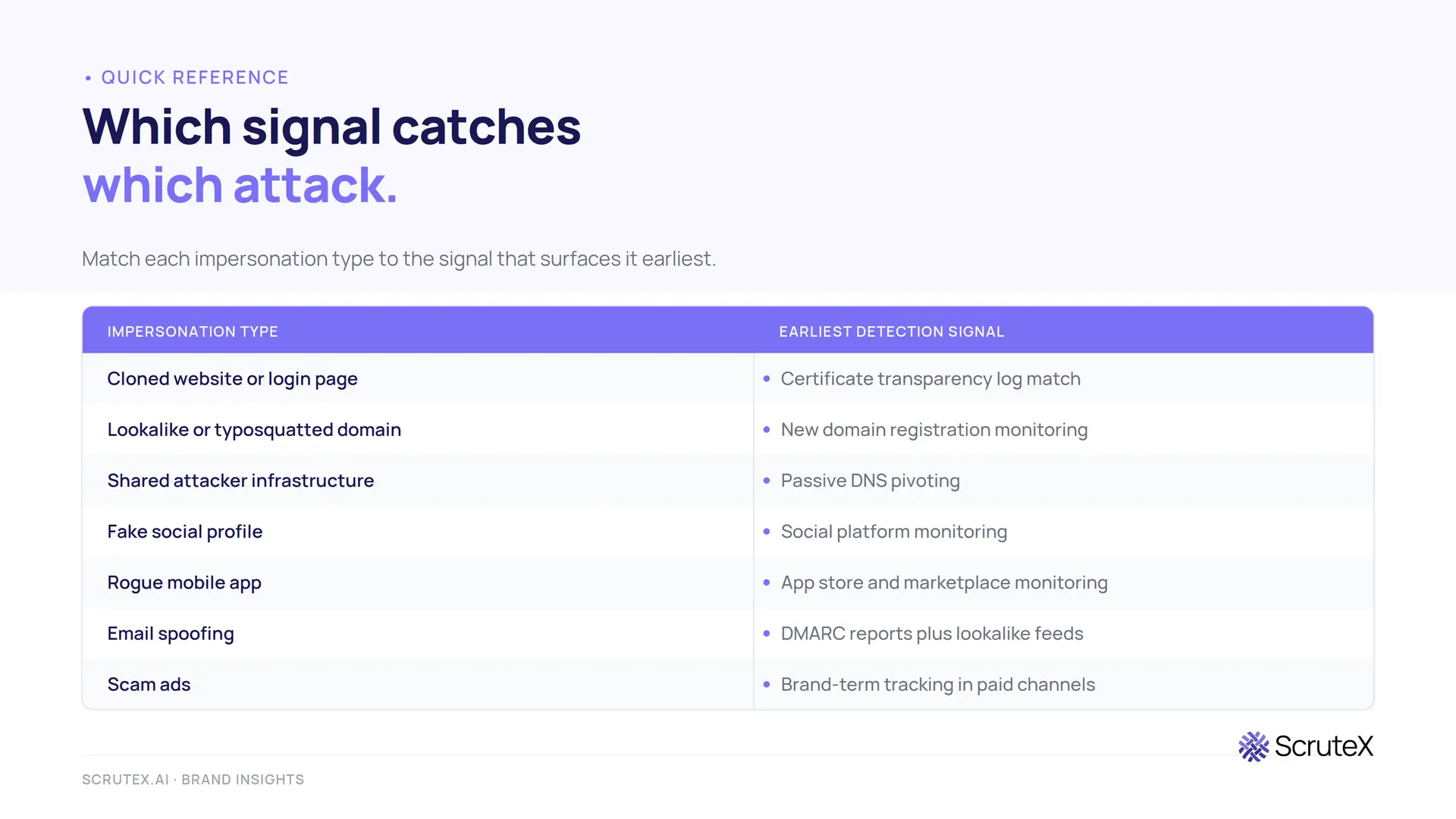
| Impersonation type | Earliest reliable detection signal |
|---|---|
| Cloned website / login page | Certificate transparency log match, then web crawl |
| Lookalike / typosquatted domain | Domain permutation monitoring on new registrations |
| Infrastructure cluster | Passive DNS pivoting from a known-bad asset |
| Fake social profile | Social platform monitoring for name and image matches |
| Rogue mobile app | App store and marketplace monitoring |
| Email spoofing | DMARC aggregate reports plus lookalike domain feeds |
| Scam ads | Brand-term tracking in paid search and social ad libraries |
A step-by-step detection workflow
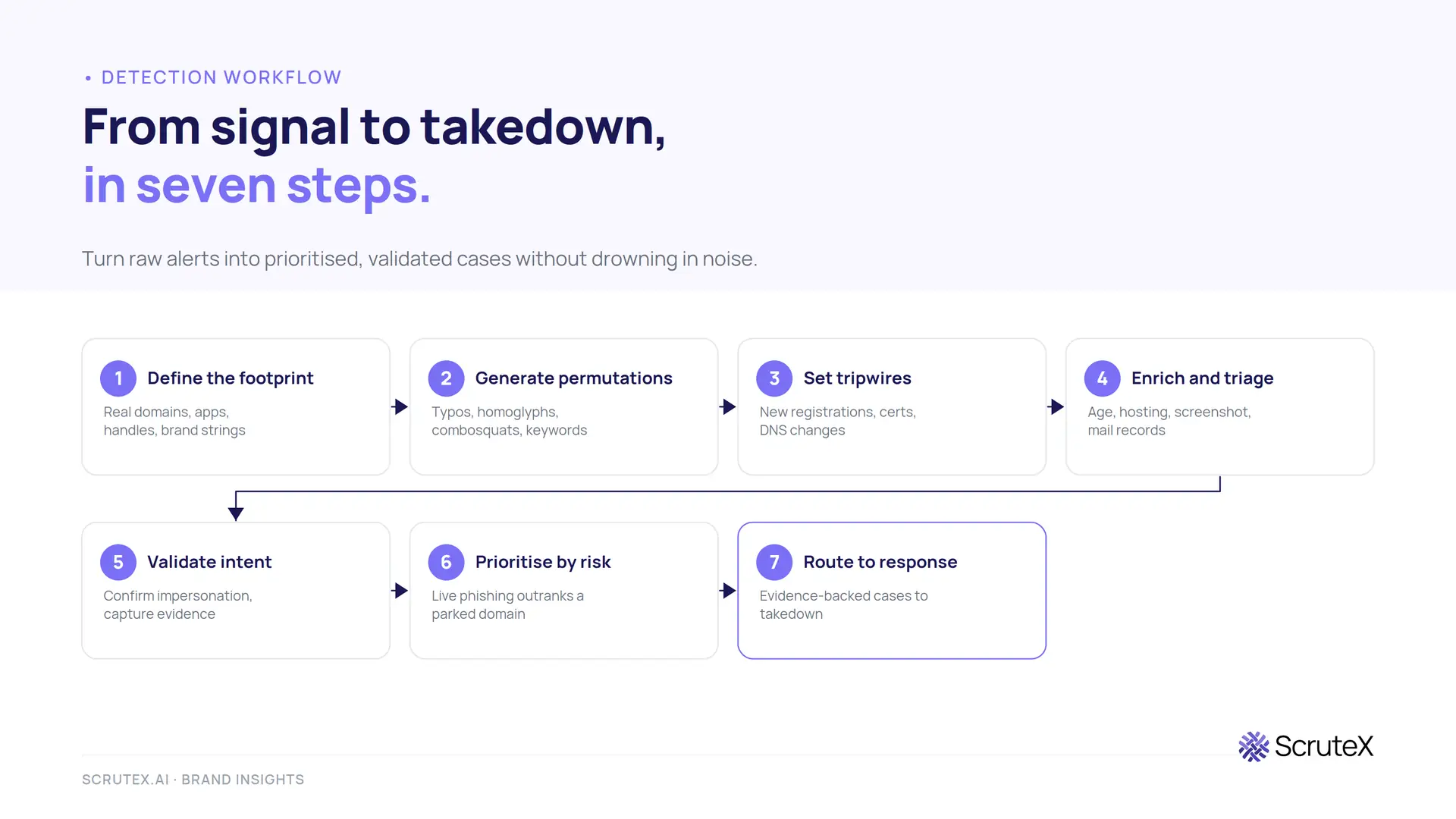
A signal is not a finding. This workflow turns raw alerts into prioritised, validated cases your team can act on without drowning in noise.
Step 1: Define the monitored footprint. List your real domains, subdomains, apps, verified social handles, executive identities, and brand strings in every language and market you operate in. Everything the monitoring compares against depends on this being accurate. A missing brand variant is a blind spot.
Step 2: Generate the permutation and keyword set. Build the list of lookalike variants (typos, homoglyphs, combosquats, TLD swaps) and the brand keywords to watch across social, app stores, and ads. This is what your detection matches against.
Step 3: Set tripwires on new assets. Feed new domain registrations, certificate transparency issuances, and DNS changes into continuous monitoring. Alert on any brand-adjacent asset the moment it appears. This is the stage that buys you the early-warning window.
Step 4: Enrich and triage automatically. For each hit, pull registration age, registrar, DNS resolution, hosting, a screenshot, and any MX records. A parked domain with no content is low priority. A domain that just resolved to a cloned login page with mail records configured is not. Automated enrichment is what keeps volume manageable.
Step 5: Validate intent. Confirm the asset is actually impersonating you and gauge how far the campaign has progressed. Cloned assets, active content, and configured mail all signal a live threat rather than a squatter. Capture evidence at this point: screenshots, HTML snapshots, WHOIS/RDAP records, and timestamps.
Step 6: Prioritise by risk, not by order of arrival. Rank confirmed cases by how much harm they can do now. A live phishing page targeting customer logins outranks a parked lookalike, even if the parked one was flagged first.
Step 7: Route to response. Push validated, evidence-backed cases straight into your takedown and ticketing process. Detection without a response path is just a longer list of things you knew about and did nothing about.
Best tools for brand impersonation detection
Tools in this space fall into a few honest categories. Match the category to your team, not to the loudest marketing.
| Category | What it does well | Best fit |
|---|---|---|
| Point tools (domain, social, or app only) | Deep coverage of one channel, often at low cost | Teams with one acute problem, such as domain spoofing alone |
| Dedicated brand protection platforms | Broad multi-channel detection plus managed takedown | Large brands with a named brand-protection owner and budget |
| Digital risk protection suites | Impersonation folded into wider external risk and dark web coverage | Security teams that want brand abuse inside one external-risk view |
| Built-in platform features (email, ad platforms) | Basic impersonation flags where you already work | A starting layer, never the whole programme |
The honest trade-off is coverage against integration. Best-of-breed point tools give the deepest single-channel detection and suit a large, mature team that can run several of them and stitch the output together. A single connected view gives less depth per channel but far less blind space between channels, and it suits a leaner team that cannot manage five separate consoles. Neither is universally correct. The wrong choice is the one that leaves a channel unwatched because nobody owned the tool that covered it.
Whatever you choose, judge it on four things: how early it catches a threat (certificate-stage beats customer-complaint-stage), how many channels it actually covers, how much noise it removes before a human sees the alert, and whether it connects detection to takedown. A tool that floods you with unvalidated parked domains and no response path adds work rather than removing it.
Best practices
- Register your own obvious variants first. Buy the common misspellings, the "secure" and "login" combinations, and the high-traffic TLDs of your brand before an attacker does. Defensive registration removes the easiest targets from the board.
- Enforce DMARC at reject. Publish SPF, DKIM, and a DMARC policy set to reject, and read the aggregate reports. This stops exact-domain spoofing and turns the reports into a lookalike-domain feed.
- Monitor continuously, not periodically. A quarterly sweep misses campaigns that live and die in a week. Impersonation detection has to run every day to matter.
- Cover every channel your customers use. Domains and email alone miss the cloned ad, the fake app, and the spoofed support number. Extend to social, app stores, and paid ads.
- Reduce noise before it reaches a human. Automated enrichment and triage are what make continuous monitoring survivable. Without them, analysts learn to ignore the feed.
- Keep an evidence trail on every case. Screenshots, HTML snapshots, and timestamps captured at detection make takedowns faster and give legal something to act on.
- Treat brand abuse as external risk, not marketing. Put it in the same programme as your exposed assets and leaked credentials. Impersonation is how attackers weaponise both.
Incident response for confirmed impersonation
Detection buys time only if a response follows. A confirmed impersonation should move through a set sequence.
- Contain the immediate risk. If a phishing page is live and harvesting credentials, warn customers through your real channels and, where you can, coordinate blocklisting so browsers and mail filters flag the site.
- Preserve evidence. Lock down the screenshots, HTML captures, certificate records, and WHOIS/RDAP data. Takedowns and any legal action depend on a clean, timestamped record.
- Initiate takedown through the right channel. Route the case to the registrar, hosting provider, social platform, app store, or ad network that controls the asset. Each has its own abuse process and its own evidence expectations. A ready takedown playbook sits in our domain takedown guide.
- Hunt for the rest of the cluster. Use passive DNS and shared infrastructure to find the other domains and profiles staged alongside the one you caught. Campaigns rarely ship a single asset.
- Reset the loop. Feed the confirmed indicators back into monitoring so related assets are caught faster next time, and record what the detection missed so the footprint and permutation set improve.
For staff-facing impersonation, loop in identity and email security, since the same lookalike domain is often used for both customer phishing and internal business email compromise. The MITRE ATT&CK techniques to reference in write-ups are Phishing (T1566) for the delivery and Acquire Infrastructure: Domains (T1583.001) for the setup.
Brand impersonation detection checklist
Lift this straight into an operating procedure.
Set-up
- ☐ Documented list of real domains, subdomains, apps, and verified social handles
- ☐ Brand strings recorded in every operating language and market
- ☐ Executive identities catalogued for impersonation monitoring
- ☐ Permutation and keyword set generated from those brand strings
- ☐ DMARC published at reject, with SPF and DKIM aligned
Continuous detection
- ☐ New domain registration monitoring against the permutation set
- ☐ Certificate transparency log monitoring for the brand string
- ☐ Passive DNS access for infrastructure pivoting
- ☐ Social platform monitoring across the channels your customers use
- ☐ App store and marketplace monitoring beyond the two major stores
- ☐ Brand-term tracking in organic and paid search
- ☐ DMARC aggregate reports reviewed on a schedule
Triage and response
- ☐ Automated enrichment (registration age, DNS, hosting, screenshot, MX)
- ☐ Written criteria separating live threats from parked or benign assets
- ☐ Risk-based prioritisation rather than first-in-first-out
- ☐ Evidence captured at detection (screenshots, HTML, timestamps)
- ☐ Defined takedown routing per channel
- ☐ Confirmed indicators fed back into monitoring
Frequently asked questions
How do you detect brand impersonation?
You monitor the external channels where attackers stage the fraud, meaning new domain registrations, certificate transparency logs, DNS, social platforms, app stores, and paid ads. Each suspicious asset is enriched and validated against your real footprint, then prioritised by how much harm it can do. The earliest reliable signals are a brand-adjacent domain registration and a matching TLS certificate in the transparency logs.
What is the difference between typosquatting and a lookalike domain?
Typosquatting is one method of creating a lookalike domain, based on misspellings and character swaps such as homoglyphs. A lookalike domain is the wider category that also covers combosquatting (your brand plus a word like "login"), exact-match strings on other TLDs, and mixed-script homograph domains.
Can you detect brand impersonation before customers are harmed?
Often, yes. Certificate transparency monitoring surfaces impersonation domains within minutes of certificate issuance, frequently before the phishing page is live. Combined with new-domain-registration monitoring, this gives a window to act before any customer interacts with the fake.
Does brand impersonation show up in a SIEM?
Usually not. The attack happens entirely outside your perimeter, on infrastructure you do not own, so internal telemetry is blind to it. Detection needs outside-in monitoring of domains, certificates, social platforms, and app stores.
Which channels do attackers impersonate brands on?
Websites and login pages, lookalike and typosquatted domains, email, social profiles (including executives), mobile apps across many stores, and paid ads on search and social. A single campaign usually spans several at once, which is why single-channel monitoring misses it.
Key takeaways
- Brand impersonation is an external attack that abuses your reputation, so internal tooling cannot see it. Detection is an outside-in monitoring problem.
- The earliest, lowest-noise signals are new brand-adjacent domain registrations and matching certificates in transparency logs, often visible before a phishing page is live.
- A single campaign spans domains, social, apps, and ads at once. Watching one channel misses the others.
- Signals are not findings. Automated enrichment, validation, and risk-based prioritisation are what make continuous monitoring workable.
- Detection only pays off with a response path. Capture evidence at detection and route confirmed cases straight to takedown.
Conclusion
Brand impersonation works because it borrows the trust you built and points it at the people who rely on you. That is also its weakness: the attack has to appear in public, on registrars, certificate logs, social platforms, and app stores, before it can reach a single customer. Every one of those surfaces is watchable. The organisations that catch impersonation early are not the ones with the biggest security budget. They are the ones treating their external footprint as something to monitor continuously, not something to check after a customer complains.
Scrutex Brand Insights runs that monitoring across domains, DNS, certificate transparency, social platforms, and app stores, correlates it with your exposed assets and leaked data, and coordinates takedowns from the same view. It is available on a free tier for your primary domains, with no credit card. Scrutex reports a 92% reduction in mean time to detect and a 48-hour median remediation time from its own customer deployments, with the usual caveat that individual results vary. The point is not the tool. The point is that impersonation is detectable early, and waiting for a complaint is a choice.