Exposed .git and .env Files: What One Forgotten Folder Reveals
By Mohana SubiPublished
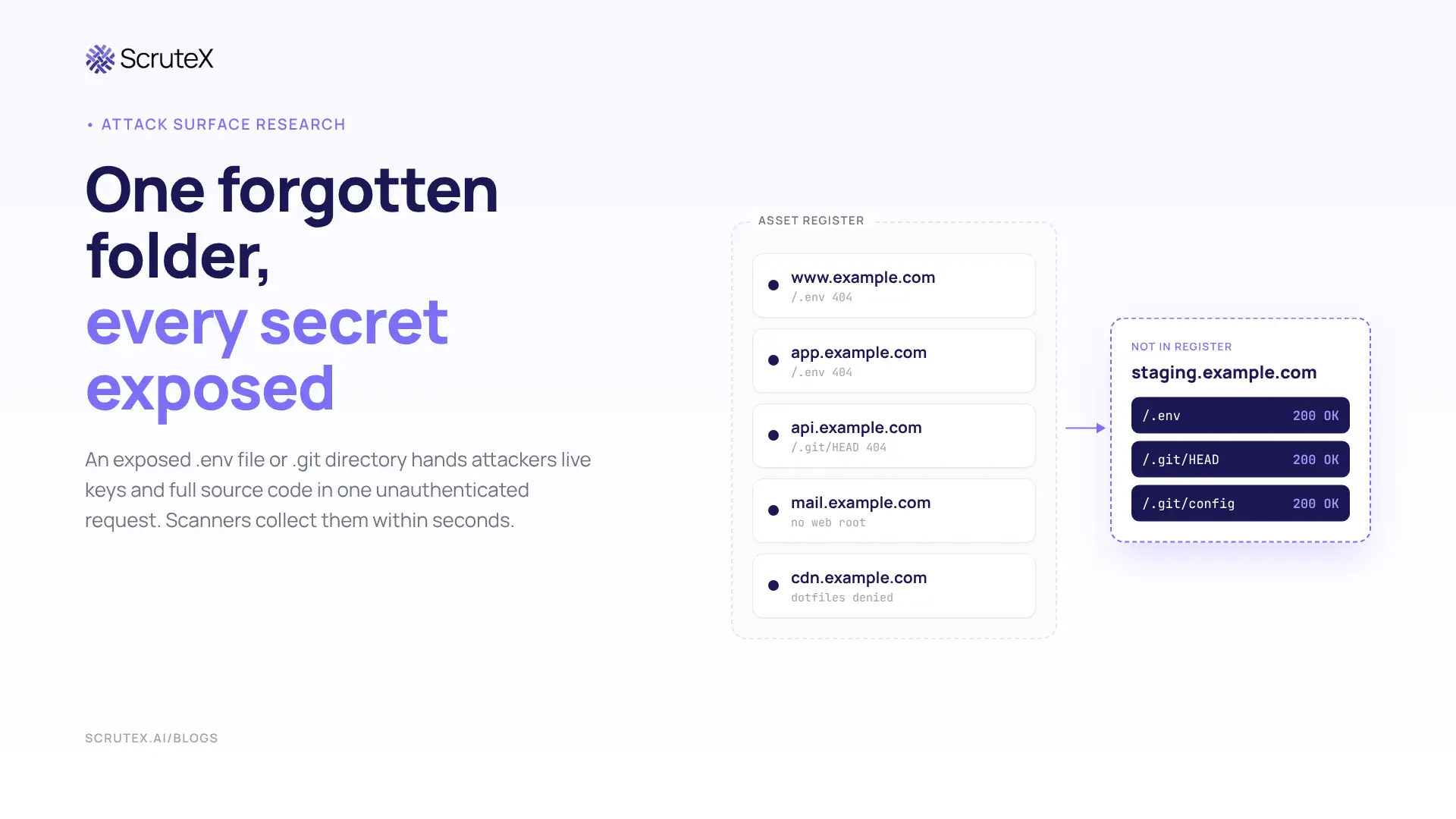
A web server that answers a request for
/.env with HTTP 200 has already lost its secrets. Nobody needed an exploit. Somebody needed one GET request, and on the public internet somebody is always sending it.On 19 October 2026, a Peakhour honeypot served decoy files at
/.env, /.env.backup and /.env.bak, each holding a different fake SMTP password. One source requested all three, then logged in to the honeypot's mail service with each password. The password from /.env came back 21.58 seconds after the file was fetched; the other two came back in about 17 seconds. That is the real window between exposure and abuse: seconds, run by machines, at internet scale.What is an exposed .env file or .git directory?
An exposed .env file is an application's environment configuration served as plain text to anyone who requests it over HTTP. It usually holds live database passwords, cloud access keys, mail credentials and signing secrets. An exposed .git directory is a Git project's version-control folder left inside a website's public document root. Anyone can download its objects and rebuild the source code, including every past commit. Both are misconfigurations rather than software vulnerabilities, and automated scanners find both without any authentication.
What does an exposed .git directory give away?
Every Git working copy carries a
.git folder. It is the repository itself, not a cache. These are the files an attacker reads first:| Path | What it holds | Why an attacker wants it |
|---|---|---|
/.git/HEAD | A pointer to the current branch, such as ref: refs/heads/main | Confirms the repository is readable and gives a starting point |
/.git/config | Remote URLs and branch settings, sometimes a credential embedded in a URL (https://user:token@host/org/repo.git) | Reveals the code host, the organisation, private repository names, and now and then a working token |
/.git/index | Every tracked file path with its object hash | A full map of the application, including admin routes and config files |
/.git/logs/HEAD, /.git/packed-refs | Commit IDs, author names, email addresses | Commits to walk, plus real staff identities for phishing |
/.git/objects/ and pack files | Compressed blobs, trees and commits | The source code, and every earlier version of it |
Directory listing is not required. Git stores its data in a predictable layout, so an attacker can fetch
HEAD, follow the references to object hashes, and request each object by its known path. Open-source tools such as git-dumper and GitTools automate the whole walk. The output is a working local clone.The 403 trap
In 2018, Czech researcher Vladimír Smitka scanned 230 million domains and found around 390,000 websites with an exposed
.git folder. He also explained why owners miss it. A request for /.git/ often returns 403 Forbidden, because the folder has no index page and directory listing is off. The files inside are still served. His test, and the right one, is a direct request for /.git/HEAD.History is the real payload
A key committed in 2021 and deleted in 2022 still sits in the object store. An exposed
.git directory leaks every secret the project has ever contained, not only the ones in production today. A rebuilt repository also hands over:- Dependency manifests (
composer.lock,package-lock.json,requirements.txt) with exact versions to match against known CVEs - Internal hostnames, API base URLs and staging addresses hard-coded in config
- Authentication and authorisation logic, which turns a black-box target into a white-box code review
- Developer names and the company's email format, ready for targeted phishing
The EMERALDWHALE operation, documented by Sysdig in October 2024, shows the yield at scale. Its tooling used httpx to sweep target lists for exposed
/.git/config files, then pulled repositories and harvested what they held. Sysdig found more than a terabyte of stolen data in an open S3 bucket, including more than 15,000 cloud and email credentials, with access to over 10,000 private repositories. A list of more than 67,000 URLs with an exposed /.git/config was on sale on Telegram for about $100. The finding list itself had become a product.Why is an exposed .env file worse than an exposed .git directory?
A
.git exposure needs a tool and some parsing. A .env exposure needs nothing. The file is plain KEY=value text, loaded at start-up by dotenv libraries and by frameworks such as Laravel, Symfony, Django (through django-environ) and Next.js. When the web server serves it, the credentials arrive in the response body, ready to use.| Typical variable | What the holder can do |
|---|---|
DB_PASSWORD, DATABASE_URL | Log in to the database if it is reachable, or try the password on other services |
AWS_ACCESS_KEY_ID, AWS_SECRET_ACCESS_KEY | Call cloud APIs as the application's IAM identity |
MAIL_PASSWORD, MAILGUN_SECRET, SENDGRID_API_KEY | Send mail from your real domain that passes SPF and DKIM |
APP_KEY (Laravel) | Decrypt and forge encrypted cookies and, in vulnerable configurations, run code |
JWT_SECRET, SESSION_SECRET | Mint valid session tokens for any user |
STRIPE_SECRET_KEY | Read customer and payment data, and issue refunds |
OPENAI_API_KEY and other AI keys | Run up usage bills and reach stored prompts or files |
The CISA and FBI joint advisory on Androxgh0st (AA24-016A, January 2024) describes a botnet built around this file. The agencies said the Python malware mainly targets
.env files holding credentials for AWS, Microsoft Office 365, SendGrid and Twilio. It sends a GET request to /.env, or a POST to the same path with the variable 0x[]. The advisory's path list goes well beyond /.env and includes /.git/config, /.env.dist, /.env.save, /.env.production, /.env.prod and /.env.old. Attackers do not guess one path. They try dozens.The exposed population is large. Mysterium VPN reported 12,088,677 IP addresses serving publicly accessible environment configuration files, with 2,799,918 in the United States (23.2%) and 651,846 in India (5.4%). The report does not describe its scan method, and an IP count is not a count of organisations, so treat it as an order of magnitude. Even heavily discounted, it describes a problem that has not shrunk.
How do .git and .env files end up on the public internet?
The files are fine where they belong. The failure happens at the boundary between the build and the web root.
| Root cause | What happens | Where teams miss it |
|---|---|---|
Deploying with git clone or git pull into the web root | .git ships with the code | VPS and shared-hosting deploys, old scripts |
| Document root set to the project root | Laravel expects public/ as the web root; one level up exposes .env | Manual builds, control-panel hosting |
| Web server serves hidden files | Many default configs do not block dotfiles | Configs copied before a hardening standard existed |
| Backup and editor copies | .env.bak, .env.old, .env.save and .env~ slip past rules that match only .env | Hotfixes made directly on the server |
Container images built with COPY . . | .git and .env land in image layers | Missing .dockerignore |
| Development servers on public ports | A tool meant for localhost answers the internet | Cloud VMs, preview environments |
| Public object storage | .env uploaded to listable buckets | Static hosting, backup jobs |
| Forgotten hosts | Staging, legacy and acquired sites keep serving old builds | Anything missing from the asset register |
The last three rows are current, not theoretical.
Development servers. CVE-2026-39364 is a high-severity flaw in the Vite development server, disclosed in April 2026. Appending query parameters such as
?raw to a file request bypasses the server.fs.deny list, so blocked files such as .env come back with HTTP 200. F5 Labs reported that file-read attempts against Vite rose from 1,732 events across the previous three months to more than 32,000 in August 2026. Probes included /proc/self/cwd/.env, which reads the running process's own .env without the attacker needing to know the application path. The flaw is fixed in Vite 7.3.2 and 8.0.5, with patched releases on the older branches.Public storage. The Ransomnews Cloud Exposure Index, published in October 2026, counted 80,495
.env files in publicly listable cloud buckets, 67% of them last modified in 2026. The researchers counted file names and timestamps only and opened nothing, so this is a ceiling rather than a count of live secrets. The age profile is the point: most of these files are recent, not leftovers from 2018.How do attackers find exposed .git and .env files at internet scale?
Reconnaissance for these files is cheap, parallel and continuous. Three public cases show the scale.
EMERALDWHALE (Sysdig, October 2024). Scanning scripts fed target lists through httpx, kept hosts that served
/.git/config, and passed them on for credential extraction and validation. The resulting URL list of 67,000+ exposed configs was resold.Unit 42 extortion campaign (Palo Alto Networks, August 2024). The actors scanned more than 230 million unique targets for exposed
.env files. They hit environment files on 110,000 domains and collected more than 90,000 unique variables, of which about 7,000 belonged to cloud services and about 1,500 were tied to social media accounts.GreyNoise (April 2025). Nearly 4,800 unique IP addresses a day crawled for Git configuration files on 20 and 21 April 2025, the largest of four spikes since September 2024, each of the earlier ones involving about 3,000 IPs. GreyNoise classed 95% of the IPs doing this over the previous 90 days as malicious. India was the fifth most targeted destination country, with 3,373 unique IPs.
The same behaviour maps cleanly to MITRE ATT&CK:
| Stage | Technique | What it looks like here |
|---|---|---|
| Reconnaissance | T1595.003 Active Scanning: Wordlist Scanning | Requests for /.env, /.env.bak, /.git/HEAD, /.git/config |
| Credential access | T1552.001 Unsecured Credentials: Credentials In Files | Parsing KEY=value pairs from the response |
| Collection | T1213.003 Data from Information Repositories: Code Repositories | Rebuilding the repository; cloning private repositories with harvested tokens |
| Initial access | T1078.004 Valid Accounts: Cloud Accounts | Calling cloud APIs with harvested keys |
| Collection | T1530 Data from Cloud Storage | Copying data out of buckets |
| Impact | T1657 Financial Theft | Extortion, and resale of credentials and target lists |
If a host serves one of these files, assume a scanner has already fetched it. A detection cycle that runs weekly is losing to reconnaissance that runs every minute.
From one file to a ransom note: how the attack chain runs
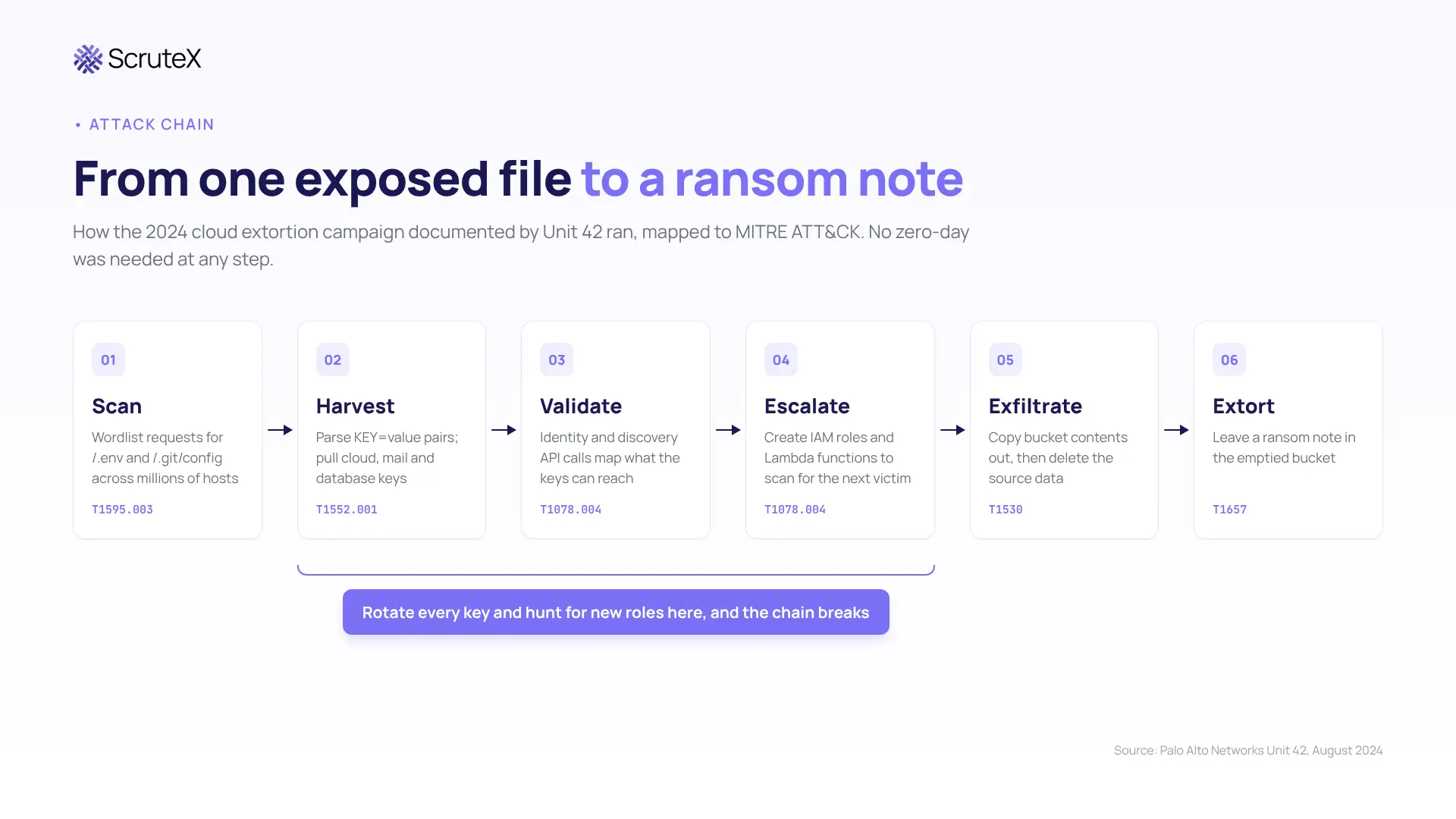
The Unit 42 case is the clearest public account of what follows a single exposed
.env file.- Harvest. The actors scanned for
.envfiles on unsecured web applications and pulled AWS IAM access keys out of them. - Validate and map. Identity and discovery API calls told them whose keys they held and what those keys could reach: users, roles, buckets, regions.
- Escalate and expand. They created new IAM roles and used them to deploy AWS Lambda functions that ran internet-wide scans for more
.envfiles. The victim's cloud account became infrastructure for finding the next victim, on the victim's bill. - Exfiltrate. They copied data out of S3 buckets.
- Extort. They did not encrypt anything. They deleted the source data and left a ransom note in the emptied bucket.
- Abuse mail. Unit 42 noted particular interest in Mailgun credentials, consistent with sending phishing from legitimate domains. That mail authenticates correctly and lands in inboxes where a lookalike domain would be filtered.
Unit 42 named the enabling failures: exposed environment variables, long-lived credentials, and no least-privilege architecture. It stressed that the campaign succeeded because of the victims' own misconfigurations, not because of flaws in the cloud provider's services. That is the uncomfortable part. Nothing in the chain needed a zero-day.
Why does deleting the file not close the incident?
The usual first response is to delete the file, add a deny rule and close the ticket. That ends the exposure. It does not end the incident.
- The file has probably been collected. At the scan rates above, a window measured in days is long enough, and the Peakhour data shows use within seconds. Target lists are also resold, so collection and use can be weeks apart.
- History persists. For a
.gitexposure, every secret ever committed is compromised, including keys long gone from today's code. - Copies persist. CDN caches, search engine caches, container registries and backup snapshots can keep the file after the origin is fixed.
- Keys stay valid. GitGuardian's State of Secrets Sprawl 2026 report found that 64% of valid secrets it detected in 2022 were still active in 2026, four years later and never revoked.
Laravel's
APP_KEY shows why rotation, not deletion, is the fix. GitGuardian and Synacktiv extracted more than 260,000 APP_KEY values from GitHub commits made between 2018 and 30 May 2025, validated about 400 as functional, and identified more than 600 Laravel applications exposed to remote code execution. The underlying flaw was first documented as CVE-2018-15133 (Laravel before 5.6.30). It persists in newer versions where session data is serialised in cookies (SESSION_DRIVER=cookie), as CVE-2024-55556 showed. 63% of the exposed keys came from .env files or their variants, which usually hold other valuable secrets too. GitGuardian's advice was to rotate a compromised key immediately and update every production system, because removing it from the repository changes nothing for anyone who already copied it.The working rule: treat an exposed
.env file or .git directory as a credential compromise. Rotate every value. Review usage logs back to the first date the file could have been served. Hunt for persistence: new IAM users, roles and access keys, unfamiliar Lambda functions, new mail routes and forwarding rules, and new OAuth grants.Who pays: the business, the regulator and the customer
The business. The first-order costs arrive fast: hijacked compute, stolen data, an extortion demand, and engineering time spent rotating every integration at once, often during a weekend. Second-order costs arrive later. Stolen source code lets an attacker study the application offline and return months afterwards with a working exploit for a flaw nobody else has found. Revoked mail keys and a sending domain on blocklists can disrupt legitimate customer email for days.
The regulator. An exposed credential file that leads to data access is reportable in most jurisdictions, and the clocks are short. In India, CERT-In's April 2022 directions require specified cyber incidents to be reported within six hours of noticing them, and the Digital Personal Data Protection Act and its rules add duties to notify the Data Protection Board and affected individuals. In the EU, NIS2 requires an early warning for significant incidents within 24 hours, and GDPR sets 72 hours for notifying the supervisory authority. In Australia, APRA's CPS 234 requires regulated entities to notify APRA of material information security incidents within 72 hours of becoming aware. Explaining to any of them that the root cause was a file anyone could download is a hard conversation.
The customer. The people who pay most are outside the company. Mail credentials become phishing that arrives from the real domain and passes authentication checks, so the usual advice to "check the sender" fails. A leaked JWT secret becomes account takeover without a single password guessed. Database credentials become personal data on a leak site. Customers did nothing wrong, and they cannot see the cause.
How to prevent .git and .env exposure
These controls are ordered by risk removed for the effort spent.
1. Deny hidden files at the web server. Block every path segment that starts with a dot, except
/.well-known/, and return 404 so the response does not confirm the file exists.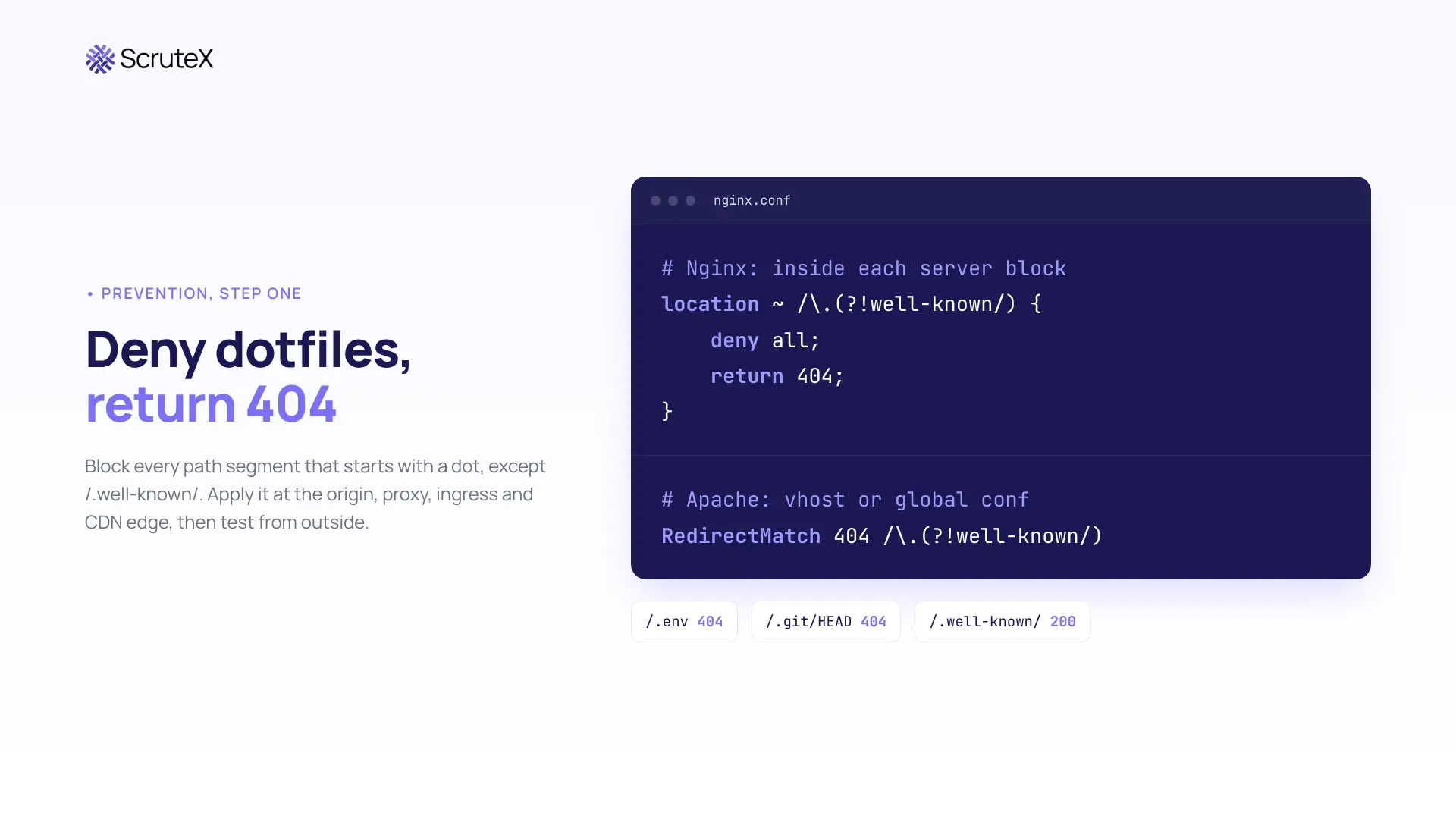
Apply the rule at every layer that can serve files: origin, reverse proxy, ingress controller and CDN edge. A rule at the CDN does nothing for the origin IP if the origin answers the internet directly.
2. Ship build artefacts, not repositories. Build in CI and deploy an artefact that contains no
.git folder and no .env variant. Add both to .dockerignore. Never run git pull inside a web root.3. Point the document root at the public folder. For Laravel and similar frameworks the web root is
public/, and .env sits one level above it, out of the web server's reach.4. Take secrets out of files. Use a secrets manager or the platform's own secret store, and prefer workload identity over static keys. The CISA and FBI Androxgh0st advisory recommends removing cloud credentials from
.env files and revoking them, noting that cloud providers offer temporary, frequently rotated credentials for code running on a web server.5. Shrink the blast radius. Give each application key the narrowest permissions and a short lifetime. A leaked key scoped to one bucket is an incident. A leaked admin key is a breach.
6. Keep development servers off the internet. Bind them to localhost, put preview environments behind authentication, and upgrade Vite to a release that fixes CVE-2026-39364.
7. Test your own perimeter in the pipeline. After each deploy, request
/.git/HEAD and the common .env paths from outside, and fail the pipeline if any returns file content.8. Treat probe traffic as intelligence. Requests for
/.env and /.git/config are reconnaissance. A 404 is noise. A 200 is an incident. Alert on the second, and correlate it with authentication logs, as Peakhour recommends, so a file request followed by a login attempt with its contents is caught as one event.9. Plant a canary. A decoy credential that should never be used turns silent collection into a loud alert.
Where do repository scanners stop and outside-in discovery start?
Secret scanning in repositories and CI, through code hosts' push protection and dedicated scanners, is the right first control. It stops a key before it is committed and finds old keys in history. Cloud posture tools find misconfigurations inside the accounts they are connected to. Mature teams run both, and they should.
Neither answers the attacker's question: which hosts on this domain serve
/.env or /.git right now? That is an outside-in question. A repository scanner cannot see the staging server a contractor built from a laptop copy. A posture tool cannot see a host in a cloud account nobody connected, or an agency microsite from three years ago. The exposures in this post live on exactly those hosts, because the known hosts have usually been hardened already.The case for a connected external view is correlation, not replacement. Large teams with dedicated engineers can stitch asset discovery, file-exposure checks and leaked-credential monitoring together across separate tools, and best-of-breed tools serve them well. Smaller teams gain more from one view that ties a forgotten host to what it exposes and to whether that organisation's credentials already circulate in leaked data. That combination is what turns a finding into a priority.
Key takeaways
- An exposed
.envfile hands over live credentials in one unauthenticated request. An exposed.gitdirectory hands over the source code and every secret in its history. - Scanners request these paths continuously, and honeypot data from October 2026 shows harvested credentials in use within 22 seconds.
- Test
/.git/HEAD, not/.git/. A 403 on the folder proves nothing. - Deleting the file fixes the exposure, not the incident. Rotate every value, then hunt for persistence.
- The riskiest copies sit on hosts missing from your asset register, so the check has to run from the outside.
Am I exposed?
Five checks you can run today without any vendor:
- ☐ Run
curl -s https://<host>/.git/HEADfor every hostname you own. A response startingref: refs/heads/means the repository is readable and can be rebuilt. - ☐ Request
/.env,/.env.bak,/.env.backup,/.env.old,/.env.save,/.env.productionand/.env.local. Any 200 whose body containsKEY=valuelines is an exposure. Single-page apps often returnindex.htmlfor every path, so check the body, not only the status code. - ☐ Build the host list from Certificate Transparency logs (crt.sh is free), not from memory. Staging, legacy and acquired domains are where these files sit.
- ☐ Search the last 90 days of access logs for 200 responses to those paths. A past 200 means rotation is required, even if the file is gone now.
- ☐ If you run Vite anywhere, confirm no development server is reachable from the internet and that every instance runs 7.3.2, 8.0.5 or a patched older-branch release.
What ScruteX finds here
ScruteX discovers your internet-facing hosts from the outside, starting from a domain, and surfaces the subdomains missing from your register. At an ASX-listed financial services client, the first scan returned 30+ internet-facing assets against a 20-asset manual register; nine were unknown, including a staging environment for a client-facing app. It flags outdated web technologies on those hosts together with their known vulnerabilities, which is how an exposed, unpatched development server shows up. It lists open cloud storage buckets tied to your brand, and it matches your domains against leaked credentials and infostealer logs, so a forgotten host can be read next to evidence that your organisation's secrets already circulate.
ScruteX sees what the internet sees. It will not find secrets inside private repositories, CI logs or internal hosts that never face the internet. Repository secret scanning covers that side, and you need both.
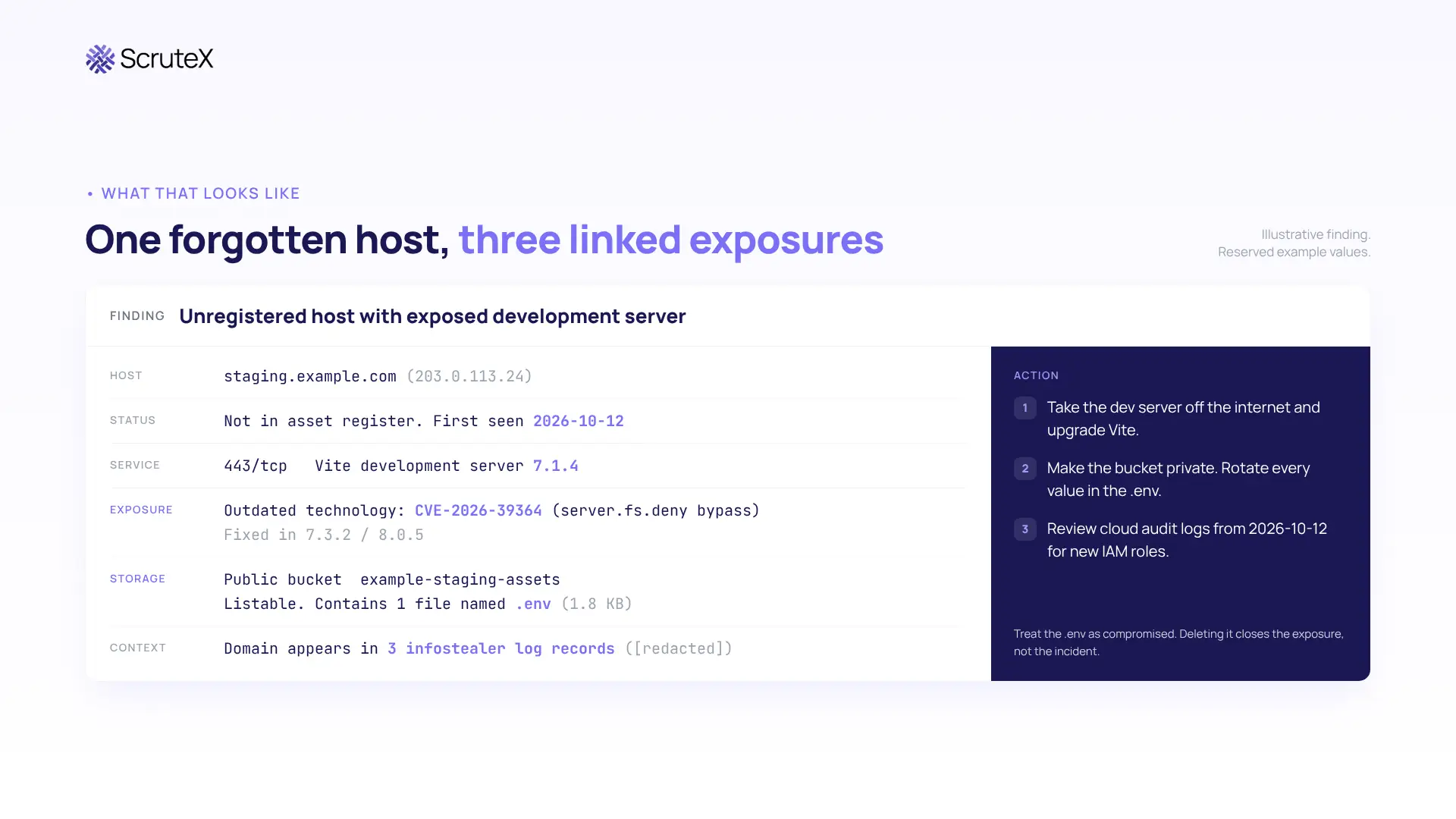
What that looks like
An illustrative finding, using reserved example values, structured like a real one:
Check your domain
See what an attacker sees on your domain, including the hosts you have forgotten. Domain only. Agentless. External view only.
Where to go next
- If you do not have a current list of every host on your domains: start with Vulnerability Insights, which covers subdomain discovery, outdated technologies and exposed services.
- If you know your hosts and need to know whether their credentials already circulate: start with Data Exposure Insights, which covers leaked credentials, infostealer logs and open cloud buckets.
- If the file turned up on a host nobody owned: read Shadow IT and unknown assets: why your register is wrong.
- If your
.envkeys appear in leak data: read Infostealer logs and session theft.
Frequently asked questions
What is an exposed .env file?
An exposed .env file is an application's environment configuration that a web server returns to anyone who requests it. Because the file stores credentials in plain text, one request can give an attacker database passwords, cloud keys and API tokens.
How do I check if my .git directory is exposed?
Request
https://yourdomain/.git/HEAD. If the response starts with ref: refs/heads/ followed by a branch name, the repository is readable and can be rebuilt. Do not rely on /.git/ returning 403, because the files inside can still be served.What can attackers do with an exposed .git folder?
They can rebuild the full source code and commit history with tools such as git-dumper. That gives them every secret ever committed, the application's file map and logic, dependency versions to match against CVEs, and developer identities for phishing.
Is deleting an exposed .env file enough?
No. Scanners may already have the file, and the credentials stay valid until they are rotated. Rotate every value, review logs back to the first date of exposure, and check for new accounts, roles, keys and mail rules.
How do I block .git and .env files in Nginx?
Add a location block that denies every path segment starting with a dot except
/.well-known/ and returns 404. Apply the same rule at proxies and CDNs, then test by requesting /.git/HEAD and /.env from outside your network.