How to Detect Leaked Employee Credentials Before They're Exploited
By ScruteXPublished
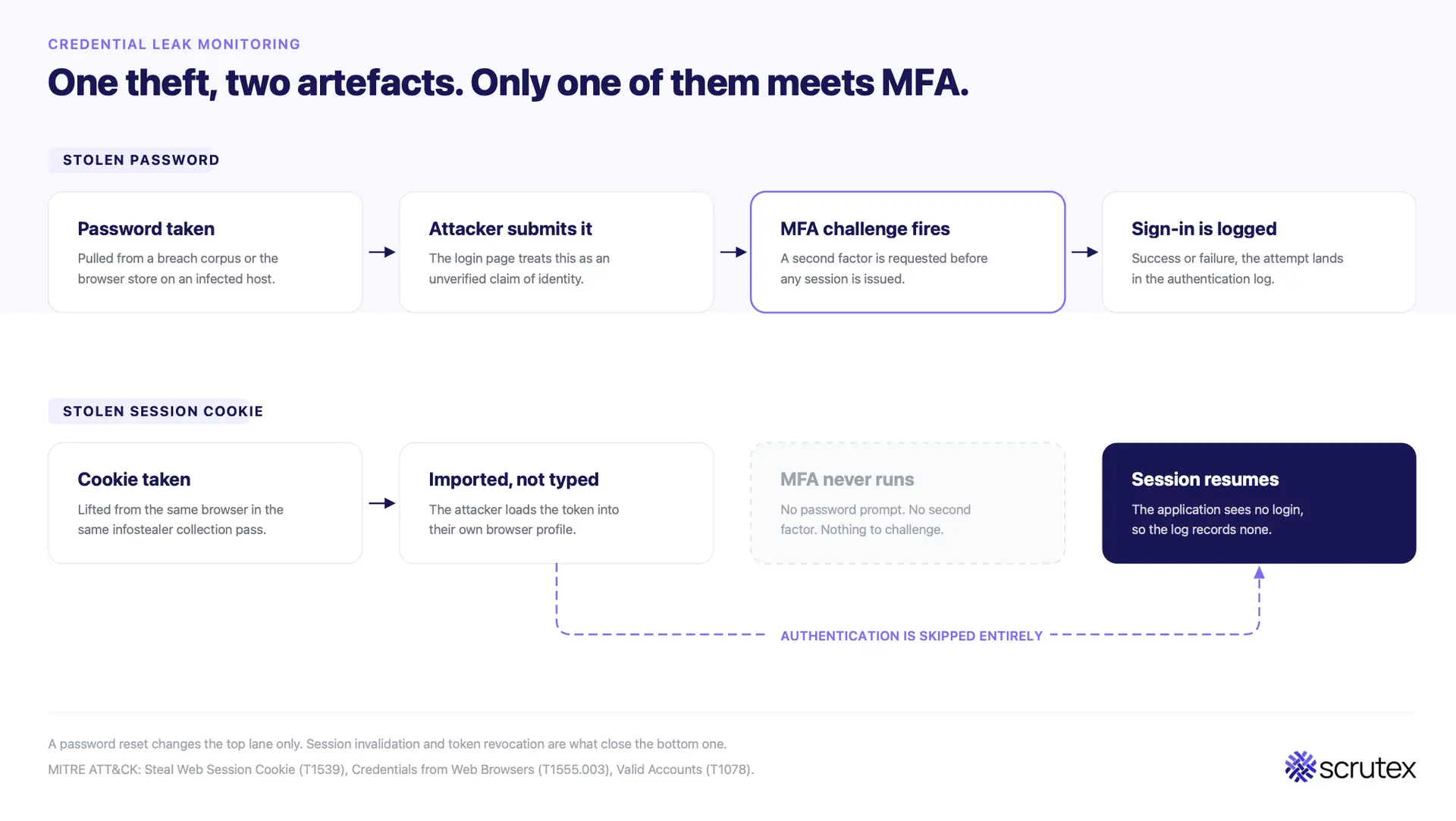
A stolen password is a claim that still has to be checked. A stolen session cookie is the receipt proving the check already happened. Most credential monitoring programmes are built to find the first thing and quietly ignore the second, which is why so many of them close tickets on incidents that are still running.
Credential leak monitoring is the continuous search of breach corpora, infostealer logs, paste sites, criminal marketplaces, and messaging channels for your organisation's usernames, passwords, session tokens, and API keys, so exposed accounts can be contained before an attacker signs in with them. It is a detection control, not a prevention control. Its only real output is time.
Detection is also no longer the hard part. Credential data is available, and most platforms will surface a match against your domain. The failure happens in the ninety minutes after the alert fires: nobody knows whose account it is, how fresh the exposure is, whether the account can be reached from the internet, or which of four very different response paths applies. The ScruteX CTI team sees the same pattern across client environments. Exposure discovery is rarely the gap. Triage, ownership, and response sequencing are.
This guide covers that part. Not where credentials leak from, which is well documented, but what a working programme does once it knows.
In This Post
- What credential leak monitoring is, and what it is not
- Why a stolen session cookie is worse than a stolen password
- The four classes of credential exposure and why each needs a different response
- Why programmes fail at triage rather than detection
- How to separate a live exposure from recycled noise
- A scoring model for prioritising exposures
- The first 24 hours: response playbooks by exposure type
- Five metrics that prove the programme works
- The identities your monitoring is probably missing
- How ScruteX runs credential exposure inside a CTEM workflow
- Choosing between free tools, specialist platforms, and connected platforms
What is credential leak monitoring?
Credential leak monitoring is a detection capability that continuously matches your organisation's identity footprint (corporate domains, employee email patterns, executive identities, brand names, code repositories, and third-party accounts) against credential data circulating outside your control. When a match appears, the monitoring system tells you which account, from which source, containing what type of secret, and how recently it surfaced.
Three things separate it from a breach notification service:
- It runs continuously, not on disclosure. Public breach databases update when a breach becomes public. Infostealer logs update hourly, with no disclosure event ever.
- It covers credential types beyond passwords. Session cookies, OAuth refresh tokens, API keys, and cloud access keys all grant access, and none of them are fixed by a password reset.
- It resolves to an owner. An alert that names a domain is intelligence. An alert that names an account, its privilege level, and the person or system responsible for it is an action.
What it does not do is prevent theft. An employee's laptop can get infected an hour after your last clean scan. Monitoring exists to shorten the window between theft and containment, and every design decision in the programme should be judged against that single purpose.
Why is a stolen session cookie worse than a stolen password?
When an infostealer takes browser data from an infected machine, it takes both artefacts in one pass. The password goes into a credential dump. The session cookie goes into the same log, mapped in MITRE ATT&CK as Steal Web Session Cookie (T1539) alongside Credentials from Web Browsers (T1555.003). An attacker who imports that cookie into their own browser resumes your user's authenticated session. No password prompt. No MFA challenge. Nothing in the authentication log that looks like a login, because from the application's point of view no login occurred.
This is the mechanic behind most MFA-bypass activity currently reported against Microsoft 365 and Google Workspace tenants. Adversary-in-the-middle phishing kits sit between the user and the real login page, relay the MFA challenge in real time, and harvest the resulting session token. Infostealers reach the same artefact from the endpoint instead of the network. Two routes, one outcome.
The consequence for monitoring is direct. A programme that alerts on exposed passwords and closes the ticket on password reset has not responded to the incident. It has changed a string the attacker may not have needed.
Credential-driven intrusions are also the slowest to find, because nothing about them looks like an attack. Valid Accounts (T1078) generates authentication events, not exploit signatures. There is no payload to detect, no signature to match, no anomalous process tree. External detection matters precisely because the evidence that an account is compromised usually exists outside your environment before any signal exists inside it. That asymmetry is the entire argument for monitoring: the criminal supply chain publishes your exposure before your own logs can reveal it.
Where do leaked credentials come from, and why does the source change the response?

Most guides list credential sources. Few explain that the source determines the entire response. A password from a decade-old forum breach and a password from a stealer log captured yesterday are the same string of characters and completely different incidents.
| Exposure class | What it contains | Typical freshness | What it actually means | Correct first action |
|---|---|---|---|---|
| Public breach corpus | Email plus hashed or plaintext password from a disclosed third-party breach | Months to years | Password reuse risk against your estate | Screen against Active Directory and SSO, reset on match |
| Combolist | Aggregated email and password pairs, recycled and repackaged | Unknown, often recycled | Credential stuffing fuel, low individual signal | Rate-limit and monitor authentication, do not mass-reset |
| Infostealer log | Browser-stored passwords, autofill data, session cookies, tokens, host fingerprint | Hours to days | A specific endpoint is or was infected | Contain the device, invalidate sessions, then reset |
| Broker or marketplace listing | Advertised access to VPN, RDP, or SSO for a named organisation | Days to weeks | Someone is preparing to sell access to you | Treat as a pre-ransomware indicator, engage IR |
The infostealer row is the one that breaks conventional playbooks. Malware families in this space (Lumma, RedLine, Vidar, StealC, and the successors that filled the gap after the 2024 and 2025 law enforcement disruptions of RedLine and Lumma infrastructure) do not steal one credential. They exfiltrate the entire browser credential store, the autofill database, the cookie jar, and a host fingerprint in a single collection. One alert about one employee is almost never one problem.
Confidence in the family-level attribution of any single log is usually medium at best, and it rarely matters operationally. What matters is the endpoint. Reset the password on an infected machine and you have generated a new password that the still-resident malware will steal on the next beacon. Endpoint tooling does not close this either: infostealer collections routinely include hosts that were running antivirus or EDR at the time of infection, because the malware is stealing files the user's own browser is entitled to read.
Why do credential monitoring programmes fail at triage rather than detection?

Four failure modes account for most of it.
Volume without precision. A monitoring feed matching on domain alone returns every combolist appearance of every address at your company, including addresses that no longer exist. Analysts learn to ignore the channel within a month, and an ignored feed is worth less than no feed, because it carries the illusion of coverage.
No ownership resolution. The alert says
j.patel@company.com. Nobody knows whether that is a current employee, which business unit owns them, whether the account is privileged, or who is authorised to force a reset at 11pm on a Saturday.One response for every exposure type. Password reset applied uniformly. Fast to execute, and wrong for stealer logs, service accounts, and API keys.
Reset-and-close. The ticket closes on password change. The session token stays valid. The host stays infected. The API key stays live in a public repository.
Underneath all four sits an ownership problem that is organisational rather than technical. Credential security frequently sits across identity, security operations, and IT with no single accountable owner, so the alert arrives in a queue that belongs to everybody and therefore nobody. Fixing the tooling without fixing that assignment produces a faster feed into the same vacuum.
The fix is a triage model that runs before the alert reaches a human, and a response model that branches by exposure class.
How do you tell a live exposure from recycled noise?
Six signals do most of the work. Any monitoring platform worth paying for should expose all six as fields you can filter and score on.
- First-seen date versus collection date. A record newly ingested by a platform is not a new exposure. Ask when the credential was first observed anywhere, not when the platform indexed it.
- Credential state. Plaintext, hashed with a known-weak algorithm, or hashed and salted properly. These are three different urgency levels.
- Companion artefacts. A password alone is one problem. A password plus a session cookie plus a host fingerprint means an infected endpoint and an active session.
- Account existence and status. Does the identity resolve in your directory today, and is it enabled? Dead accounts inflate counts and should be filtered, then separately reviewed as a deprovisioning failure.
- Match precision. Exact address match, domain pattern match, or fuzzy brand match. Fuzzy matches belong in a review queue, not an alert queue.
- Reachability. Does the account authenticate against something an attacker can reach from the internet (VPN, SSO, webmail, a customer portal), or only against an internal system requiring existing access?
Deduplication deserves particular attention, because the underground actively recycles. A large share of what circulates as a fresh combolist is repackaged material from infostealer logs that have already traded, renamed and rebundled to look new. Any platform that cannot give you a reliable first-seen date will re-alert you on the same exposure indefinitely, and your analysts will correctly conclude the feed is noise.
Reachability is the signal most programmes skip, and it is the one that connects credential monitoring to attack surface data. An exposed credential for a service that is not internet-facing is a hygiene item. The same credential for an SSO tenant fronting your entire SaaS estate is an incident. You cannot make that distinction without knowing your external attack surface, which is why ScruteX runs credential exposure and asset discovery in one system: Data Exposure Insights supplies the exposed identity, Vulnerability Insights supplies the internet-facing authentication surface it can reach, and the correlation happens before an analyst sees the alert rather than in a spreadsheet afterwards.
How should you score and prioritise a credential exposure?

Use a scoring model rather than analyst instinct. Instinct does not survive an alert backlog. The following model is deliberately simple enough to implement in a SOAR playbook or a spreadsheet in an afternoon.
| Factor | 0 points | 1 point | 3 points | 5 points |
|---|---|---|---|---|
| Freshness | Over 12 months | 3 to 12 months | 30 to 90 days | Under 30 days |
| Credential type | Salted hash | Weak hash | Plaintext password | Session token, API key, or cloud key |
| Account privilege | Standard user, no admin | Privileged app access | Admin on a business system | Domain, cloud, or identity provider admin |
| Reachability | Internal only | Internal with VPN | Internet-facing app | SSO, VPN, or email gateway |
| Source type | Recycled combolist | Public breach corpus | Infostealer log | Access broker listing |
| MFA status | Phishing-resistant MFA | App-based MFA | SMS or fallback available | No MFA |
Scoring bands: 0 to 6, hygiene queue and monthly review. 7 to 14, standard response within 24 hours. 15 to 22, priority response within 4 hours. 23 and above, treat as an active incident and page the on-call responder.
The MFA row deserves a caveat. MFA raises the cost of using a stolen password, and it does not remove the exposure. Adversary-in-the-middle kits relay the challenge in real time, stolen session cookies skip authentication entirely, and password fallback paths remain enabled in most tenants. Score MFA as a mitigating factor, never as a closing condition.
What should you do in the first 24 hours after finding leaked credentials?

Branch the playbook by exposure class. Running one procedure for all four is the most common operational mistake in this area.
Infostealer log exposure (highest urgency).
- Identify the host from the log fingerprint (hostname, username, installed software, IP).
- Isolate the device before touching the account. The malware is the problem; the password is a symptom.
- Invalidate every active session for the affected identity in your identity provider, and revoke OAuth grants and refresh tokens. Password reset alone leaves stolen cookies working.
- Reset credentials only after the host is contained or rebuilt.
- Pull every other credential in the same log. One infected machine usually exposes personal accounts, SaaS logins, and sometimes a shared service account password stored in the browser.
- Search authentication logs for sign-ins from the exposure date forward, filtering on impossible travel, unfamiliar ASNs, and new device registrations.
Public breach corpus exposure. Screen the exposed password against your directory. If it matches, force a reset and check for reuse across privileged accounts. If it does not match, record it and move on. NIST SP 800-63B is explicit that passwords should change on evidence of compromise, not on a calendar, so resist the urge to trigger an estate-wide rotation.
Access broker or marketplace listing. Treat this as a pre-ransomware indicator. Initial access brokers do not deploy ransomware themselves; they sell working access to the groups that do, which means a listing naming your organisation is an advertisement running ahead of an intrusion (confidence: high, based on consistently reported broker-to-affiliate activity). Review remote access paths (VPN, RDP, Citrix, VDI), audit accounts with external authentication rights, and consider engaging incident response before waiting for confirmation. This is also where actor context earns its place: ScruteX Threat Insights scopes broker and forum activity to the client's sector and region, so a listing can be read against the groups currently active against similar organisations rather than as an isolated post.
Exposed API key or secret in code. Rotate first, investigate second. Check the provider's audit log for use of the key between the commit date and rotation. Removing the commit does not remove the key from forks, clones, or scraper caches, which is the point most teams learn once.
Across all four, close the loop with a written record of what was exposed, when, what was done, and by whom. Under CERT-In's six-hour reporting requirement in India, NIS2's 24-hour early warning in the EU, MAS notification timelines in Singapore, APRA CPS 234 in Australia, and SEC materiality disclosure in the US, the evidence trail is the deliverable regulators ask for, and reconstructing it after the fact is far harder than capturing it during response.
What metrics prove credential leak monitoring is working?

Alert counts measure the internet, not your programme. Five metrics measure the programme.
| Metric | Definition | Target to aim for |
|---|---|---|
| Exposure-to-containment time | Median hours from a credential first appearing in a monitored source to session invalidation and reset | Under 24 hours for scored priority exposures |
| Ownership match rate | Percentage of alerts automatically resolved to a current, named account owner | Above 90% |
| False-match rate | Percentage of alerts closed as not applicable (dead accounts, wrong domain, recycled data) | Under 15%, trending down |
| Non-workforce coverage | Percentage of monitored identities that are service accounts, machine identities, SaaS-only logins, or third-party accounts | Rising every quarter |
| Repeat-host rate | Percentage of infostealer exposures traced to a device that has appeared before | Near zero, and investigated when not |
Repeat-host rate is the quietest of the five and the most diagnostic. A device that shows up twice means the first response reset a password and never touched the malware.
Across measured ScruteX customer deployments, the platform reports a 92% reduction in mean time to detect and a 48-hour median remediation time, with 1.2 million or more digital assets under continuous monitoring. These are ScruteX's own figures rather than industry benchmarks, and individual results vary with the size of the estate and the maturity of the response process on the customer side.
Which identities is your monitoring probably missing?
Credential monitoring tends to be scoped to the workforce directory, because that is what the identity team owns. Coverage of everything else authenticating in your name is usually thinner. Every category below can be stolen, and most of them have no MFA.
- Service and machine identities. Non-human accounts rarely have MFA, rarely rotate, and often hold broader permissions than any human.
- AI tool credentials and agent tokens. Agentic tooling has added a fast-growing population of API keys and OAuth grants, frequently stored in browser sessions and local config files, on the exact endpoints infostealers target.
- SaaS-only logins. Accounts created outside SSO on tools bought by a business unit. They do not exist in your directory, so directory-scoped monitoring never sees them.
- Contractor and third-party accounts. The exposure that matters is often not on your payroll. ScruteX Vendor Insights extends credential and posture monitoring to third-party domains, which is the only practical way to see an exposure that starts in a supplier's browser and ends in your environment.
- Executive and personal-adjacent identities. Personal addresses used for corporate SaaS, and executives targeted for high-value fraud.
- Legacy and acquired domains. Old brands, sunset products, and domains inherited through acquisition still appear in breach data and still resolve for attackers.
- Customer accounts. Credential stuffing against your customer login page is your fraud problem regardless of where the passwords came from.
How does ScruteX run credential exposure inside a CTEM workflow?
Continuous Threat Exposure Management is a framework Gartner introduced in 2022, built on five stages: scoping, discovery, prioritisation, validation, and mobilisation. Credential exposure maps onto all five, and treating it as a standalone feed is what keeps it stuck at stage two. Most organisations run discovery and mobilisation, skip prioritisation and validation, and end up with a high-volume feed and a fatigued team.
Here is the sequence as ScruteX runs it.
Scoping starts from client-supplied inputs: domains, brand keywords, executive identities, third-party names, and business context. That defines whose credentials count before anything is collected.
Discovery runs continuously across the dark web, Telegram channels, paste sites, breach corpora, and the live external attack surface. Data Exposure Insights covers leaked credentials, stealer logs, exposed sessions, and source code exposure. New assets and new exposures surface within hours rather than at the next quarterly scan.
Prioritisation enriches each finding rather than ranking it by raw severity. The Exploit Context Layer adds weaponisation status, active campaign intelligence, and asset reachability, and Threat Insights maps activity to MITRE ATT&CK and to the actors currently operating in the client's sector and geography. This is where the reachability question gets answered automatically, because the credential record and the attack surface record already live in the same system.
Validation confirms exploitability before escalation. ScruteX uses AI-driven continuous automated red teaming and on-demand automated penetration testing, with a human approving the plan before the agent executes inside configured guardrails. Applied to credentials, that answers the question a feed cannot: does this exposed login still authenticate against something reachable.
Mobilisation pushes the validated exposure into two-way ticketing, takedown workflows where a brand or phishing asset is involved, and an audit-ready evidence record captured as the response happens.
The platform is agentless, so there is no rollout project. Discovery begins once a domain and keywords are added, and the free tier covers core modules on a primary domain with no credit card.
CTEM (Continuous Threat Exposure Management) is a framework developed by Gartner, Inc. GARTNER is a registered trademark and service mark of Gartner, Inc. and/or its affiliates and is used herein with permission. All rights reserved.
Free tools, specialist platforms, or a connected platform?
Three honest options, with real trade-offs.
Free breach-check services. Public breach-lookup tools are genuinely useful and cost nothing. They cover publicly disclosed breaches and some stealer corpora, and a domain search is a reasonable way to establish whether you have a problem at all. They are not built for enterprise workflow: no ownership resolution, no severity scoring, no ticketing, no coverage of broker forums. Use them to find out, not to run a programme.
Specialist credential intelligence platforms. Products focused purely on recaptured credential and malware-infection data hold deep collections and strong analytics in that one area. For a mature team with dedicated identity and CTI functions and the budget to integrate several best-of-breed tools, that depth is worth buying. The cost is another console, another integration, and another correlation job that lands on a human.
Connected exposure platforms. Credential data sits next to attack surface, brand, third-party, and threat intelligence in one lifecycle. Depth in any single category may not match a dedicated specialist, and the reachability question gets answered automatically rather than by an analyst joining two exports. For smaller teams without proportional headcount, that correlation is usually worth more than raw collection depth. This is the trade ScruteX makes deliberately.
The wrong choice is monitoring nothing because the specialist quote came in above budget. Partial coverage that reaches a responder beats complete coverage nobody reads.
Who is protected when credential monitoring works?
The person whose reused password caught an attacker's eye at 2am is usually not a security professional. They are a payroll clerk whose home laptop picked up an infostealer from a cracked utility, or a customer whose password from an unrelated 2019 breach still works on your shopping account. When credential monitoring works, that reset happens before the fraudulent login, the account holder never learns how close it got, and the breach notification letter never gets written. The measurable outcome is an internal metric. The actual outcome is that someone outside your organisation keeps their money and their identity.
Key takeaways
- A stolen session cookie skips both the password prompt and the MFA challenge, so password reset is not a complete response to an infostealer exposure.
- Detection is rarely the gap. Triage, ownership resolution, and response sequencing are where programmes fail.
- The source of an exposure determines the response. Infostealer logs require device containment and session invalidation before any password reset.
- Reachability is the signal that separates a hygiene item from an incident, and it requires credential data and attack surface data in the same system.
- Measure exposure-to-containment time, ownership match rate, false-match rate, non-workforce coverage, and repeat-host rate. Alert volume measures the internet, not your programme.
Run the check on your own domain. ScruteX combines credential exposure monitoring in Data Exposure Insights with external attack surface, brand, third-party, and threat intelligence in one CTEM workflow, so an exposed login is scored against the systems it can actually reach. The free tier covers core modules on a primary domain with no credit card, and first findings land in about ten minutes. Run your free exposure scan.
FAQ
Q: What is credential leak monitoring?
A: Credential leak monitoring is the continuous search of breach corpora, infostealer logs, paste sites, criminal marketplaces, and messaging channels for an organisation's usernames, passwords, session tokens, and API keys. It detects exposed accounts so they can be contained before an attacker signs in with them.
Q: How do I find out if my employees' credentials have been leaked?
A: Start with a domain search on a free breach-lookup service to establish whether public breach data contains your addresses. That covers disclosed breaches only. Infostealer logs, access broker listings, and closed Telegram channels need an automated monitoring platform that matches your domains, employee patterns, and third-party accounts against those sources continuously.
Q: Is a password reset enough after a credential leak?
A: Not for infostealer exposures. The same malware that stole the password usually stole active session cookies and tokens, which stay valid after a password change and bypass MFA. Contain the device, revoke sessions and OAuth grants, then reset. For a password found in an old third-party breach with no matching directory account, screening and monitoring is often the proportionate response.
Q: How often should credential monitoring run?
A: Continuously. Infostealer logs are generated and traded within hours of infection, and a stolen session cookie is usable the moment it is exfiltrated. Weekly or monthly checks measure history rather than risk.
Q: Does MFA make credential leak monitoring unnecessary?
A: No. MFA raises the cost of using a stolen password but does not remove the exposure. Adversary-in-the-middle phishing relays the challenge in real time, stolen session cookies skip authentication entirely, and password fallback paths remain enabled in most environments. Treat MFA as a mitigating control, not a closing condition.
Q: What is the difference between credential leak monitoring and dark web monitoring?
A: Dark web monitoring is the broader category, covering any mention of an organisation across criminal sources, including ransomware leak sites, brand abuse, and data for sale. Credential leak monitoring is the identity-focused subset, scoped to exposed authentication material and measured on how fast an exposed account is contained.